

Have you discovered an unfamiliar charge from Actsoft2.com on your credit or debit card statement recently? You’re probably wondering what Actsoft2.com is, why there is a charge on your card, and what you can do about it. This comprehensive guide will provide insight into Actsoft2.com, explain why you might have charges from them, detail what to do if you discover unauthorized charges, and provide key takeaways.
Overview of Actsoft2.com
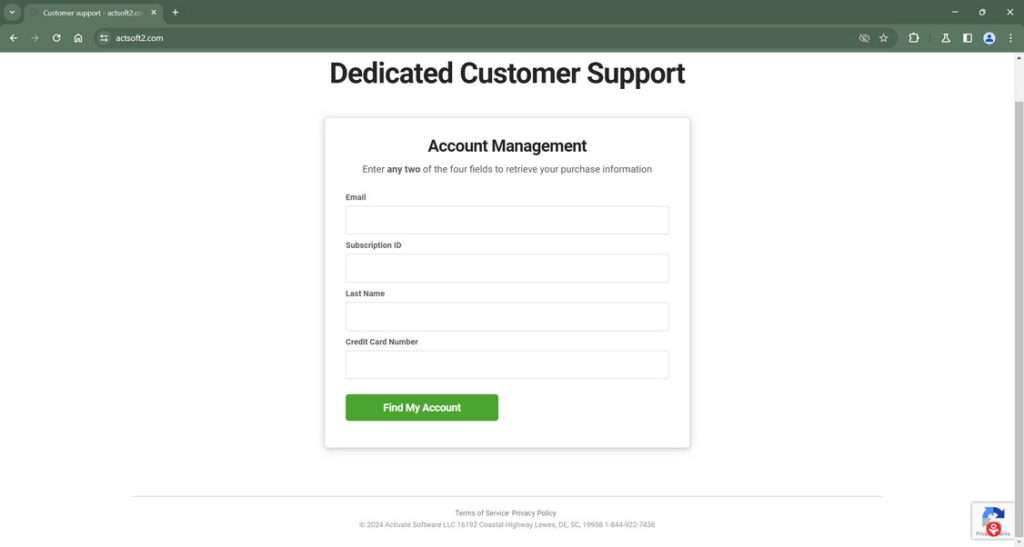
Actsoft2.com is a payment alias used by scammers impersonating Actsoft Inc, a legitimate technology company based in Tampa, Florida that produces software and GPS tracking services for businesses.
The scammers add “2” to the end of the Actsoft name and charge unsuspecting consumers’ credit cards without authorization. They have also created a website, Actsoft2.com, that asks for personal and payment information but provides no legitimate services.
Actsoft Inc has confirmed that Actsoft2.com charges are fraudulent and they are in no way associated with them. The scammers appear to have compromised consumers’ payment card data from various online sites and are now using it to commit financial fraud.
How the Scam Works
The criminals behind Actsoft2.com obtain victims’ credit card or debit card numbers through:
- Phishing websites – Fake shopping websites designed to steal financial information
- Third-party data breaches – When a site with stored payment data gets hacked
- Malware infections – Malicious software that grabs data from victim computers
Once they have the card data, they process fraudulent charges under the name Actsoft2.com hoping victims don’t notice the charges or dispute them. The charges may be small, under $10, to avoid detection.
Who is Behind Actsoft2.com?
Actsoft2.com appears to be run by a global cybercriminal ring engaging in payment card fraud. They go to great lengths to hide their true identities through proxy registrations and by hosting their websites overseas, often in China or Russia.
Sadly, these types of criminal groups are rarely caught and shut down completely. However, being aware of their tactics can help prevent you from becoming a victim in the first place.
How Actsoft2.com Charges Appear on Your Credit Card
If you discover an Actsoft2.com charge on your credit card or bank statement that you didn’t authorize, your payment card information has been compromised. Here is a step-by-step explanation of how it likely happened:
1. Criminals Obtain Your Card Number and Details
Your card number, expiration date, CVV code, and possibly your personal details like name and address were acquired by scammers through:
- You entered it on a fraudulent website disguised as a legitimate online shop
- A previous site you shopped at suffered a security breach
- Spyware or a virus on your computer stole your financial data
2. Criminals Create a Fake Payment Company Profile
The scammers invent what looks like a legitimate payment merchant business that they name Actsoft2.com. This masks where the fraudulent charges are really coming from.
3. Scammers Process an Unauthorized Charge
A small $1-$15 charge from Actsoft2.com then shows up on your credit or debit card statement without your permission. This is to test if the card is active before trying larger fraudulent charges.
4. Criminals Access the Stolen Money
Once the Actsoft2.com test charge goes through successfully, showing that your card is active and the credentials are legitimate, the crooks behind the operation can start processing larger unauthorized charges or selling your payment profile to other fraudsters on the black market.
What to Do If You Have Actsoft2.com Charges
If you discover unauthorized Actsoft2.com charges on your credit card or bank account statement, take action right away with the following steps:
1. Contact Your Bank or Card Issuer Immediately
Call the phone number listed on the back of your payment card, or log in to your online banking portal and use the messaging feature to notify your bank of the fraudulent charge. Ask them to reverse the charge, block any future charges from Actsoft2.com, and ship you a new card.
2. Report the Fraudulent Charges
In addition to your bank, report the fraudulent Actsoft2.com charge to a few other agencies:
- Local police – File an official identity theft / fraud report.
- Federal Trade Commission – Report at IdentityTheft.gov.
- CFTC – If Actsoft2 defrauded you in a phony investment scheme.
Having a paper trail of fraud reports can help in investigating the criminals behind Actsoft2.com and aid in recovering any stolen money.
3. Monitor Statements for Further Fraud
Carefully review your credit card and bank account statements as soon as you receive them for any additional unknown charges. Look out especially for small $1-$10 charges from unfamiliar companies, as these “test charges” are meant to go unnoticed. Report any suspicious transactions immediately.
4. Lock Down Your Credit Reports
Put a free 90-day initial fraud alert on your credit reports with Equifax, TransUnion and Experian to warn lenders of possible fraud. This also forces lenders to take extra steps to verify your identity before granting credit, to prevent further identity theft.
5. Reset All Account Passwords
Immediately change the passwords, passcodes and PINs for every financial account you access online, in case your credentials were compromised. Turn on enhanced security settings like two-factor authentication when available.
Following these steps can stop fraudulent charges in their tracks, prevent further misuse of your information, and help investigators locate the criminals.
Frequently Asked Questions about Actsoft2.com Credit Card Scams
What is Actsoft2.com?
Actsoft2.com is a fraudulent website set up by scammers to mimic the real company Actsoft, Inc. The scammers add a “2” to the end of the name to try and trick consumers. They use the site to illegally gain access to credit card information.
How did Actsoft2.com charge my credit card?
Your credit card information was likely stolen through a data breach, malicious software, or phishing scam. The criminals then used your card details without authorization to charge the Actsoft2.com payments.
Are the Actsoft2.com charges legal?
No. Actsoft2.com charges are fraudulent. They are made by criminals who do not have permission to bill your card. If you see a charge you did not authorize, it is identity theft.
Is Actsoft2.com associated with Actsoft, Inc.?
Actsoft, Inc. is a legitimate technology company, while Actsoft2.com is a fraudulent site. Actsoft, Inc. has no affiliation with the scammers and does not condone illegal credit card billing.
What should I do about unauthorized Actsoft2 charges?
Immediately call your credit card company and bank to report the charges as fraudulent. Ask them to reverse the payments, block future charges, and issue new cards/accounts. Also file police and Federal Trade Commission identity theft reports.
How can I prevent Actsoft2.com fraud in the future?
Be cautious where you enter card information online. Only shop on secure sites with “https://” URLs. Also use virtual credit card numbers for purchases. Sign up for credit monitoring and set transaction alerts. Use strong, unique passwords on all accounts.
Can the criminals be held accountable?
These types of cybercriminal rings operate across international borders, using technical tricks to avoid capture. However, with sufficient evidence, law enforcement agencies can potentially trace them. Reporting the fraud is important to help stop future criminal acts.
Will I get my money back from fraudulent charges?
If you report unauthorized charges promptly to your bank and card issuer, you are protected by zero liability policies. The transactions will be reversed and you will be reimbursed for any money stolen through fraud.
The Bottom Line
While discovering unfamiliar charges like Actsoft2.com on your card statements can be alarming, having the right information on what happened and taking quick action to report fraud can help resolve the situation.
To recap, Actsoft2.com charges are unauthorized transactions made by criminal scammers who have stolen payment card data. They are in no way associated with or condoned by the legitimate Actsoft company.
By immediately contacting your bank, reporting the fraud to agencies like the FTC, and locking down your credit reports, you can halt the crime spree against your accounts. And with greater awareness of how these high-tech fraudsters operate, you can better protect yourself from threats in the future.

Join the discussion
0 commentsShare your experience or ask a question about this article.
Discussion
Start the conversation
Have a question or something useful to share? Add the first comment.