

Online shoppers beware. There is a new scam making the rounds on social media that tries to trick people into thinking they can buy the latest iPhone models for 90% off on Amazon. This article will provide an in-depth overview of how the scam works, advice for avoiding falling victim, and steps to take if you were scammed.
Overview of the Amazon iPhone Discount Scam
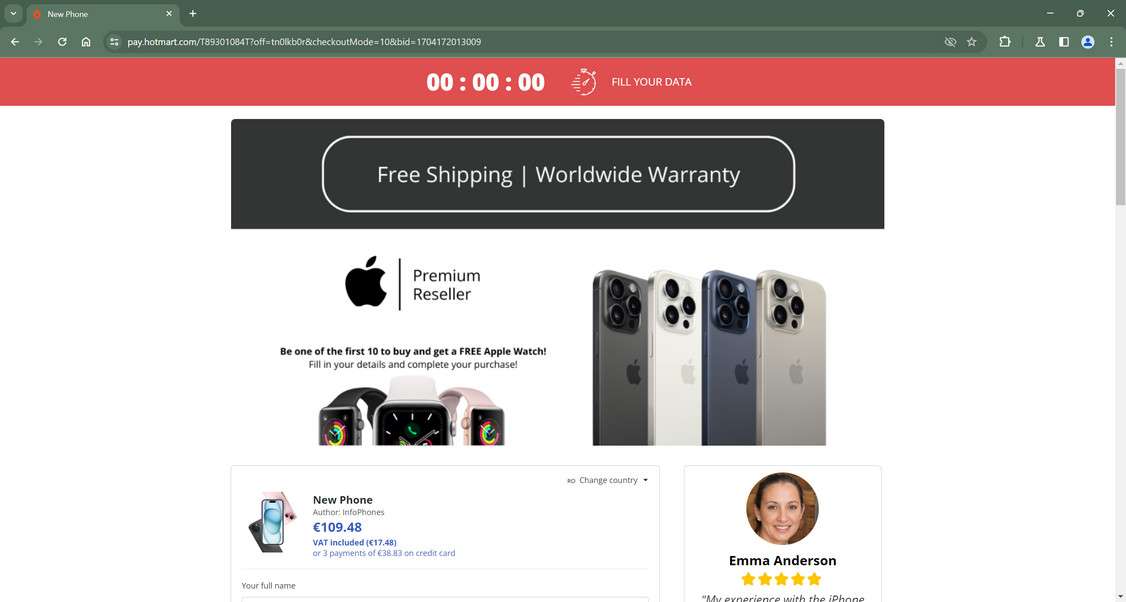
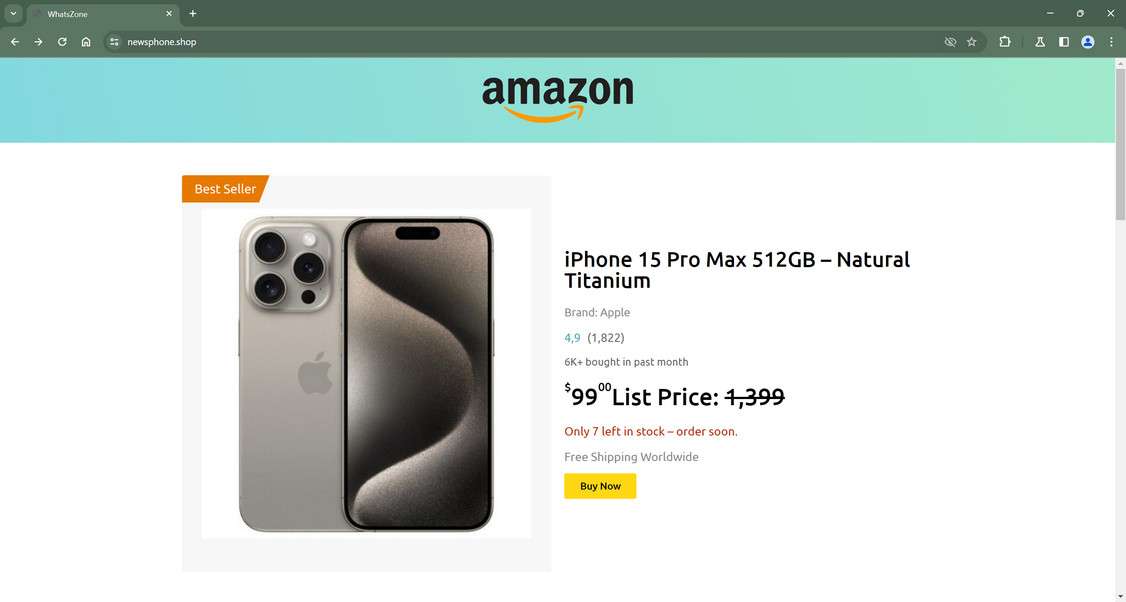
The Amazon iPhone discount scam operates by creating fake ads and sponsored posts on Facebook, Instagram, TikTok and other platforms. The ads use Amazon branding and claim the retailer is offering huge discounts on the latest iPhone models, up to 90% off. For example, the ads might say you can buy an iPhone 15 Pro for just $99.
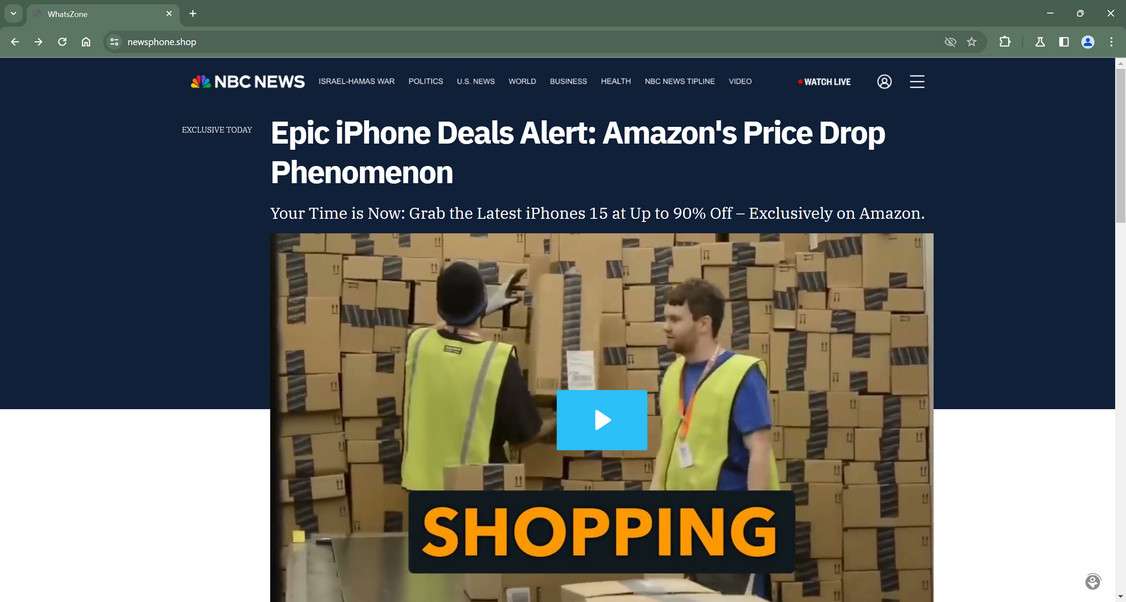
The goal is to make the deals look legitimate by using Amazon’s name and reputation. But when users click on the ads, they are directed to fake websites made to look like real news outlets reporting on the supposed Amazon deal.
The scam news sites use big brand names like Fox News, CNN, NBC, and ABC in their URLs and page designs. They also include fake mastheads and articles reinforcing the myth of Amazon’s epic iPhone sale.
These “news reports” lend credibility and dupe readers into thinking it’s a real, exclusive deal. The sites even provide a checkout process so victims can purchase the discounted iPhone. But it’s all a scam designed to steal money and personal information. Victims will never receive the promised iPhone 15.
Below we’ll explore exactly how the iPhone deal scam operates and what techniques it uses to trick users. This overview will help you recognize and avoid these online shopping scams.
Scam Website Design and Tactics
The scam websites follow many of the same templates and tactics to successfully deceive users:
- Fake domain names – The sites use domain names like cnn-breakingnews.com or foxnews-online.co to sound official. But they are not the real news sites.
- Mimic famous brand designs – The scam pages visually mimic the logo, fonts, layouts and branding of major news outlets. This helps lend legitimacy to the fake articles.
- Fake mastheads and reporter names – Phony mastheads list pretend reporter names and sections like “Tech News Desk” to appear authentic.
- SEO keywords – The sites contain keywords like “Amazon” and “iPhone deals” to rank high in search results.
- Credible-sounding headlines – Headlines like “Amazon’s Epic iPhone 15 Sale Revealed” help convince readers the deals are real.
- Persuasive article copy– The articles use sensational language about an “exclusive opportunity” and “game-changing initiative” by Amazon. This drums up excitement.
- Sense of urgency – The scam articles emphasize limited quantities and time-sensitive nature of deal to get users to act fast.
- Links to checkout– Working checkout forms and credit card fields add legitimacy so users complete purchases.
With so many fake indicators of authority and urgent calls to action, it’s easy to see how these sites dupe so many victims. Awareness of their deceptive tactics is key to spotting and avoiding the scam.
Spreading on Social Media
The fake ads and sponsored posts containing the scam offers spread rapidly on social media thanks to a variety of underhanded promotion techniques:
- Paid ads– Scammers pay for cheap sponsored posts and ads on Facebook, Instagram, TikTok, Snapchat and elsewhere to target deal seekers.
- Clickbait text– The posts contain enticing captions like “Insane iPhone Discounts on Amazon – Hurry Before Sold Out!” to catch attention.
- Comments and tags– Scammers use bots and fake accounts to leave comments hyping the deal on posts to increase buzz.
- Influencer marketing – In some cases, scammers pay or compromise social media influencers to promote the scam offer to their followers.
- Targeting and retargeting – Specific age groups, interests and behaviors are targeted to focus only on users likely to fall for scam.
- Dark social tactics – Messages are spread anonymously via anonymous communication apps to avoid detection.
With these promotion strategies, scam posts and ads can reach millions of users quickly. Even if the social platforms detect and disable some posts, the scam continues spreading nonstop.
Stealing Money and Information
The end goal of the iPhone deal scam is to steal money and personal information from victims who take the bait. They accomplish this through:
- Fake checkout forms – Users must enter credit card, billing address and other sensitive details to “purchase” the discounted iPhone. This gives scammers what they need for payment fraud and identity theft.
- Charging cards – Once submitted, victims’ credit cards are charged for the iPhone, even though it will never ship. Scammers quickly max out cards.
- Selling details – User details like names, addresses and card numbers are sold on the dark web to other criminals.
- Installing malware – In some cases, simply visiting the scam sites can infect devices with trojans, spyware, and other malicious software.
- Phishing for logins – Scam pages mimic Apple and Amazon login screens to hijack account credentials when entered.
The scam operators rake in revenues from all these criminal activities, while leaving victims to deal with fraudulent charges, compromised accounts, and identity theft fallout. Awareness is the best protection.
Now that you understand how the Amazon iPhone discount scam works on a high level, let’s explore each step of the scam process in detail.
How the Amazon iPhone Discount Scam Works
It’s important to examine the tactics scammers use in each step of the iPhone deal scam operation. This makes it easier to recognize the warning signs of a fraudulent offer before becoming a victim. Here is a step-by-step breakdown:
Step 1: Creating Fake Ads and Sponsored Posts
The scam begins with scammers designing clickbait ads, images and sponsored posts about the non-existent Amazon iPhone deal. Some examples:
- Fake ads showing iPhones with “Amazon Prime Exclusive!” and “90% off for Amazon Users”.
- Posts using Apple and Amazon logos claiming “Limited Time! iPhone 15 Just $99!”
- Instagram sponsored content stating “Hurry! Amazon Selling iPhone 15 for 95% Off While Supplies Last!”
These ads are crafted to go viral while clearly implying Amazon is behind the deals. The scammers often purchase cheap social media ads and influencer promotions to maximize reach.
Step 2: Driving Traffic to the Scam Websites
The scam ads all contain links to the fraudulent deal websites. Unknowing users who click these links are sent to the fake “news” articles detailing Amazon’s blowout iPhone sale.
These sites use the deceptive design tactics described above like mimicking famous news brands and using fake journalist names and credentials. The articles reinforce that Amazon has slash iPhone prices temporarily while stocks last.
Step 3: Persuading Users the Deal is Real
The fake news articles work aggressively to persuade visitors that the unbelievable iPhone discounts are legitimate:
- Detailed descriptions explain Amazon’s “groundbreaking” new initiative for steep smartphone discounts.
- “Reliable sources” are cited to confirm Amazon authorized the sale.
- Tech “experts” are quoted voicing enthusiasm and calling it a “pivotal moment” in online commerce.
- The articles repeatedly reinforce that the deals are exclusively through Amazon, the trusted brand name.
With these and other social proof and influence tactics, the scam pages convince most users the deals are real. Any doubts are overcome by desire to get a cheap iPhone.
Step 4: Creating Urgency to Purchase
The scam sites utilize several tricks to create urgency and prompt visitors to purchase the deeply discounted iPhones right away:
- Limited timeframes like “New Year Blowout Sale: Today Only!” add pressure to buy quickly.
- Strict purchase limits like “Only 5 Discounted iPhones Per Customer” make it seem exclusive.
- Countdown timers and notifications to “Hurry! Only 7 iPhone 15 Units Remain at This Price!” fuel impulse buying.
- Low stock warnings like “Only 2 Left in Stock, Order Soon!” give the impression units are selling out fast.
These tactics instill fear in visitors that they will miss out on the amazing deal if they don’t purchase immediately. This drives sales for the scammers.
Step 5: Collecting Personal and Payment Details
To complete the scam, users must enter their payment method and personal information into the fake checkout forms on the deal websites.
Visitors must submit details including:
- Full name, email, and physical address
- Credit card number, security code, and expiration date
- Phone number and other contact info
- Account passwords and other data in some cases
Users willingly hand over these critical details because they believe it’s needed to buy the deeply discounted iPhone. In reality, this is exactly what the scammers want to steal identities, commit payment fraud, and resell on the dark web.
Step 6: Charging Cards and Disappearing
After users complete the checkout process, the scam websites immediately charge their credit cards the full price of the iPhone being purchased. This can be $99, $159, or other discounted amounts advertised.
Some victims don’t realize their card was charged for days or even weeks later. Meanwhile, the scammers withdraw these funds rapidly before payments can be stopped or reversed.
Of course the promised iPhones are never shipped to buyers. And soon after stealing the payment info, the scam sites usually disappear or change domains to avoid detection.
Victims are left with maxed out cards, compromised information, and no new iPhone to show for it. The scammers repeat the process endlessly to rip off as many eager deal seekers as possible.
Step 7: Making Money from Stolen Data
Beyond the direct charges to victims’ cards, the scam operators profit through multiple avenues:
- Stolen credit card numbers are sold on dark web marketplaces.
- Personal information is traded to be used in identity fraud schemes.
- Compromised account credentials are abused to steal additional funds.
- Victims are added to mailing lists for phishing scams and malware attacks.
- Some scam pages install hidden Trojan downloads that steal data from users’ devices.
So the damage from the iPhone deal scams extends far beyond just the initial unauthorized charges. Without caution, users can suffer financial and identity theft repercussions for months or years.
This walkthrough of how the iPhone discount scam unfolds sheds light on how convincing and manipulative their techniques are. But with the right knowledge, these scams can be safely avoided.
How to Avoid Falling Victim to the iPhone Scam
Now that you understand the deceptive tactics used in the iPhone deal scam, here are some tips to help avoid becoming a victim yourself:
Be Skeptical of Too-Good-to-Be-True Deals
The #1 red flag of a scam is an offer that seems unrealistic or too good to be true. In this case, brand new iPhones being 90% off fits that category. Learn to quickly identify offers that are simply too amazing to be legitimate.
Research Unfamiliar Deal Websites
Don’t take obscure blogs or unknown websites at face value, even if they look professional. Do quick searches on the site name, look for contact info, search for reviews, and validate any claims.
Verify Deals on Official Brand Sites
Rather than trusting third-party ads or articles, go directly to Amazon.com and Apple.com to see if the deal exists on the official brand websites. Avoid clicking links making bold claims.
Watch for Fake Reviews and Pressure Tactics
Scams often use lots of fake 5-star reviews and high-pressure tactics about low stocks and time limits. Be wary if a site seems overly pushy or has mostly flawless reviews.
Pay With Credit Cards vs. Debit Cards
Never pay with direct bank payments or debit cards when shopping on unfamiliar sites. Use credit cards for stronger fraud protections and ability to dispute charges.
Beware Social Media Shopping
approach online shopping ads and deals promoted on social media with caution, especially from accounts you don’t know. Verify offers completely before making purchases.
Use Antivirus Software
Some scam sites install malware just by visiting. Use comprehensive antivirus software to detect and block malicious programs and infections.
Staying vigilant against online shopping scams is crucial. If an offer seems dubious, trust your instincts and avoid the risk of losing money. Only purchase from reputable retailers you know and trust.
We’ll cover more ways to confirm deal legitimacy and steps to take if you are scammed next. But the best approach is prevention by using caution against schemes that feel off.
How to Spot the Amazon iPhone Discount Scam on Socia Media
How to Spot the iPhone Scam on Facebook
The iPhone discount scam spreads on Facebook through sponsored posts, ads, and fake posts within Groups and on Pages. Here’s how to recognize it:
- Sponsored posts – Be wary of Posts promoting iPhone deals that are marked “Sponsored”. The scammers pay to boost these to more users.
- 90% off claims – Posts advertising iPhones for 90% off or just $99 should raise red flags. Prices that seem too good to be true often are.
- Enticing slogans – Scam ads use slogans like “Blowout Sale!” “Going Out of Business Sale!” or “Limited Time Offer!” to create false urgency and excitement.
- Stolen Images – The ads often feature stolen product images or fake mockup iPhones. The photos may be slightly distorted or low quality since they weren’t authorized.
- Comments – Scam Facebook posts often have comments from bots and fake accounts hyping the deal to try to increase legitimacy.
- Links – If you click on the post, the website link will take you to an unfamiliar site designed to look like a real news page, rather than Amazon.com.
- Reports – Other users may have reported or replied to scam posts warning that they are fraudulent. Look for warnings.
Using caution with Facebook shopping posts, verifying deals on real sites like Apple.com, and watching for these red flags of iPhone scams will keep you secure. Trust your instincts if an offer seems fake.
How to Spot the iPhone Scam on Instagram
On Instagram, be on high alert for the following signs of iPhone deal scams:
- Sponsored Stories – The scam posts will be marked “Sponsored” at the top since scammers pay to promote them in feeds.
- @Usernames – The Sponsored posts often come from accounts with generic usernames like “@techshop402” rather than real stores.
- Comments Disabled – The scammers usually disable comments on the posts so users can’t warn others that they are fake deals.
- Link in Bio – The account bio will say “Link in bio!” or “Shop now!” directing to the phishing site rather than a real online store.
- Reposted Images – The photos showing iPhones in the scam posts are often stolen from other accounts or websites, rather than originals.
- No Blue Verification Check – The scam accounts lack Instagram’s blue verification check since they are not real businesses.
- Too Good to Be True – Just like on Facebook, prices like 90% off or iPhone 15 for $99 are clear red flags of a scam on Instagram.
Avoid clicking on sponsored posts promoting unbelievable iPhone deals. Report scam posts and accounts to help remove them from Instagram.
How to Detect the iPhone Scam on TikTok
On TikTok, the iPhone scam takes the form of in-feed video ads, sponsored livestreams, and fraudulent profiles. Identify them by:
- #Ad hashtag – Scam video ads are labeled #ad showing they paid to promote them to users.
- Comments disabled – Just like Instagram, the scam videos block comments so users can’t post warnings.
- Sponsored Live posts – Clip previews for livestreams by scam accounts promoting iPhone deals often appear in feeds.
- Links in bios – Scammer profiles contain links not to real stores but to the phishing deal websites.
- Stock content – The scam TikTok videos feature stock footage and images rather than authentic content.
- Fake discounts – Prices like “90% off iPhone 15” on Amazon are signals of fraud since iPhones rarely go on steep sale.
Stay vigilant for videos from accounts you don’t recognize pushing iPhone deals that seem unrealistic. Verify any offer directly through Apple before providing personal information or payment details. Avoid clicking links on TikTok to unpredictable third-party websites.
What to Do If You Are Scammed by a Fake iPhone Deal
If you believe you have fallen victim to the iPhone discount scam detailed here, stay calm but act swiftly. Here are the steps experts recommend you take in response:
Step 1: Contact Your Credit Card Provider
If you paid via credit card, immediately call the card issuer to report the charges as fraudulent. Request they reverse the charges, block future charges, and issue a new card number. Acting ASAP increases chances the charges can be stopped.
Step 2: Notify Your Bank
If you instead used a debit card or direct bank transfer, alert your bank of the unauthorized iPhone charges. Ask them to halt payments, block linked accounts, and watch for further suspicious charges. Monitoring accounts closely prevents criminals from stealing more of your money.
Step 3: Change Passwords
If you entered any account passwords or other sensitive credentials into the scam checkout forms, change those passwords immediately. Assume the scam operators have access to any data you submitted. Updating passwords secures your accounts.
Step 4: Place Fraud Alert
Consider placing 90-day fraud alerts with credit reporting bureaus Equifax, Experian and Transunion to prevent scammers from opening new accounts in your name using stolen info. Renew fraud alerts after 90 days if needed.
Step 5: File Police Report
Report the scam to your local police department and request a copy of the official incident report. This creates a paper trail and evidence the scam occurred. Give copies to your bank/credit card companies too.
Step 6: Report the Scam Websites
Lookup and submit complaints reporting the scam websites and related social media accounts to the FTC, IC3, social media platforms, domain registrars, and other reporting channels to get them taken down.
Step 7: Monitor Accounts Closely
Carefully monitor bank and credit card statements, credit reports, and account activity over the next 6-12 months. Report any fraudulent charges or accounts opened in your name immediately. Consider a credit monitoring service too.
Step 8: Warn Others
To prevent others from falling victim, expose the scam by posting details, screenshots, and web addresses to scam reporting sites and social media. Educating consumers is powerful.
Getting scammed is frustrating and damaging. But by acting quickly and assertively, you can halt additional losses, repair your identity, and empower authorities to shut down the scammers. Don’t let them steal more from innocent consumers.
Frequently Asked Questions About the Amazon iPhone Scam
Shoppers are being targeted by an insidious scam involving fake discounts on the latest iPhone models on Amazon. If you’ve encountered social media posts, ads, or websites promoting unbelievable iPhone deals, you likely have questions. Here are answers to some frequently asked questions about this scam.
What exactly is the Amazon iPhone scam?
This is a scam where scammers create online ads and posts falsely claiming Amazon is offering huge discounts on iPhones, up to 90% off. The goal is to direct shoppers to fake websites that mimic trusted news sources and convince visitors the deals are real, in order to steal credit card details and personal information.
How does the iPhone discount scam work?
The scammers post ads on social media and pay for promoted posts. When users click through, they are sent to fraudulent websites disguised as news outlets reporting on the false iPhone sale. These sites use fake articles, urgency tactics, and working checkout forms to trick users into entering payment and personal details, which the scammers then steal.
What tactics do the scammers use to convince people the deals are real?
The scam websites utilize deceptive designs mimicking famous news brands like Fox News and NBC, fake mastheads and journalist names, and persuasive sales copy about Amazon’s “blowout” iPhone sale. They create urgency with time limits, low stock warnings, and pressure tactics to prompt impulse buying before users scrutinize the deals.
What are some warning signs of the iPhone scam online?
Red flags include prices that seem too good to be true like 90% off, alarming urgency tactics and limited time warnings, unfamiliar websites you’ve never heard of, scam ad reports from other users, and credit card forms on checkout pages of unknown sites.
How can I avoid becoming a victim of the iPhone discount scam?
Tips include being skeptical of unbelievable prices, always verifying deals on real brand sites like Apple.com, researching unfamiliar sites, using credit cards with fraud protection for purchases, avoiding clicking links in social media ads, and watching for fake reviews and scam website warning signs.
What should I do if I fell for the iPhone scam and entered my information?
Immediately contact your credit card company to report fraudulent charges, monitor your statements closely for suspicious activity, change any passwords you submitted to the scam site, place fraud alerts with credit bureaus, file a police report, report the scam to the FTC, and be vigilant about identity theft.
Can I get my money back if I was scammed out of hundreds or thousands of dollars?
If you used a credit card and report the charges as fraudulent quickly, the card issuer will likely reverse the charges and issue a new card number. Debit cards and direct bank transfers are riskier, but alert your bank right away and escalate the issue to increase chances of recovering lost funds.
How can I check if an online deal I find is a scam or legitimate?
Ways to verify deals include comparing prices on other major retailers, looking up website history/reviews, checking for valid contact info/privacy policies, inspecting the payment processor and security features, and watching for pressure tactics and quality issues. When uncertain, avoid providing your information.
This iPhone deal scam tries to take advantage of eager deal seekers and steal hard-earned money. But understanding their tricks and doing your due diligence when researching offers can keep your identity and accounts secure. Trust your instincts and don’t get duped by unbelievable prices. If it seems too good to be true, it almost always is.
The Bottom Line on Avoiding iPhone Discount Scams
The scam detailed in this article – featuring fake ads and websites that promote steep iPhone discounts on Amazon to steal money and information – has defrauded countless online shoppers. Losses to these fraudulent deals are estimated in the millions.
But by learning their deceptive tactics and following tips like:
- Watching for unrealistic prices and high-pressure claims
- Verifying deals on real brand sites
- Researching unfamiliar websites
- Paying only with protected payment methods
- Monitoring your accounts closely
you can detect and steer clear of these online shopping scams. No deal is worth the risk of compromised finances and identity. When an offer seems questionable, trust your gut and just say no.
Sticking to trustworthy retailers you know, using caution around social media deals, and doing due diligence before providing payment details will keep you safe. Don’t let desire for a bargain blind you to scams. Saving money is great – but losing money and personal data is never worth it. Stay vigilant to protect yourself from thieves looking for the next victim.

Join the discussion
0 commentsShare your experience or ask a question about this article.
Discussion
Start the conversation
Have a question or something useful to share? Add the first comment.