

A dangerous new wave of Amazon survey scams is capitalizing on shopper affinity for the e-commerce giant by using fraudulent social media ads, emails, and websites pretending to offer free gifts like iPhones and Amazon gift cards for completing short qualification questionnaires. However, it’s all an elaborate ruse stealing personal information and billing victims repeatedly for monthly services they never approved once credit card details get collected.
This comprehensive guide breaks down precisely how these Amazon survey cons work and what precautions savvy consumers must take in order to avoid getting swindled by seemingly rewards offerings online.
Overview of Fake Amazon Survey Scams
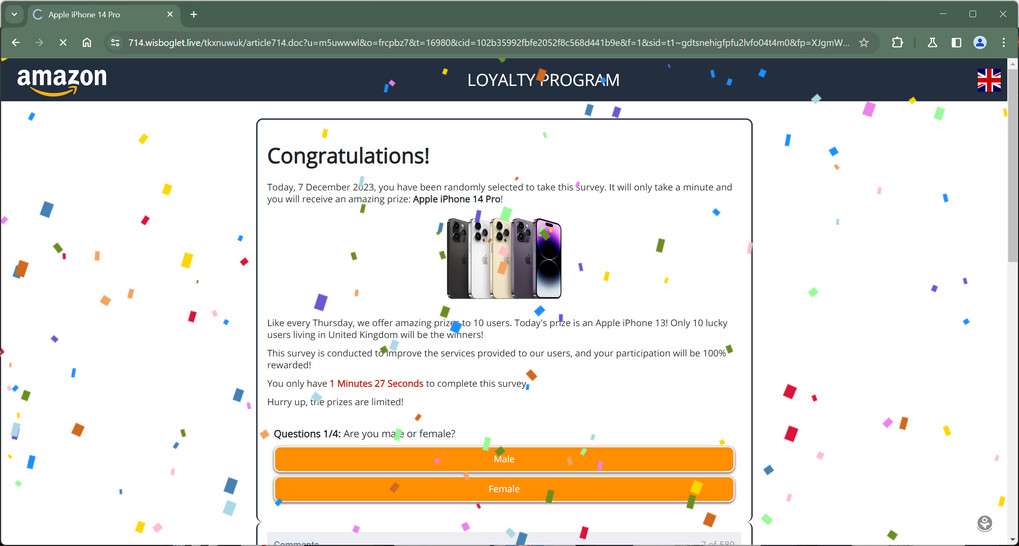
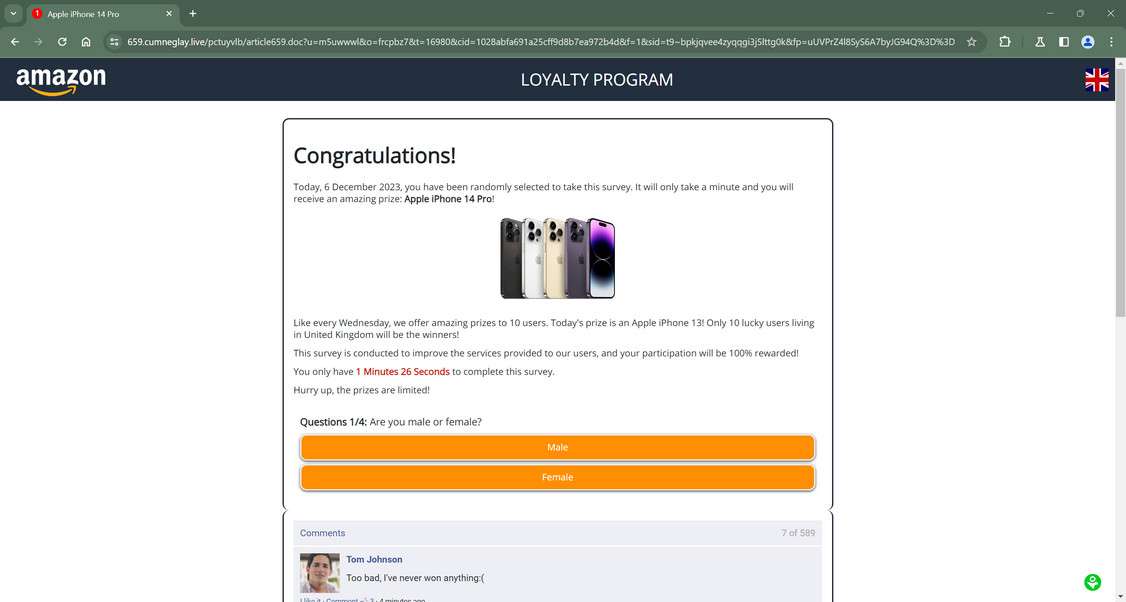
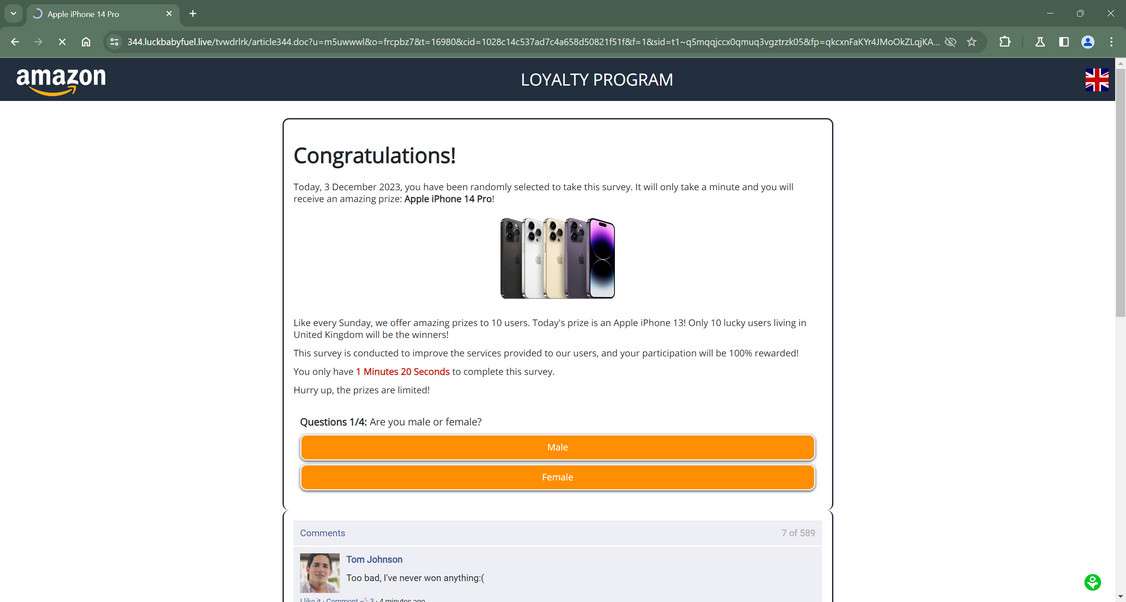
The Amazon Survey Scam preys on the inherent trust customers already have in the retail giant by impersonating branded rewards offers for completing alleged shopping feedback questionnaires. Fraudsters bait engagement through social media ads, emails, and fake websites featuring the familiar Amazon logos and imagery.
However, it’s just a conduit to harvest personal information, install malware, or trick users into unauthorized recurring subscription charges exceeding $100 monthly once credit card details get phished. This digital fraud ensnares consumers through carefully orchestrated psychological and technical manipulation.
Slick Videos and Images Cultivate Assumed Authenticity
The scam web pages and ads feature Amazon’s iconic branding including logos, fonts, countdown timers, and gift card graphics matched precisely to the real website. Videos depict Amazon packaging orders to establish legitimacy based on users’ positive affinity with the company as loyal customers.
This convinces visitors the offers are authorized due to their pre-existing relationship. In reality, there is zero actual affiliation with Amazon being exploited.
Phony Questionnaires Mine Personal Data
Once hooked, users are asked short multiple-choice questions about Amazon shopping frequencies, categories, and brand satisfaction pretending to “guide corporate decisions” on inventory or loyalty programs. After investing time answering, visitors are more inclined to follow through claiming prizes.
In actuality, personal details get harvested for identity theft and sold on dark web marketplaces while victims believe they are just helping their favorite retailer innocuously. Danger hides in perceived triviality.
Credit Card Charges Fund Secret Thefts
After securing user financial data through a mandatory $1 “shipping fee”, criminals really activate expensive secret recurring monthly subscriptions for services never requested. Mystery $59 – $99 automatically bills victims to fund scammer accounts while cancellations are made difficult deliberately.
How Fake Amazon Survey Scams Spread
The tactics for distributing fake Amazon survey scams mimic other retail cons but leverage Amazon’s brand specificity to seem more convincing. Scammers rely on a variety of digital mediums to widely spread links driving traffic to convincing mock Amazon domains baiting engagement through the promise of survey compensation gifts. Each channel takes advantages of different consumer blind spots.
Phishing Emails
One popular tactic sends spam template emails to masses featuring subjects like “Complete a Amazon Survey to Redeem Your $100 Gift Card!” These messages pretend association with real Amazon customer satisfaction programs to trick recipients. Embedded links route visitors to realistic forgeries gathering personal information rather than providing genuine surveys. Flooded inboxes enable this fraud to reach countless unfamiliar victims at scale.
Social Media Ads & Posts
More recently, Amazon survey scam ads frequent platforms like Facebook, Instagram and TikTok using video and images promoting free rewards worth hundreds for short question completions. These nudge visitors to external landing pages initiating cons through data harvesting and undisclosed recurring credit charges linked to users’ excitement around the globally recognized brand.
Search Engine Advertising Campaigns
Fraudsters will buy Google ads linked to keywords like “Amazon survey” so results falsely appear affiliated with first party promotions. Users who click ads expecting official customer research portals instead get rerouted to unrelated domains showing the familiar Amazon templates. This tactic hides the scam unfolding through search traffic specifically seeking engagement opportunities.
Malicious Smart Assistant Skills
A newer tactic implants malicious skills into voice assistants like Alexa that activate upon commands asking about Amazon surveys. These fraudulent skills pretend completing eligible questions vets users for future beta testing rewards. However, they phish personal details and route victims towards external websites resuming broader financial cons.
Inside Fake Amazon Survey Scam Funnels
While scam details vary slightly, most fraudulent Amazon survey cons follow a very strategic progression moving visitors through a pipeline maximizing information and payment capture before allowing exit.
Stage 1: Landing Pages
The deceitful portal visitors land on after clicking email links or ads mirrors Amazon’s true visual design in great detail. Logos, fonts, colors and more precisely copy the real website to reassure victims of its authenticity. False claims insist surveys help Amazon improve while compensating loyal customers.
Those enticed into the premise proceed towards questionnaires ready to share opinions with the beloved brand.
Stage 2: Data Collection Surveys
The online survey pretends wanting consumer perspectives around Amazon shopping experiences, reviewing attitudes on things like product selection, brand affinity, Prime benefits and satisfaction ratings in various departments.
Questions feign helping guide corporate decisions around inventory and loyalty programs rather than clearly phishing for shareable personal data inadvertently. Victims perceive harmlessness answering basic multiple choice questions.
Stage 3: Prize Redemption
After completing all survey questions, another congratulatory message appears praising users for qualifying to receive a “guaranteed” Amazon gift card worth $500. Psychologically this reinforces feelings of value exchange for time spent while priming compliance accepting next steps securing “owed” rewards.
A wheel spins or box selection mimics contest dynamics before confirming amazing prize guarantees. Victims merely need provide a valid shipping address and credit card to claim gifts!
Stage 4: Hidden Recurring Billing Subscription
Although visitors expect authorization charges solely for gift delivery, supplying payment information also approves expensive mystery subscription sign-ups exceeding $100 monthly that secretly bill victims repeatedly afterwards. Just like survey promises, these digital services never requested nor utilized still require intricate cancellations.
Few consumers notice until the first large invoice arrives for things like a “Mega Kindle Unlimited Subscription” or “Amazon Prime Video Channel Bundle”. Meanwhile scammers profit on stolen financial data and can obscure tracing.
The key details may vary slightly but the procedures enable the same credit card billing cons through eliciting emotional engagement around Amazon’s brand targeting loyal customers.
What Happens Once Credit Card Details Are Compromised
After victims enter credit card information, most assume submission simply approves reasonable fees deducting for promised Amazon gift card shipments. However, relinquishing payment details to scammers instead facilitates much broader financial offenses.
Initial Small Charge
A legitimate seeming $1 – $10 charge labeled as a “shipping processing” fee or similar initially appears on billing statements from an unfamiliar merchant. Without additional obvious activity arising during the days following, users erroneously assume validity of transactions.
Ongoing Mystery Subscription Fees
However within approximately 2-3 weeks of initial orders, victims encounter exponentially larger mystery charges from the same shady merchant. Recurring fees ranging from $39 – $99 monthly for digital subscription services never selected or consciously activated now bill user accounts repeatedly.
Typical fraudulent charges include:
- Mega Kindle Unlimited – $49 monthly
- Amazon Prime Video Channels – $59 monthly
- Amazon Music Unlimited – $99 monthly
And services only fabrication imaginary value through deception. Nevertheless, victims pay heavily prior to recognizing the financial offenses perpetrated against them initially through survey engagement flows.
Difficult Cancellations
By design, scam merchants make stopping unexpected subscription fees exceedingly complex for users. Fake phone numbers listed on websites actually route to disconnected lines or overseas call centers claiming no record of any customer account access. Emails receive only automated templated responses devoid of resolutions.
These barriers buy criminals more billing cycles extracting income through these fraudulent tactics from victim credit card or bank accounts. Eventually account holders face no choice but complete closures when other cancellation efforts fail.
Warning Signs: How to Spot Fake Amazon Survey Scams
Although highly polished frauds, several common patterns can help consumers identify and evade engagement with fake Amazon survey ads upon closer inspection:
No Previous Subscription Consent
Legitimate ongoing promotions marketed via ads or emails require prior opt-in registration through card applications or newsletter sign ups to participate in rewards programs. Outbound offers claiming existing membership eligibility absent any past consent from recipients signals likely scams.
Redirects Funnel Towards Sketchy Domains
Authentic Amazon portal URLs always reflect some “amazon.com” variant country domains. Survey links routing visitors instead through multiple redirects ultimately landing on mismatched third party portals should instantly seem suspicious without more context.
Aggressive Sales Pressure
Scarcity claims of limited time windows to participate or receive prizes triggers emotional responses overriding logical objections. By misrepresenting artificial pressures, scammers coerce hasty survey participation essential for schemes succeeding before victims recognize inconsistencies.
Mandatory Credit Card Charges
Free rewards would never require upfront costs from those targeted especially after providing extensive personal data inputs already through questions alone. Demands for bank information to claim promised Amazon prizes implies ulterior financial motives beyond surveys themselves.
The patterns of emotional manipulation, concealed financial motives, and brand impersonation shine common lights on survey scams regardless of specifics. Stay vigilant.
4 Ways to Spot Fake Amazon Survey Sites
While sophisticated counterfeits mimic Amazon’s interfaces, a few subtle but consistent discrepancies can help protect savvy shoppers from survey scams:
1. Analyze Website URLs Carefully
Authentic Amazon domains always reflect “amazon.com” variations. Third party links should raise instant suspicion. Inspect destinations by hovering over links without clicking. Odd URLs like “amazon-survey.offers123.com” expose scam fakes.
2. Look for Glitched Design Elements
Smooth Amazon branding gets replaced by awkward spacing, formatting, colors and font issues on counterfeit sites. Images show distortion attempts copying legitimate graphics. Sloppy execution slips past scammer efforts to mimic authenticity.
3. Search for Working Contact Information
Amazon publishes extensive customer support resources easily verifiable elsewhere online. Scams lack working phone numbers, addresses or chat options – just façade templates aiming exclusively to collect visitor data quickly. Dead links, numbers and emails indicate shallow support.
4. Note Broken Site Flows
Counterfeit sites often display errors reaching checkout stages. After capturing personal inputs at the survey level, final processes glitch since scammers don’t invest in fully dynamic portals – just convincing templates harvesting enough details initially already. Test functionality beyond opening pages.
How to Identify Amazon Survey Scams on Social Media
Scammers aggressively promote fake Amazon survey cons on popular platforms using slick videos, images and ads to mislead consumers. Learn the common tricks to recognize on each:
1. Spotting Facebook Survey Scams
- Clickbait Link Previews – Scam posts feature mismatched link previews not reflecting real Amazon destinations. Inspect URLs instead of sensational headlines.
- Dubious Sponsored Ads – Imposter ads intermix with legitimate ones thanks to limited vetting of claims by Facebook. Scrutinize promoted posts more closely before clicking.
- Comment Floods – Numerous identical positive comments often come from a small ring of connected fake accounts rather than real users. Review the underlying source legitimacy.
2. Identifying Instagram Amazon Survey Scams
- Artificially Boosted Metrics – Fraudsters purchase fake followers/likes to establish perceived authority around offer posts. But small real engagement reveals deceit relative to inflated statistics.
- Stolen Online Photos – Scammer accounts steal or borrow images appearing reputable to manufacture credibility around survey claims. Reverse image searches reveal inconsistencies.
- No Critical Feedback Visibility – Instagram filtering allows hiding scam call-outs easily. Monitoring latest tagged comments forces transparency around criticism.
3. Avoiding TikTok Survey Scams
- Repetitive Narration – Numerous scam TikToks feature identical audio narration fueling video template repurposing at scale. Notice copied voiceovers across suspected scam accounts.
- Deflections to Other Platforms – Because TikTok prohibits certain outbound links, scammers redirect followers to Instagram instead appearing more reputable while still enabling shady redirects.
- Suspicious Sudden Offers – Gift card survey promises originating suddenly without previous account history discussing Amazon deviates from most authentic content patterns. Ask why now?
4 Ways to Spot Fake Amazon Survey Emails
While scam messages pretend affiliation, key details expose faux communications aiming to bait response clicks rather than convey legitimate offers. Notice:
1. Generic Greetings Lacking Personalization
Authentic corporations reference customer names, account numbers and recent purchase details when extending “exclusive” survey offers. Impersonal greetings like “Dear shopper” signal indiscriminate distribution rather than targeted outreach.
2. Mismatched Sender Addresses
Inspect email headers closely rather than just sender names displayed. Fraudsters often spoof official branding in the “from” field while actual underlying message origins show odd third party domains having nothing to do with companies portrayed.
3. Suspicious Links With Unrelated URLs
Hover over embedded hyperlinks to preview destinations before clicking. Amazon links should always reflect some variation of their corporate domain. Unexpected redirects to unrelated portals indicate phishing attempts.
4. Poor Grammar, Spelling and Formatting
Professional brands proofread outbound communications carefully unlike scammers hastily copying corporate templates. Notice issues like uneven fonts, spacing inconsistencies and repeated misspellings exposing international origins.
If core components fail authentication checks, communications should default to skepticism regardless of appearing affiliation. Context matters catching technical deception where emotional appeals yelling “free gift cards” attempt bypassing logic deliberately.
How to Avoid Fake Amazon Survey Scams
Clever psychological manipulation makes avoiding online cons challenging, but consumers can protect themselves by:
Avoid Taking Bait Offers At Face Value
The most reliable defense begins with conceding human decision making carries inherent blind spots. Countering external exploit tactics mandates fact checking emotive stories and reviewing tangible evidence behind claims before supplying data.
Analyze Redirect Chains Closely
Monitor browser domain changes after clicking links, being wary of unfamiliar destinations. Requested actions on mismatched sites lacking affiliation with advertised brands nearly always enable scams through some means.
Never Provide Payment Details To Unvalidated Parties
Supplying credit card or banking data comprises the most consistent precursor enabling recurring billing frauds. Withholding those crown jewels absent extensive prior account verification checks through separate channels causes downstream damages.
Use Credit Cards For Added Fraud Protection
Should identity theft or billing fraud still occur unexpectedly, credit cards provide greater legal protections regarding disputes compared to directly accessed bank accounts or debit cards. Adding intermediary barriers limiting fraudster funds access protects assets.
What To Do If You Are Already Scammed
If you provided any sensitive information or payment details to a fake Amazon survey website, remain proactive responding to minimize damages by immediately:
- Contact Financial Institutions – Call every bank or credit provider tied to compromised cards/accounts and flag all related transactions as fraudulent with their security teams. Request replacement account and card numbers to completely halt billing access.
- Initiate Disputes and Chargebacks – Open disputes and chargebacks against all connected third party merchant charges referencing scam details. Providers can block vendors through these filings if deemed in violation of card agreements.
- Review Credit Reports – Check credit reports from Equifax, Experian and TransUnion for any indicators fraudsters have attempted opening additional lines of credit or loans under your identity using stolen info. Freeze reports if detected.
- Reset Associated Passwords – If you reused the same password entered on the fake Amazon survey anywhere else online, change these credentials immediately to restrict lateral access reaching other key shopping, email or social accounts that may expose more personal data.
- Scan Devices for Malware – Run complete malware and antivirus scans in case redirects or site downloads initiated background installation of data harvesting tools tracking online behaviors, passwords and network traffic. Delete any threats confirmed.
Is Your Device Infected? Run a Free Malware Scan
Slow performance, constant pop-ups, or strange behavior? These are classic signs of a malware infection. The fastest way to find out is to scan your device with Malwarebytes Free — one of the most trusted malware removal tools available.
The free version detects and removes the most common threats, including:
- Adware — the cause of those annoying pop-ups
- Browser hijackers — unwanted redirects and changed homepages
- Trojans and spyware — hidden programs stealing your data
- Potentially unwanted programs (PUPs) — software you never asked for
👉 Select your device below — Windows, Mac, or Android — then follow the simple steps to download Malwarebytes, scan your system, and remove any threats it finds. The scan usually takes 5 to 20 minutes.
Run a Malware Scan with Malwarebytes for Windows
Malwarebytes is one of the most popular and trusted anti-malware tools for Windows — and it’s completely free for removing infections. It catches threats that many antivirus programs miss, including adware, browser hijackers, and trojans. Follow the steps below to scan and clean your PC in just a few minutes.
Download Malwarebytes
Click the button below to download the latest version of Malwarebytes for Windows from the official source. The free version is all you need — it will scan your computer and remove adware, browser hijackers, and other malicious software at no cost.
Download MalwarebytesOfficial installer for Windows 11 and 10. Your download starts right away.Want real-time protection? See Malwarebytes Premium Malwarebytes Free for WindowsScans and removes malware at no cost
-
Install Malwarebytes
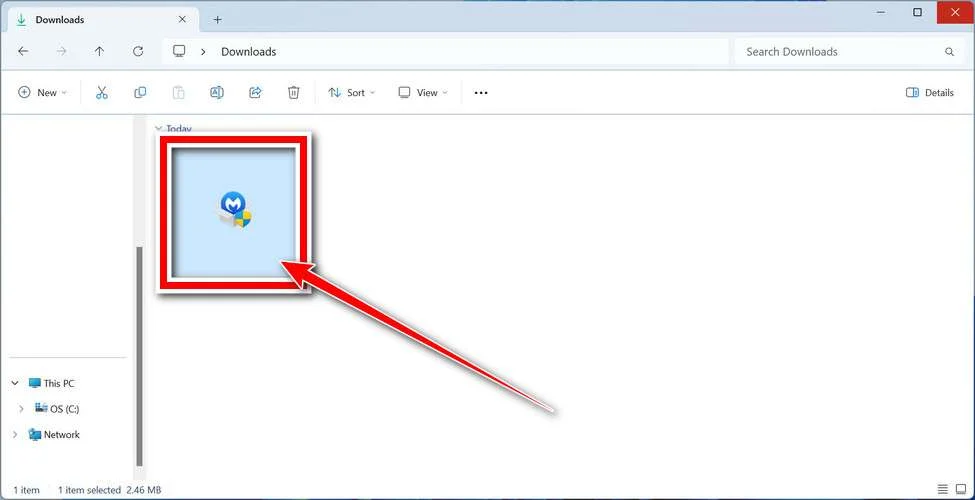
When the download finishes, open your Downloads folder and double-click the MBSetup file. If Windows shows a User Account Control pop-up, click “Yes” to allow the installation.
Follow the On-Screen Prompts to Install Malwarebytes
The setup wizard will walk you through a few quick screens:
-
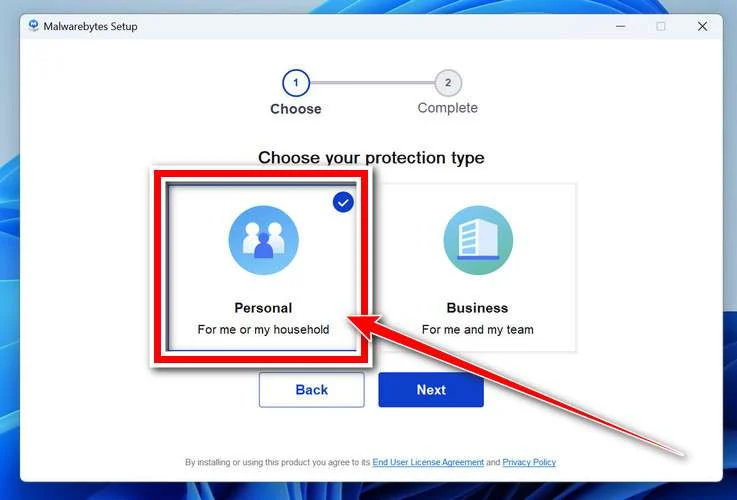
Choose where you’re installing the program — “Personal Computer” or “Work Computer” — then click Next.
-
Malwarebytes will now install on your device. This usually takes under a minute.

-
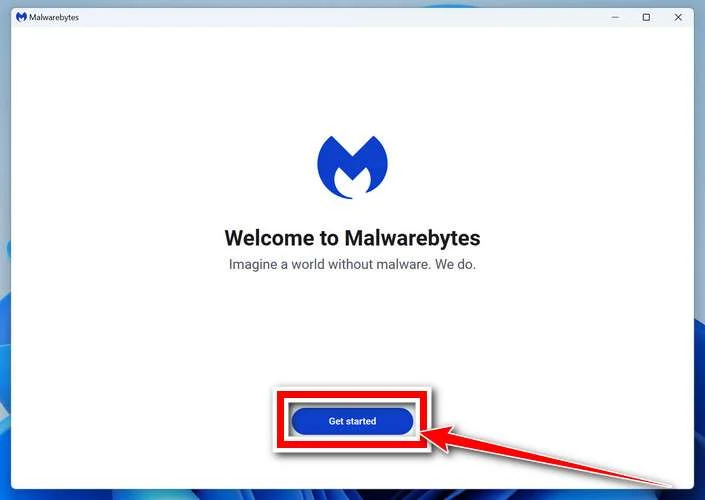
When installation is complete, the “Welcome to Malwarebytes” screen will open automatically.
-
On the final screen, click Open Malwarebytes to launch the program.

-
Enable “Scan for Rootkits”
Before scanning, turn on rootkit detection so Malwarebytes can find even the most hidden threats. Click the Settings gear icon on the left side of the screen.
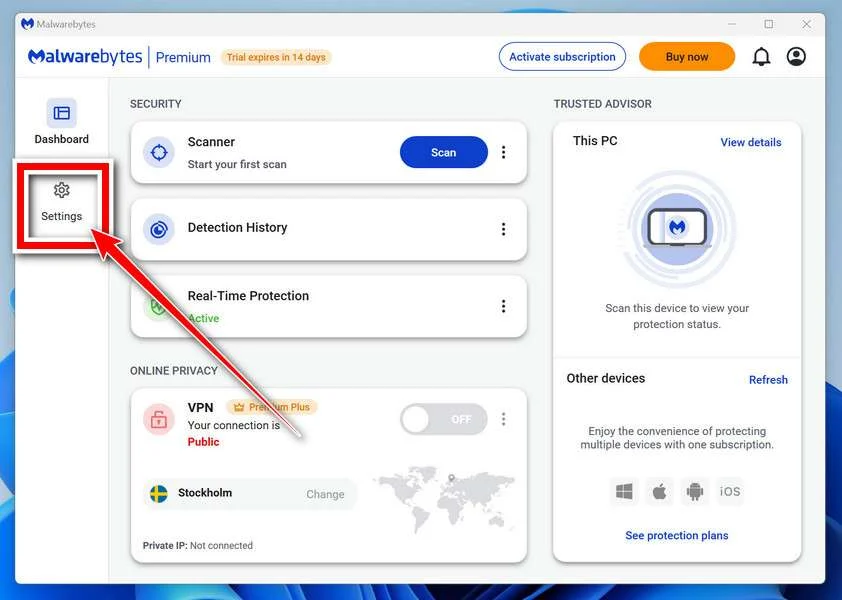
In the settings menu, find “Scan for rootkits” and click the toggle so it turns blue.

Done? Click “Dashboard” in the left pane to return to the main screen.
Start the Scan
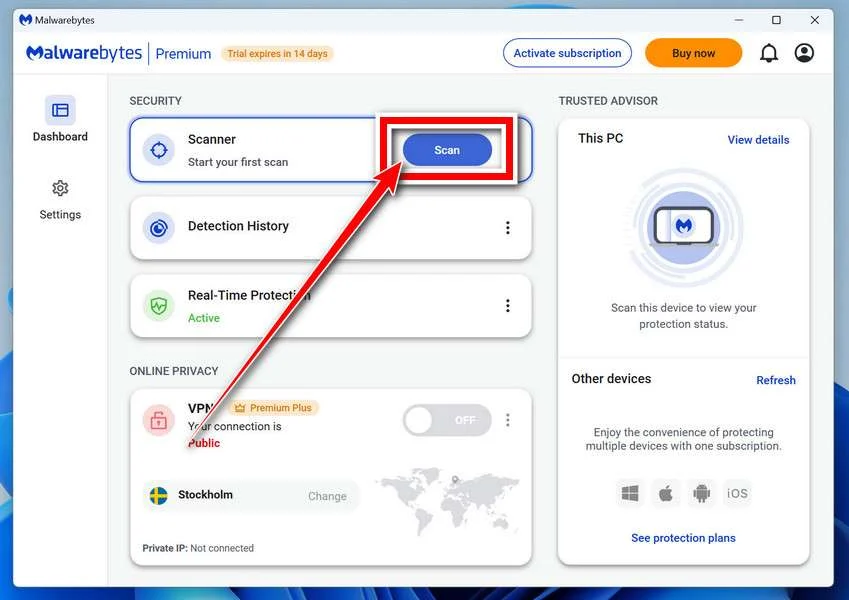
Click the blue Scan button. Malwarebytes will automatically update its virus database and start checking your computer for malware.
-
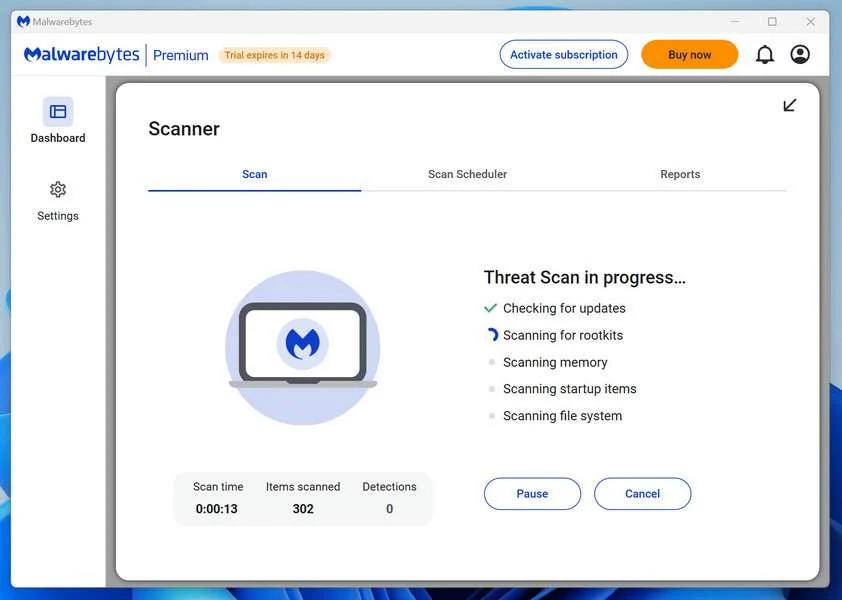
Wait for the Scan to Finish
The scan checks your entire system for browser hijackers and other malicious programs, so it can take 5 to 20 minutes depending on your computer. Feel free to do something else — just check back occasionally to see the progress.
-
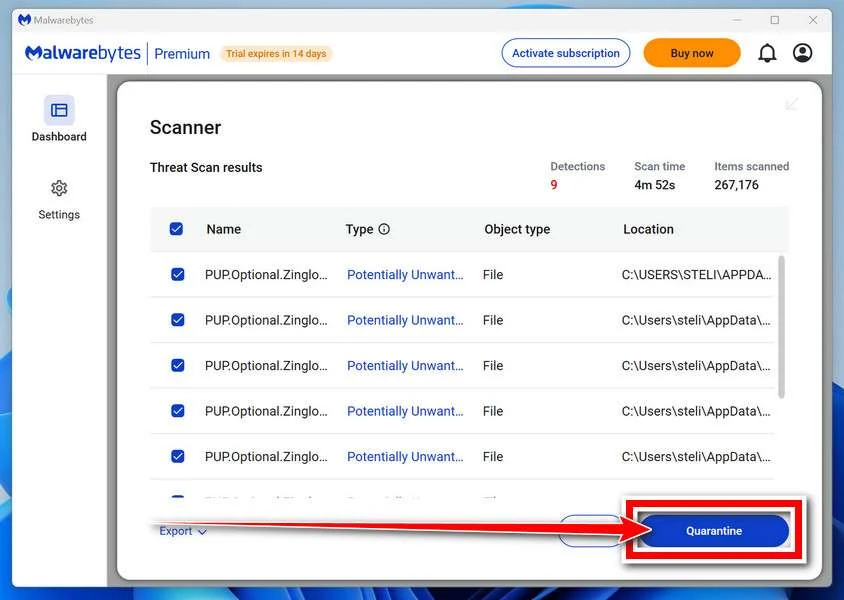
Quarantine the Detected Threats
When the scan is done, you’ll see a list of everything Malwarebytes found — malware, adware, and potentially unwanted programs. Click the “Quarantine” button to remove all of them at once.
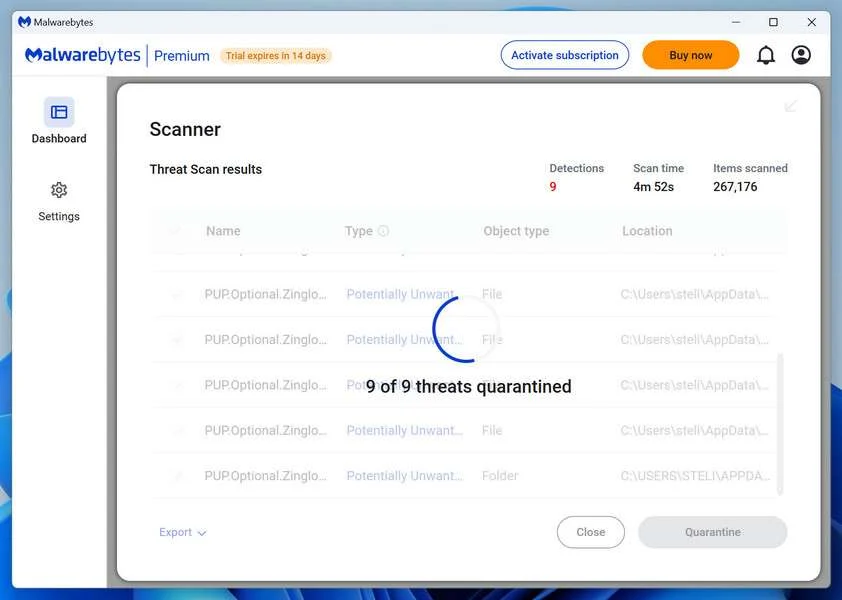
Malwarebytes will now remove the malicious files and registry entries and move them safely into quarantine.
-
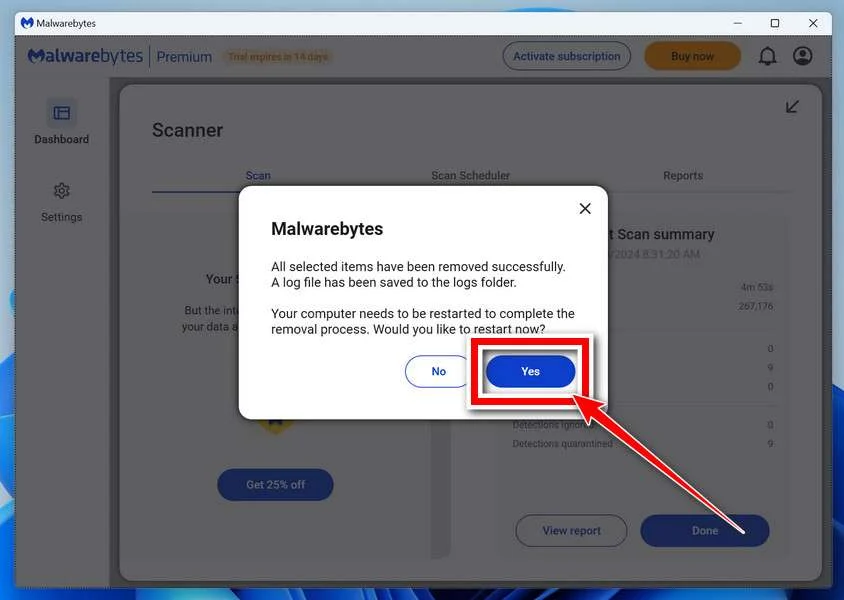
Restart Your Computer
Some threats can only be fully removed after a reboot. If Malwarebytes asks you to restart, click Yes. Once you’re logged back in, Malwarebytes has finished removing the threats it found.
That’s it — your Windows PC is now clean of trojans, adware, and other malware, and should be back to running smoothly.
If you are still having problems with your computer after completing these instructions, then please follow one of the steps:
- Run a computer scan with ESET Online Scanner
- Ask for help in our Windows Malware Removal Help & Support forum.
Run a Malware Scan with Malwarebytes for Mac
Malwarebytes for Mac is a free on-demand scanner that removes the malware other security software tends to miss — adware, browser hijackers, and unwanted programs included. Cleaning an infected Mac with Malwarebytes has always been completely free, and it’s our go-to recommendation. Follow the steps below to scan and clean your Mac in just a few minutes.
-
Download Malwarebytes for Mac
Click the button below to download the latest version of Malwarebytes for Mac.
Download MalwarebytesOfficial installer for macOS. Your download starts right away.Want real-time protection? See Malwarebytes PremiumMalwarebytes Free for MacScans and removes malware at no cost -
Open the Malwarebytes setup file
When the download finishes, open your Downloads folder and double-click the setup file to begin the installation.
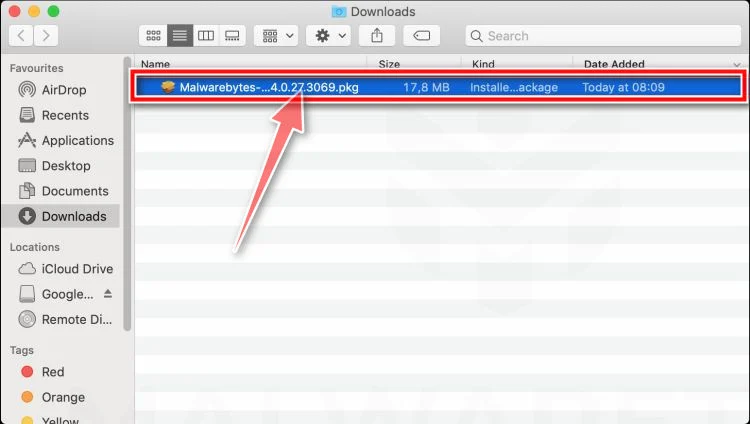
-
Follow the On-Screen Prompts to Install Malwarebytes
The Malwarebytes for Mac Installer will guide you through a few quick screens. Click “Continue” and keep following the prompts until the installation completes.
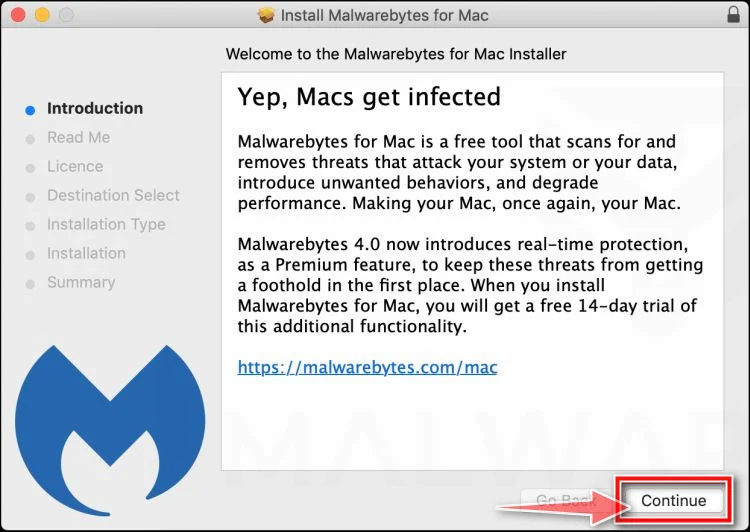
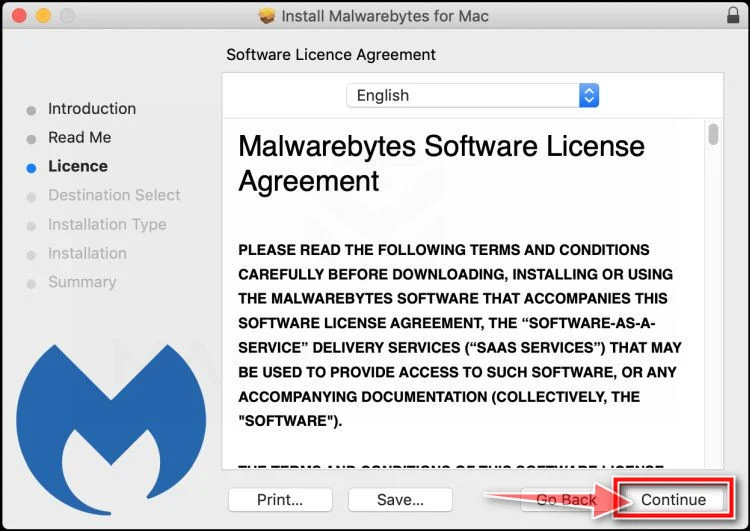
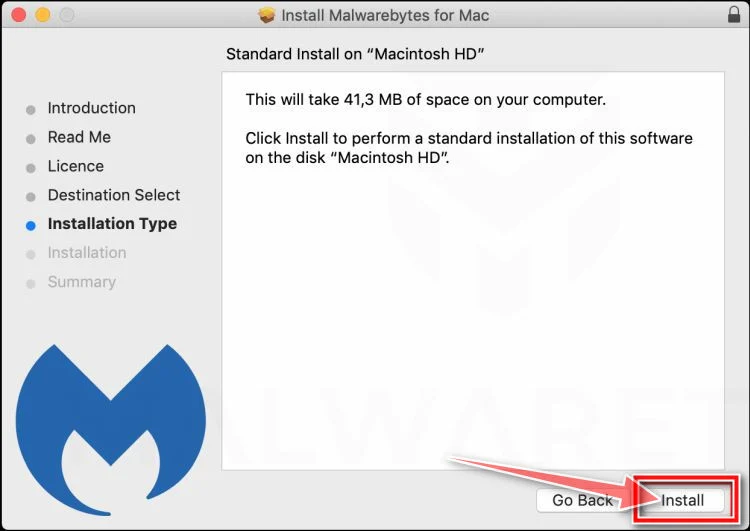
When the installation is complete, Malwarebytes opens to the Welcome to Malwarebytes screen. Click “Get started“.
-
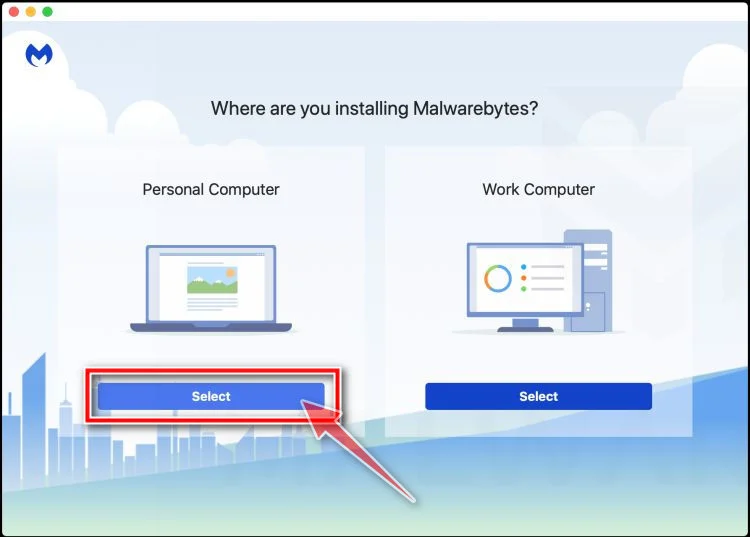
Select “Personal Computer” or “Work Computer”
Malwarebytes will ask what type of computer you’re installing it on. Click either Personal Computer or Work Computer, whichever applies.
-
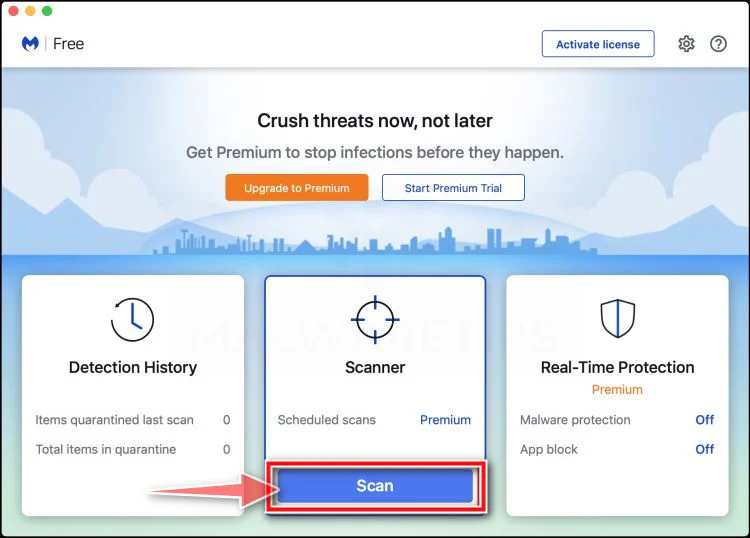
Start the Scan
Click the “Scan” button. Malwarebytes will automatically update its detection database and begin checking your Mac for malware.
-
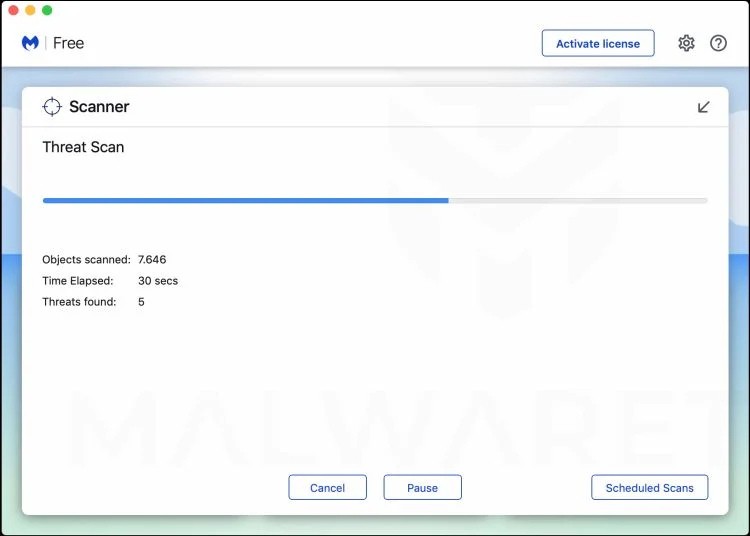
Wait for the Scan to Finish
Malwarebytes will scan your Mac for adware, browser hijackers, and other malicious programs. This can take a few minutes, so feel free to do something else — just check back occasionally to see the progress.
-
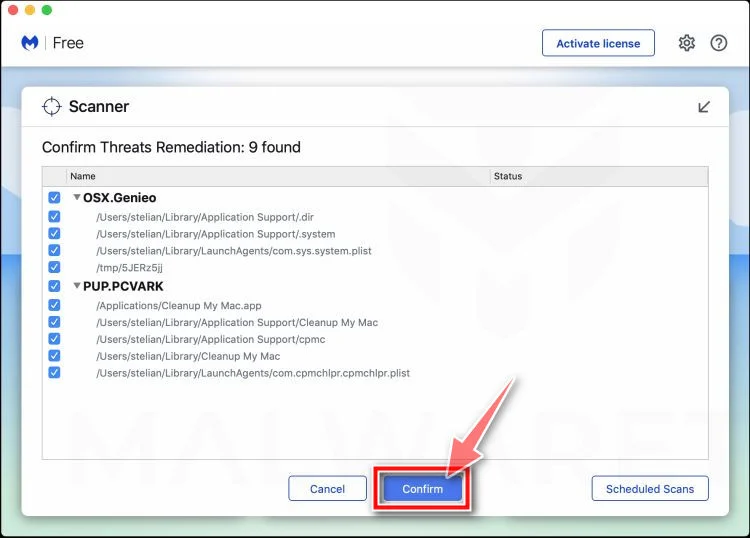
Quarantine the Detected Threats
When the scan is done, you’ll see a list of everything Malwarebytes found. Click the “Quarantine” button to remove all the threats at once.
-
Restart Your Mac
Malwarebytes will now remove all the malicious files it found. Some threats can only be fully removed after a reboot — if Malwarebytes asks you to restart, allow it. Once you’re logged back in, your Mac is clean.
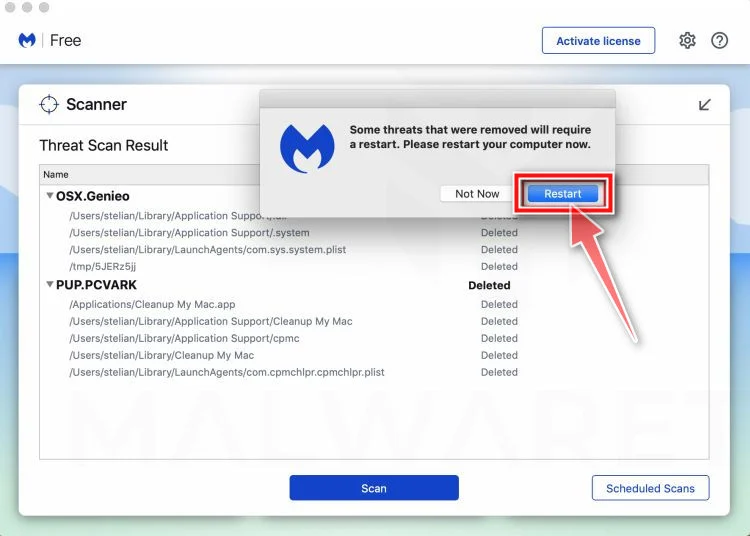
That’s it — your Mac is now free of adware, rogue browser extensions, and other potentially harmful software.
If you are still experiencing problems while trying to remove a malicious program from your computer, please ask for help in our Mac Malware Removal Help & Support forum.
Run a Malware Scan with Malwarebytes for Android
Malwarebytes for Android automatically detects and removes dangerous threats like malware and ransomware so you don’t have to worry about your most-used device being compromised. Aggressive detection of adware and potentially unwanted programs keeps your Android phone or tablet running smooth.
-
Download Malwarebytes for Android.
You can download Malwarebytes for Android by clicking the link below.
Get Malwarebytes for AndroidOpens Google Play in a new tab.Want real-time protection? See Malwarebytes Premium for AndroidMalwarebytes for AndroidScans your phone and removes malware at no cost -
Install Malwarebytes for Android on your phone.
In the Google Play Store, tap “Install” to install Malwarebytes for Android on your device.

When the installation process has finished, tap “Open” to begin using Malwarebytes for Android. You can also open Malwarebytes by tapping on its icon in your phone menu or home screen.

-
Follow the on-screen prompts to complete the setup process
When Malwarebytes will open, you will see the Malwarebytes Setup Wizard which will guide you through a series of permissions and other setup options.
This is the first of two screens that explain the difference between the Premium and Free versions. Swipe this screen to continue.
Tap on “Got it” to proceed to the next step.
Malwarebytes for Android will now ask for a set of permissions that are required to scan your device and protect it from malware. Tap on “Give permission” to continue.
Tap on “Allow” to permit Malwarebytes to access the files on your phone.
-
Update database and run a scan with Malwarebytes for Android
You will now be prompted to update the Malwarebytes database and run a full system scan.

Click on “Update database” to update the Malwarebytes for Android definitions to the latest version, then click on “Run full scan” to perform a system scan.

-
Wait for the Malwarebytes scan to complete.
Malwarebytes will now start scanning your phone for adware and other malicious apps. This process can take a few minutes, so we suggest you do something else and periodically check on the status of the scan to see when it is finished.

-
Click on “Remove Selected”.
When the scan has been completed, you will be presented with a screen showing the malware infections that Malwarebytes for Android has detected. To remove the malicious apps that Malwarebytes has found, tap on the “Remove Selected” button.

-
Restart your phone.
Malwarebytes for Android will now remove all the malicious apps that it has found. To complete the malware removal process, Malwarebytes may ask you to restart your device.
That’s it — your Android phone is now clean — no more malicious apps, adware, or browser redirects.
If you are still having problems with your phone after completing these instructions, then please follow one of the steps:
- Restore your phone to factory settings by going to Settings > General management > Reset > Factory data reset.
- Ask for help in our Mobile Malware Removal Help & Support forum.
Stay Protected: Block Ads and Malicious Sites
Now that your device is clean, keep it that way. Most infections start with a malicious ad or a fake download button — so blocking them at the source is your best defense.
We recommend AdGuard, which blocks malicious ads, phishing pages, and dangerous redirects before they can reach you.
👉 Download AdGuard and browse safely
FAQ: Avoiding Fake Amazon Survey Scams
Fraudulent Amazon-branded surveys promise gift card rewards but actually steal personal information and credit card details enabling recurring monthly subscription fee theft exceeding $100. This FAQ answers critical questions on identification and prevention:
What are fake Amazon survey scams?
Scam survey ads and emails pretending affiliation with Amazon bait engagement by promising free gifts just for answering a few questions. However, it enables recurring credit card charges without consent.
How do survey scams reach potential victims first?
Fraudsters rely on spam messages, social media ads, search results, and malicious skills/bots which leverage Amazon’s brand recognition to portray survey legitimacy and upcoming rewards offers.
What happens after starting phony Amazon questionnaires?
After answering personal questions, visitors see prize redemption games seemingly confirming amazing free gifts. Asking for shipping information to send prizes actually transfers billing rights enabling unexpected subscription fees on cards provided.
What types of monthly fees may start appearing?
While small initial $1 charges temporarily show for order processing, larger mystery costs between $39 – $99 monthly begin billing victims repeatedly thereafter for services never approved including:
- Mega Kindle Unlimited
- Prime Video Channels
- Amazon Music Unlimited
And these subscription lines only fabricate value through deception while extracting substantial recurring incomes.
Why is stopping subscription fees so difficult?
Fraudster-operated merchant accounts deliberately frustrate cancellation attempts through disconnected customer service lines and automated email responses. This facilitates prolonging unauthorized transaction access to victim accounts.
How can users avoid Amazon survey scams?
Remain skeptical of hyperbolic survey claims, scientifically scrutinize communications from strangers, avoid supplying data to unvalidated parties, and monitor statements routinely for mystery subscription billings suggestive of potential fraud requiring immediate dispute.
The Bottom Line
The promise of easy income through online shopping rewards perpetuates because exploitative tricks often leverage emotional manipulation bypassing logic first. Smooth presentations and familiar branding readily coerce engagement from consumers receptive towards brands they know and trust already. In that context, Amazon’s industry dominance makes them prime targets for elaborate survey scams baiting loyal shoppers to relinquish valuable personal data, financial account access and exposed device integrity through downloaded malware.
By understanding the psychological triggers against them combined with technical funnel design, consumers gain better recognition of subtle deception signs common across survey frauds. Shopping safely online requires proactive precautions like closely inspecting redirect chains before clicks, validating real account needs for data requests, confirming why sudden bounties require any privileged information access at all. Once users see logical gaps underpinning fraudulent offers, emotional impulses cool enabling threats to be assessed more objectively sans manipulation. Tempered prudence online checks rates of growing retail cons targeting every consumer through scaled data profiles.

Join the discussion
0 commentsShare your experience or ask a question about this article.
Discussion
Start the conversation
Have a question or something useful to share? Add the first comment.