

A new phishing scam has emerged involving emails that impersonate American Express and claim your account requires immediate validation. However, these are fraudulent emails intending to steal login credentials. This article will break down the American Express ‘Account Validation Required’ phishing scam and explain how to identify and report it.
Understanding the American Express ‘Account Validation Required’ Email Scam
In this scam, victims receive an unsolicited email constructed to appear as if it has come directly from American Express support teams. The scam emails closely impersonate legitimate American Express messages including:
- Using a near identical sender email address to real American Express contacts, with only subtle differences in the domain name.
- Incorporating the real American Express logo, credit card images, colors, fonts and overall formatting to look authentic.
- Addressing the recipient by name and including other personalized details like a made-up customer ID and account number.
- Referencing recent charges to make it appear they have insight into your statement activity.
- Listing a date the account will supposedly be locked pending validation to create urgency.
The content of the scam email states that due to detected suspicious activity, your American Express account has been temporarily suspended and requires immediate validation to avoid being permanently disabled.
A bright “Validate Account” button links to a fake American Express login portal that mimics their real website login page. If you enter your username and password, the credentials are stolen by the scammers.
However, American Express does not actually send emails out of the blue demanding sudden account validation in this manner. The entire thing is a detailed phishing ruse aimed at tricking you into surrendering your login credentials.
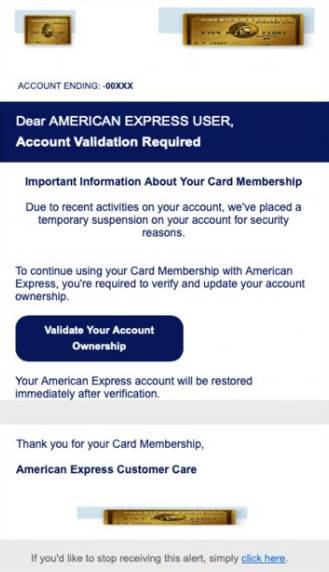
Here is how the American Express ‘Account Validation Required’ phishing scam typically looks:
“Dear AMERICAN EXPRESS USER,
Account Validation Required
Important Information About Your Card Membership
Due to recent activites on your account we’ve placed a temporary suspection on your account for security reasons.
To continue using your Card Membership with American Express, you’re required to verify and update your account ownership.
Validate Your Account Onwership”
Red Flags of the American Express ‘Account Validation Required’ Email
Here are some red flags to help identify the fake American Express account validation emails:
- It is completely unsolicited – you did not initiate any account lock appeals or reviews.
- The sender address uses an incorrect domain like “@americanexpress-secure.com” instead of the real “@americanexpress.com”.
- There are grammar, spacing, and formatting errors that legitimate emails from American Express would not contain.
- The urgent call to action creates pressure instead of advising checking your account portal directly.
- The account validation link goes to a fake domain completely separate from American Express’s real login portal.
- American Express already has your personal information and would never validate accounts this way.
If an email displays any suspicious signs, do not click the link or provide any login credentials requested. Log in directly through the real American Express website.
Sneaky Phishing Tactics Used by the American Express ‘Account Validation Required’ Scam
Here are some of the manipulative tactics used in this American Express phishing scam:
- Impersonating a widely used credit card company many victims likely have accounts with
- Including the real American Express logo, credit card images, and fonts to appear 100% authentic
- Fabricating an urgent account restriction notification citing suspicious activity to create fear
- Providing an unrealistic 24-48 hour timeline to validate the account before permanent disabling
- Including an enticing call-to-action button to quickly fix the account problem before it’s too late
- Leveraging public user security fears around losing access to their financial accounts
- Registering lookalike domains to create convincing fake login pages
These tricks prey on people’s fear of losing access to their accounts. The scammers hope victims will urgently enter their information without thinking it through first.
What to Do If You Entered Your Login Details
If you already provided your American Express username and password on one of the phishing sites, take these steps immediately:
- Log in to your real American Express account and enable login alerts for any future unauthorized access detections.
- Change your American Express password immediately to something completely new that the scammers won’t have.
- Review your account transactions, statements, and settings to check for any signs of unauthorized access or activity.
- Contact American Express to notify them your credentials were compromised so they can monitor closely for fraudulent activity.
- Consider signing up for credit monitoring to detect any wider threats resulting from the stolen credentials.
- Run a Malwarebytes Free scan on the device used to click the phishing link in case of infections.
How to Avoid American Express “Account Validation” Scam
Here are some tips to avoid becoming a victim of the fake American Express account validation phishing scam:
- Never click links in unsolicited emails claiming account issues. Manually log in through the real website.
- Verify the sender address matches the official “@americanexpress.com” domain completely.
- Check for minor differences in logos, fonts, and signatures before trusting urgent notices.
- Disregard any threats about sudden disabling of your account if you don’t take immediate action.
- Contact American Express’s real customer service number if you receive any suspicious validation requests.
- Use unique complex passwords across all financial accounts and enable two-factor authentication for added security.
Carefully reviewing any unexpected emails and verifying legitimacy directly with American Express helps users avoid the urgency traps set by phishing scams requesting immediate account validation.
Conclusion
In summary, this scam sends fraudulent emails pretending to be from American Express and claiming your account suddenly requires validation. The emails phish for login credentials through intricate mimicry and urgency tactics. However, American Express does not randomly disable accounts without notice and redirect users to unknown sites. Any unexpected validation requests should be ignored and reported to help squash these scams targeting consumers.








