

A new parcel delivery scam is making rounds in Australia, catching innocent victims unaware. The sophisticated scam involves text messages and emails falsely claiming to be from Australia Post about an unsuccessful parcel delivery attempt. If recipients click on the provided link, they are directed to a convincing but fake Australia Post website and tricked into providing personal information and even payment. This scam takes advantage of the spike in online shopping and deliveries, especially during the pandemic. Read on to learn more about how this scam works and how to avoid becoming a victim.
Australia Post “Parcel Delivery Unsuccessful” Scam Overview
The Australia Post “Parcel Delivery Unsuccessful” scam typically starts with an unsolicited text or email that appears to come from Australia Post. The message claims that multiple attempts were made to deliver a parcel but no one was available to receive it. It then prompts the recipient to click on a link to reschedule the delivery.
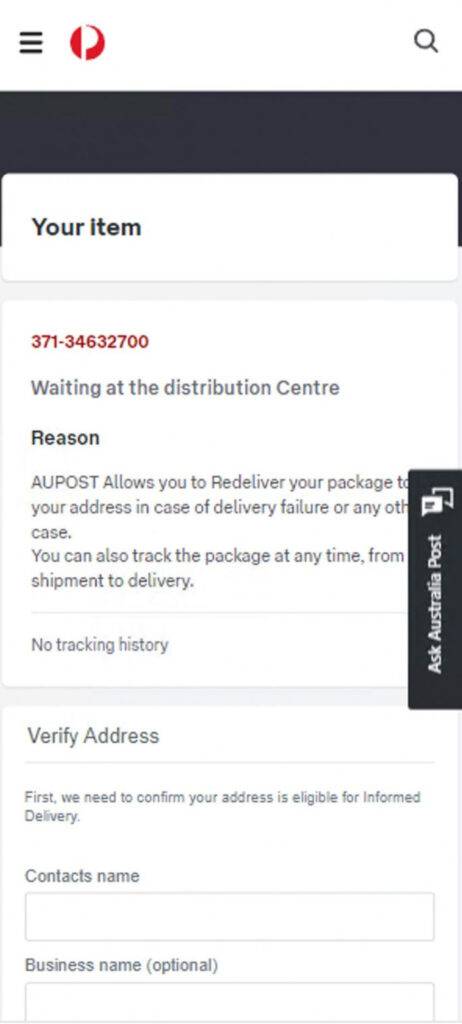
However, the link actually leads to a sophisticated fake website impersonating the real Australia Post site. On this fraudulent website, recipients are shown a detailed but fabricated notification about the missed delivery. To “reschedule” the delivery, they are asked to enter personal details like name, date of birth, address, phone number, and sometimes even credit card information. An “express pay” option may also be presented to supposedly cover the cost of the first delivery attempt.
In reality, the entire interaction is a scam designed to steal identities, money, credit card details, and other personal data. The texts and emails are randomly generated with no actual missed parcel. The fake sites are elaborate hoaxes built to mimic Australia Post and trick victims into handing over valuable information and funds.
This scam preys on the spike in online shopping and deliveries, especially since Covid-19 began. With so many parcels in transit, a “missed delivery” seems plausible. But Australia Post warns that legitimate notifications will never ask for sensitive information or payment via text, email or external links. Anyone who receives a suspicious message should not click on any links or provide data.
How the Australia Post “Parcel Delivery Unsuccessful” Scam Works
The “Parcel Delivery Unsuccessful” scam usually starts with a text message or email that looks like it’s from Australia Post. The message will claim that multiple attempts have been made to deliver a parcel but no one was available to receive it.
Some versions of the scam message include details like the recipient’s full name, a parcel tracking number, the delivery address, and claims that the parcel requires a signature. This makes the message seem more legitimate.
The message will then prompt the recipient to click on a link to “reschedule delivery” or “arrange redelivery.” But the link does not lead to the official Australia Post website. Instead, it goes to a sophisticated fake website designed to mimic the look and feel of the real Australia Post site.
On the fake website, the recipient is shown a convincing but completely fabricated notification about the missed delivery. There may be parcel details like a tracking number, sender name, delivery address etc. The recipient is then prompted to enter additional personal information to “verify their identity” and “reschedule” the delivery.
Details requested include full name, date of birth, phone number, billing and delivery address, email, and sometimes even credit card information. The website might also have an “express pay” feature to supposedly cover the cost of the failed first delivery attempt.
In reality, the entire experience is a scam. The texts and emails are sent out randomly, there is no missed parcel, and the fake sites are carefully designed to steal personal identities, credit card details, money, and anything else the scammers can get.
What to do if You Have Fallen Victim
If you entered any personal or financial information into one of these fake Australia Post scam websites, take action immediately:
- Contact your bank and cancel any compromised cards right away. Also monitor all accounts closely for fraudulent charges and transactions.
- Change passwords, pins and security questions/answers for any breached accounts, especially email, social media, and financial accounts. Enable two-factor authentication wherever possible.
- Call the Australia Post Scam Hotline at 1300 30 40 54 for specific guidance related to your situation.
- Place a ban on your accounts with the credit bureaus to prevent scammers from opening new accounts in your name.
- File a report with the ACCC via the ScamWatch website. Also notify your local police.
- Be vigilant about suspicious activity on all accounts going forward. Review credit reports regularly for any accounts opened without authorization.
- Do not communicate any further with the scammers. Block their emails, texts and phone numbers.
Take swift action to limit the damage. And continue monitoring all accounts closely over the next few months for further suspicious activity.
Australia Post “Parcel Delivery Unsuccessful” Scam FAQ
Why are scammers pretending to be Australia Post?
Australia Post is a trusted brand that most Australians interact with regularly. By impersonating Australia Post, scammers can more easily trick people into lowering their guard and clicking on links or entering information. The high volume of real parcel deliveries also makes a “missed parcel” scam seem plausible.
How are the scam text messages and emails generated?
The scammers use bot programs to generate massive volumes of texts and emails with Australian phone numbers and addresses. Most are sent out randomly in the hope that some will reach real Australians expecting a parcel delivery.
Are the tracking numbers in the messages real?
No, the tracking numbers used are fake and do not match up with any real Australia Post parcels. The numbers are included simply to make the scam feel more convincing. Checking a fake tracking number on the Australia Post website will return an error or “number not found” message.
Why do they want my personal details?
By gathering personal information like names, birthdates, addresses and ID numbers, the scammers can commit identity theft. They sell the data or use it themselves to open fraudulent accounts, take out loans, or engage in other criminal activities while posing as the victim. Credit card details are used to make direct purchases or sold on the dark web.
Is it ever legitimate for Australia Post to ask for financial information over a text or email?
No, Australia Post will never request credit card numbers, bank account details, online account passwords or similar sensitive information over text, email or third-party links. If financial data is required, they will direct the customer to the official website or a Post Office in person.
What happens if I pay the “redelivery” fee on the fake site?
Any money sent to the scammers via the fake sites is lost for good. There is no parcel to redeliver, and any credit card details entered will be used fraudulently. Contact banks immediately to halt payments if you did pay a redelivery fee to the scammers.
Conclusion
The Australia Post “Parcel Delivery Unsuccessful” scam is a serious threat currently making the rounds via text and email. If you receive a suspicious message, do not click any links or enter personal data. These sites are very sophisticated fakes designed to steal identities and money. Monitor accounts closely if you did fall victim and report the scam immediately. Be extra vigilant about deliveries and any communications claiming to be from Australia Post. Don’t let scammers tamper with your hard-earned cash or identity.

Join the discussion
0 commentsShare your experience or ask a question about this article.
Discussion
Start the conversation
Have a question or something useful to share? Add the first comment.