

Bath & Body Works is known for its indulgent body care products, candles, and scoping sales. But scammers are preying on fans, using fake tester programs promising rewards to steal personal information and money.
Fraudsters create convincing websites and ads promoting a phony “Bath & Body Works Tester Panel” that claims to pay participants. However, it’s just a ruse to scam victims and expose them to recurring fees, malware downloads, and identity theft.
This comprehensive guide will unravel how this deceitful con works, identify techniques to recognize it, and provide recommendations to avoid getting duped.
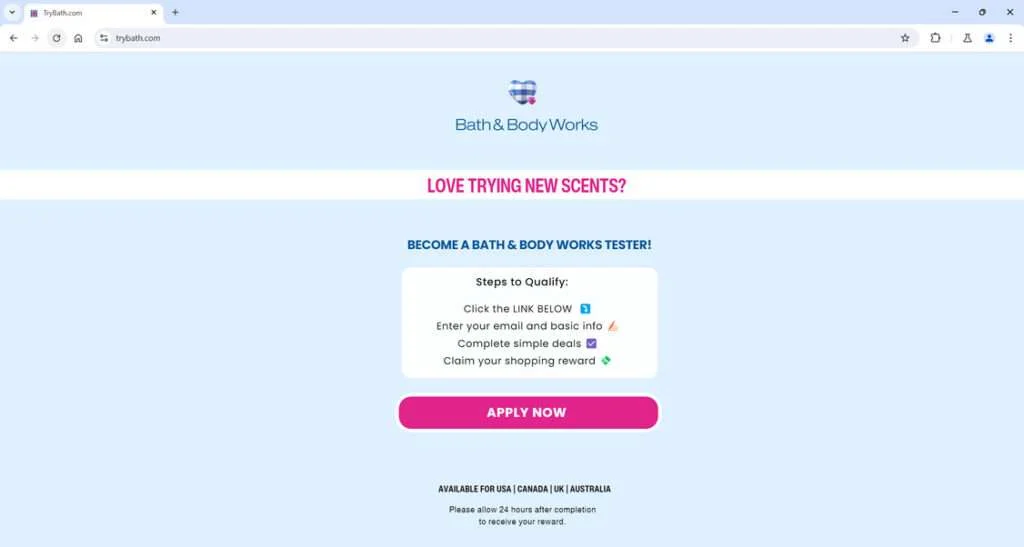
Overview of the Bath & Body Works Tester Scam
The Bath & Body Works tester scam operates by enticing victims with the opportunity to test products like candles and skincare in exchange for monetary rewards. Scammers construct slick websites advertising this fictitious tester panel complete with fake enrollment forms.
In reality, there is no such thing as a Bath & Body Works paid tester program. The criminals simply want to harvest personal data for identity theft and trap victims into recurring credit card charges hidden as “offers” to qualify.
By disguising the ruse as a tester panel, the scammers convince excited users to hand over valuable personal and financial details that lead to compromised privacy and stolen funds. But the promised payouts never come.
How the Scammers Carry Out This Deception
Here are the devious strategies fraudsters deploy to execute this tester scam:
- Fake websites – Sophisticated sites mimicking real Bath & Body Works tester programs using the company’s logos.
- Social media ads – Promoted posts on platforms like Facebook and Instagram drive traffic to fraudulent enrollment pages.
- Pop-up browser ads – Deceptive pop-up ads also redirect users to the fake tester platforms.
- Phishing emails – Emails pretending to be from Bath & Body Works customer service offering tester opportunities.
- Malware downloads – Required downloads contain malware to infect users’ devices.
- Subscription fees – Victims get signed up for recurring subscriptions disguised as completing “deals.”
- Rewards fraud – No shopping rewards are ever provided, despite promises.
The scam evolves but continues deceiving eager victims with the false promise of easy cash as a tester. In reality, it results in stolen funds and compromised personal data.
Breakdown of the Bath & Body Works Tester Scam
Here is an in-depth explanation of how this fraudulent tester program unfolds:
Step 1: Encountering a Fake Tester Ad
The scam starts with the victim coming across a digital ad promoting the chance to become a paid product tester for Bath & Body Works and earn shopping rewards.
The ads appear credible with eye-catching Bath & Body Works imagery and claims of rewarding testers. High pressure tactics create false urgency to sign up fast.
Step 2: Signing Up for the Fake Program
Deceived by the ads, victims click the link to join the tester panel. They are taken to convincing websites made to look like official Bath & Body Works tester portals. The sites have forms to enter personal details.
The data harvesting forms disguise themselves as application pages. But in reality, it’s just a scam to steal user information.
Step 3: Completing Required Deals
After submitting their sensitive data, victims must complete “simple deals” to finish the fake enrollment. This usually involves free trial subscriptions that turn into monthly charges.
Potentially malicious downloads are also required, infecting devices with bugs.
Step 4: No Payment and Ongoing Fraud
Unfortunately, victims complete these deals but never get the shopping rewards promised. Their personal information is now compromised.
Credit cards get unlawfully charged for deceptive subscriptions. Downloaded malware may have infected devices. Identities get stolen to open fraudulent accounts.
In the end, engaging with the scam results in lost money through theft and unauthorized fees. The criminals disappear with victims’ data and profits.
Red Flags to Recognize the Bath & Body Works Tester Scam
- Grammatical/spelling errors throughout the website and ad copy
- Urgent calls to action insisting you must sign up right now before the offer expires
- Requests for sensitive personal information like SSN, bank account numbers, etc.
- Lack of contact information for legitimate inquiries or customer service
- Poor website design and layout that seems hastily created
- No links or mentions of the real Bathandbodyworks.com website
- Aggressive pop-up ads redirecting you unexpectedly to the scam enrollment pages
- Pages have recently been created according to domain registration records
- Low engagement and followers on social media accounts promoting the deal
- Comments seem fake or lack critical discussion on the ads and posts
- Malware download requirements to access rewards, infecting devices
- Credit card required just to “validate your identity” for supposed security
- Recurring subscription fees buried in the fine print, never mentioned in ads
- No physical business address or phone number to contact for issues
Use healthy skepticism when evaluating tester opportunities and do not provide your personal information easily. Make sure to validate directly with Bath & Body Works if an offer seems questionable.
Avoiding the Fake Bath & Body Works Tester Scam
Here are recommendations to steer clear of this con:
- Verify directly on Bath & Body Works’ website – don’t just trust third-party pages claiming affiliation.
- Watch for poor grammar/spelling on pages promoting the deal as this signals fraud.
- Do not enter personal info on unfamiliar sites offering the program.
- Avoid sketchy downloads required to get rewards, as they likely contain malware.
- Read the fine print for any free trials to prevent unwanted recurring charges.
- Use antivirus programs and monitor devices used on suspicious platforms.
- Check privacy policies on data harvesting forms to ensure proper security protocols.
- Report fake ads/emails to raise awareness and get them removed.
Stay proactive and skeptical when assessing offers that appear too good to be true. Do your homework to confirm legitimacy directly through Bath & Body Works’ official channels.
What to Do If You Already Got Scammed
If you unfortunately fell for the fraudulent Bath & Body Works tester scam, take these steps right away to limit the damage:
- Contact your bank immediately to dispute charges. Report any unauthorized credit card charges or suspicious activity. Have them reverse the transactions and issue new cards.
- Place fraud alerts and order credit reports. Alert the credit bureaus to watch for theft. Carefully review reports for any accounts opened fraudulently.
- Change passwords on all accounts. Update passwords everywhere you reuse them. Make them long and complex. Enable two-factor authentication as well.
- Scan devices for malware. Run full antivirus scans to remove any bugs downloaded from fake tester sites. Wipe devices that may be compromised.
- Monitor accounts closely for suspicious activity. Watch statements for signs of identity theft. Sign up for text/email alerts from financial institutions.
- Cancel recurring subscription charges. If signed up for deceptive “deals”, cancel immediately to avoid further billing. Get evidence showing you canceled.
- Submit complaints to the FTC. Reporting helps authorities track down scammers and build cases against them. Provide details on how you got targeted.
- Educate yourself on common online scams. Learn the typical red flags so you can stay vigilant moving forward and not get deceived again.
- Warn loved ones about the scam. Share on social media or directly with friends so they know to avoid it. Report fake ads and pages you encountered.
The earlier you act, the better chance you have to limit financial and identity theft damages. But also take time to learn how to recognize similar scams going forward to protect yourself.
Is Your Device Infected? Run a Free Malware Scan
Slow performance, constant pop-ups, or strange behavior? These are classic signs of a malware infection. The fastest way to find out is to scan your device with Malwarebytes Free — one of the most trusted malware removal tools available.
The free version detects and removes the most common threats, including:
- Adware — the cause of those annoying pop-ups
- Browser hijackers — unwanted redirects and changed homepages
- Trojans and spyware — hidden programs stealing your data
- Potentially unwanted programs (PUPs) — software you never asked for
👉 Select your device below — Windows, Mac, or Android — then follow the simple steps to download Malwarebytes, scan your system, and remove any threats it finds. The scan usually takes 5 to 20 minutes.
Run a Malware Scan with Malwarebytes for Windows
Malwarebytes is one of the most popular and trusted anti-malware tools for Windows — and it’s completely free for removing infections. It catches threats that many antivirus programs miss, including adware, browser hijackers, and trojans. Follow the steps below to scan and clean your PC in just a few minutes.
Download Malwarebytes
Click the button below to download the latest version of Malwarebytes for Windows from the official source. The free version is all you need — it will scan your computer and remove adware, browser hijackers, and other malicious software at no cost.
Download MalwarebytesOfficial installer for Windows 11 and 10. Your download starts right away.Want real-time protection? See Malwarebytes Premium Malwarebytes Free for WindowsScans and removes malware at no cost
-
Install Malwarebytes
When the download finishes, open your Downloads folder and double-click the MBSetup file. If Windows shows a User Account Control pop-up, click “Yes” to allow the installation.

Follow the On-Screen Prompts to Install Malwarebytes
The setup wizard will walk you through a few quick screens:
-
Choose where you’re installing the program — “Personal Computer” or “Work Computer” — then click Next.

-
Malwarebytes will now install on your device. This usually takes under a minute.

-
When installation is complete, the “Welcome to Malwarebytes” screen will open automatically.

-
On the final screen, click Open Malwarebytes to launch the program.

-
Enable “Scan for Rootkits”
Before scanning, turn on rootkit detection so Malwarebytes can find even the most hidden threats. Click the Settings gear icon on the left side of the screen.

In the settings menu, find “Scan for rootkits” and click the toggle so it turns blue.

Done? Click “Dashboard” in the left pane to return to the main screen.
Start the Scan
Click the blue Scan button. Malwarebytes will automatically update its virus database and start checking your computer for malware.

-
Wait for the Scan to Finish
The scan checks your entire system for browser hijackers and other malicious programs, so it can take 5 to 20 minutes depending on your computer. Feel free to do something else — just check back occasionally to see the progress.

-
Quarantine the Detected Threats
When the scan is done, you’ll see a list of everything Malwarebytes found — malware, adware, and potentially unwanted programs. Click the “Quarantine” button to remove all of them at once.

Malwarebytes will now remove the malicious files and registry entries and move them safely into quarantine.

-
Restart Your Computer
Some threats can only be fully removed after a reboot. If Malwarebytes asks you to restart, click Yes. Once you’re logged back in, Malwarebytes has finished removing the threats it found.

That’s it — your Windows PC is now clean of trojans, adware, and other malware, and should be back to running smoothly.
If you are still having problems with your computer after completing these instructions, then please follow one of the steps:
- Run a computer scan with ESET Online Scanner
- Ask for help in our Windows Malware Removal Help & Support forum.
Run a Malware Scan with Malwarebytes for Mac
Malwarebytes for Mac is a free on-demand scanner that removes the malware other security software tends to miss — adware, browser hijackers, and unwanted programs included. Cleaning an infected Mac with Malwarebytes has always been completely free, and it’s our go-to recommendation. Follow the steps below to scan and clean your Mac in just a few minutes.
-
Download Malwarebytes for Mac
Click the button below to download the latest version of Malwarebytes for Mac.
Download MalwarebytesOfficial installer for macOS. Your download starts right away.Want real-time protection? See Malwarebytes PremiumMalwarebytes Free for MacScans and removes malware at no cost -
Open the Malwarebytes setup file
When the download finishes, open your Downloads folder and double-click the setup file to begin the installation.

-
Follow the On-Screen Prompts to Install Malwarebytes
The Malwarebytes for Mac Installer will guide you through a few quick screens. Click “Continue” and keep following the prompts until the installation completes.



When the installation is complete, Malwarebytes opens to the Welcome to Malwarebytes screen. Click “Get started“.
-
Select “Personal Computer” or “Work Computer”
Malwarebytes will ask what type of computer you’re installing it on. Click either Personal Computer or Work Computer, whichever applies.

-
Start the Scan
Click the “Scan” button. Malwarebytes will automatically update its detection database and begin checking your Mac for malware.

-
Wait for the Scan to Finish
Malwarebytes will scan your Mac for adware, browser hijackers, and other malicious programs. This can take a few minutes, so feel free to do something else — just check back occasionally to see the progress.

-
Quarantine the Detected Threats
When the scan is done, you’ll see a list of everything Malwarebytes found. Click the “Quarantine” button to remove all the threats at once.

-
Restart Your Mac
Malwarebytes will now remove all the malicious files it found. Some threats can only be fully removed after a reboot — if Malwarebytes asks you to restart, allow it. Once you’re logged back in, your Mac is clean.

That’s it — your Mac is now free of adware, rogue browser extensions, and other potentially harmful software.
If you are still experiencing problems while trying to remove a malicious program from your computer, please ask for help in our Mac Malware Removal Help & Support forum.
Run a Malware Scan with Malwarebytes for Android
Malwarebytes for Android automatically detects and removes dangerous threats like malware and ransomware so you don’t have to worry about your most-used device being compromised. Aggressive detection of adware and potentially unwanted programs keeps your Android phone or tablet running smooth.
-
Download Malwarebytes for Android.
You can download Malwarebytes for Android by clicking the link below.
Get Malwarebytes for AndroidOpens Google Play in a new tab.Want real-time protection? See Malwarebytes Premium for AndroidMalwarebytes for AndroidScans your phone and removes malware at no cost -
Install Malwarebytes for Android on your phone.
In the Google Play Store, tap “Install” to install Malwarebytes for Android on your device.

When the installation process has finished, tap “Open” to begin using Malwarebytes for Android. You can also open Malwarebytes by tapping on its icon in your phone menu or home screen.

-
Follow the on-screen prompts to complete the setup process
When Malwarebytes will open, you will see the Malwarebytes Setup Wizard which will guide you through a series of permissions and other setup options.
This is the first of two screens that explain the difference between the Premium and Free versions. Swipe this screen to continue.
Tap on “Got it” to proceed to the next step.
Malwarebytes for Android will now ask for a set of permissions that are required to scan your device and protect it from malware. Tap on “Give permission” to continue.
Tap on “Allow” to permit Malwarebytes to access the files on your phone.
-
Update database and run a scan with Malwarebytes for Android
You will now be prompted to update the Malwarebytes database and run a full system scan.

Click on “Update database” to update the Malwarebytes for Android definitions to the latest version, then click on “Run full scan” to perform a system scan.

-
Wait for the Malwarebytes scan to complete.
Malwarebytes will now start scanning your phone for adware and other malicious apps. This process can take a few minutes, so we suggest you do something else and periodically check on the status of the scan to see when it is finished.

-
Click on “Remove Selected”.
When the scan has been completed, you will be presented with a screen showing the malware infections that Malwarebytes for Android has detected. To remove the malicious apps that Malwarebytes has found, tap on the “Remove Selected” button.

-
Restart your phone.
Malwarebytes for Android will now remove all the malicious apps that it has found. To complete the malware removal process, Malwarebytes may ask you to restart your device.
That’s it — your Android phone is now clean — no more malicious apps, adware, or browser redirects.
If you are still having problems with your phone after completing these instructions, then please follow one of the steps:
- Restore your phone to factory settings by going to Settings > General management > Reset > Factory data reset.
- Ask for help in our Mobile Malware Removal Help & Support forum.
Stay Protected: Block Ads and Malicious Sites
Now that your device is clean, keep it that way. Most infections start with a malicious ad or a fake download button — so blocking them at the source is your best defense.
We recommend AdGuard, which blocks malicious ads, phishing pages, and dangerous redirects before they can reach you.
👉 Download AdGuard and browse safely
Frequently Asked Questions About the Fake Bath & Body Works Tester Scam
1. What is the Bath & Body Works tester scam?
The Bath & Body Works tester scam is a fraudulent scheme where scammers create fake websites and ads promoting a non-existent rewards program for product testing in exchange for gift cards or shopping credits.
2. How do the scammers attract potential victims?
Scammers use social media ads, pop-ups, spam emails, and fake websites advertising a lucrative Bath & Body Works product testing opportunity. The ads promise rewards for trying out products.
3. What happens when victims sign up through the scammers’ links?
Victims are taken to convincing fake sites and asked to enter personal information and complete “deals” to enroll in the fake tester program. The scammers then steal their data and money.
4. What methods do the scammers use?
Tactics include fake Bath & Body Works-branded websites, phishing emails, social media ads, pop-up ads, malware downloads, and subscription fee scams, among others. They adapt their methods often.
5. What types of data do victims end up providing?
Scammers trick victims into giving names, emails, physical addresses, phone numbers, birthdates, passwords, and sometimes financial information like credit card numbers.
6. Are there any legitimate Bath & Body Works tester programs offering rewards?
No. Bath & Body Works does not currently have any public product tester programs rewarding participants with gift cards or shopping credits. Be suspicious of any ads claiming otherwise.
7. What are signs of the Bath & Body Works tester scam?
Bad grammar/spelling, high-pressure tactics, asking for personal info immediately, links going to odd URLs rather than the real site, required downloads, and more.
8. What should I do if I shared my information?
Change passwords, monitor accounts, check for identity theft, scan devices for malware, watch out for recurring fees, and report the scam.
9. How can I avoid this scam moving forward?
Verify offers on the real Bath & Body Works site, avoid entering personal data on unfamiliar sites, use antivirus software, learn red flags of scams, don’t download from random links, etc.
10. Where can I learn more about spotting and avoiding online scams?
Reputable cybersecurity blogs, technology websites, consumer protection agencies, and fraud awareness advocates on social media. Also, the FTC and FBI websites.
The Bottom Line
The Bath & Body Works tester scam preys on excited fans by promising easy rewards through a fake program that doesn’t exist. Any real rewards initiative from an established brand would never demand personal data or financial activity upfront.
Apply healthy skepticism when faced with tester opportunities that seem too good to be true. Do your due diligence to confirm directly with the company, watch for red flags, avoid entering information on random sites, and secure your data in case of exposure. Staying informed is the best way to avoid tester scams seeking to capitalize on unsuspecting consumers.

Join the discussion
0 commentsShare your experience or ask a question about this article.
Discussion
Start the conversation
Have a question or something useful to share? Add the first comment.