

In this blog post, I will explain what the Beast Flow scam is, how it works, and what you can do if you have fallen victim to it. The Beast Flow scam is a fraudulent scheme that uses the name and image of popular YouTube star MrBeast to lure unsuspecting people into clicking on malicious links and filling out fake surveys. The scam promises a $1,000 reward for participating, but in reality, it is a way to steal personal and financial information from the victims. The scam has been spreading on various social media platforms, such as YouTube, TikTok, Facebook, and Instagram, and it is important to be aware of the signs and avoid falling for it.
What is the Beast Flow Scam?
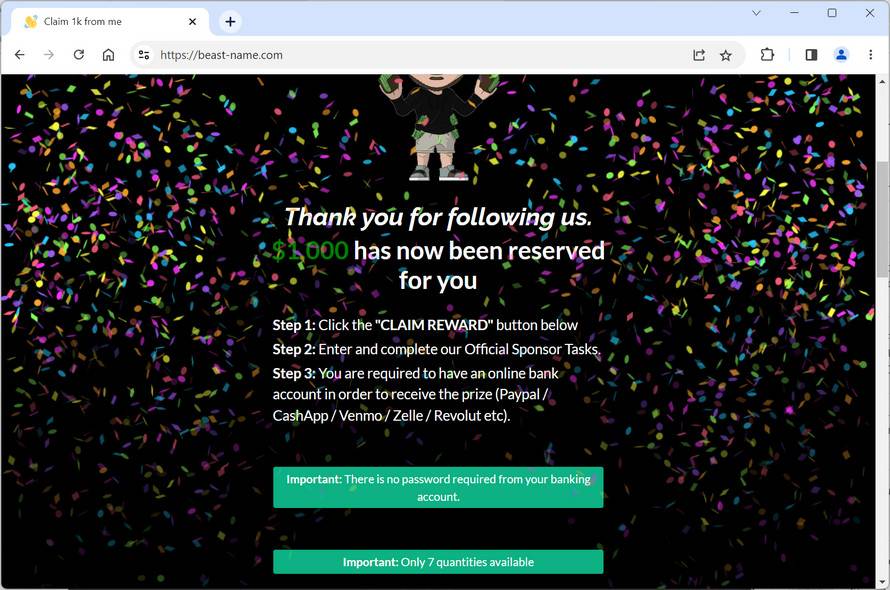
The Beast Flow scam is a type of phishing scam that uses social engineering techniques to trick people into believing that they are interacting with MrBeast, a famous YouTuber known for his generous giveaways and philanthropic activities. The scam uses fake websites, such as beast-van.com, that look similar to MrBeast’s official website, and claim that he is giving away $1,000 to anyone who clicks on a link and completes a survey. The link leads to a malicious website that asks for personal and financial information, such as name, email address, phone number, credit card details, bank account details, etc. The scam also uses fake social media accounts and posts that impersonate MrBeast and his team, and urge people to click on the link and claim their reward. The scam exploits the popularity and trust that MrBeast has among his fans and followers, and tries to take advantage of their curiosity and greed.
How does the Beast Flow Scam work?
The Beast Flow scam works by using a combination of fake websites, social media accounts, posts, and messages that create a sense of urgency and legitimacy for the victims. The scam usually follows these steps:
- The victim sees a post or a video on social media that claims that MrBeast is giving away $1,000 to anyone who clicks on a link and completes a survey.
- The post or the video looks authentic and has MrBeast’s name, logo, and image. It may also have positive comments and likes from other users who claim that they have received their money.
- The victim clicks on the link and is redirected to a fake website that looks like MrBeast’s official website. The website has a countdown timer that shows how much time is left to claim the reward.
- The victim fills out a survey that asks for personal and financial information, such as name, email address, phone number, credit card details, bank account details, etc. The survey may also ask for permission to access the victim’s contacts, photos, or other data on their device.
- The victim submits the survey and is told that they have successfully claimed their reward. They may also receive a confirmation email or text message from the scammer.
- The victim never receives the $1,000 reward. Instead, they have exposed themselves to identity theft, fraud, malware infection, spam calls, phishing emails, or other cyberattacks.
What to do if you have fallen victim to the Beast Flow Scam?
If you have fallen victim to the Beast Flow scam, you should take immediate action to protect yourself from further harm. Here are some steps you can take:
- Contact your bank or credit card company and inform them of the situation. They may be able to cancel any unauthorized transactions or issue you a new card or account number.
- Change your passwords and security questions for any online accounts that you have used or shared with the scammer. Use strong and unique passwords for each account and enable two-factor authentication if possible.
- Report the scam to the relevant authorities and platforms. You can file a complaint with the Federal Trade Commission (FTC) at https://reportfraud.ftc.gov/, or with your local law enforcement agency. You can also report the fake websites, social media accounts, posts, and messages to the platforms where you encountered them.
- Educate yourself and others about how to spot and avoid phishing scams. You can find more information and tips at https://www.consumer.ftc.gov/articles/how-recognize-and-avoid-phishing-scams.
- If you suspect your device is infected with malware, run a free scan with Malwarebytes Anti-Malware.
Conclusion
The Beast Flow scam is a malicious scheme that uses the name and image of MrBeast to trick people into giving away their personal and financial information. The scam has been spreading on various social media platforms and targets fans and followers of MrBeast who may be tempted by his generous giveaways. The scam uses fake websites, social media accounts, posts, and messages that create a sense of urgency and legitimacy for the victims. However, there is no $1,000 reward, and the victims only expose themselves to identity theft, fraud, malware infection, spam calls, phishing emails, or other cyberattacks. If you have fallen victim to the scam, you should contact your bank or credit card company, change your passwords and security questions, scan your device for malware, report the scam to the authorities and platforms, and educate yourself and others about how to spot and avoid phishing scams. Remember, if something sounds too good to be true, it probably is.








