

Online shopping has become extremely popular and convenient. With just a few clicks, you can purchase almost anything you need and have it delivered right to your doorstep. However, as online shopping grows, so do the scams and fraudulent websites looking to take advantage of unsuspecting shoppers. One such scam operation is the “Bed Bath Warehouse” websites that impersonate the real Bed Bath & Beyond stores. This article will explore what these fake websites are, how they operate, and what you can do if you have fallen victim to their tricks. With awareness and caution, you can avoid these scam sites and safely purchase from legitimate retailers online.
What are the Bed Bath Warehouse Scam Sites?
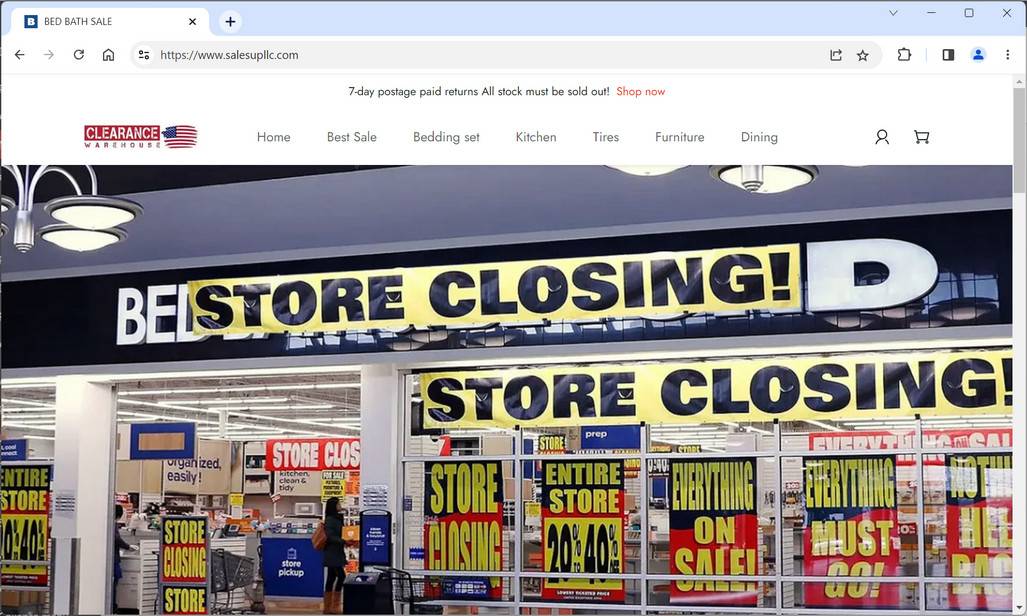
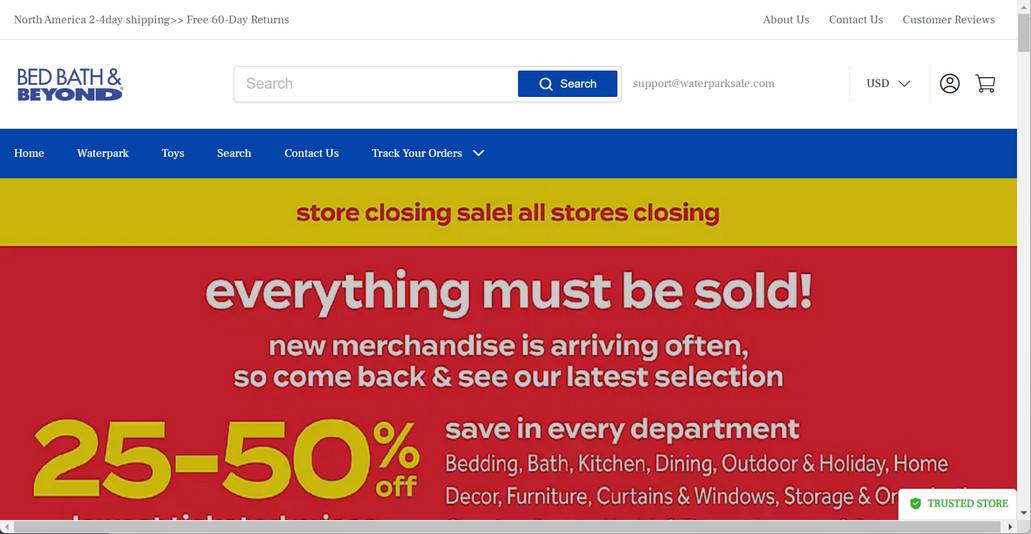
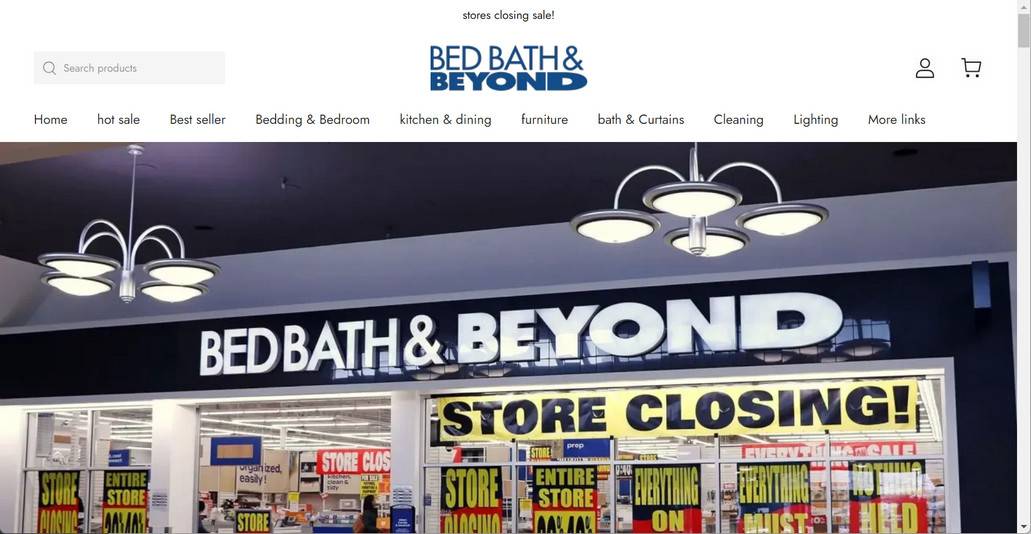
The Bed Bath Warehouse scam websites refer to a network of fraudulent sites that use the Bed Bath & Beyond name, logo, images, and branding without authorization. They create lookalike sites with domain names like “bedbathwarehouse.com” intended to deceive customers into thinking they are on the official Bed Bath & Beyond website. However, these scam sites have no affiliation with the real home goods chain.
The scam sites are specifically designed to tap into the brand recognition and trust that Bed Bath & Beyond has built over the years. Unsuspecting shoppers may think they are getting legitimate Bed Bath & Beyond merchandise at amazing discounts. However, the scam sites sell low-quality, knockoff products that are not actually from Bed Bath & Beyond’s inventory. Any credit card and personal information entered on these sites are stolen and can be used for identity theft and other forms of fraud.
Some red flags that indicate a website is an illegitimate Bed Bath Warehouse scam include:
- Domain name is slightly different from the actual “bedbathandbeyond.com”
- Abnormally low prices on merchandise
- Spelling and grammatical errors on the site
- Stock photos instead of images of actual products
- No physical addresses or contact information listed
How Do the Bed Bath Warehouse Scam Sites Operate?
The criminals behind these elaborate fake Bed Bath & Beyond websites have devised clever ways to dupe customers. Here are some of their tactics:
- Paid ads on search engines: The scam sites will bid on keywords like “Bed Bath and Beyond sale” so their sites show up at the top of search results. Their ads may falsely claim things like “70% Off Bed Bath & Beyond Coupons” to entice people.
- Fake discounts: The sites will advertise eye-catching blowout deals on Bed Bath & Beyond products. For example, high-end bed sheets may be listed at 50% off or more. These unrealistic discounts are a red flag.
- Social media ads: The scam company may buy Facebook and Instagram ads promoting their website. The ads use Bed Bath & Beyond’s images and mention sales or limited-time offers.
- Pop-up browser ads: Some people have reported getting pop-up ads for the fake Bed Bath Warehouse while browsing unrelated sites. When they click the ad, it takes them to the scam website.
- Phishing emails: Scammers may send out mass emails pretending the email is from Bed Bath & Beyond advertising a huge sale. The email contains links redirecting to the illegitimate site.
- Gift card scams: Victims have reported being asked to purchase gift cards to redeem supposed prizes or offers from the fake sites. This is always a scam, as real retailers will never ask you to pay via gift card.
The scam company designs the website to look convincingly like the real Bed Bath & Beyond site at first glance. However, if you look closely, usually there are some discrepancies. The merchandise available may not match Bed Bath & Beyond’s actual selection. And upon adding items to the cart, suddenly out-of-stock warnings appear and you cannot check out.
Some victims have reported entering their personal and credit card information, but then never receiving an order. That’s because these sites are not actually fulfilled warehouses despite using the word “warehouse” in their domains. Any billing information entered goes directly to the scammers to use maliciously or sell on the dark web.
What to Do If You Have Fallen Victim to a Bed Bath Warehouse Scam
If you suspect you may have placed an order or shared your personal information on a fraudulent Bed Bath Warehouse website, there are steps you should take right away:
- Call your credit card company: Notify your credit card provider that your card details were compromised. Have them cancel your current card and reissue you a new one with a different number. This will stop the thieves from being able to use your credit card info for further purchases.
- Check credit reports: Pull your credit reports from Equifax, Experian and TransUnion to check for any signs of identity theft. Look for unauthorized new accounts or inquiries you don’t recognize. If you spot suspicious activity, place a fraud alert on your credit file.
- Change passwords: Make sure to change the passwords on all your online accounts, especially financial, retail and email accounts. Use strong, unique passwords for each account to secure them. Enable two-factor authentication whenever possible.
- Contact the real Bed Bath & Beyond: Reach out to Bed Bath & Beyond’s actual customer service channels to notify them there are scam sites illegitimately using their name and branding without permission. This helps them pursue legal action.
- Report the site: File a complaint report about the fraudulent website to the FTC and IC3 to aid law enforcement in investigating and shutting down the scam operation. Also alert the domain name registrar.
- Monitor statements: Keep a close eye on your financial statements and accounts for signs of further suspicious activity. Promptly report any unauthorized transactions to your bank. Consider signing up for account alerts.
- Recover lost money: If you already paid the scammers, contact your bank to see if you can dispute the charges and get the money back. Also file a claim with your credit card’s chargeback protection program.
- Run a antivirus scan: If you suspect your device is infected with malware, you can run a scan with Malwarebytes Anti-Malware Free.
Conclusion
With the rise of sophisticated online scams, it pays to be vigilant when shopping on the internet. Be wary of unbelievable prices or deals that seem too good to be true. Always verify you are on a retailer’s legitimate website before providing any sensitive information. Check for the padlock security icon, correct URL spellings, and valid contact details. When in doubt, reach out to customer service to confirm. Taking the time to research sites can protect you from falling victim to “Bed Bath Warehouse” and other convincing fake retailer scams. Stick to trustworthy online stores with an established reputation.








