

A new phishing scam has surfaced targeting unsuspecting Canadians with fraudulent text messages claiming issues delivering their parcels. The deceptive texts state invalid zip code information is preventing delivery and urge victims to click a link to verify their address. However, the link leads to a sophisticated fake Canadian Customs website designed to steal personal and financial information. This in-depth guide will uncover everything you need to know about spotting and stopping this scam.
Scam Overview
This parcel delivery scam starts with an unsolicited SMS text message stating there is a problem clearing your package through Canadian Customs due to invalid zip code information. The text claims your parcel is “temporarily detained” and cannot be delivered until you confirm your full address in a provided link.
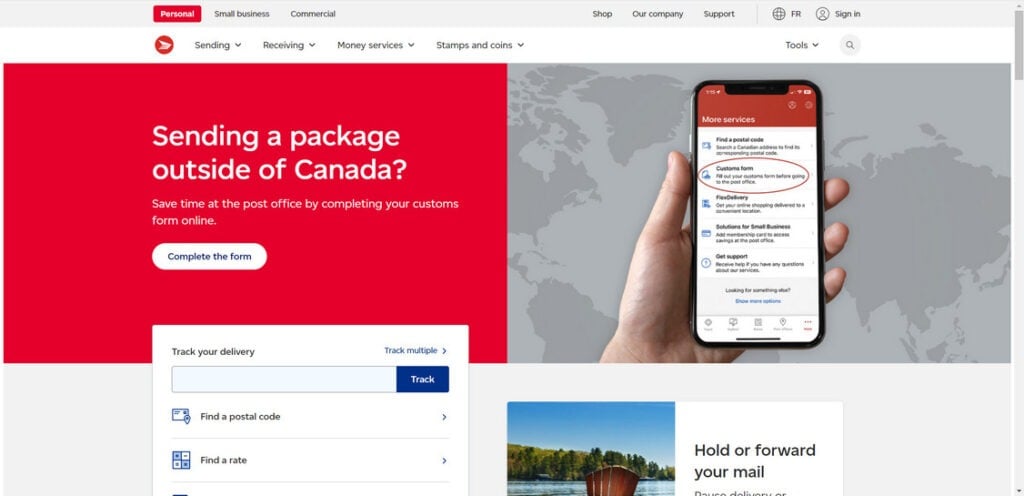
However, the link actually leads to a convincing phishing site dressed up to resemble the real Canada Post website. If victims input their personal details, this sensitive information goes directly into the hands of scammers.
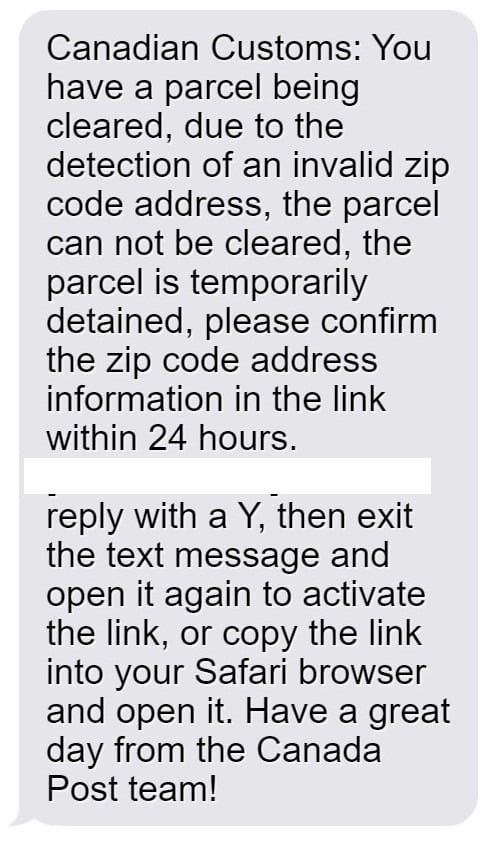
Here is an example of the text message victims receive:
“Canadian Customs: You have a parcel being cleared, due to the detection of an invalid zip code address, the parcel can not be cleared, the parcel is temporarily detained, please confirm the zip code address information in the link within 24 hours.
[Malicious link]
Please reply with a Y, then exit the text message and open it again to activate the link, or copy the link into your Safari browser and open it. Have a great day from the Canada Post team!”
This message is filled with typos, grammar errors and other red flags. But the premise seems believable enough: a simple zip code mistake is holding up delivery of your package. Most recipients won’t think twice before clicking the link to correct the supposed address error.
After all, people are accustomed to receiving shipping notifications by text. And with the massive volume of parcels now shipped worldwide, an occasional customs delay seems reasonable.
But the truly devious part is what happens when you click the link. Victims are taken to an extremely realistic fake website mimicking the look and feel of the official Canada Post site. An online form asks you to enter personal details like your full name, address, phone number, date of birth and sometimes other info like credit card numbers.
Victims dutifully input their information, expecting this will release their stuck shipment. But in reality, everything they enter goes right into the fraudsters’ hands.
Armed with names, addresses, phone numbers, dates of birth and credit cards, scammers can go on an identity theft rampage. They can open fake accounts, make unauthorized purchases, access your existing accounts, or sell your information on the dark web.
This simple scam enables serious identity theft and financial fraud repercussions. And unsuspecting Canadians hand over the keys to their identity simply by trying to retrieve a non-existent package.
How the Canadian Customs Zip Code Scam Works
Fraudsters rely on a simple but extremely deceptive process to execute this scam:
Step 1. Victims Receive a Text About an Undelivered Parcel
You receive an unsolicited SMS text message stating there is a problem clearing your package through Canadian Customs due to invalid zip code information. The message says your parcel is temporarily detained and provides a link to confirm your full address.
Of course, you never ordered a package shipping from overseas. But the message seems legitimate enough, possibly just a mix-up.
Step 2. The Link Goes to a Fake Canada Post Website
You click the link, expecting to be taken to the official Canada Post website. But instead it takes you to an incredibly realistic Canada Post imposter site created by scammers. This fake site is carefully designed to mimic the real Canada Post page.
Step 3. You Input Your Personal Information
On the phishing site, a form asks you to enter personal details like your full name, address, phone number, date of birth, and sometimes credit card information – all to “correct the zip code error”.
You fill out the form, not realizing that your data is going directly to cyber criminals.
Step 4. Scammers Steal Your Personal Data to Commit Identity Theft
With your name, address, date of birth, phone number, and potentially credit card details, scammers can now commit serious identity theft and financial fraud in your name.
They may open fake accounts, make unauthorized purchases, take out loans, or sell your information on the dark web. You may only find out once the damage is done.
Step 5. You Never Receive the Package
After compromising your personal information, the scammers disappear. You never receive a package, because there was no parcel being shipped to you in the first place. The entire interaction took place on phishing sites controlled by fraudsters.
What to Do If You Are Targeted by This Scam
If you receive a suspicious text about an undelivered parcel from Canadian Customs, here are important steps to protect yourself:
- Never click on links in unsolicited messages about delayed packages. Always go directly to the Canada Post website or app.
- Double check the sending number. Scam texts often come from unusual numbers not registered to Canada Post.
- Look for typos, grammar issues and writing errors. Scam messages are poorly written.
- Verify parcel statuses directly on canadapost.ca. Don’t rely on information in random texts.
- If concerned, call Canada Post at 1-866-607-6301 to confirm texts. Do not reply to the message.
- Contact your bank if you entered any financial information to monitor for fraud.
- Report scam texts to the Canadian Anti-Fraud Centre at 1-888-495-8501.
Being cautious and avoiding clicking direct links in messages can keep your personal data safe from phishing scams.
FAQ: The Canadian Customs Invalid Zip Code Text Scam
1. How does the Canadian Customs zip code scam work?
You get a text claiming a customs issue with your parcel due to an invalid zip code. It provides a link to confirm your address. But it goes to a fake Canada Post site that steals your information.
2. What does the scam text message say?
The text says: “Canadian Customs: You have a parcel being cleared, due to the detection of an invalid zip code address, the parcel can not be cleared…please confirm the zip code address information in the link within 24 hours.”
3. What happens when you click the link?
The link goes to a fake Canada Post website asking you to enter personal details to “fix the zip code error”. This gives your data to scammers.
4. Should you reply to the text?
No, never reply to suspicious texts about unsolicited packages. This confirms your number is active for more scam messages.
5. How do you tell if a parcel text is a scam?
Bad grammar, typing errors, unusual sending number, and asking for personal info via links indicate a scam. Legit Canada Post messages have no errors.
6. What do scammers do with your information?
They use your name, address, birth date, and card details to commit identity theft or make unauthorized purchases.
7. What should you do if you entered your details?
Contact your bank and credit bureaus immediately. Monitor your statements for fraudulent activity. Place a fraud alert on your credit.
8. How can you stay safe from this scam?
Never click links in odd texts about packages. Confirm statuses directly with Canada Post. Report suspicious messages.
9. How can you report these phishing texts?
Forward the texts to the Canadian Anti-Fraud Centre at 1-888-495-8501. Also report the number to your wireless provider.
10. Why are these scams increasing?
More parcel deliveries makes this ruse believable. Scammers use real branding like Canada Post to appear legitimate. Phishing by text tricks more people than email.
The Bottom Line
This parcel delivery scam has already duped countless Canadians into compromising sensitive personal and financial information. By pretending to be from Canadian Customs and claiming an easily believable issue with your address, scammers convince victims the message is legitimate. But the ensuing identity theft and financial fraud can be devastating.
Safeguard yourself by never clicking direct links in unsolicited texts, even if they appear to come from a trusted source. Taking a moment to confirm a message’s authenticity by contacting the organization directly can protect you from inadvertently handing your valuable details to cyber criminals. Stay vigilant against parcel delivery scams to keep your identity and finances safe.

Join the discussion
0 commentsShare your experience or ask a question about this article.
Discussion
Start the conversation
Have a question or something useful to share? Add the first comment.