


Seeing CBI*Malwarebytes on a bank or credit-card statement can be unsettling when the name “CBI” does not look familiar. It is reasonable to pause before assuming the charge is safe or reporting it as fraud.
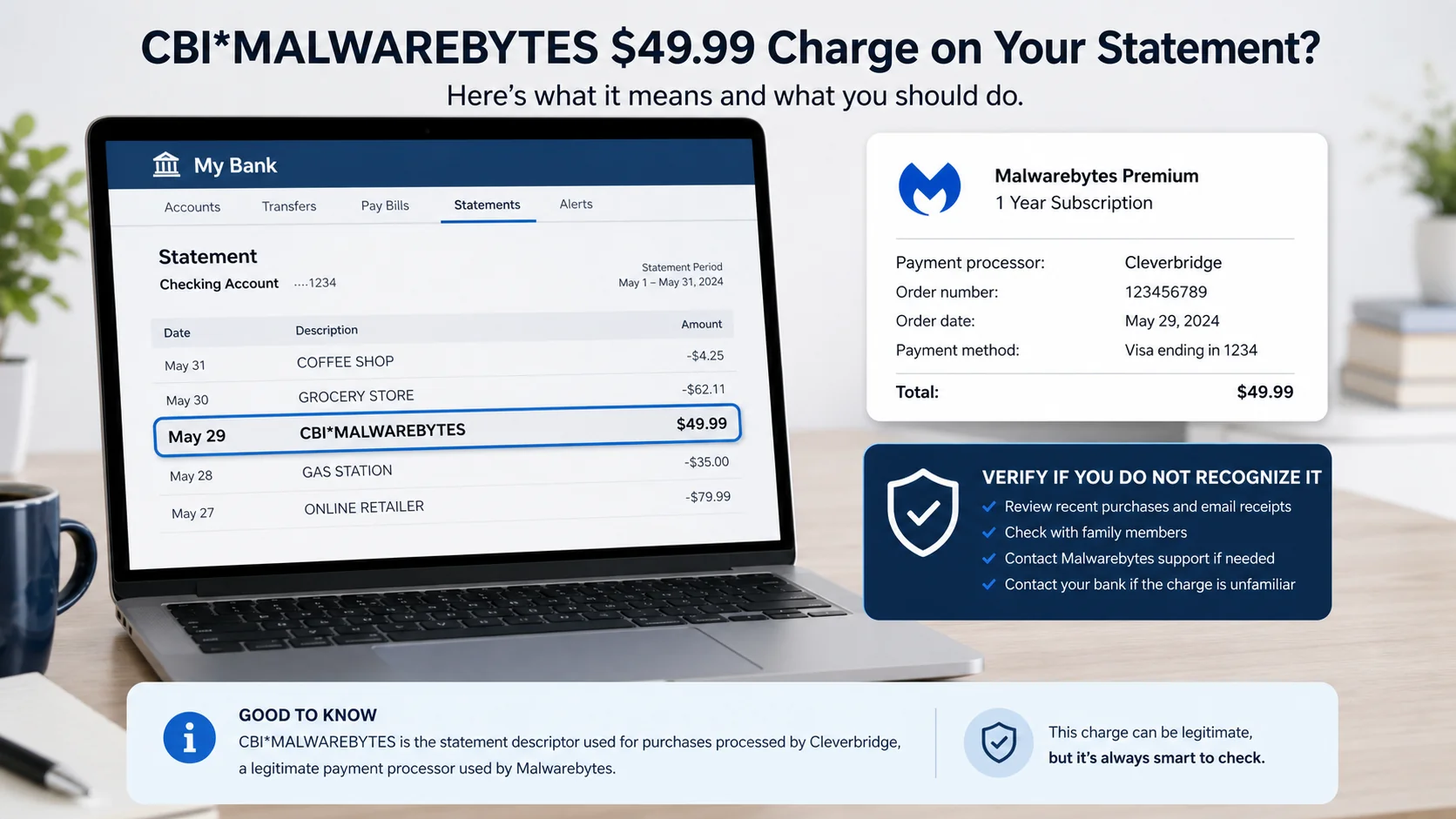
In most cases, this descriptor has a straightforward explanation. CBI refers to Cleverbridge, an authorized payment processor used for Malwarebytes purchases and subscription renewals. The charge can be legitimate, but it should still match an order you recognize.
Overview
A CBI Malwarebytes charge is not automatically a scam. Malwarebytes’ official billing guidance identifies Cleverbridge as one of its payment partners and says transactions processed through it can appear as CBI*Malwarebytes on a billing statement.
The merchant name on a statement does not always match the name printed on the product. Payment processors use short descriptors that fit bank systems, so customers may see the processor prefix alongside the software brand.
The charge commonly relates to a new Malwarebytes purchase, an annual subscription renewal, an order placed through a different email address, or a plan bought by another person authorized to use the card.
Malwarebytes also uses Verifone, formerly known as 2Checkout, for some transactions. Charges handled by that processor can use a descriptor such as 2CO*Malwarebytes. Seeing a different processor does not by itself make a purchase fraudulent.
What matters is whether the amount, date, account, and subscription correspond with a real order. A legitimate descriptor can still reflect an unwanted auto-renewal, a forgotten purchase, or unauthorized card use.
Scammers add a second layer of confusion by sending fake renewal invoices that mention Malwarebytes, Cleverbridge, or “CBI Billing.” Those emails may tell recipients to call a fraudulent cancellation number, click a phishing link, or install remote-access software.
An email claiming you were charged is not proof that a transaction exists. Check the bank statement and Malwarebytes account independently. Conversely, a real statement charge should not be ignored simply because no email is visible.
What the statement entry may look like
Transaction description: CBI*MALWAREBYTES
Transaction type: Card purchase
Amount: $49.99
Status: Posted
The amount is only an example. Prices vary by plan, number of devices, country, tax, discount, and renewal terms. Use the date and exact amount to match the entry with your receipt or account history.
What a fake billing email may say
Subject: CBI Malwarebytes renewal confirmed
Your Malwarebytes protection plan has renewed for $389.99. The charge will appear on your statement within 24 hours.
If you did not authorize this purchase, call the cancellation department immediately.
A large unexpected amount and urgent callback instruction are classic refund-scam signs. Do not call a number contained in the message. Use the official Malwarebytes support site and the number printed by your card issuer.
Common variations of the charge or email
CBI*MALWAREBYTESCBI MALWAREBYTES2CO*MALWAREBYTES- “Your Malwarebytes subscription has renewed”
- “Cleverbridge order confirmation”
- “Payment receipt for Malwarebytes Premium”
- “Malwarebytes annual billing notification”
- “Your free trial converted to a paid plan”
- “CBI billing refund department”
- “Call immediately to cancel a $399.99 charge”
- “Your protection expires unless payment is updated”
- “Download the attached invoice for order details”
The first three can be legitimate statement descriptors. The remaining messages require verification. A genuine renewal email does not need your password, PIN, one-time security code, Social Security number, or full card details by reply.
Why a legitimate charge may feel unfamiliar
The purchase was made months or years ago. Annual renewals are easy to forget, particularly when the original order used a discounted first-year price.
The receipt went to another email address. A customer may have used a work address, an older mailbox, an Apple private relay address, or a family member’s account.
Someone else uses the card with permission. A spouse, parent, child, employee, or IT administrator may have bought protection for another device.
The processor name appears instead of the storefront. The cardholder remembers buying Malwarebytes but does not recognize the Cleverbridge prefix.
The plan renewed automatically. A subscription can remain active until auto-renewal is disabled. The reminder may have been filtered into spam or missed among other messages.
The final amount includes tax or a changed plan price. Compare the receipt line by line instead of relying on memory of the advertised amount.
How to verify the charge without taking a risk
- Open your bank directly. Confirm that the entry is posted rather than relying on an email screenshot or attachment.
- Sign in through Malwarebytes’ official site. Review active subscriptions, renewal dates, devices, and billing history.
- Search your email carefully. Look for Malwarebytes, Cleverbridge, CBI, 2Checkout, Verifone, order number, and the exact amount.
- Ask authorized card users. Use the date and amount, but do not publish the full card number or account information.
- Contact official support independently. Type the Malwarebytes address yourself. Do not use a phone number or link from an unexpected invoice.
- Use the card issuer’s number. If support cannot match the transaction, call the number printed on the card or inside the official banking app.
How The Operation Works
1. A customer starts or renews a subscription
The legitimate process begins when a customer purchases a Malwarebytes plan or an existing subscription reaches its renewal date. The order can include software for one or more devices and may renew annually under the terms shown at checkout.
The customer authorizes payment through the storefront. Malwarebytes can route the transaction through one of its approved commerce partners rather than processing every card directly.
2. Cleverbridge handles the transaction
Cleverbridge provides e-commerce and payment services. It transmits the payment information through its processing environment and creates an order record associated with the purchase.
Malwarebytes’ official support information says Cleverbridge is PCI-compliant and identifies it as a trusted payment partner. This is the source of the “CBI” portion of the statement description.
3. The bank displays a shortened descriptor
Card networks and banks have limited space for merchant descriptions. The resulting line can show CBI*Malwarebytes rather than a longer sentence such as “Malwarebytes subscription processed by Cleverbridge.”
This shortening is normal, but it can confuse someone who recognizes Malwarebytes and not CBI, or who remembers the product but forgot that it renews automatically.
4. A receipt and renewal notice are sent
The customer generally receives order or renewal information at the email address associated with the transaction. Malwarebytes says legitimate renewal reminders may come from trusted processors such as Cleverbridge or 2Checkout.
Official guidance also says Malwarebytes does not ask for passwords, PINs, verification codes, Social Security numbers, or credit-card information in renewal emails or support conversations.
5. The subscription remains active
A successful renewal extends the licence according to the plan. The user can review protection status and subscription details through the official account.
If the renewal was unwanted but authorized under existing terms, the appropriate path is to contact official support, request cancellation or a refund if eligible, and turn off future automatic renewal.
6. A fraudster copies the billing language
The scam version begins separately. Criminals send bulk invoices that mention Malwarebytes, CBI, Cleverbridge, Norton, McAfee, or another security company. The recipient does not need to be a customer.
The email may copy logos and include an order number, product list, tax line, and refund policy. These visual details are easy to manufacture and do not create a real bank transaction.
7. The fake invoice creates panic
The amount is often much higher than a normal consumer plan, such as $299, $389, or $499. The message says the payment has been processed or will be debited within hours.
The victim’s natural reaction is to cancel quickly. Instead of sending the person to the official account, the email makes a telephone number or button look like the only cancellation route.
8. The callback becomes a refund scam
A fraudster answers as “billing support” and offers to reverse the charge. The caller may request card details, bank access, identity information, a security code, or installation of a remote-control application.
Remote access lets the scammer watch the victim sign in to online banking, hide browser content, transfer money, or manipulate what appears on the screen. A fake refund can then be used to claim that too much money was returned.
9. The victim is asked to send money back
In an overpayment version, the scammer edits the page or moves money between the victim’s own accounts to create the appearance of an excessive refund. The victim is pressured to repay the difference through gift cards, cryptocurrency, wire transfer, or cash.
There was no accidental refund. The displayed balance was altered or misunderstood, and the money sent back goes to the criminal.
10. A real descriptor and a fake email are compared incorrectly
Some people see a genuine CBI*Malwarebytes renewal and then find a fraudulent support number through a sponsored search result or unsolicited email. The real transaction gives the scammer’s story credibility even though the caller has no connection to it.
Always keep the two verification channels separate. Confirm the charge inside official accounts, then contact the merchant or bank through details you obtained independently.
Legitimate, unwanted, or unauthorized
A legitimate and recognized charge matches your order, plan, and renewal. No fraud response is needed, though you can adjust renewal settings if desired.
A legitimate but unwanted charge comes from a subscription you previously authorized but no longer wanted. Contact official support promptly about cancellation and refund eligibility.
An unauthorized charge cannot be matched to any account or authorized card user. Contact the card issuer, protect the card, and dispute it as potential fraud.
A fake invoice without a statement charge is a phishing or callback scam. Do not call, click, or install anything. Report and delete the message.
What To Do If You Do Not Recognize the Charge
- Confirm that the transaction exists. Open the official banking app or type the bank’s address yourself. Do not trust an email that merely claims a debit occurred.
- Check whether it is pending or posted. A pending authorization can change or disappear, while a posted transaction has completed. Your bank can explain its status.
- Review every Malwarebytes account and email address. Search for receipts and subscriptions under personal, work, old, and family email accounts.
- Ask other authorized card users. Provide the merchant, date, and amount. Do not send a photograph showing the full card or banking credentials.
- Contact Malwarebytes through its official support portal. Ask whether the amount and date match an order. Provide only the limited information requested through the verified channel.
- Turn off auto-renewal if you no longer want the plan. Canceling future renewal is different from requesting a refund for the current transaction, so confirm both actions separately.
- Ask about a refund promptly. If the renewal was yours but unwanted, explain the situation and retain the case number, emails, and cancellation confirmation.
- Contact the card issuer if no order can be found. Use the phone number on the card or inside the banking app. Ask about blocking the card, replacing it, and disputing the transaction.
- Do not call numbers in unexpected invoices. A fake “CBI refund desk” can turn confusion about a real or invented charge into remote-access fraud.
- Secure the device if remote access was granted. Disconnect it from the internet, remove the remote tool, run a full security scan, and change financial and email passwords from another trusted device.
- Review bank activity after the incident. Look for small test transactions, new payees, transfers, cash advances, and recurring payments. Enable transaction alerts where available.
- Preserve and report fake messages. Keep the sender, full email headers, attachment, phone number, and screenshots. Report the impersonation through Malwarebytes’ official support channel and your mail provider.
If the charge is yours, do not dispute it as stolen merely because the descriptor was unfamiliar. A chargeback can complicate a legitimate account. First try to match the order and use the merchant’s official cancellation or refund process.
If the charge is not yours, speed matters. A replaced card can stop further use, but also review recurring-payment tokens and digital wallets with the bank because some merchant credentials can be updated automatically.
The Bottom Line
CBI*Malwarebytes is a legitimate billing descriptor associated with Malwarebytes payments processed by Cleverbridge. Its appearance does not automatically mean your card was compromised.
Verify the amount against official account history, receipts, authorized users, and renewal settings. Treat unexpected emails and callback numbers separately from the bank entry. If no legitimate order explains the charge, contact Malwarebytes and your card issuer through independently verified channels and act quickly.

Join the discussion
0 commentsShare your experience or ask a question about this article.
Discussion
Start the conversation
Have a question or something useful to share? Add the first comment.