

Imagine this: you stumble upon an enticing offer claiming you can receive a $500 Aritzia gift card simply by completing a few easy steps. The website looks clean and professional, with Aritzia’s familiar branding and logo. It promises that after signing up and doing some “recommended deals,” your gift card will be on its way. Sounds like an amazing opportunity, right? Unfortunately, it’s too good to be true.
The website in question—ClienteleGift.com—is part of a dangerous and widespread scam designed to trick users into giving away personal data, signing up for costly subscriptions, and generating profits for scammers without ever delivering the promised gift card. If you’ve seen ads for this site or even clicked through, this comprehensive guide will reveal everything you need to know about how the scam works, what risks it poses, and what you should do if you’ve fallen victim.
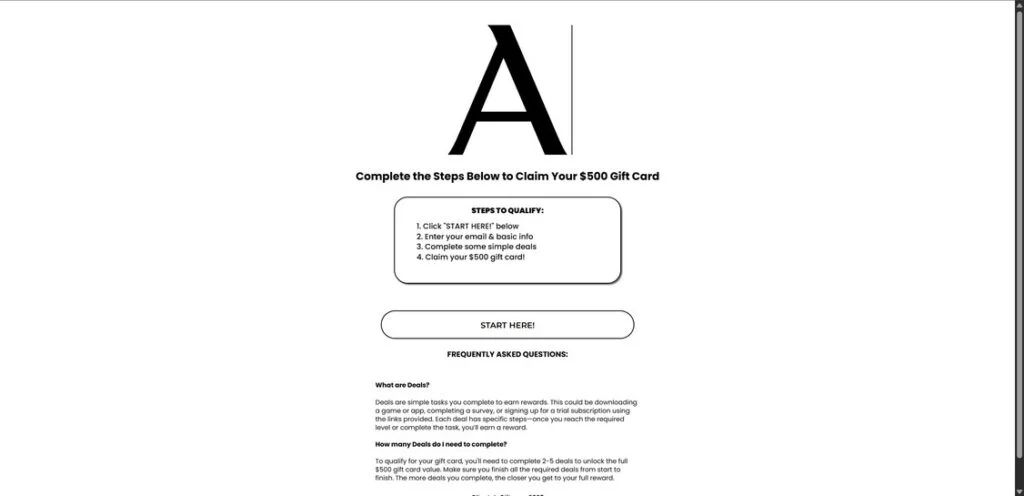
Scam Overview – The Illusion of Free Aritzia Gift Cards
At first glance, ClienteleGift.com appears legitimate. It uses a minimalist design, clean fonts, and even imitates Aritzia’s branding. The steps seem simple:
- Click “Start Here”
- Enter your email and personal details
- Complete a few “simple deals”
- Claim your $500 Aritzia gift card
Sounds harmless, doesn’t it? But behind this polished front lies a manipulative and dangerous scam. Here’s why it’s so convincing—and why so many people fall for it.
Why It Looks Legitimate
- Use of official logos: Scammers borrow Aritzia’s brand identity to gain instant trust.
- Professional website layout: Sleek and minimal, mirroring real marketing campaigns.
- Enticing headlines: “Exclusive Offer,” “Claim Your $500 Gift Card Now.”
- Urgency tactics: Fake timers, limited spots available messages, and “only a few gift cards left” banners.
These psychological triggers are designed to make you act fast without thinking critically.
The Real Goal Behind ClienteleGift.com
Unlike legitimate rewards programs or loyalty schemes, the purpose of this site is NOT to give away gift cards. The real objectives are:
- Harvesting your personal data: Names, emails, addresses, and sometimes payment info.
- Forcing you through affiliate links: Scammers earn money when you sign up for third-party offers.
- Trapping users in subscription schemes: Many “offers” require credit cards for “free trials” that turn into recurring charges.
- Monetizing your clicks: Each page you visit or app you download makes them money—not you.
How the ClienteleGift.com Scam Works
Let’s break down the mechanics of this scam so you can recognize the warning signs.
Step 1: The Hook – Irresistible Ads and Social Media Posts
Most victims first encounter this scam through:
- Sponsored ads on Facebook, Instagram, or TikTok
- Fake influencer endorsements claiming, “I just got my Aritzia gift card for free!”
- Pop-ups on other websites
- Spam emails with subject lines like, “Congratulations! Your $500 Aritzia gift card is waiting!”
These ads often use emotional triggers, such as:
- Limited-time offers
- Testimonials from “real users” (which are fake)
- Promises of instant rewards
Step 2: Collecting Personal Information
Once you click on the ad and land on ClienteleGift.com, the first step is to enter your personal details, including:
- Full name
- Email address
- Phone number
- Sometimes even your mailing address
This information is highly valuable to scammers. It’s often sold on data broker lists or used to launch phishing attacks later.
Step 3: The Endless “Deals” Trap
After submitting your details, you’re taken to the next stage: completing offers or deals. This is where things get dangerous.
- Some deals involve app downloads—many of which contain tracking tools or even malware.
- Others require you to sign up for free trials of subscription services. Here’s the catch:
- You must enter your credit card information.
- If you forget to cancel (or even if you do), you might face recurring charges.
- Some deals are disguised phishing attempts, where you unknowingly share sensitive data.
Each deal is designed to generate revenue for the scammer via affiliate commissions. The more deals you complete, the more money they make—while you get nothing.
Step 4: The Infinite Loop
Even after completing several deals, the website never confirms your eligibility. Instead:
- You’re redirected to more offers.
- There’s no progress tracker.
- No email or confirmation from Aritzia.
- No actual gift card—ever.
The system is rigged so that the promised $500 reward remains forever out of reach.
Dangers of Falling for ClienteleGift.com
Here’s what you risk if you engage with this scam:
- Identity Theft: Your personal information can be sold on the dark web.
- Financial Loss: Unauthorized charges from subscriptions you never wanted.
- Malware Infection: Some apps or files could install spyware on your device.
- Phishing Attacks: Once scammers have your email, expect spam and fake security alerts.
What to Do If You Fell for the ClienteleGift.com Scam
If you’ve already clicked, entered details, or completed offers, act fast:
1. Stop All Activity
Close the website immediately and do not click further.
2. Change Your Passwords
If you reused your email password anywhere else, update it immediately.
3. Monitor Your Bank Accounts
If you entered credit card info:
- Check for unauthorized charges.
- Cancel suspicious subscriptions.
- Consider requesting a new card from your bank.
4. Run a Malware Scan
Use reputable security software like:
- Malwarebytes
- Bitdefender
- Norton Security
5. Report the Scam
Help stop others from falling victim by reporting to:
- FTC: reportfraud.ftc.gov
- IC3 (FBI): www.ic3.gov
- Canadian Anti-Fraud Centre: antifraudcentre-centreantifraude.ca
6. Spread Awareness
Share this information on:
- Social media
- Community forums like Reddit (r/scams)
Is Your Device Infected? Run a Free Malware Scan
Slow performance, constant pop-ups, or strange behavior? These are classic signs of a malware infection. The fastest way to find out is to scan your device with Malwarebytes Free — one of the most trusted malware removal tools available.
The free version detects and removes the most common threats, including:
- Adware — the cause of those annoying pop-ups
- Browser hijackers — unwanted redirects and changed homepages
- Trojans and spyware — hidden programs stealing your data
- Potentially unwanted programs (PUPs) — software you never asked for
👉 Select your device below — Windows, Mac, or Android — then follow the simple steps to download Malwarebytes, scan your system, and remove any threats it finds. The scan usually takes 5 to 20 minutes.
Run a Malware Scan with Malwarebytes for Windows
Malwarebytes is one of the most popular and trusted anti-malware tools for Windows — and it’s completely free for removing infections. It catches threats that many antivirus programs miss, including adware, browser hijackers, and trojans. Follow the steps below to scan and clean your PC in just a few minutes.
Download Malwarebytes
Click the button below to download the latest version of Malwarebytes for Windows from the official source. The free version is all you need — it will scan your computer and remove adware, browser hijackers, and other malicious software at no cost.
Download MalwarebytesOfficial installer for Windows 11 and 10. Your download starts right away.Want real-time protection? See Malwarebytes Premium Malwarebytes Free for WindowsScans and removes malware at no cost
-
Install Malwarebytes
When the download finishes, open your Downloads folder and double-click the MBSetup file. If Windows shows a User Account Control pop-up, click “Yes” to allow the installation.

Follow the On-Screen Prompts to Install Malwarebytes
The setup wizard will walk you through a few quick screens:
-
Choose where you’re installing the program — “Personal Computer” or “Work Computer” — then click Next.

-
Malwarebytes will now install on your device. This usually takes under a minute.

-
When installation is complete, the “Welcome to Malwarebytes” screen will open automatically.

-
On the final screen, click Open Malwarebytes to launch the program.

-
Enable “Scan for Rootkits”
Before scanning, turn on rootkit detection so Malwarebytes can find even the most hidden threats. Click the Settings gear icon on the left side of the screen.

In the settings menu, find “Scan for rootkits” and click the toggle so it turns blue.

Done? Click “Dashboard” in the left pane to return to the main screen.
Start the Scan
Click the blue Scan button. Malwarebytes will automatically update its virus database and start checking your computer for malware.

-
Wait for the Scan to Finish
The scan checks your entire system for browser hijackers and other malicious programs, so it can take 5 to 20 minutes depending on your computer. Feel free to do something else — just check back occasionally to see the progress.

-
Quarantine the Detected Threats
When the scan is done, you’ll see a list of everything Malwarebytes found — malware, adware, and potentially unwanted programs. Click the “Quarantine” button to remove all of them at once.

Malwarebytes will now remove the malicious files and registry entries and move them safely into quarantine.

-
Restart Your Computer
Some threats can only be fully removed after a reboot. If Malwarebytes asks you to restart, click Yes. Once you’re logged back in, Malwarebytes has finished removing the threats it found.

That’s it — your Windows PC is now clean of trojans, adware, and other malware, and should be back to running smoothly.
If you are still having problems with your computer after completing these instructions, then please follow one of the steps:
- Run a computer scan with ESET Online Scanner
- Ask for help in our Windows Malware Removal Help & Support forum.
Run a Malware Scan with Malwarebytes for Mac
Malwarebytes for Mac is a free on-demand scanner that removes the malware other security software tends to miss — adware, browser hijackers, and unwanted programs included. Cleaning an infected Mac with Malwarebytes has always been completely free, and it’s our go-to recommendation. Follow the steps below to scan and clean your Mac in just a few minutes.
-
Download Malwarebytes for Mac
Click the button below to download the latest version of Malwarebytes for Mac.
Download MalwarebytesOfficial installer for macOS. Your download starts right away.Want real-time protection? See Malwarebytes PremiumMalwarebytes Free for MacScans and removes malware at no cost -
Open the Malwarebytes setup file
When the download finishes, open your Downloads folder and double-click the setup file to begin the installation.

-
Follow the On-Screen Prompts to Install Malwarebytes
The Malwarebytes for Mac Installer will guide you through a few quick screens. Click “Continue” and keep following the prompts until the installation completes.



When the installation is complete, Malwarebytes opens to the Welcome to Malwarebytes screen. Click “Get started“.
-
Select “Personal Computer” or “Work Computer”
Malwarebytes will ask what type of computer you’re installing it on. Click either Personal Computer or Work Computer, whichever applies.

-
Start the Scan
Click the “Scan” button. Malwarebytes will automatically update its detection database and begin checking your Mac for malware.

-
Wait for the Scan to Finish
Malwarebytes will scan your Mac for adware, browser hijackers, and other malicious programs. This can take a few minutes, so feel free to do something else — just check back occasionally to see the progress.

-
Quarantine the Detected Threats
When the scan is done, you’ll see a list of everything Malwarebytes found. Click the “Quarantine” button to remove all the threats at once.

-
Restart Your Mac
Malwarebytes will now remove all the malicious files it found. Some threats can only be fully removed after a reboot — if Malwarebytes asks you to restart, allow it. Once you’re logged back in, your Mac is clean.

That’s it — your Mac is now free of adware, rogue browser extensions, and other potentially harmful software.
If you are still experiencing problems while trying to remove a malicious program from your computer, please ask for help in our Mac Malware Removal Help & Support forum.
Run a Malware Scan with Malwarebytes for Android
Malwarebytes for Android automatically detects and removes dangerous threats like malware and ransomware so you don’t have to worry about your most-used device being compromised. Aggressive detection of adware and potentially unwanted programs keeps your Android phone or tablet running smooth.
-
Download Malwarebytes for Android.
You can download Malwarebytes for Android by clicking the link below.
Get Malwarebytes for AndroidOpens Google Play in a new tab.Want real-time protection? See Malwarebytes Premium for AndroidMalwarebytes for AndroidScans your phone and removes malware at no cost -
Install Malwarebytes for Android on your phone.
In the Google Play Store, tap “Install” to install Malwarebytes for Android on your device.

When the installation process has finished, tap “Open” to begin using Malwarebytes for Android. You can also open Malwarebytes by tapping on its icon in your phone menu or home screen.

-
Follow the on-screen prompts to complete the setup process
When Malwarebytes will open, you will see the Malwarebytes Setup Wizard which will guide you through a series of permissions and other setup options.
This is the first of two screens that explain the difference between the Premium and Free versions. Swipe this screen to continue.
Tap on “Got it” to proceed to the next step.
Malwarebytes for Android will now ask for a set of permissions that are required to scan your device and protect it from malware. Tap on “Give permission” to continue.
Tap on “Allow” to permit Malwarebytes to access the files on your phone.
-
Update database and run a scan with Malwarebytes for Android
You will now be prompted to update the Malwarebytes database and run a full system scan.

Click on “Update database” to update the Malwarebytes for Android definitions to the latest version, then click on “Run full scan” to perform a system scan.

-
Wait for the Malwarebytes scan to complete.
Malwarebytes will now start scanning your phone for adware and other malicious apps. This process can take a few minutes, so we suggest you do something else and periodically check on the status of the scan to see when it is finished.

-
Click on “Remove Selected”.
When the scan has been completed, you will be presented with a screen showing the malware infections that Malwarebytes for Android has detected. To remove the malicious apps that Malwarebytes has found, tap on the “Remove Selected” button.

-
Restart your phone.
Malwarebytes for Android will now remove all the malicious apps that it has found. To complete the malware removal process, Malwarebytes may ask you to restart your device.
That’s it — your Android phone is now clean — no more malicious apps, adware, or browser redirects.
If you are still having problems with your phone after completing these instructions, then please follow one of the steps:
- Restore your phone to factory settings by going to Settings > General management > Reset > Factory data reset.
- Ask for help in our Mobile Malware Removal Help & Support forum.
Stay Protected: Block Ads and Malicious Sites
Now that your device is clean, keep it that way. Most infections start with a malicious ad or a fake download button — so blocking them at the source is your best defense.
We recommend AdGuard, which blocks malicious ads, phishing pages, and dangerous redirects before they can reach you.
👉 Download AdGuard and browse safely
The Bottom Line
ClienteleGift.com is NOT a legitimate promotion. It’s a scam built to exploit your trust, steal your data, and profit from deceptive offers. No matter how professional it looks, Aritzia is not behind this campaign.
If something sounds too good to be true, it usually is. Always verify offers on a company’s official website or through verified social media channels.
Stay vigilant, stay informed, and protect your data.
Frequently Asked Questions About ClienteleGift.com and the Aritzia Gift Card Scam
1. Is ClienteleGift.com a legitimate website?
No. ClienteleGift.com is not a legitimate website. It is a scam platform that uses Aritzia’s branding to mislead users into thinking they are participating in an official promotion. The site is designed to collect personal information, push users into completing affiliate deals, and in some cases, obtain credit card details for recurring charges. The promised $500 Aritzia gift card is never delivered.
2. How does the ClienteleGift.com scam work?
The scam works in four stages:
- Attraction: Ads on Facebook, Instagram, and TikTok promise a $500 Aritzia gift card.
- Data Collection: The site asks for your name, email address, phone number, and sometimes your physical address.
- Fake Offers: Users are redirected to complete “deals,” which often include:
- Downloading apps that track your data.
- Signing up for free trials requiring credit cards.
- Completing endless surveys for affiliate revenue.
- No Reward: Even after finishing multiple steps, no gift card is ever issued.
3. Will I ever receive the $500 Aritzia gift card if I complete all the deals?
No. These scams are structured so that users never receive the advertised gift card. The platform continuously pushes you toward more tasks, deals, or subscriptions without providing any confirmation or actual reward. The entire process is designed to benefit scammers through affiliate commissions, not you.
4. Why does the scam look so convincing
Scammers use professional tactics to build trust, such as:
- Using the official Aritzia logo and branding.
- Clean, minimalist website design that mimics real promotions.
- Urgency triggers like “limited spots available” or countdown timers.
- Fake testimonials and social proof, including “recent winners.”
These strategies are psychological tricks to make users act quickly without verifying legitimacy.
5. What are the risks of interacting with ClienteleGift.com?
Engaging with this scam can lead to:
- Identity theft: Your name, email, and phone number may be sold to data brokers or other scammers.
- Financial fraud: If you enter credit card details for “free trials,” you could face unauthorized charges.
- Spam and phishing attacks: Expect an influx of scam emails and calls.
- Device compromise: Some app downloads may contain malware or spyware.
6. I entered my email and phone number. What should I do now?
If you only provided your email and phone number:
- Enable spam filters on your email account.
- Do not click on any suspicious links sent to your inbox or via text.
- Be on high alert for phishing attempts posing as “Aritzia” or “customer support.”
7. What if I entered my credit card details on the site?
If you provided payment information:
- Immediately contact your bank or credit card provider.
- Cancel any suspicious subscriptions linked to these sign-ups.
- Monitor your account for unauthorized charges.
- Consider requesting a new credit or debit card for security.
8. How can I verify if an Aritzia promotion is real?
To confirm the legitimacy of any Aritzia promotion:
- Visit the official Aritzia website or their verified social media pages.
- Contact Aritzia customer support directly.
- Search for scam alerts on trusted forums like Reddit (r/scams) or review websites like Trustpilot.
If the offer requires you to complete unrelated deals, sign up for free trials, or provide sensitive information, it is almost certainly a scam.
9. How do I report the ClienteleGift.com scam?
You can report the scam to the following authorities:
- Federal Trade Commission (FTC): reportfraud.ftc.gov
- Internet Crime Complaint Center (IC3): www.ic3.gov
- Canadian Anti-Fraud Centre: antifraudcentre-centreantifraude.ca
Also, notify Aritzia by contacting their customer service to help prevent misuse of their brand.
10. How can I protect myself from similar gift card scams in the future?
- Avoid deals that sound too good to be true, like “Get $500 for free.”
- Never provide credit card details for free gift card offers.
- Install browser security extensions to block phishing sites.
- Use strong passwords and enable two-factor authentication on all accounts.
- Regularly check scam awareness resources and forums.

Reviews & discussion
0 commentsShare a firsthand experience, or ask a question.
Community reviews
clientelegift.com
Moderated reader experiences, not an editorial verdict.
Start the conversation
Have a question or something useful to share? Add the first comment.