

Social media users may encounter enticing advertisements promoting clearance sales on electric bikes at Costco for unbelievable prices like $39.99. However, these viral ads redirect to fake Costco-themed websites to steal personal and financial information from victims hoping to score an amazing deal.
This guide will uncover how the ‘Costco Clearance Sale Electric Bike’ Facebook scam operates, red flags to recognize it, and tips to avoid getting duped by fraudulent discounts.
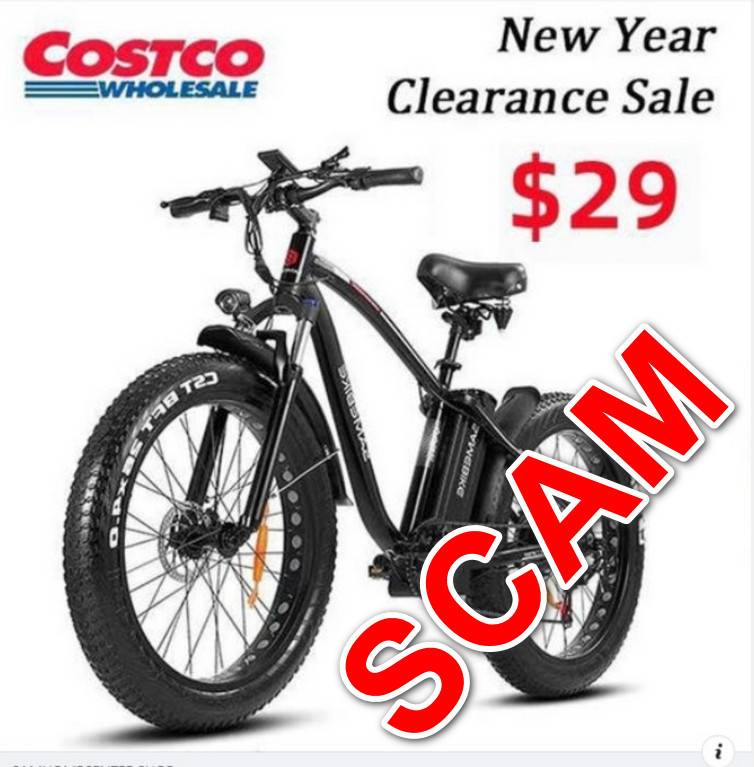
Overview of the Costco Electric Bike Scam
The scam starts with Facebook ads promoting clearance sales on electric bikes at Costco for staggeringly low prices around $39.99 to $99.99. The ads claim to offer premium ebikes worth thousands of dollars at unbelievable discounts only for Costco members.
When users click on these ads for more details, they are redirected to elaborate fake Costco websites that mimic the design of the real Costco site. Any customer and payment information submitted on the phony sites is harvested by scammers rather than fulfilling orders.
In some cases, victims receive a small, cheap item in the mail like a sticker to technically fulfill the sale and delay detection. Meanwhile, credit cards used on the sites can be charged recurring hidden monthly fees after the initial purchase.
This slick scheme leverages Costco’s reputation and Facebook’s ad targeting to widely spread fraudulent offers that dupe unwitting online shoppers into giving up their personal data and payment details.
How the Costco Electric Bike Scam Works
The Costco ebike scam unfolds in several stages designed to successfully extract money and information from victims:
1. Engaging Facebook Ads
Interest-targeted Facebook ads promote the compelling deals trying to entice clicks with images of high-end ebikes at clearance prices reserved just for Costco members.
2. Deceptive Costco-Themed Websites
Clicking the Facebook ads leads to phony yet realistic websites themed around Costco’s brand, web design, and membership program.
3. Collecting Personal and Payment Details
Shoppers browsing the fake sites looking to purchase bikes are tracked with scripts that steal entered information.
4. Fraudulent Credit Card Charges
Providing payment information results in extra unauthorized card charges including recurring monthly fees after the initial scam purchase.
5. No Products Shipped
No electric bikes are ever shipped out. Victims may receive unrelated, cheap mailed items weeks later to delay scam detection.
This sequence turns the reputation of Costco into a weapon to trick unsuspecting shoppers and siphon their personal assets. Avoiding this ruse requires recognizing the underlying deception.
5 Red Flags to Identify the Costco Electric Bike Scam
While designed to look authentic, close inspection reveals many suspicious signals within these phony Costco bike ads and websites:
1. Dramatically Discounted Prices
Real Costco prices match mainstream market rates rather than offering $1000+ products for $39.99.
2. Wrong Website URLs
URLs lead to odd domains totally unrelated to Costco’s real site address.
3. No Real Costco Branding
Costco’s logo and designs are mimicked rather than legitimate. Names may be slightly altered.
4. Poor Writing and Grammatical Errors
Scam sites contain typos, formatting issues, and awkward phrasing unlike the real Costco.
5. Credit Card Security Issues
The site does not use full HTTPS encryption or PCI compliance for safely handling payments.
With proper scrutiny, the framed discounts and phony associations with Costco become clear red flags of an illegal scam. But many are still duped when enticed by prices that are unbelievable.
Safely Shopping at Costco Online
Shoppers can protect themselves from viral Costco scams using these online safety tips:
- Always access Costco.com directly – Never visit Costco’s site through third-party links.
- Verify the URL matches exactly – Ensure the site address matches www.costco.com before entering any information.
- Check for the Costco seal – Real Costco pages display a black seal certifying it as an authorized Costco merchant.
- Know the usual prices – If a price seems dramatically lower than normal rates, it’s likely a scam.
- Avoid public WiFi – When shopping online, public networks can expose your data to scammers.
Staying alert for simple validating factors when shopping major brands online is the best way to identify and avoid sophisticated impersonation scams.
What To Do If You Are Scammed
If you suspect you’ve become a victim of the Costco electric bike scam, take these steps immediately to limit damages:
- Call bank to halt payments – Notify your credit card provider or bank to stop any pending or recurring charges by the fraudulent sellers.
- Place fraud alert – Contact credit bureaus to request increased monitoring and alerts for any deceptive activity involving your identity.
- Change account passwords – Update passwords on any online accounts that utilized the same credentials entered on the scam site.
- Review credit card statements – Check statements for any unusual charges from unfamiliar merchants.
- Report the scam ads – Flag the Facebook ads as fraudulent to get them removed and prevent more victims.
- File official complaints – Submit reports about the scam to the FTC, state attorney general, and BBB to aid law enforcement investigations.
Acting quickly if scammed can significantly reduce resulting damages. Make sure to also take preventative measures to avoid additional frauds in the future.
How to Avoid Costco Electric Bike Scams on Facebook
Savvy social media users can steer clear of Costco electric bike scams through the following defensive tactics:
- Research unfamiliar sellers – Search for reviews and complaints before buying to validate legitimacy.
- Visit retailers directly – Access major brand websites only through known official URLs, not third-party links.
- Compare prices – If deals deviate greatly from normal retail costs, treat them as fraudulent until confirmed.
- Inspect URLs – Preview embedded links to spot odd domains pretending to be popular merchants.
- Avoid “limited time” lures – Beware ads urging immediate action to get unrealistic deals before they expire.
- Read ads closely – Fake promotions overuse emojis, exaggerate discounts, and omit key product details.
With caution and awareness, shoppers can spot signs of social media retail scams and avoid surrendering personal information or payment data.
Key Takeaways to Avoid the Costco Electric Bike Scam
This proliferating scam leverages Costco’s reputation to disguise credit card and identity theft schemes as amazing clearance sales. Protect yourself using these lessons:
- Unbelievably low prices like $39 ebikes are obvious indicators of a fraudulent promotion.
- Verify URLs match real Costco domains exactly before entering any sensitive information.
- Research unfamiliar sellers thoroughly to uncover warnings and complaints.
- Report suspicious ads directly to Facebook and brands being impersonated.
- If scammed, quickly contact your bank to halt charges and contain potential damages.
Stay vigilant for unbelievable social media deals that seem too amazing to be true. With caution and awareness, consumers can identify misleading ads, avoid entering details into fake websites, and steer clear of online shopping scams.
Final Thoughts
Viral Facebook ads promoting clearance Costco electric bikes for 99% off should raise skepticism, not enthusiasm. While everyone loves an amazing bargain, unbelievable prices are a reliable red flag indicating fraud.
This guide outlined the inner workings of online shopping scams that utilize the reputations of major retailers via social media ads. Hopefully the insights provided will make readers more aware of the manipulation tactics scammers deploy against unwary deal-seekers.
Please share this article to help others protect themselves from proliferating retail impersonation schemes. Let’s prevent fraudsters from continuously profiting off these deceptive ploys. Stay safe online by applying critical thinking before supplying payment details, even when enticed by dramatic discounts from well-known brands.

Join the discussion
0 commentsShare your experience or ask a question about this article.
Discussion
Start the conversation
Have a question or something useful to share? Add the first comment.