

An unexpected Crypto.com verification code can make an ordinary afternoon feel suddenly urgent, especially when another message arrives offering to explain it.
Before answering that supposed support contact, pause long enough to separate what your account shows from what a stranger says happened.
Overview
What the Crypto.com verification code scam is
The Crypto.com verification code scam uses concern about account security to obtain a code or lead someone into a fraudulent support interaction.
The deceptive request may arrive by message or through a person claiming to help stop suspicious activity. It impersonates Crypto.com rather than representing its support team.
The crucial distinction is between a code requested by your own action and an unverified person asking you to disclose or submit one.
Why the different codes matter
A verification code is not the same thing as an anti-phishing phrase. Crypto.com’s products use different security features for different purposes.
An authenticator code helps authorize sensitive actions. An anti-phishing phrase, when enabled, helps you recognize certain account emails. Neither should be treated as universal proof.
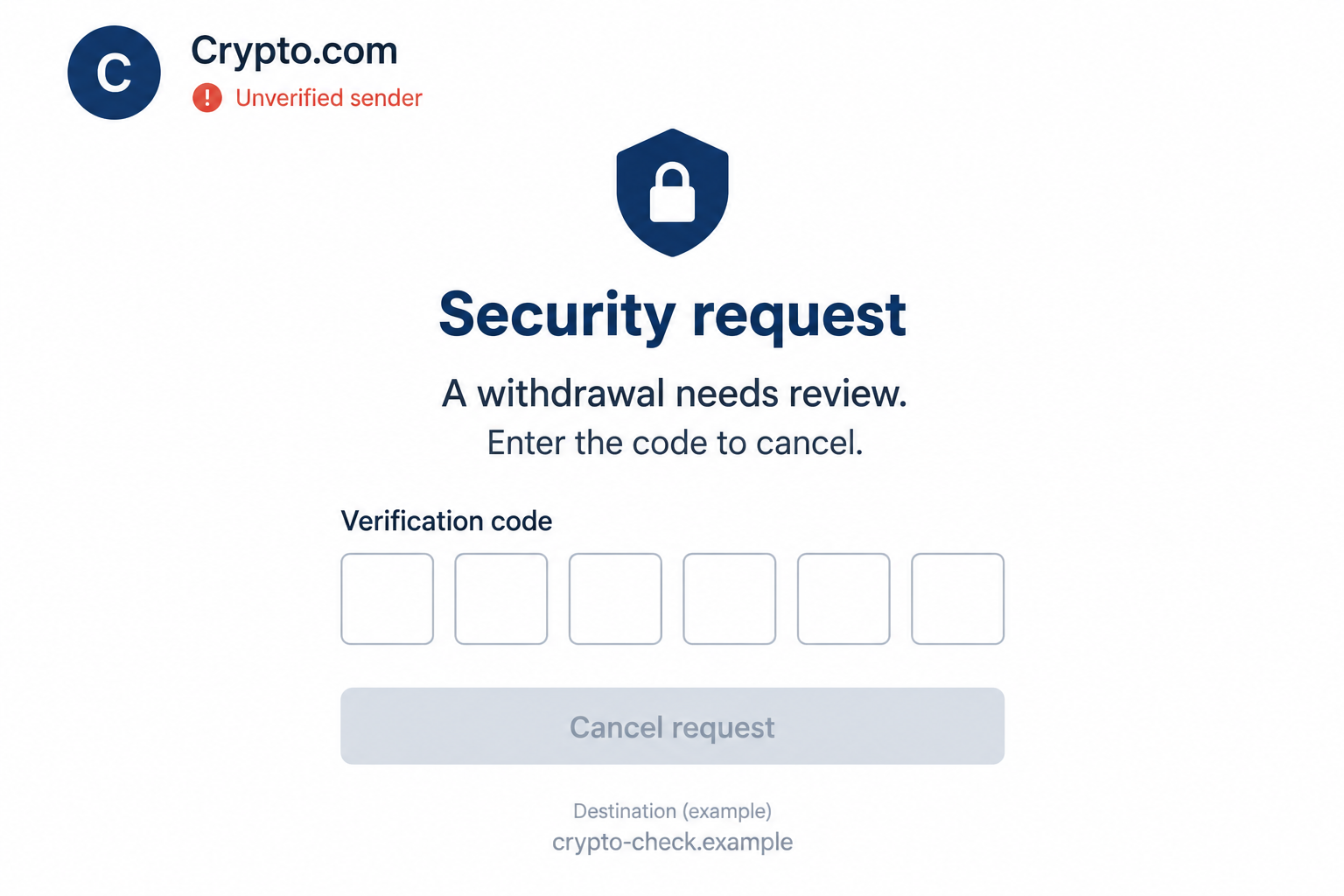
The image above is a generated illustration of the deceptive request, not an authentic Crypto.com screen. Its code fields are empty and its destination is fictional.
What should make you stop
An incoming security message needs independent checking when it asks you to give an outsider the very information used to protect your account.
- A stranger asks for a code to cancel or reverse an alleged transaction.
- A link opens a page asking for account secrets outside your usual sign-in route.
- Someone requests remote access, a software installation, or a transfer for account protection.
- The contact discourages checking the situation through the official app.
An unsolicited code is worth investigating. It does not, by itself, prove that someone has successfully signed in or that a withdrawal has occurred.
How the Scam Works
Step 1: An unexpected code or warning creates uncertainty
You receive a code you did not request, or a message claiming there is a problem with your Crypto.com account.
Both situations deserve care, but they do not establish the same facts. A claimed problem in a message may not exist in the account at all.
Even an authentic code can reflect an attempted action rather than a completed one. The surrounding message still needs checking through a trusted route.
Do not try the code in a page supplied by a stranger just to find out what it does. That turns uncertainty into unnecessary disclosure.
Step 2: A supposed support contact supplies an explanation
The impersonator connects the surprise to a story about suspicious access or a transaction needing attention. The explanation makes the contact appear useful.
Its accuracy has not been established. Someone knowing your address or the fact that you received a code does not prove they work for Crypto.com.
A real security concern can coexist with a fake helper. The correct response is to investigate the concern independently, not trust the first person discussing it.
Keep the incoming claim separate from account evidence. Check whether the alleged action appears in the official product and ask genuine support when the situation is unclear.
Step 3: A protective instruction asks you to reveal a secret
The request may describe code entry as a way to block, cancel, verify, or secure something. That wording makes disclosure feel like a defensive action.
But a code’s effect is determined by the real action it authorizes, not by the caller’s description. Handing it over can undermine an account safeguard.
Do not read a code aloud, paste it into chat, or enter it on a linked page because an unverified contact asks.
If you initiated a legitimate action yourself, use only its expected official flow. Stop when an unrelated incoming conversation tries to take over that process.
Step 4: The fake interface borrows a familiar appearance
A page can display a Crypto.com name, security wording, and a row of code boxes without being operated by Crypto.com.
Design is not authentication. Nor does an encrypted connection establish that the site asking for your code belongs to the organization it names.
Rather than carefully experimenting with the suspicious page, close it. Open the app you already use or a trusted official bookmark to review the situation.
Do not supply a spare password or invented code to test the form. There is no need to interact further to decide it is untrusted.
Step 5: Urgency narrows the chance to check
The contact may insist that a withdrawal must be stopped immediately. The effect is to make independent verification feel like a dangerous delay.
That is precisely when you should leave the incoming conversation. Official support reached independently is a safer place to discuss an urgent account concern.
Crypto.com warns against requests to install software or provide remote device access. An unexpected “support” session is not a necessary price of protecting your balance.
If a transfer has actually happened, preserve the transaction details and contact genuine support. Do not send another payment to supposedly unlock a refund.
Understand the Security Checks Before You Use Them
One-time codes authorize particular actions
A one-time code delivered through a supported channel belongs to a specific account action. Read the genuine message carefully without forwarding its contents to a stranger.
The fact that a code expires does not make sharing it safe. An attacker may be trying to use it while it remains valid.
Do not assume the same instructions apply across the Crypto.com App, Exchange, or another product. Follow the security guidance for the account you actually use.
Authenticator codes are different from an app PIN
Crypto.com’s App 2FA guidance describes time-based authenticator codes for sensitive actions. These are not interchangeable with an app unlock PIN.
Keeping an authenticator separate from a password adds protection, but an impostor can still ask you to disclose its current code.
Never disable a security feature merely because an unexpected support contact says it is interfering with recovery. Verify any account changes through genuine support.
An anti-phishing phrase is a clue, not a permission slip
Crypto.com’s anti-phishing feature places a phrase you choose in supported App and Exchange emails once enabled.
The feature can help identify missing or incorrect phrases. It is not the same as a code generated by an authenticator or sent for an account action.
Do not treat a visible phrase as sufficient proof that every request in a message is safe, particularly if the phrase has been exposed.
Review the current product instructions if you change it. Connected App and Exchange accounts can share the phrase, so avoid assuming the settings are entirely independent.
How to Check a Supposed Crypto.com Contact
Use the official channel-checking tool carefully
Crypto.com Verify lets you check supported contact types against the company’s registered channels.
Select the right category and enter the actual address, website, handle, or number being checked. A display name alone is not the same information.
A match is not a complete investigation. A listed official phone number does not authenticate every incoming call displaying it or approve a particular transaction request.
If a contact cannot be verified or its instructions feel wrong, stop using it. Ask through the official app or Crypto.com support chat.
Look at account activity without following the alert
Open the product directly and review the relevant account or transaction information. Compare the actual details with the incoming claim.
If you cannot sign in, start recovery from the official service rather than using a “recovery” link sent by the same questionable contact.
Do not move funds to a destination supplied by someone promising safety. A supposedly protective transfer can itself be the loss you were trying to avoid.
What to Do if You Have Fallen Victim to This Scam
-
Stop sharing codes and leave the suspicious conversation. Close the linked page and do not continue responding to prove that the account is yours.
Preserve the sender details, destination address, timestamps, and the request itself. Keep any still-sensitive code out of public posts and reports.
-
Contact genuine Crypto.com support promptly. Use the app or the official chat route obtained independently, particularly if you disclosed a code or see unexplained activity.
Explain exactly what you shared and when. Ask about securing the affected product and reviewing pending or completed actions; do not assume a code reset reverses transactions.
-
Secure the accounts connected to the exposure. If you disclosed a password, change it through the official account process and replace it anywhere you reused it.
Protect the associated email account too. Review available sessions, recovery settings, and sign-in safeguards without following the impersonator’s instructions or disabling protection unnecessarily.
-
Review transaction and account changes with support. Record unfamiliar withdrawals, destinations, and security changes visible in your own account.
Ask what can still be restricted or investigated. Do not claim a transfer is reversible simply because it was unauthorized; cryptocurrency recovery can be limited.
-
Contact a financial provider if linked payment information was exposed. Use your bank or card provider’s trusted contact route.
Describe the actual disclosure or payment and ask about available safeguards and disputes. A bank investigation and a cryptocurrency transfer investigation are different processes.
-
Preserve transaction evidence and report losses. Keep relevant transaction identifiers, receipts, messages, and support case references in one place.
The FTC’s scam recovery guidance explains reporting and payment-related steps. Report facts without publicly exposing account secrets or identity documents.
-
Reject guaranteed-recovery offers. Someone contacting you after a loss is not trustworthy merely because they understand cryptocurrency or mention your transaction.
Do not pay an advance recovery fee, reveal a wallet recovery phrase, or transfer assets for “verification.” Use established official support and reporting channels.
Choose the Response That Matches What Happened
You received a code but disclosed nothing
Do not share or use the code in response to an incoming request. Check your account independently and report repeated unexplained messages to official support.
A code by itself does not prove device infection or a completed takeover. Avoid turning an unconfirmed warning into unnecessary software installations or transfers.
Still review relevant security settings if you are concerned. Reused passwords and unexplained activity deserve attention even when this particular message did not cause a loss.
You entered information or approved something
Tell official support whether you shared a password, code, recovery phrase, or transaction approval. Those are different exposures and may require different containment.
Do not reduce the report to “I clicked a link” if more happened. Specific details help support identify the action that needs checking.
If you installed software or granted remote access, disclose that separately and involve qualified device support. The code scam alone does not establish what software did.
You are unsure which product or action the code concerns
Do not guess by trying it across different pages. Read the original notice without following its links and open your established account separately.
Tell genuine support which product you normally use and what the notice claims. Redact the code itself when initially describing the problem.
If a caller says the code must be shared before it expires, let it expire rather than allowing that pressure to decide for you.
A genuine action you initiated can be restarted through the official process if needed. An unexpected outsider does not need control of that process.
Keep a timeline when several messages arrive close together. Distinguish the initial code, the supposed support contact, and any action visible in your actual account.
That sequence helps support investigate without assuming that all messages have the same origin. A real notification can be used as context for a separate deceptive approach.
If you discover an unfamiliar action, report its actual details. Avoid sending public screenshots that expose balances, account identifiers, recovery information, or usable security codes.
Before you leave the genuine support conversation, keep its case reference and next steps. You’ll have something concrete to follow if another message arrives.
Frequently Asked Questions
Does an unexpected Crypto.com code mean my account was hacked?
Not necessarily. It warrants an independent account check, but it does not prove successful access, a completed withdrawal, or malware on your device.
Should I share a code to cancel a withdrawal?
Do not share it with an unverified caller or linked page. Leave that conversation and check the claimed withdrawal through the official product and support.
Is an anti-phishing phrase the same as a verification code?
No. A chosen anti-phishing phrase helps recognize supported emails. A one-time verification or authenticator code serves a different security function.
Does Crypto.com Verify guarantee a message is genuine?
It checks supported registered channels, not every detail of an incoming interaction. Confirm suspicious instructions through official support even when a displayed contact appears familiar.
Can support legitimately ask me to install remote-control software?
Crypto.com’s scam guidance warns against software-installation and remote-access requests. Do not grant control to an incoming contact claiming it is needed to protect your account.
Can a recovery company guarantee my cryptocurrency back?
No. Treat guaranteed recovery and advance-fee promises cautiously. Preserve the transaction evidence and ask genuine support and authorities about the options available.
The Bottom Line
An unexpected code is a reason to check your Crypto.com account, not a reason to hand that code to someone claiming to help.
Leave the incoming conversation and use official support independently. If you already disclosed information or approved an action, report that exact exposure promptly.

Reviews & discussion
0 commentsShare a firsthand experience, or ask a question.
Community reviews
crypto.com
Moderated reader experiences, not an editorial verdict.
Reviews
Be the first to review
Approved reviews for this site or product will appear here.