

Hunt.io published Operation CameraSwarm on 18 August 2026: more than 14,000 Dahua cameras abused in a mid-year campaign, with nearly 1,900 carrying a persistent backdoor account named p2pwn. The password on that account is p2password. If you have a Dahua camera at home, or an Amcrest, Lorex, Annke, or Swann unit that still talks to Dahua cloud services, check the user list, kill P2P if you do not need it, update firmware, and keep port 37777 off the public internet.
Overview
What broke
Hunt.io recovered an operator toolkit from an open directory and mapped a campaign that ran from mid-June into late July 2026. Confirmed compromises concentrated in Ukraine and Russia, but the scanning was wider, and the techniques work against unpatched Dahua-family devices wherever they sit. This brief is for home and small-shop camera owners, not a geopolitics essay.
Three paths mattered in the toolkit Hunt documented. Credential guessing against Dahua Easy4IP on TCP port 37777. An authentication-bypass chain tied to CVE-2021-33044 and CVE-2021-33045, which Dahua addressed in advisory SA-2021-0130 years ago. And abuse of Dahua P2P cloud relay using serial numbers, which can reach cameras behind NAT when P2P is on.
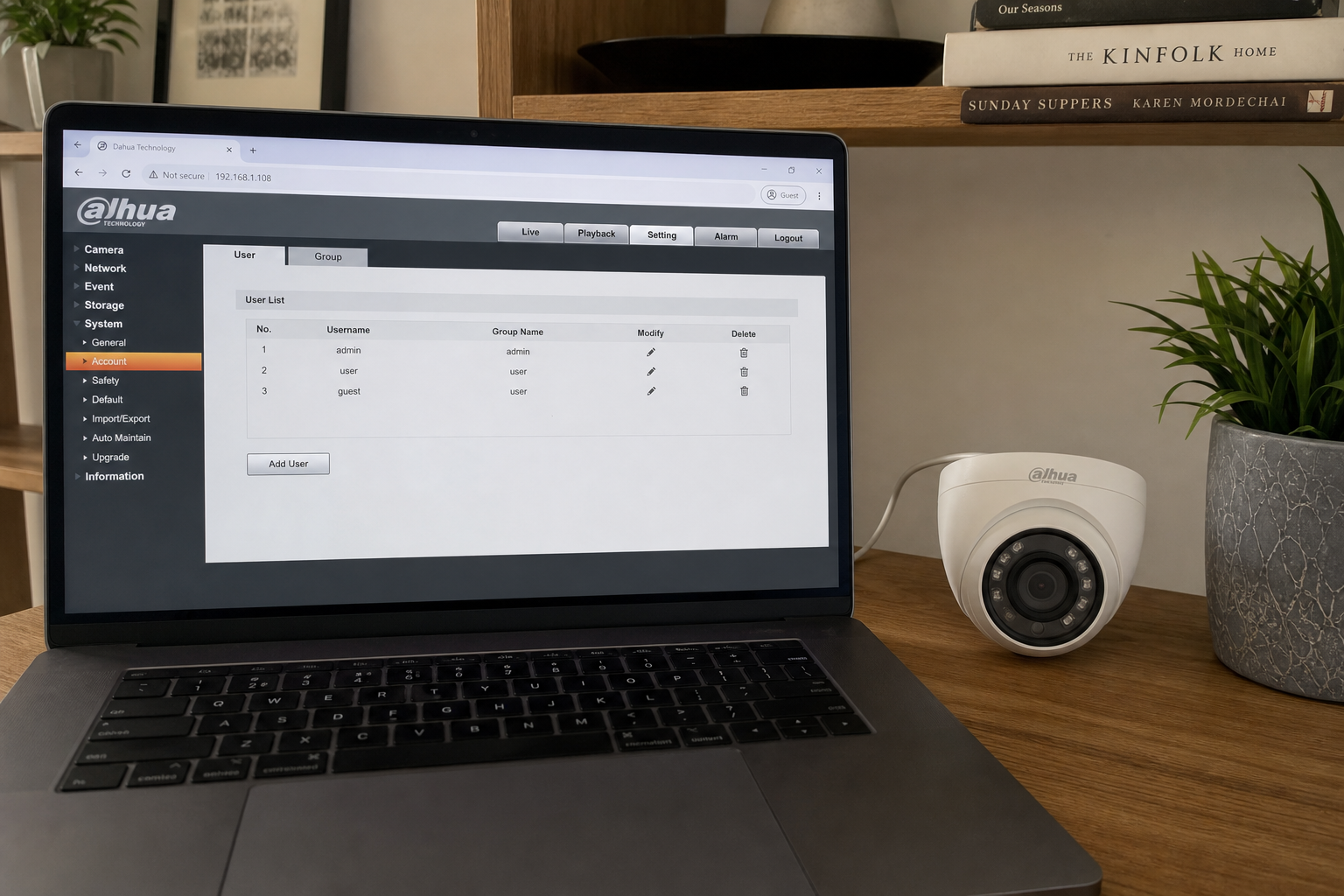
After a bypass, the operator toolkit installed a local account p2pwn with password p2password over RPC. Hunt reports that account is stored independently of the normal admin password. It can survive a password change and, on many firmware builds, even a factory reset. That is why “I already changed admin” is not enough. You have to open Users and look for p2pwn.
Hunt also notes that some CVE labels inside the attacker tooling were wrong or mismatched. The techniques still worked. For this home checklist we stick to what Hunt documented for CameraSwarm: the bypass pair above, the p2pwn backdoor, P2P relay exposure, and the mitigations Hunt and Dahua guidance point to. We are not inventing extra in-the-wild claims beyond that report.
Who is in range
You. Home and small-business owners with Dahua IP cameras, NVRs, or rebranded lines that still use Dahua cloud P2P (commonly Amcrest, Lorex, Annke, and Swann in Hunt’s notes). If the camera web UI looks like Dahua’s WEB SERVICE style, or the app still registers to Dahua DDNS or Easy4IP cloud, assume you are in the family until you prove otherwise.
Cameras reachable on port 37777 from the internet are highest urgency. Cameras with P2P enabled are reachable in ways that ignore your home IP allow list. Cameras that never left the LAN, never enabled P2P, and already run post-SA-2021-0130 firmware are lower risk, but still deserve a user-list check if they were online during the campaign window.
What the vendor shipped
- Dahua SA-2021-0130 firmware fixing CVE-2021-33044 and CVE-2021-33045 (patch available since 2021; still missing on neglected cameras).
- Ongoing firmware updates that, per Dahua statements Hunt relays, also blunt offline recovery-code abuse once devices are updated.
- Device settings that let you disable P2P under Network when you do not need remote relay.
Primary write-up for the campaign: the Hunt.io Operation CameraSwarm report. Use your model support page for the newest firmware file. There is no single zip that covers every SKU.
What this is not
- Not a claim that every Dahua camera worldwide is backdoored. Hunt documented a large operator corpus and 1,923 backdoored devices in that set.
- Not fixed by changing only the admin password if p2pwn remains.
- Not fixed by a factory reset alone on firmware that keeps the backdoor account.
- Not a reason to block Dahua’s legitimate relay IPs as “attacker infrastructure” (Hunt explicitly warns against that).
- Not a Tapo C200 story. Different vendor checklist.
Hunt published on 18 August 2026 after CERT and PSIRT notice. The cheap window is your camera’s Users and Network pages tonight.
Do This Now
In range: You. Dahua and Dahua-cloud rebrand cameras at home or in a small shop.
Urgency: This week. Persistent p2pwn accounts survive ordinary password changes.
- Open the camera web UI. Go to Settings, System (or Users / Account). Delete any account named p2pwn. Rotate every remaining password.
- Open Settings, Network. Disable P2P / Easy4IP cloud if you do not need vendor relay. Prefer VPN or a controlled NVR path instead.
- Open System, Upgrade (or Maintenance). Install the latest firmware for your exact model, at least SA-2021-0130-class fixes. Block port 37777 from the internet on your router.
Who can skip
- You have no Dahua-family cameras, and no Amcrest/Lorex/Annke/Swann units on Dahua cloud.
- User list has no p2pwn, P2P is off, firmware is current for the model, and 37777 is not forwarded.
- Cameras are powered off and retired.
Why it matters
A living-room camera is a microphone and a lens inside the house. A shop camera is a map of open hours, deliveries, and cash-wrap routines. Persistent backdoor accounts turn “we changed the password” into false comfort.
Port 37777 on the public internet is how brute force and old bypasses keep paying rent. P2P by serial is how NAT fails to save you. Firmware from 2021 still missing in 2026 is how a five-year-old advisory becomes this week’s problem.
Rebrands confuse people into skipping the check. An Amcrest box on a shelf can still register serials into Dahua-style cloud backends. Lorex, Annke, and Swann lines show up in the same Hunt notes for that reason. If the mobile app still offers Easy4IP-style P2P or a Dahua DDNS hostname, run the same Users, Network, and Upgrade pass you would on a camera that says Dahua on the badge.
Small shops often forward 37777 because a vendor tech said it was required for remote support years ago. That forward is now a liability. Remove it. If a technician still needs access, give them a temporary VPN or an on-site visit. Leaving Easy4IP open to the world is how masscan lists get built.
After you remove p2pwn, assume other credentials on the camera may have been copied. Hunt describes tooling that drains stored secrets after a bypass. Rotate NVR passwords, ONVIF users, and any RTSP URLs you pasted into Home Assistant or a scrap NVR. Then check the NVR user list for the same p2pwn name.
Hunt’s campaign geography is not a free pass for everyone else. The same CVEs and the same P2P design ship in consumer hardware worldwide. Check the users. Then patch.
The bottom line
On the camera web UI
- Find the camera LAN IP from your router device list or the vendor app.
- Browse to that IP on the local network. Sign in with admin.
- Open account or user management. List every user. Delete p2pwn if present.
- Change admin and any other remaining passwords to long unique values. Save them in your password manager.
- Open Network settings. Set P2P / cloud relay to Off if you can live without it.
- Open Upgrade. Note the current firmware string. Download the matching update from the official support page for your model. Flash it and wait for the reboot.
On the router
- Disable port forwarding for 37777, 80, 443, and RTSP to cameras unless you have a documented need.
- Prefer placing cameras on a guest or IoT VLAN that cannot reach your PCs.
- If you need remote view, use a vendor path you understand or a VPN into the LAN, not “expose 37777 to the world.”
If the UI will not load
Factory-reset only after you are ready to reconfigure, then still check Users for p2pwn after the first setup. Some firmware keeps the backdoor across resets. If the account returns after reset, the unit needs a firmware update before you trust it again. If the vendor no longer ships firmware for that model, replace the camera.
Model and firmware tips
Write down the exact model string from the label or Status page before you download firmware. Flashing the wrong file bricks cameras. Prefer the regional support site that matches where you bought the unit. After the upgrade, confirm the new firmware string on Status, then re-check Users one more time in case a reset path recreated defaults.
If you own five cameras, spreadsheet them: IP, model, firmware before, firmware after, p2pwn yes/no, P2P on/off. Fifteen minutes each is still under two hours for a whole house. Skipping the indoor nursery cam because “it is indoors” misses the point of a backdoor account.
What you should see
User list has no p2pwn. P2P shows Off if you disabled it. Firmware string matches the newest file on the official support page for your exact model. Router has no WAN forward to 37777. Vendor app still views live video only through the path you chose.
When you are done
Every Dahua-family camera in the building has a clean user list, current firmware, locked-down remote exposure, and new passwords. You followed Hunt’s CameraSwarm mitigations without inventing extra drama. Close the tab.