

Have you received an email, text message, or phone call claiming to be from DHL saying you have unpaid duties on a package? Don’t fall for it – it’s a scam. Read on to learn all about the DHL unpaid duty scam, how it works, what to do if you are a victim, and key facts everyone should know.
Overview of the DHL Unpaid Duty Scam
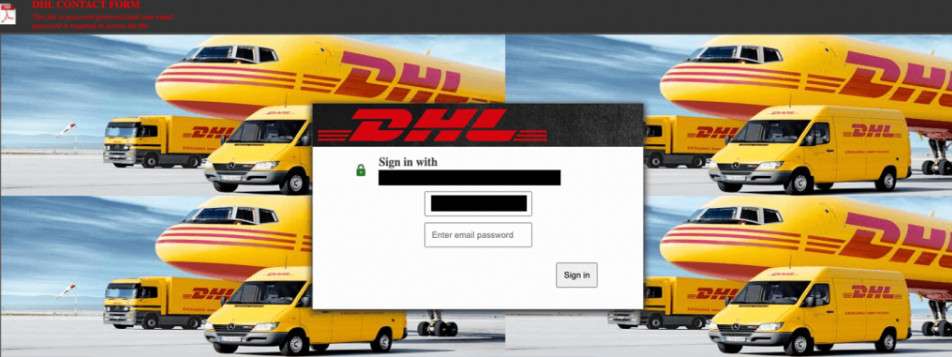
The DHL unpaid duty scam is a common scam where fraudsters send phishing emails or text messages pretending to be from delivery company DHL. These messages state there is an issue with a package delivery, often saying the recipient owes “unpaid duties” on the shipment before it can be delivered.
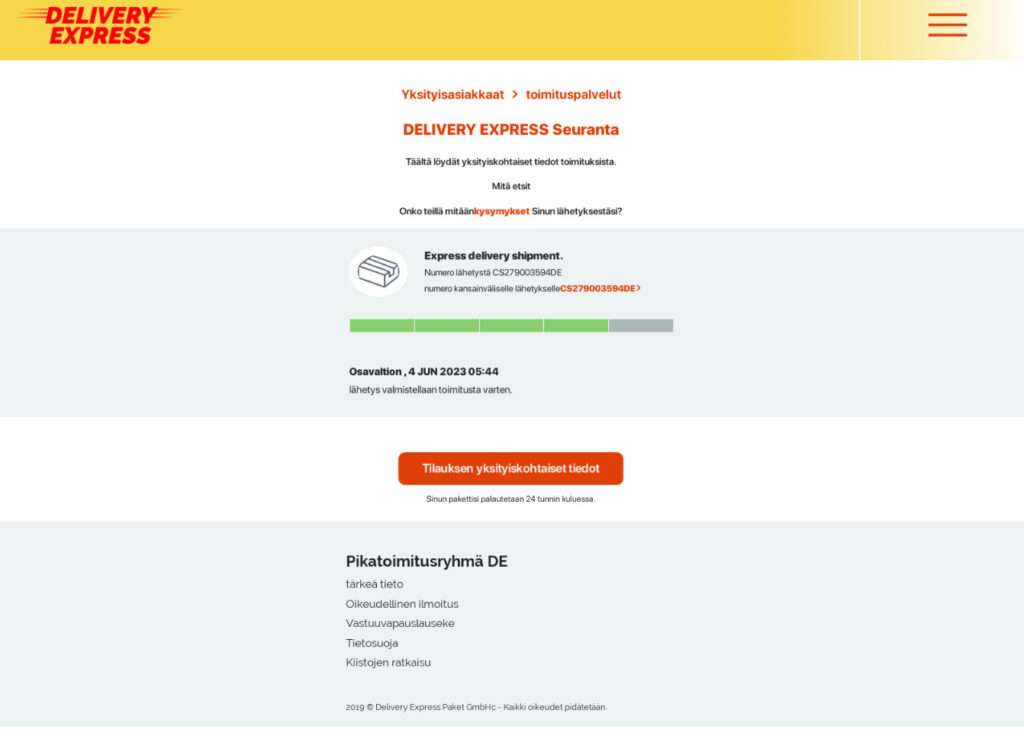
The messages contain links or buttons to fake DHL websites. On these sites, victims are prompted to enter personal information like their name, address, and credit card details under the guise of paying a small processing or duty fee. With this sensitive information obtained, scammers are able to steal identities, money, and commit payment fraud using stolen financial data.
This scam is completely fraudulent – there is no unpaid package or duties owed. The scammers simply want to trick recipients into willingly handing over personal information and money. These scams can be quite convincing, featuring official DHL branding and wording that sparks concern of an urgent issue needing resolution.
However, there are some key signs that can help identify these DHL scams:
- Unexpected emails or texts related to a shipping notification you don’t recall getting
- Messages addressed in generic terms like “Dear Customer” rather than your name
- Links going to odd URLs or misspelled domains rather than official DHL websites
- Messages with poor grammar, spelling errors, or other language quirks
- Requests for personal info before allowing package delivery
- Sketchy-sounding stories about unpaid taxes and duties causing delivery issues
DHL is aware unlawful groups target their brand for phishing ploys and notes customers should never disclose personal or financial data in response to unsolicited messages. But many scam attempts slip through. Read on to better understand exactly how this scam unfolds.
How the DHL Unpaid Duty Scam Works
While scammers may alter specifics, most DHL unpaid duty scams follow the same general storyline with common psychological triggers to spur victims to act quickly. Here is an overview of how these types of scams typically operate:
Step 1: Recipients Get a Phishing Email or Text
Victims will receive an unsolicited email or SMS text message designed to look like legitimate correspondence from DHL. Emails use DHL logos, colors, and standard messaging about a package awaiting delivery to add authenticity.
These messages are sent at random based on stolen email lists and phone numbers, rather than targeting specific planned DHL customers. This means recipients may not recall signing up for a DHL delivery. Messages may be addressed generically as “Dear Customer” or to an oddly spelled name rather than a proper name if emails came from compromised sources.
Texts also feign legitimacy with recognizable sender names like “DHL Alerts” and standard SMS formatting. The scam works by merely getting the phishing correspondence opened by recipients who don’t realize they have not actually signed up for a DHL delivery.
Step 2: Message Says There’s an Issue Needing Immediate Attention
These phishing messages are crafted to spur urgent action by claiming there is an issue requiring the recipient’s intervention before the shipment can be delivered.
A common storyline is that the package has been held up because taxes, duties, customs fees, or processing charges are owed on the shipment. The messages stress the urgency of paying these “unpaid duties” right away or before an impending deadline for the shipment to be released and delivered.
This creates a pressure scenario where victims are more apt to take action quickly without deeper scrutiny on the legitimacy of the irregular payment request. Facing a short turnaround time also limits the likelihood of someone spotting the scam or investigating further before sharing financial data.
Step 3: Fake DHL Payment Portal Collects Personal and Financial Info
The phishing emails and texts will include a link or button to redirect the recipient to a fake DHL webpage to process the duty payment. While links may look convincing at quick glance, closer inspection would reveal odd URLs from misspelled or unaffiliated domains rather than official DHL sites.
However, urgency being emphasized in the messages reduces the chance of scrutiny. So victims click through to what appears to be a legitimate DHL payments page, featuring official branding and design elements mimicking real DHL portals.
On the fake DHL sites, victims are prompted to enter detailed personal info like their name, address, contact info, and perhaps even government ID numbers for identity verification. Victims may then be asked to enter full financial data like credit card numbers to process payment of the $5 to $50 reportedly owed in unpaid shipment duties and fees.
With this sensitive data obtained, the scammers have all they need to steal identities, commit payment fraud, clone ATM cards, hack accounts, and more damaging exploits leaving victims at great financial and legal risk.
Step 4: Criminals Steal Money and Info with No Package Delivery
Unfortunately at this point the trail goes cold for victims. After entering payment info and submitting duty fees, the fake DHL websites may show confirmation screens of the transaction processing successfully.
But in reality, there is no parcel. So no package gets shipped, while scammers raid debit card balances and start exploiting obtained financial data.
When no delivery shows up, victims may attempt to follow up with DHL only to be told there is no record of the shipment, their data, or any unpaid duties linking back to them.
At this point the stark reality sets in that sensitive information has been handed off to sophisticated scam rings based on a highly convincing phishing ploy. This data can be used in identity theft, financial fraud, or resold on dark web marketplaces – all without easy routes to reclaim losses or restore compromised accounts.
How to Spot the DHL Unpaid Duty Scam
It can be hard to discern legitimate DHL emails and texts from sophisticated phishing scams asking for payments on customs fees. But learning common red flags can prevent people from being duped by fraudulent parcel delivery schemes.
While scammers constantly alter emails to appear real, some patterns give their deceptions away:
No Name Personalization
Many phishing scams start the email with simply “Dear Customer” or “Hello Valued Recipient” versus addressing you by name. Real delivery providers connect messages directly to your verified customer account.
Example: Email starts addressing you generically saying “Dear DHL member” versus “Dear John”
Odd URLs and Misspellings
Scam links look closely mimicking real sites but lead to subtle domain alterations. Notice pages with extra numbers/letters added or words spelled in a tricky way.
Example: Link goes to “www.dh1TrackingUpdates.com” instead of “www.dhl.com”.
Unexplained Payment Obligations
Trusted delivery services don’t suddenly mandate extra fees without batches of earlier notices. Be skeptical of any surprise tax or duty payment mentions without months of preceding communications about the amounts said to be owed.
Example: Out of the blue email claims “$47 in customs processing fees must be paid immediately before package can be delivered.”
Personal Info Requests
Valid delivery providers have your details on file from earlier validated orders. Any outreach asking to collect your private data like bank/ID details as if it was never gathered flags devious data phishing.
Example: Fake DHL portal requests you enter full credit card and government ID numbers again despite having facilitated past deliveries in the past with this data on record.
What to Do If You Have Fallen Victim to This Scam
If you realize you have been scammed by fake DHL unpaid duty emails, it is important to take action quickly to avoid as much damage as possible:
Step 1: Alert Your Financial Institutions of Fraudulent Activity
If you entered any financial data or paid fake duty fees by debit card or another payment source, begin by immediately contacting those institutions. Alerting banks, credit unions, or firms like PayPal or Venmo is essential to potentially freeze compromised accounts. This can limit further fraudulent transactions or withdrawals in some cases.
It is also vital to have compromised cards cancelled and replaced right away. Reporting fraud at first notice gives the best shot at recovering illegally transferred funds through fraud protection programs. Be ready to provide details on payments made, URLs visited, and data shared.
Step 2: Reset Any Breached Account Passwords
If you utilized existing usernames or passwords during the scam interactions, all associated accounts are now vulnerable. Think beyond financial accounts to also consider social media, email, utility accounts, etc. where duplicate credentials may have been used and are now exposed.
Swiftly resetting all passwords can help lock out criminals before they gain access. Use updated, unique passwords for each account unrelated to original ones you entered on fake DHL sites. Enable two-factor authentication anywhere possible for added security moving forward as well.
Step 3: Report the Incident to Relevant Agencies
To help authorities track and shut down scam networks exploiting the DHL brand, be sure to report the phishing attempt and any resulting fraud. Contact DHL directly so they can document the unlawful use of their trademarks and storefront mimicry tactics. You should also file reports with agencies like:
- ICO (UK Information Commissioner’s Office)
- ActionFraud (UK’s National Fraud & Cyber Crime Reporting Centre)
- FTC (US Federal Trade Commission)
- IC3 (FBI Internet Crime Complaint Center)
- Local police departments
Detailed reports with specific dates, $ amounts, web addresses, and screenshots can aid investigations and consumer alerts about active scam campaigns.
Step 4: Monitor Accounts Closely for Further Trouble Spots
Even will rapid response efforts, financial, identity, and account impacts may linger and unfold over time given the depth of access scammers gained. So while hoping for the best, prepare for the worst by closely checking bank statements, credit reports, and account activity for any signs of fraudulent use.
Ongoing vigilance for misuse paired with quick communication to fraud departments can limit adversities. Depending on depth of the breach, it may also be smart to place a consumer credit freeze or fraud alert on your credit file as added precautions against wide-spread identity theft over months ahead.
Step 5: Learn From the Experience to Boost Defenses
While being scammed understandably erodes trust and sparks fear of repeated adversity, try focusing those sentiments into self-education and enhanced skepticism to reduce future risk.
Study up on latest phishing red flags, email security tactics, strong password best practices, and safe web surfing guidelines. Being an informed digital citizen makes you a less apt target moving ahead. Also consider defensive services like dark web monitoring or identity theft protection services to catch future fraud faster.
Frequently Asked Questions about the DHL Unpaid Duty Scam
Wondering if you encountered the DHL unpaid duty scam? Have more questions about how this phishing tactic works and what to watch for? Here are answers to the most commonly asked questions surrounding DHL delivery scams:
1. What is the DHL unpaid duty phishing scam?
This is a fraudulent scam where victims receive emails or text messages pretending to be from DHL. These official-looking messages claim there are outstanding taxes, customs fees, or processing charges that must be paid before DHL can deliver your package. The messages include links to fake DHL payment portals to submit your personal and financial details. In reality, there is no package. Scammers use this phishing tactic to steal money and identities.
2. How can I identify this DHL phishing scam?
Watch for these common red flags:
- Unexpected DHL delivery notifications for shipments you did not order
- Emails addressing you generically rather than by name
- Links leading to misspelled or unverified URLs
- Poor grammar, spelling errors, or formatting quirks
- Requests for personal info or payment before receiving the parcel
- Short payment deadlines and high pressure requests for fast action
3. I got a suspicious DHL email. What should I do?
Do NOT click any links or provide personal or financial information. Report phishing attempts to DHL directly so they can escalate investigations on scams abusing their brand. Check with local post offices to confirm if you have a real package awaiting pickup somewhere with customs duties owed.
4. I already clicked a link and shared info. Am I at risk?
Yes, unfortunately entering details on fake DHL sites gives scammers access to your personally identifiable data, financial accounts, and more. Immediately contact banks to freeze accounts and monitor for fraudulent charges. Reset any breached account passwords, enable added security protections, and watch out for signs of identity theft.
5. Can I get money back that I paid for fake DHL customs fees?
If you used a credit card, you can dispute the charges by reporting fraud to your card company. Debit payments are harder to recover directly. File reports with agencies like the FTC on money lost to help authorities track scam operations. Enroll in identity theft protection services to monitor for fraudulent financial accounts opened in your name.
6. How can I avoid parcel delivery scams in the future?
Stay skeptical of requests for personal data or payments via unsolicited messages. Verify irregular payment claims directly with vendors before providing card details. Learn to spot phishing red flags like odd URLs or formatting quirks. Enable security tools like multifactor authentication to verify identity before accessing account portals.
The Bottom Line
The DHL unpaid duty scam provides critical learnings on modern phishing strategies masquerading as urgent delivery problems in order to prompt hasty actions that hand over personal data and funds.
Being aware this scam exists allows recipients to spot red flags sooner and avoid being duped. But even savvy web users can trip up on creatively-crafted lies. So additional safety tips like independently looking up odd URLs, ignoring pressure scenarios pushing immediate payment, and confirming irregular asks directly with vendors can provide extra layers of defense against sneak attacks on security.
Staying alert on the latest phishing techniques allows online citizens to outsmart scammers vying to trick even the most dedicated cyber-safety experts. Following best practices for account, email, and device safeguards also reduces adversities if attackers do manage to breach first lines of defense.
And reaching out quickly at any potential signs of fraud can provide the fast action needed to minimize damages while nabbing cyber crooks. With awareness and rapid response, those aiming to impersonate trusted brands like DHL stand far less chance of saddling consumers with hefty hardships down the road.

Join the discussion
0 commentsShare your experience or ask a question about this article.
Discussion
Start the conversation
Have a question or something useful to share? Add the first comment.