

Pass-travel-usa.com is a fraudulent website that falsely claims to provide passport renewal and application services. This site, which poses as an official U.S. passport service, has scammed thousands of unsuspecting Americans out of their money and personal information.
This comprehensive guide will provide an in-depth overview of the pass-travel-usa.com scam, how it works, what to do if you are a victim, and how to protect yourself going forward. With identity theft and online scams on the rise, it’s crucial that citizens remain vigilant and informed when conducting any private business over the internet.
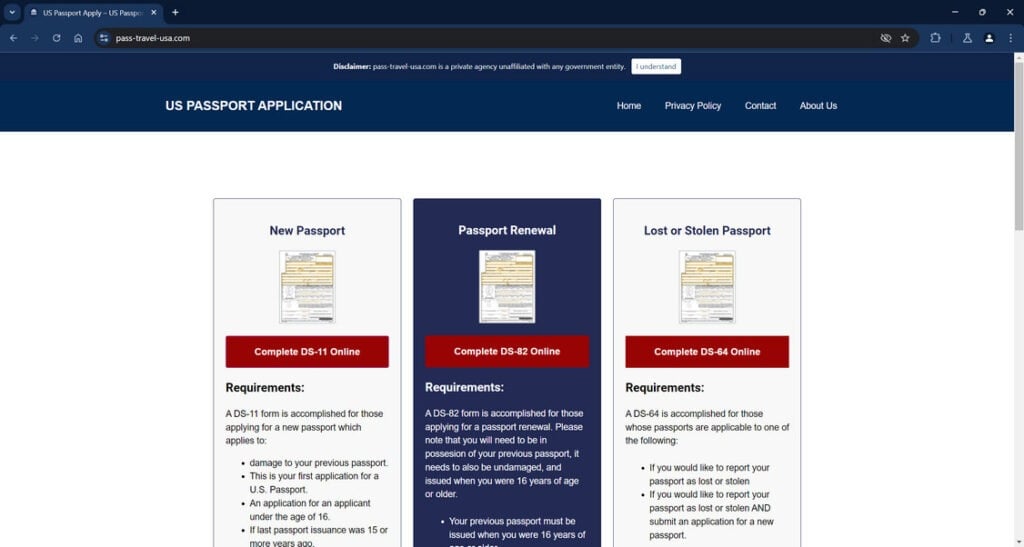
Overview of the Pass-Travel-USA.com Scam
Pass-travel-usa.com pretends to be an authorized passport service that can renew or apply for new U.S. passports online. However, this site has no affiliation with the U.S. government or any official passport services. The sophisticated design intentionally mimics official U.S. passport sites in order to deceive applicants into believing it is legitimate.
Once victims arrive at the site, they are prompted to enter personal information such as full name, date of birth, Social Security number, passport number, parents’ names, and more. The site also collects credit card information from applicants in order to process payment and complete passport “renewal” or “application” forms.
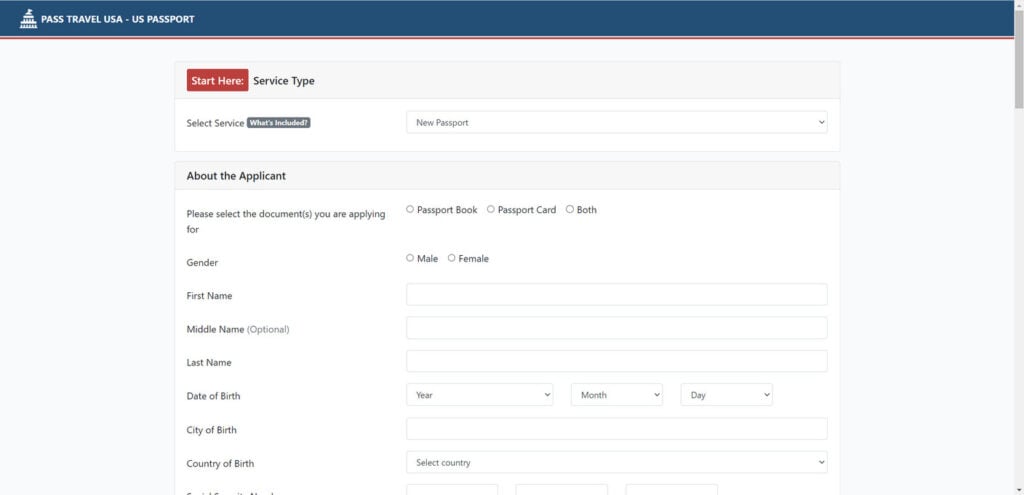
In reality, pass-travel-usa.com is stealing users’ personal data and charging fraudulent application fees upwards of $100 or more. No official passport application or renewal services are rendered. The victims’ information is likely sold on the dark web or used by the scammers themselves to commit identity theft.
This scam has been ongoing since 2022, with potentially thousands of victims reporting fraudulent charges and compromised personal data. Losses can range from $50 to over $250 per person.
How the Pass-Travel-USA.com Scam Works
The operators of pass-travel-usa.com have devised a highly effective scam taking advantage of U.S. passport regulations and common search engine optimization techniques. Here is exactly how the scam works at each stage:
Stage 1: Keyword Targeting
The scammers behind this scheme have optimized the site to rank at the top of search engines when users search for terms like “passport renewal,” “renew my passport,” and other related keywords. This increases the likelihood of citizens landing on the fraudulent site instead of the official U.S. Department of State passport site.
Stage 2: Believable Interface Design
Once the victim arrives at pass-travel-usa.com, the design and interface bears shocking resemblance to official U.S. passport sites with the same colors, navigation, branding, and web layout. To the average person, the site appears 100% legitimate with no immediate red flags.
Stage 3: Information Collection
The site contains web forms prompting users to input confidential personal information including full legal name, Social Security number, date of birth, place of birth, passport number, parents’ full names, parents’ birthdates, and more. Victims are led to believe this is required information for renewing or applying for a passport. In reality, it is data harvesting by scammers.
Stage 4: Payment Collection
After inputting all personal information, victims are directed to a payment page requesting all credit or debit card details, plus billing address and CVV code, in order to process passport application fees. The amounts range from $50 to over $250 depending on the type of “service.”
Of course, these are fabricated application fees meant to steal money, not provide any real passport services.
Stage 5: Fraudulent Documents
In some cases, victims have reported receiving official looking passport application forms filled with the information they inputted. This false documentation is designed to further legitimize the scam service. In reality, no legitimate applications are ever processed.
Stage 6: Identity Theft
With all of the harvested personal and financial data, the criminals behind pass-travel-usa.com now possess everything needed to engage in identity theft and financial fraud. Victims have reported seeing unauthorized charges, loans taken out in their name, and other signs of ID theft after falling for this scam.
Stage 7: Difficulty Contacting Site
Many people who later realized they were scammed tried contacting pass-travel-usa.com via email or phone only to receive zero responses or disconnect notices. The scammers offering no customer service makes recovering lost money next to impossible.
What To Do If You Are A Victim
If you submitted personal information or payment to pass-travel-usa.com, take the following recommended steps right away:
- Contact your bank/credit card company – Report the charges as fraudulent and have new cards issued. Monitor statements closely for any abnormalities.
- Place a fraud alert – Contact one of the three major credit bureaus to place an initial 90-day fraud alert on your credit file. This signals creditors to verify your identity before approving new credit.
- Consider a credit freeze – Take extra protection by freezing your credit report at each bureau, which blocks access to your reports and prevents criminals from opening new accounts.
- Report your compromised information – File an identity theft report with the FTC at IdentityTheft.gov. Provide details on your compromised information.
- Check your credit reports – Obtain your free annual credit reports from AnnualCreditReport.com and scan for any unauthorized accounts or activity. Dispute any errors with the bureaus.
- Enable account protection – Log into your financial accounts and turn on enhanced account protection where available, such as multifactor authentication. Update passwords and security questions.
- Monitor your accounts – Carefully check bank, credit card, and other account statements each month for fraudulent activity. Report anything suspicious to your providers.
- Review your passport application status – After taking the above safety precautions, you can contact the Department of State to check the status of your real passport application and make any needed corrections.
- Report the site – Official complaints can be submitted about this scam site to the FTC here, the FBI here, and the Department of State here.
Taking rapid action if you are victimized can help reduce the chances of significant identity theft or financial damages. Continue monitoring all of your accounts closely over the next year for further suspicious activity.
Frequently Asked Questions About the Pass-Travel-USA.com Scam
1. Is Pass-Travel-USA.com a legitimate website?
No, pass-travel-usa.com is a fraudulent website that poses as an official U.S. passport renewal service in order to steal money and personal information from victims. It has no affiliation with any government agencies. The site is intentionally designed to mimic official passport sites and fool applicants.
2. What information does the site ask for?
The site prompts users to input very sensitive personal data including full legal name, date of birth, Social Security number, passport number, parents’ full names, parents’ birthdates, and more. They claim this is required for passport applications.
3. Does the site actually provide passport services?
No, despite collecting a passport application “fee,” pass-travel-usa.com does not actually submit any passport applications or provide any real services. It is a scam designed to harvest users’ personal data.
4. How much money has the site stolen from victims?
Reported losses range from $50 to over $250 per person. With thousands likely scammed since January 2023, the total amount stolen could be in the tens or hundreds of thousands of dollars.
5. How are the scammers able to create such a real looking site?
The criminals behind this exploit their web design skills and search engine optimization techniques to make the site appear as convincing as possible. Mimicking real .gov sites fools applicants.
6. What is done with the personal information collected?
The scammers harvest the data to engage in identity theft, open fraudulent accounts, take out loans in victims’ names, and commit other cybercrimes for financial gain.
7. What should I do if I was scammed by this site?
Immediately contact your bank, credit bureaus, the FTC Identity Theft reporting system, passport agencies, and monitor your credit reports. Enable account protection features and watch closely for any signs of fraud.
8. How can I avoid similar passport renewal scams in the future?
Only use the official U.S. Department of State website at travel.state.gov for any passport services. Beware of sites with similarly convincing designs and be alert for subtle signs of fraud.
9. Where can I report this scam site and its activities?
You can file complaints about this scam at the FTC, FBI, and Department of State websites. Reporting this fraud helps warn others and assists law enforcement.
10. What is the big takeaway about this scam I should remember?
Exercise extreme caution when providing personal data for passport applications online. Only use .gov sites and watch for scams mimicking official providers. Monitor your accounts closely afterwards for fraud.
The Bottom Line
The pass-travel-usa.com passport scam has successfully deceived thousands, stealing private information and money from unwitting U.S. citizens. By luring victims in with savvy search engine tactics and sophisticated site designs, this fraud has resulted in substantial losses and compromised sensitive data.
If you require passport services, exercise extreme caution conducting any business online. Only use the official U.S. Department of State website at travel.state.gov and be on high alert for subtle signs of scams. Protect yourself further by monitoring credit reports, freezing your credit if needed, and reviewing all account statements vigilantly.
Being informed is your best defense against the many cunning digital schemes targeting the public today. Share this guide with others to help spread awareness about the harms of the pass-travel-usa.com scam and similar frauds perpetrated online.
This article is for educational purposes only and does not constitute professional, financial or legal advice. The content is intended for general information and should not be construed as definitive guidance. Information contained herein is subject to change without notice.  For concerns, please contact us via the provided form.
If you are the owner of the website or product in question and wish to offer clarifications regarding your business or website, please reach out to us through the provided Contact Form.








