

Nothing strikes fear into the heart of a driver quite like an unexpected parking ticket. But what if that surprise fine popping up on your phone wasn’t even real? Scammers are using fake DVSA parking penalties to trick unsuspecting people into handing over personal information and payment.
This devious scam starts with an urgent-sounding text message about an unpaid parking violation. The message looks legit and authoritative enough to dupe many recipients into clicking on the link and inputting sensitive data. However, it’s nothing but a low-down con. Learn how to avoid getting conned by fake DVSA parking fines.
An Overview of the DVSA Parking Penalty Charge Scam
In the digital age, scammers don’t need to lurk on street corners to run their cons. They can now reach thousands of potential victims instantly through scam text messages and emails. A common and effective new gambit is sending fake Driver and Vehicle Standards Agency (DVSA) parking fines.
This scam preys on a near-universal fear of unexpectedly owing money to an authority. The texts and emails look official enough to fool people into believing they have an outstanding parking penalty on record with the DVSA. Victims end up handing over bank details, credit card numbers, or other sensitive information to crooks posing as a government body.
The messages typically claim you committed a parking or traffic offense captured by license plate recognition cameras. They say you must pay an overdue fine urgently or face court fees, bans, or other consequences. The texts and emails include links to review the offense and submit payment to settle the matter.
However, the links actually direct victims to sophisticated fake websites dressed up to impersonate DVSA penalty services. These scam sites display realistic-looking parking tickets and request personal and financial details. Once submitted, scammers can steal identities and clean out accounts.
Because the messages and websites replicate official DVSA and .gov.uk sites so convincingly, it’s easy to be fooled. But telltale flaws expose these contacts as mere scams. Learning to recognize the warning signs can help motorists steer clear of DVSA parking fine swindles and protect their wallets.
How the DVSA Parking Penalty Charge Scam Works
Scam artists have devised a formulaic process for executing fake DVSA parking ticket scams. Understanding how they operate sheds light on the deceit. Here’s an inside look at each step of the con:
Step 1: Send Out Mass Texts and Emails
The scammers begin by firing off thousands of scam parking fine texts and emails randomly. They don’t actually target specific people, just blast as many messages as possible hoping some recipients will take the bait.
The messages come from burners phones and spoofed email addresses pretending to be official DVSA contacts. Using masked numbers and addresses lets scammers avoid accountability.
The messages follow similar templates, alleging the recipient has an unpaid parking penalty on record that requires immediate payment. Threats of fines, bans, and court dates create urgency.
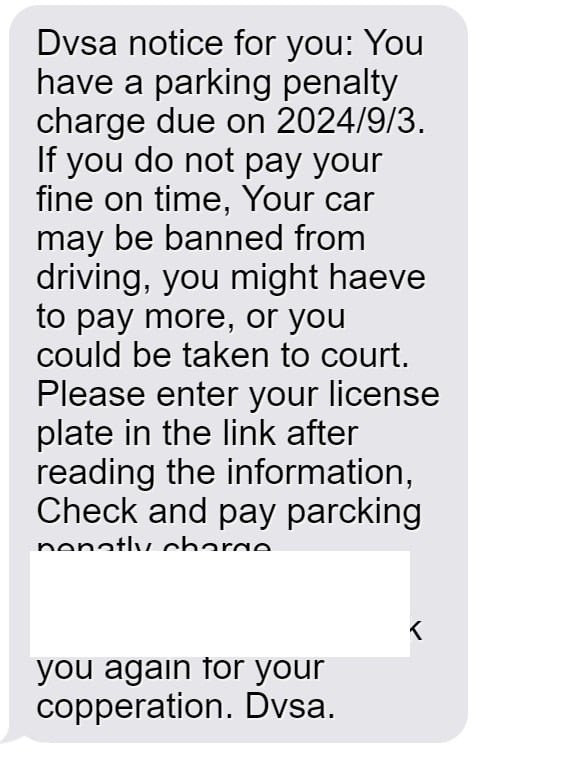
Here is one how one of these scam text messages might look:
Dvsa notice for you:
You have a parking penalty charge due on 2024/9/30.
If you do not pay your fine on time, Your car may be banned from driving, you might haeve to pay more, or you could be taken to court.
Please enter your license plate in the link after reading the information, Check and pay parcking penatly charge.
https://qrco.be/bfplhr?WY=2TQS5c8Os
Thank you again for your copperation.
Dvsa.
Step 2: Direct Victims to the Fake DVSA Website
The texts and emails include links that supposedly lead to the DVSA site where victims can view details and pay their parking ticket. But the URLs actually reroute to sophisticated fake DVSA pages the scammers control.
These scam websites closely imitate real DVSA penalty pages. The design, branding, web address, and terminology aims to convince victims they’re on a legitimate .gov.uk site.
Step 3: Display a Fake Parking Violation
Once lured onto the scam site, users see an official-looking parking ticket or Penalty Charge Notice (PCN) on file under their name and vehicle registration.
The ticket claims to be issued for parking illegally or driving infractions picked up on ANPR cameras. Location data from your IP address may show on the ticket to seem even more credible.
Of course, it’s just bogus fines randomly generated for the scam. There are no real corresponding records or violations.
Step 4: Request Personal and Payment Information
After duping the victim with the fake ticket, the scammers present an online form asking for personal details and payment to settle the fine. This sensitive information allows them to steal identities and money.
The form requests your full name, home address, phone number, email address, vehicle info, and crucially, your payment details.
Step 5: Steal Identities and Funds
Armed with stolen personal and financial information, the scammers can now carry out identity theft and drain accounts. They may clone debit cards to withdraw cash or make fraudulent purchases.
Or scammers sell the data on the dark web, where cybercriminals trade in identity records, bank accounts, and login credentials. This perpetuates more frauds.
Step 6: Cover Tracks
By the time victims realize they’ve been scammed, the scammers have already deleted traces of their operation. They ditch the temporary phone numbers and domains used for the con.
Any stolen money quickly moves through cryptocurrency exchanges and overseas shell companies to cover their trail. Victims are often left footing the bill.
Warning Signs You’ve Received a Fake DVSA Parking Penalty
Spotting the DVSA parking fine scam takes a trained eye. Use these red flags to detect fraudulent messages and websites:
- You get a surprise text or email about an unpaid parking ticket but have no recollection of any violation.
- The message comes from an unknown number or email address, not DVSA contacts you recognize.
- You are asked to click a link to pay the fine instead of typical mail payment methods.
- The link uses a redirect domain or an unofficial .gov.uk impersonation site.
- Your ticket number and info don’t appear in official DVSA records databases when you check.
- Threats demand immediate payment instead of following formal appeal processes.
- The site requests unnecessary personal info and odd payment methods like gift cards.
- Your location mirrors in the ticket details due to IP tracking.
If you see these signs, you can be sure the DVSA fine is counterfeit.
What To Do If You Receive a Suspicious DVSA Parking Fine Text
If a dodgy parking penalty text or email lands in your inbox, take these steps:
- Avoid clicking any links within the message. They could download malware or lead to scam sites.
- Double check the sender’s number or address. DVSA only uses official contacts that can be verified.
- Call DVSA directly to check if there are truly any outstanding fines in your name.
- Carefully check any site you land on before submitting info. Look for .gov.uk domains and contact details.
- If you shared payment data or other personal details, call your bank immediately and monitor for fraud.
- Report fake DVSA ticket texts and emails to Action Fraud to help authorities.
Protect yourself by being vigilant about any unexpected texts requesting urgent fine payment. Real traffic tickets only come through official postal mail, never shady links.
FAQs About the Fake DVSA Parking Penalty Scam
1. Who is the DVSA?
The Driver and Vehicle Standards Agency (DVSA) is a UK government agency responsible for vehicle registrations, driving licenses, MOT tests, and traffic enforcement. They do not issue parking tickets.
2. How does the fake DVSA parking fine scam work?
Scammers send texts/emails pretending to be from the DVSA claiming you owe a parking fine. They threaten consequences to convince you to click a link to a fake website and enter personal/payment details that they steal.
3. What are signs it’s a fake DVSA parking ticket scam?
Warning signs include getting a surprise ticket with no prior notice, urgent threats, links to sketchy sites, requests for unnecessary personal information, inability to confirm the ticket through official DVSA channels, and contact from an unknown number/email.
4. Can the DVSA issue parking tickets?
No, only local councils can issue legal parking tickets in the UK. The DVSA does not have authority over parking violations. Any DVSA fine texts/emails are scams.
5. What if I paid a fake DVSA parking fine?
Contact your bank to reverse the charges and closely monitor accounts for fraud. Change passwords on accounts that may be compromised. Report identity theft to CIFAS if personal info was shared. File a report with Action Fraud.
6. Where can I report fake DVSA parking texts/emails?
Report them to Action Fraud, the dedicated fraud and cybercrime reporting agency. You can also notify DVSA directly so they are aware scammers are falsely claiming to be them.
7. How can the DVSA help with fake parking fines?
The DVSA can look up your license plate and confirm whether any real unpaid parking tickets exist. They also raise awareness about scams impersonating their agency.
8. What are ANPR cameras?
ANPR (automatic number plate recognition) cameras read license plates and are used for various traffic enforcement purposes. But they cannot automatically issue parking tickets despite scammer claims.
9. Are there legal consequences for not paying real parking fines?
Yes, persistent nonpayment of real council parking fines can eventually lead to court proceedings, fines, bailiffs or clamping. But scammers exaggerate with threats of immediate jail time.
10. How can I avoid DVSA parking scams?
Be wary of any surprise texts/emails about fines. Verify using official DVSA contacts only. Never click unsolicited links or provide personal/payment details. Educate yourself on common scam tactics.
Don’t Let Bogus DVSA Parking Fines Stop You in Your Tracks
As parking fine scams explode across the UK, drivers have to stay alert on the roads and online. Getting hooked by a fake DVSA ticket can result in stolen funds, damaged credit, and major hassles.
But with knowledge of common red flags and tactics, motorists can avoid being taken for a ride. Being wary of any texts or emails claiming outstanding fines sent through unverified channels is key.
Checking directly with DVSA via known contacts is the only surefire way to confirm if real unpaid tickets exist. Use diligence and care before clicking links or sharing information to keep safely out of the grasp of parking penalty scammers.








