

Savvy shoppers know that scoring legitimate bargains online requires vigilance. If a deal looks too good to be true, it likely is. Unfortunately, scam websites have become more sophisticated at deceiving customers, even boldly misusing the names and logos of well-known brands. One example is an emerging scam network that falsely claims affiliation with home improvement giant Lowe’s to peddle knockoffs, used goods, or nothing at all.
This article will delve into how these convincing but fake Lowe’s websites operate, red flags to watch for, and most importantly, tips to avoid being swindled. For consumers who want to safely take advantage of real deals, awareness of this scam is key to shopping smart and guarding your wallet.
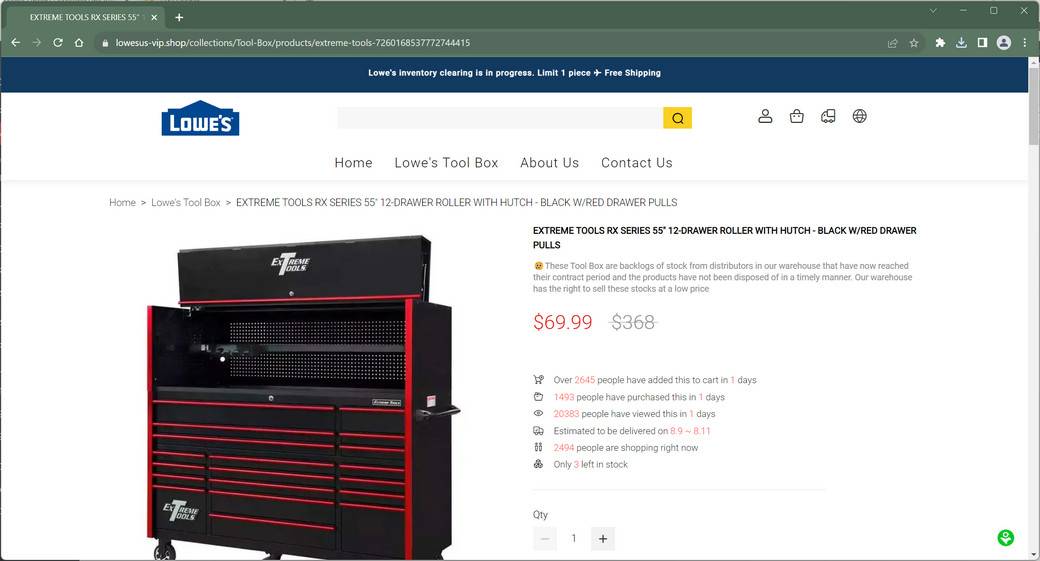
Overview of the fake Lowe’s websites Scam
The Lowe’s scam involves a string of e-commerce websites designed to mislead customers into thinking they are the official website or authorized discount outlets of Lowe’s. However, they are unaffiliated imposter sites using the company’s trademarks without permission solely to commit fraud.
These sites advertise coveted Lowe’s products like appliances, tools, and home goods at impossibly low clearance prices. But customers who place orders end up receiving one of the following:
- Nothing at all – The most frequent outcome is no items are ever shipped after payments are processed.
- Cheap knockoffs – Some orders arrive with low-quality replicas made with inferior materials that do not match the advertised products.
- Used or damaged goods – In some cases, customers receive items that are clearly used, broken, or otherwise tampered with.
- Completely wrong items – Orders may contain random products that are totally different than what was purchased on the website.
In addition to scamming customers out of their money, these fraudulent sites also harvest users’ personal information during checkout, including full names, addresses, phone numbers, and credit card details. This data is likely used or sold for nefarious purposes like identity theft and credit card fraud.
How the Scam Works
Here are the typical steps users experience when ensnared by a fraudulent Lowe’s website:
- Flashy social media ads – The scam starts with viral ads promoting huge markdowns on Lowe’s goods, using attention-grabbing slogans like “70% off for 24 hours only!”
- Lookalike website – Clicking these ads leads to sophisticated imposter sites designed to look like the real Lowe’s website or Lowe’s outlet stores. The logos, photos, and branding mimic the authentic company.
- Unbelievable discounts – Prices shown on the scam site are drastically reduced below MSRP and even lower than legitimate retailers. This signals the deals are unrealistic and only meant to drive urgency.
- Fake scarcity tactics – Countdown timers, limited quantity claims, and pressure tactics give the false impression that the deals will disappear instantly if you don’t purchase quickly.
- Checkout and credit card processing – At checkout, users are prompted to enter a vast amount of personal and payment data which is stolen even if no order is fulfilled.
- No order fulfillment – After taking payment, almost no orders ship. Requests for order status updates are either ignored or met with vague excuses about unspecified shipping delays.
- No customer support – Customers cannot contact any real company staff by phone, email, or chat to resolve issues. Refunds or solutions are never provided.
Warning Signs of the Fake Lowe’s Scam
These red flags can help identify fraudulent Lowe’s websites that should be avoided:
- Unbelievably low prices – Real Lowe’s merchandise is not discounted 60-90% off retail prices, nor deeply below prices at other legitimate retailers.
- High-pressure tactics – Fraud sites use countdown timers, claims of “only 3 left!”, and other dubious tactics to overwhelm customers into purchasing without thinking.
- Lack of contact details – Scam sites won’t provide a real street address, phone number, email, or contact form that works.
- No SSL security – Secure sites use SSL encryption, denoted by “https://” URLs. Non-secure “http://” sites do not safely handle payments.
- Poor website quality – Bad grammar, typos, sloppy designs, broken links, and lack of an About Us page often indicate an illegitimate entity.
- No customer reviews – Authentic retailers encourage customer ratings and reviews. Lack of feedback indicates a fraudulent new site.
- Credit card only – Scam sites often claim you can only pay by credit card, not through more secure methods like PayPal. This allows stealing your card information.
- No BBB listing – Check for a BBB profile. Real Lowe’s stores are BBB accredited, while scammers won’t have legitimate profiles.
Avoiding Fake Lowe’s Websites
Here are some tips for safely shopping online and avoiding scam website traps:
- Only use Lowes.com – Navigate directly to the official Lowes.com website for guaranteed legitimate deals. Bookmark it for convenience.
- Verify third-party sellers – Lowe’s authorizes certain third parties to sell products online, like Amazon or eBay. Verify these sellers are authorized by the Lowe’s name trademark program.
- Research unfamiliar sites – Search for reviews, complaints, and scam reports about unknown websites before providing your data.
- Compare deals thoroughly – Cross-check discounts on a new site against authentic Lowe’s prices and competing retailer prices. Massive unexplained markdowns are a major red flag.
- Avoid impulse buying – Dismiss pressure tactics like countdown timers trying to rush your purchase. Take time to scrutinize sellers carefully.
- Use secure payments – When possible, pay through services like PayPal to better protect your financial information if fraud occurs. Monitor card statements closely regardless.
- Check for contact information – Real companies provide legitimate ways to contact them, like working phone numbers and addresses. Lack of any way to contact the seller is a giveaway it’s a scam.
- Trust your gut – If a website raises any suspicions or seems “off,” it’s best to simply avoid it. Protecting your personal and financial data isn’t worth the risk.
What to Do If You Are Scammed
If you made a purchase through a fake Lowe’s website and suspect you’ve been defrauded, here are important next steps:
- Contact your credit card provider – Report the incident and fraudulent charges. Provide order details and request a chargeback. Under the Fair Credit Billing Act, issuers must investigate disputed charges.
- Call banks – If you used a debit card, call your bank immediately to report the transaction and monitor your accounts closely for misuse.
- Place fraud alerts – Contact credit bureaus to implement 90-day initial fraud alerts on your credit file, so no new accounts can be opened easily in your name.
- Reset account passwords – Change passwords on all of your online accounts as a preventative measure in case the scam website already misused your email address and login info. Enable two-factor authentication where possible.
- Monitor credit reports – Order free credit reports from Equifax, Experian, and TransUnion to check for any signs of accounts opened without your permission.
- File official complaints – Report details to the FBI’s Internet Crime Complaint Center and Federal Trade Commission to join public scam reports.
- Leave reviews – Post warnings about the fraudulent website on consumer sites to prevent others from being victimized. Report their social media ads as scams also.
Avoid further communication with the scam website or anyone reaching out claiming to be from Lowe’s customer service. They are likely attempting to collect more money or sensitive data.
Conclusion
As ecommerce grows, so do the tactics of scammers exploiting brand names to rip off customers. The Lowe’s scam offers a reminder to apply critical thinking when shopping online. Scrutinize websites thoroughly rather than jumping on deals that seem too good to be true. Stick with authorized sellers, and don’t let pressure tactics overwhelm your better judgment. Avoiding financial fraud requires vigilance, but a few minutes of careful research can save you from becoming the victim of elaborate imposter scams.
Frequently Asked Questions
Q: Are there any legitimate Lowe’s Factory Outlet or Lowe’s Discount Outlet websites?
A: No. Unlike some brands, Lowe’s does not currently operate any separate factory outlet or discount coupon websites. Any site using a domain name containing “Lowes” besides the official Lowes.com is fraudulent.
Q: How are scam sites able to use the real Lowe’s logo and images?
A: Scammers freely misuse trademarks, logos, and product imagery without permission to create a false appearance of being legitimate. Lowe’s attempts to enforce against this infringement, but new scam sites constantly pop up.
Q: Where are the real scammers located?
A: Most likely overseas in countries with lax consumer protection laws. Scammers go to great lengths to use web anonymization tools to conceal identities and locations. Law enforcement has difficulty pursuing crooks across borders.
Q: Is it possible to get money back if I was scammed?
A: If you paid by credit card, you can dispute the charges as fraudulent and request the payments be reversed. Providing documentation helps the claims process. Recovering wired payments or debit transactions is far more difficult however.
Q: Are these scam ads on social media reported and banned?
A: While some scam ads may get removed eventually, the crooks are constantly creating new accounts and ads faster than they can be taken down. Relying on vigilance when seeing suspicious offers is the best protection.








