

Over the last few months, Californians across the state have reported receiving suspicious text messages claiming their vehicle was recorded using the FasTrak Express Lanes and that they now owe money.
The texts include links to various scam websites that try to extract payment and personal information from victims. This new wave of text message scams marks an evolution in the tactics scammers are using to target FasTrak customers specifically.
As concerning as this scam is, the good news is awareness and knowledge can go a long way in protecting yourself and your information. This article will break down exactly how the FasTrak text message scam works, what techniques scammers are using, how to spot red flags, and most importantly, how to avoid falling victim.
Overview of the Scam
The FasTrak text message scam preys on unsuspecting drivers by sending unsolicited messages claiming a photo enforcement system caught their vehicle using the FasTrak Express Lanes without proper payment.
The text messages aim to convince recipients they owe unpaid tolls and fees, and must take immediate action to settle their “balance” or risk acquiring additional penalties. However, it’s all a fraudulent ploy to trick victims into clicking on a link that leads to fake websites designed to steal money and personal information.
This deceptive scam starts with an out-of-the-blue text message to the victim’s cell phone stating their car was photographed using the Express Lanes and they now owe money for the toll charges and any associated fees.
The message creates a sense of urgency by threatening “excessive late fees” or account suspension if the balance isn’t addressed immediately. To resolve the issue, the text provides a link to a website where the recipient can supposedly review their account details and settle the payment.
However, unsuspecting users who click on the link are taken to sophisticated fake websites pretending to be official FasTrak portals. These fraudulent sites are meticulously designed to mimic legitimate FasTrak payment pages in order to trick victims into entering sensitive personal and financial information.
If users enter their credit card, bank account, or other sensitive data on the site, this information instantly goes to the scammers who can then use it for financial fraud or identity theft.
The FasTrak text scam takes advantage of two things:
- Peoples’ fear of racking up late fees and penalties on bills.
- The desire to quickly resolve potential legal issues like unpaid tolls.
By threatening imminent late fees or account deactivation if the balance isn’t addressed ASAP, these texts create a sense of urgency and pressure that short-circuits critical thinking. As a result, recipients are more inclined to hastily click the link without verifying its legitimacy.
The two most common text message templates used in this scam are:
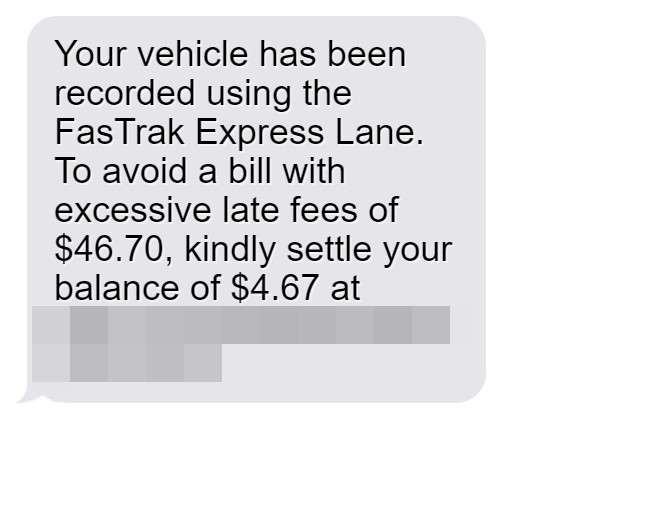
“Your vehicle has been recorded using the FasTrak Express Lane. To avoid a bill with excessive late fees of $46.70, kindly settle your balance of $4.67 at [fake website link]”
“A balance of $3.95 has been detected on your account for using the FasTrak Express Lanes. To prevent additional charges, please settle the payment by March 27th, 2024 using [fake website link]”
You may notice some red flags in the wording of these scam messages. For example:
- They mention “excessive late fees” and “additional charges” – scare tactics to prompt urgent action.
- The texts use phrases like “kindly settle” which indicate unnatural language.
- They reference specific dollar amounts and dates – to establish legitimacy.
- The links go to questionable urls like “bayareafastrakservices” instead of official sites.
In addition to deceptive texts, this scam utilizes fake websites carefully styled to appear exactly like the real FasTrak payment portal. These sites will feature FasTrak branding and logos, account management pages, payment forms requesting credit card/bank account details, and other aspects to appear 100% legitimate.
But it’s just a well-crafted forgery intended to steal money and identities. Victims tricked into entering their information on the fake sites will have their data instantly harvested by scammers.
In summary, this is how the FasTrak text scam works in 3 steps:
- Victims receive urgent texts about owing money for tolls, threatening late fees.
- The message provides a link to resolve the payment, but it goes to a fake website.
- If users enter information, the scammers steal it for financial fraud and identity theft.
This deceptive new scam combines urgency-inciting texts with sophisticated fake websites to take advantage of stressed drivers and steal their personal and financial information. Awareness of their tactics is key to avoiding being fooled.
Detailed Breakdown of the Scam Process
Now let’s break down exactly how the FasTrak text message scam works from start to finish:
Step 1: Victims Receive a Text Claiming They Owe Money
The scam starts with an unsolicited text message sent to the victim’s mobile phone. The below examples reflect two of the most common text templates scammers are using:
“Your vehicle has been recorded using the FasTrak Express Lane. To avoid a bill with excessive late fees of $46.70, kindly settle your balance of $4.67 at [fake website link]”
“A balance of $3.95 has been detected on your account for using the FasTrak Express Lanes. To prevent additional charges, please settle the payment by March 27th, 2024 using [fake website link]”
You’ll notice the texts sound somewhat official and reference specific details like a dollar amount and due date. This is done intentionally to establish legitimacy and urgency.
Step 2: The Text Urges Victims to Pay Their Balance
The scam texts will always include messaging urging the victim to quickly pay the claimed balance in order to avoid additional fees or penalties. This creates a sense of urgency designed to prompt users into immediately clicking the link without thinking it over.
Phrases like “avoid excessive late fees” or “prevent additional charges” tap into people’s fear of owing mounting penalties on a bill. This pressure tactic increases the odds victims will feel compelled to click and pay right away.
Step 3: The Link Goes to a Sophisticated Fake Website
When victims click the link in the text, it takes them to a scam website dressed up to mimic a legitimate FasTrak payment portal. The site will feature:
- Official FasTrak branding and logo
- A login page asking for your account details
- A payment page with fields to enter credit card or bank account info
- Believable web URLs like “bayareafastrakbilling” or “fastrak-onlinepay”
To most users, the site appears every bit like the real Express Lanes website. However, it’s a complete fake designed solely to steal money and personal data.
Step 4: Scammers Collect Payment and Personal Information
Once on the fake website, users will be prompted to enter details like:
- Name
- Address
- Phone number
- Date of birth
- FasTrak account username and password
- Credit/debit card information
- Bank account and routing number
All information entered will go straight to the scammers. With your payment info, they can rack up fraudulent charges or siphon money right from your bank account.
Your personal info provides the scammers with everything they need to steal your identity and commit broader fraud in your name.
Step 5: Scammers Disappear with Your Money and Information
Victims typically don’t realize they’ve been scammed until some time later when they notice fraudulent charges or activity on their accounts.
Meanwhile, the scammers have already vanished with the money and personal data they stole through the fake website. The domain will often be deactivated soon after extracting data from victims.
So in summary, the FasTrak text scam uses urgency and believable websites to trick users into handing over payment details, account credentials, and personal info. This allows scammers to steal money and identities.
Recognizing Red Flags in Scam Texts and Websites
The texts and websites scammers are using in this scam are designed to appear legitimate. But there are some key red flags to recognize that can help you avoid being fooled.
Here are things to watch out for in suspicious texts claiming you owe money:
- Strange wording or poor grammar – Scams texts often include awkward phrases, misspellings, and grammatical errors.
- Urgent demands – Language insisting you must pay “immediately” or “quickly” to avoid penalties. Designed to prompt hasty action.
- Out-of-context first contact – You didn’t initiate contact or opt-in to SMS alerts. The random text comes completely out of context.
- Threats of fees or account suspension – Scare tactics threatening consequences like penalties, deactivated accounts, or legal action.
Here are red flags to spot in the scam websites:
- Generic URLs – Sites use vague domains like “fastrakonlinepay” instead of official URLs.
- No security seals – Lack of https, SSL, Norton, etc. certifications you’d see on real payment sites.
- Requests for sensitive info – Asking for full bank/card numbers, SSNs, account logins, passwords.
- Spelling/grammar errors – Just like the text, sites contain typos, awkward phrasing, and other errors.
- Poor design – Choppy layouts, low-res images, broken links etc. Real sites are polished.
Stay on guard for these red flags, and avoid clicking links or entering info if anything seems off.
What To Do If You’re Targeted by This Scam
If you receive one of these scam texts, do not click the link or provide any personal or financial information. Here are the steps to take:
- Report the scam text – Forward the text to 7726 (SPAM) to report it to your cell provider.
- Call your bank/card issuer – If you did enter payment info, call them immediately to report unauthorized charges.
- Freeze your credit – Consider freezing your credit with Equifax, Experian and TransUnion to prevent identity theft issues.
- Reset passwords – If you entered account login info, change your FasTrak password and any other compromised credentials.
- Contact authorities – File reports with the FTC, FCC, and your local law enforcement. Provide them with details on the scam text, sender number, websites, etc.
- Check your statements – Review all financial statements closely for signs of any fraudulent activity. Dispute anything unauthorized.
- Sign up for alerts – Set up text/email alerts on your financial accounts to stay updated on all account activity.
- Ignore further texts – Scammers may follow up asking for additional info. Do not respond to any related texts.
The key is acting quickly if your information was compromised, so you can minimize any resulting fraud or identity theft fallout.
Frequently Asked Questions about the FasTrak Text Message Scam
1. What is the FasTrak text message scam?
The FasTrak text scam involves receiving a fraudulent text message claiming your vehicle was recorded using the FasTrak Express Lanes without paying. The text claims you owe money in unpaid tolls and fees and provides a link to resolve the payment and avoid additional penalties or fines. However, the link sends you to a fake website designed to steal your personal and financial information.
2. What do the scam text messages say?
The texts are designed to look like official FasTrak messages and typically say your car was photographed using the Express Lanes, you owe an outstanding balance, and you must pay immediately to avoid excessive late fees. For example:
“Your vehicle has been recorded using the FasTrak Express Lane. To avoid a bill with excessive late fees of $46.70, kindly settle your balance of $4.67 at [fake website link]”
3. What is the goal of this text message scam?
The goal is to trick you into clicking the link and entering your personal and payment information onto a fake website controlled by scammers. They can then steal your credit card number, bank account details, passwords, SSN, or other sensitive data for financial fraud or identity theft.
4. How do the scammers obtain my phone number?
Scammers likely obtain numbers through illegal databases sold on the dark web, previous data breaches, or by utilizing phone number generating software. They target FasTrak customers specifically hoping the message will seem more legitimate.
5. Are the websites linked in the texts real?
No, the links lead to sophisticated fake websites pretending to be official FasTrak payment portals. They are very convincing forgeries but designed solely to steal your information.
6. What are some red flags in the scam messages?
Watch for poor grammar/spelling, threats of penalties, urgent demands to pay, suspicious links, out-of-context first contact, and dollar amounts/dates used to establish false legitimacy.
7. What should I do if I receive one of these scam texts?
Do not click any links, call numbers listed, or provide personal or financial information. Report the scam text to your cell provider by forwarding to 7726. Check your account statements for any suspicious activity.
8. What if I already clicked the link or gave information?
If you provided sensitive information, call your bank immediately to report unauthorized charges and consider freezing your credit. Reset all passwords and watch statements closely for more fraudulent activity.
9. How can I protect myself from the FasTrak text scam?
Use awareness of their tactics, never click unverified links, ignore out-of-context texts demanding money, and don’t provide info to random contacts. Only access FasTrak sites through official channels and recognized URLs.
10. How prevalent is this new text messaging scam?
Unfortunately very prevalent and widespread. Scammers have been observed utilizing this scam across California. Be vigilant and warn others who may be vulnerable to these types of SMS and smishing attacks impersonating government agencies.
The Bottom Line on the FasTrak Text Scam
This troubling scam shows fraudsters are turning to new platforms like SMS to cast a wider net for victims. By impersonating government entities like FasTrak, they hope to catch people off guard.
The best protection is awareness – recognizing red flags, verifying legitimacy before clicking links, and never providing sensitive info to unsolicited contacts. Act








