


Fxvfvbbvff.blogspot.com says it can do what every Roblox player wishes for: put free Robux straight into your account, using nothing more than your username.
It’s built to look like the right tool for exactly that. Press the button, however, and you’ll find a different story, one that ends nowhere near your Roblox balance.
Overview
What you get pitched on Fxvfvbbvff.blogspot.com
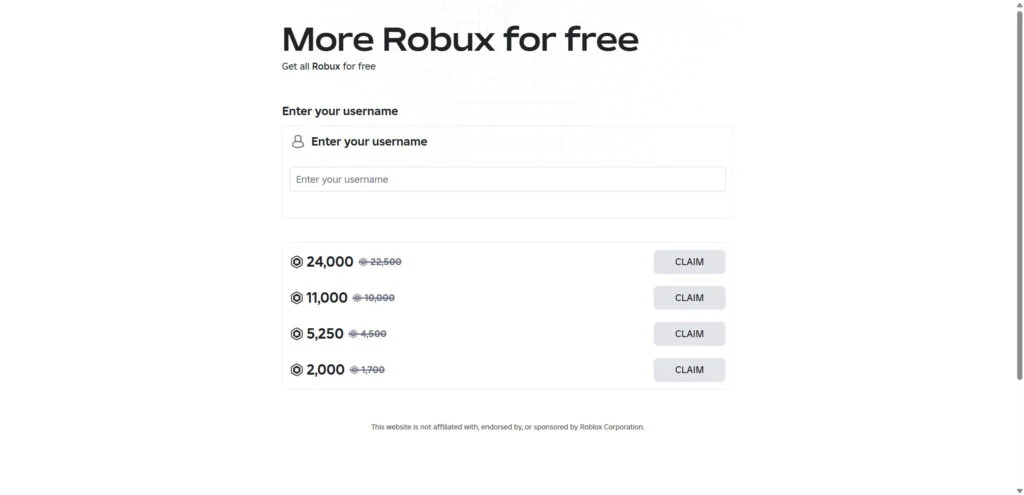
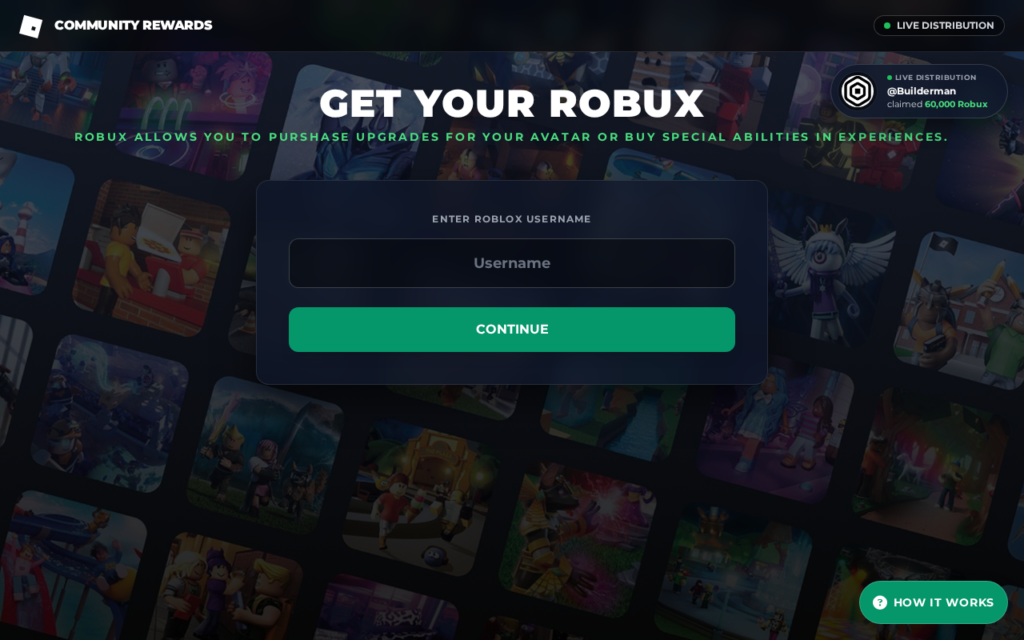
Fxvfvbbvff.blogspot.com dresses up as a free Robux generator. The routine goes like this: your Roblox username goes in, you pick an amount, often thousands of Robux, and press “send.”
What you see is usually a progress bar, a console of fake server messages and a list of players who supposedly just got paid. What you get is no Robux.
Nothing here comes from Roblox
Sites such as Fxvfvbbvff.blogspot.com get no backing from Roblox. Roblox doesn’t run them or partner with them, and it warns players not to go near them.
A website that knows your username can’t put currency into your account. Only Roblox itself can add Robux.
Where your “free” Robux actually ends up
Instead of Robux, the page throws up a “human verification” step. That’s a content locker, and every app, survey and sign-up on its wall pays the site’s operator.
Put simply, this is where that leaves you:
- You can keep completing offers forever, and no Robux will ever arrive.
- For the operator, every finished offer means a commission, which usually comes from a cost-per-action (CPA) ad network.
- Some offers request personal details, such as your email or phone number.
- Some steer you toward app downloads or subscriptions that can cost real money.
- Later, some request your Roblox login code or password.
Fxvfvbbvff.blogspot.com is a scam built around free Robux. Don’t enter your username there or complete its “verification” offers, and never let it have your password or a login code.
What We Found on Fxvfvbbvff.blogspot.com
A few details about Fxvfvbbvff.blogspot.com stand out:
- The page’s title reads "Roblox Community –jon-> free robux".
- It asks for a Roblox username, then locks the reward behind a wall of offers before anything is supposed to arrive.
- Fxvfvbbvff.blogspot.com is hosted on Blogger, Google’s free blogging platform, where anyone can put up a page in minutes.
- It uses the same page template as r-joinsrblx.blogspot.com, which MalwareTips has already exposed as a free Robux scam.
How the Fxvfvbbvff.blogspot.com Scam Works
The same few kits sit behind free Robux sites, so moving from one domain to the next barely changes the script. This is how it unfolds.
Step 1: It starts with a free Robux link
YouTube comments, TikTok videos, Discord servers and messages inside Roblox are where links to pages like Fxvfvbbvff.blogspot.com get shared. Few players find them by searching.
“Claim 10,000 free Robux.” “Working generator.” “No password needed.” The pitch is brief and noisy, and fake comments below it vow that it worked for them.
Many such pages run on free platforms like Blogger (blogspot.com) or Netlify (netlify.app). Since setup is free, a page that gets reported is easy to replace.
Step 2: You’re prompted for your Roblox username
Here’s the first request, and it seems harmless: a username, an amount, often a big one like 10,000 or 22,500 Robux, and a click on “Generate” or “Continue.”
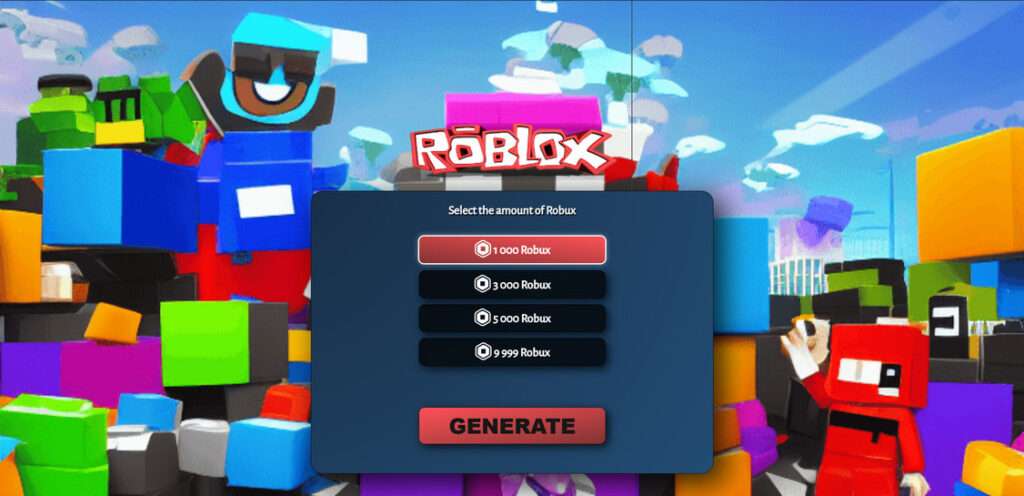
Asking for your username makes it all feel personal, like the Robux were already being sent. Some pages even pull up your avatar to sell the illusion.
A website can’t actually send Robux to a username, so that name serves another purpose. It keeps you invested in a delivery that is never going to arrive.
Step 3: A fake generator runs a staged show
A console lights up with lines such as “Connecting to Roblox servers” and “Injecting Robux into account.” At the same time, a progress bar fills. The performance has begun.
That whole window is a scripted animation. It plays out the same way for every visitor, never touches your Robux balance and injects nothing anywhere.
The show halts one step from the finish line, with the transfer supposedly “almost complete.” That deliberate pause prepares you for the real ask.
Step 4: You run into a “human verification” wall
You’re asked to complete one or two offers so you can “prove you’re not a bot.” A box appears, listing apps, games, surveys and sign-ups to pick from.
What looks like a security step is a content locker, the kind of ad tool CPA networks supply. It pays the operator for each finished offer and never delivers Robux.
Step 5: The real payout goes to someone else
Money is the point. Every locker task pays the operator, and app installs, survey answers or trial sign-ups can each earn a commission. Over thousands of visitors, that adds up.
Some offers are just a slog. Others go further, asking for a phone number that starts a paid text subscription or pushing apps from outside the official app stores.
Those offers become riskier when you remember these pages are aimed mainly at kids. A young player may accept terms or charges without understanding them.
Step 6: The payout never comes
Complete the offers and the page either claims verification “failed,” asks you for one more task, or reloads itself. Check your Roblox balance: it hasn’t changed.
The operator’s job is done by then: your time and data have already paid off for them.
A later prompt for your password or login code, supposedly to “finish the transfer,” should be treated as one thing: an attempt to take over your account.
Red Flags of Free Robux Sites Like Fxvfvbbvff.blogspot.com
You’ll find these signs on almost every free Robux site. Spot any one of them and you have reason enough to close the page.
It claims Robux will cost you nothing
Here’s the simple truth: Roblox doesn’t give Robux away through outside websites, so any site offering them free is a scam, whatever its tool is called.
A username prompt to “send” your Robux
Websites don’t add Robux to accounts; Roblox does. The username box is there to make the fake process look official, not to deliver anything.
A progress bar and a fake hacker console
Nothing is being hacked. The loading screens, “connecting to server” logs and “injection” messages are animations. Real Robux purchases happen on roblox.com or in the official app, no theatrics involved.
A “human verification” wall of offers
A real bot check, like a CAPTCHA, takes seconds. It never asks you to install apps or fill in surveys. If the verification pays someone else, it’s a content locker.
Constant winner updates and rave comments
Scripts and fake accounts handle the live feed of players “receiving” Robux and the glowing comments. Because the list is scripted, the same “winners” show up over and over.
A free host and a name built to be dumped
Free-hosting addresses like blogspot.com or netlify.app, random strings of letters and names cobbled together from “rbx,” “free” and “robux” all point to one thing: a throwaway page.
Why Free Robux Generators Can’t Work
Talk of a generator sounds technical enough that it can feel plausible. The reality: an outside site has nothing to generate or hack at all.
Robux don’t float around the internet waiting to be grabbed. They’re stored on Roblox’s servers, and only Roblox adds them after a purchase, Premium or a sale on the platform.
Roblox says it plainly in its help pages: an offer of free Robux, memberships or valuable items is always a scam, and whoever runs it wants your account.
Even breaking into Roblox wouldn’t give a site any reason to hand out free currency. In the end, these pages can actually give away just one thing: ads.
Same Kit, Different Domains
MalwareTips keeps running into new free Robux pages, and Fxvfvbbvff.blogspot.com is one of many that look nearly identical. Most are built from a handful of ready-made templates.
Different content-locker accounts, same page design. That combination suggests the templates are sold or shared, not run by one person.
So knocking one page offline rarely solves anything. Fresh copies pop up under new names, often within days, and the script doesn’t change at all.
Place the copies side by side and they match on these points:
- A headline built on “free Robux” or “Robux generator”
- A username field next to an amount selector
- A progress display that’s entirely fake
- A “human verification” prompt stuffed with offers
- Comment sections or live feeds boasting of recent payouts
There’s nothing to test on a page that matches this pattern. A new address doesn’t make it a different scam.
The Real Risks for Your Account, Device and Data
The usual result for most visitors is lost time and nothing else. Bigger risks hide in the requests made by the offers and any later pop-ups or messages. Watch for:
- Your Roblox account. Some versions ask for a “login code,” a 2-step verification code or your password. If someone gets those, they can lock you out and empty your inventory.
- Your device. Offers that steer you to app files outside Google Play or the App Store can put adware, or something nastier, on your device.
- Your phone bill. A premium text subscription can start once you enter a phone number in some offers, and the weekly charges keep coming until you cancel.
- Your personal details. Names and emails, ages and addresses: surveys and sign-ups collect all of it, and it ends up on marketing lists and in spam campaigns.
- Your browser. Some offer pages ask to show notifications. If you allow them, fake alerts and more “free Robux” ads start filling the screen.
Roblox says it won’t ask for your password outside its official login page. If any other site asks, treat it as an account thief, however good the promise sounds.
How to Get Robux the Safe Way
Skip the hunt for a free shortcut, since none exists. Instead, use one of these safe ways to add Robux without risking your account:
- Use roblox.com or the official Roblox app to buy Robux.
- Use Roblox’s own redemption page to redeem a gift card you bought from a real store.
- Collect the monthly Robux that come with a Roblox Premium membership.
- Build your own items, passes or experiences and earn Robux by selling them on Roblox.
Wondering whether a Roblox promotion is real? Check Roblox’s official website or social accounts. A genuine one doesn’t need your username on a stranger’s site.
A Note for Parents
Free Robux sites aim directly at children, since a child is more likely to trust a flashy page and less likely to read the terms of an offer.
Software filters can only do so much. A short conversation does more: tell your child free Robux offers are always fake and their Roblox password is for parents’ eyes only.
- Set up 2-step verification on the Roblox account your child uses.
- Check account activity and set spending limits through Roblox’s parental controls.
- Request that your mobile carrier block premium text subscriptions on the phone your child uses.
- Ask your child to promise to show you any unexpected login request or charge first.
If your child already used a site like Fxvfvbbvff.blogspot.com, skip the punishment. Work through the steps below together, password first.
What to Do If You Have Fallen Victim to This Scam
If you typed your username into Fxvfvbbvff.blogspot.com, completed offers or shared other details there, follow these steps to limit the damage. The account steps come first.
- Protect your Roblox account first. If your password went into any part of the site, change it on roblox.com immediately and sign out of every other session.
- Don’t skip 2-step verification. It asks for a code sent to you at sign-in, so a password someone grabs again won’t open your account by itself.
- Replace shared passwords. If the password you use on Roblox opens other accounts, such as your email, change each of them, beginning with the email.
- Get rid of the offer apps. Uninstall every app the offers had you install, and then use the steps below to check your device with Malwarebytes Free.
- End subscriptions from the offers. Go through app store subscriptions and your phone bill. For each charge the offers started, cancel it in the store settings or with your carrier.
- Stop the notification spam. Open your browser settings and remove notification permission from unfamiliar sites. You can also use AdGuard, which blocks many ads leading to these pages.
- Tell the platforms. Report the video, comment or post that pushed the link where it lives, and report the Roblox message or experience through Roblox’s Report Abuse tools.
- Skip “recovery” offers. If someone says they can get your lost items or Robux back in exchange for a fee or your password, that’s a second scam.
If you can’t log into the account anymore, turn to Roblox’s official support form for recovery. Have the username, email and any purchase receipts on hand.
Is Your Device Infected? Run a Free Malware Scan
Slow performance, constant pop-ups, or strange behavior? These are classic signs of a malware infection. A quick way to check is to scan your device with Malwarebytes Free, one of the most trusted malware removal tools available. If you only visited a scam page and didn’t download or install anything, this scan is optional.
The free version detects and removes the most common threats, including:
- Adware — the cause of those annoying pop-ups
- Browser hijackers — unwanted redirects and changed homepages
- Trojans and spyware — hidden programs stealing your data
- Potentially unwanted programs (PUPs) — software you never asked for
👉 Select your device below — Windows, Mac, or Android — then follow the simple steps to download Malwarebytes, scan your system, and remove any threats it finds. The scan usually takes 5 to 20 minutes.
Run a Malware Scan with Malwarebytes for Windows
Malwarebytes is one of the most popular and trusted anti-malware tools for Windows — and it’s completely free for removing infections. It catches threats that many antivirus programs miss, including adware, browser hijackers, and trojans. Follow the steps below to scan your PC and remove what Malwarebytes finds.
Download Malwarebytes
Click the button below to download the latest version of Malwarebytes for Windows from the official source. The free version is all you need — it will scan your computer and remove adware, browser hijackers, and other malicious software at no cost.
Download MalwarebytesOfficial installer for Windows 11 and 10. Your download starts right away.Want real-time protection? See Malwarebytes Premium Malwarebytes Free for WindowsScans and removes malware at no cost
-
Install Malwarebytes
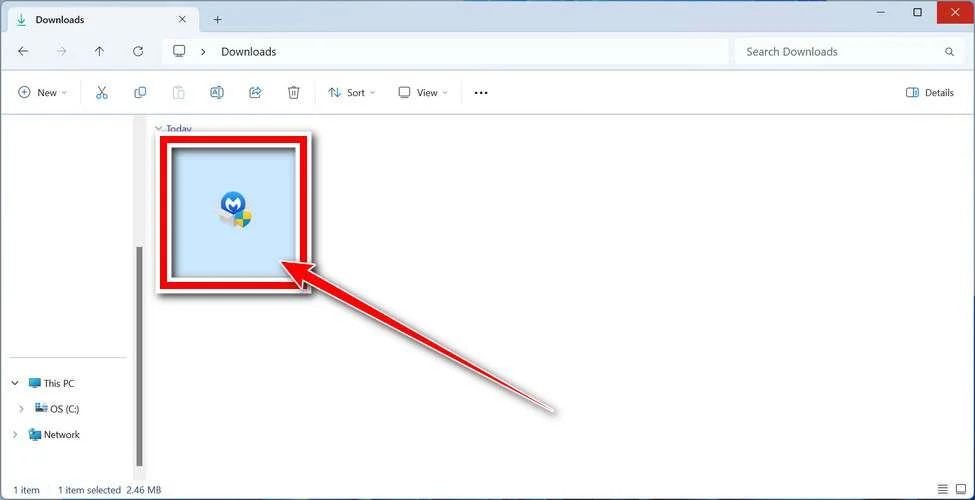
When the download finishes, open your Downloads folder and double-click the MBSetup file. If Windows shows a User Account Control pop-up, click “Yes” to allow the installation.
Follow the On-Screen Prompts to Install Malwarebytes
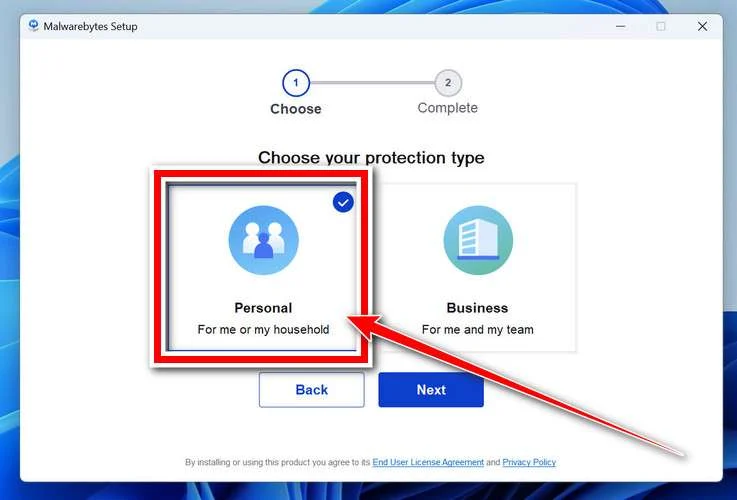
The setup wizard will walk you through a few quick screens:
-
Choose where you’re installing the program — “Personal Computer” or “Work Computer” — then click Next.
-
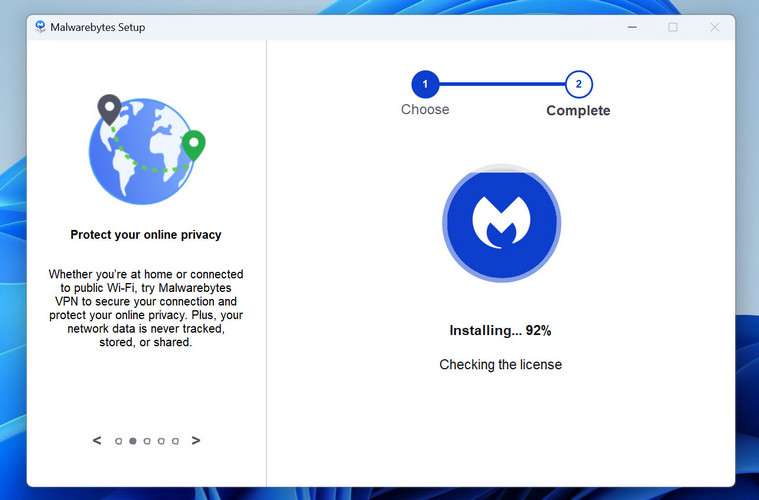
Malwarebytes will now install on your device. This usually takes under a minute.
-
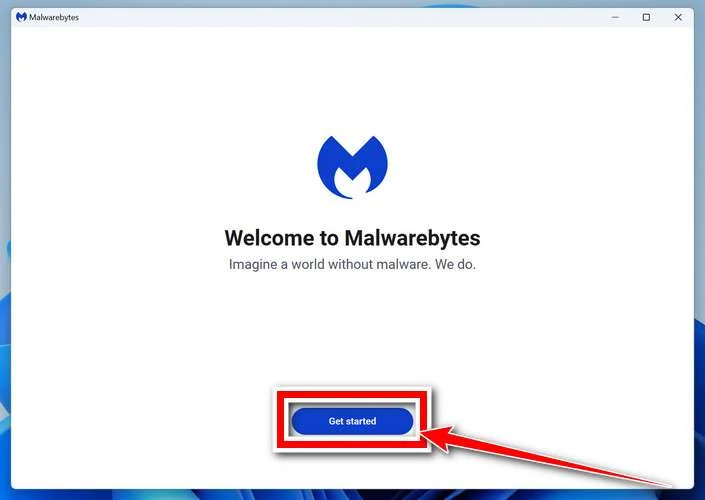
When installation is complete, the “Welcome to Malwarebytes” screen will open automatically.
-
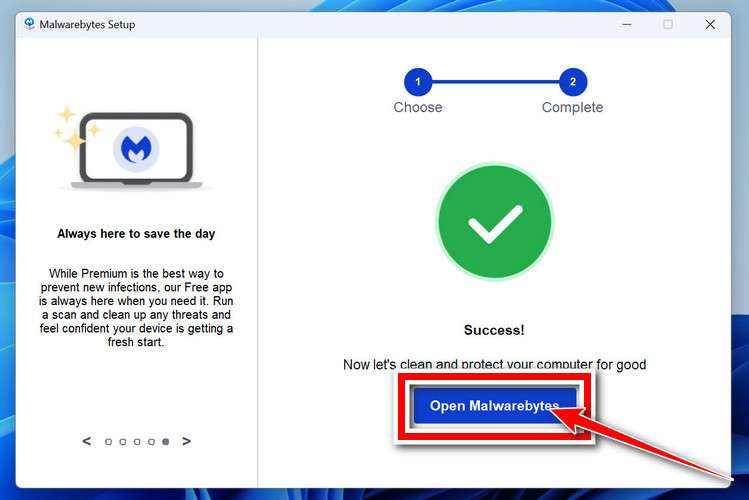
On the final screen, click Open Malwarebytes to launch the program.
-
Optional: Check for rootkits with a Custom Scan
You don’t need to change any settings for a normal scan. The standard Threat Scan in the next step is enough for most problems, so you can go straight to it.
If you also want to check for rootkits, use a Custom Scan. In current versions of Malwarebytes, rootkit scanning is only available there:
- On the Scanner tile, click the three-dot menu and select Advanced Scan.
- Choose Custom Scan. In its options, check Scan for rootkits.
- Select your system drive (usually C:\) as the location to scan, then start the scan. It takes longer than a Threat Scan.
- When it finishes, review and quarantine the results as described in the steps below.
Rootkit scanning isn’t available on Windows devices with ARM processors.
Start the Scan
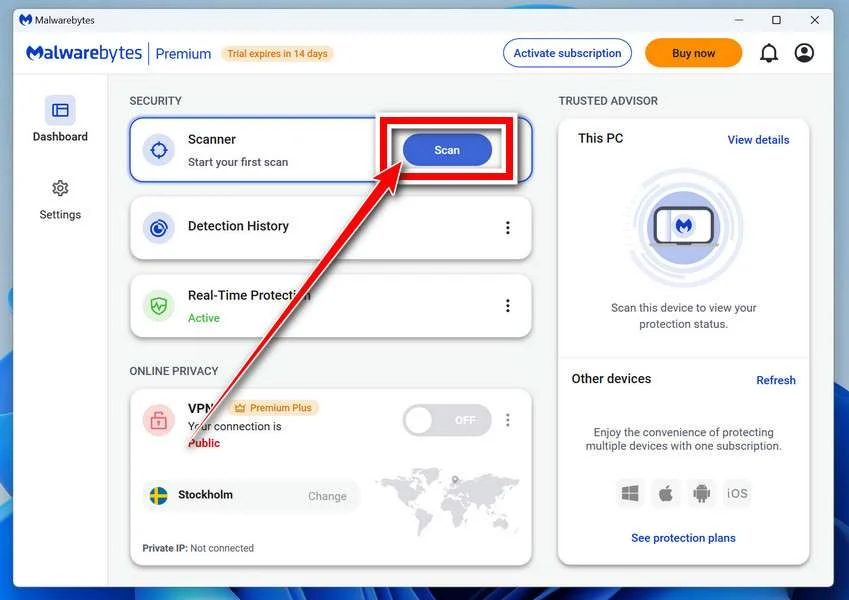
Click the blue Scan button. Malwarebytes will automatically update its virus database and start checking your computer for malware.
-
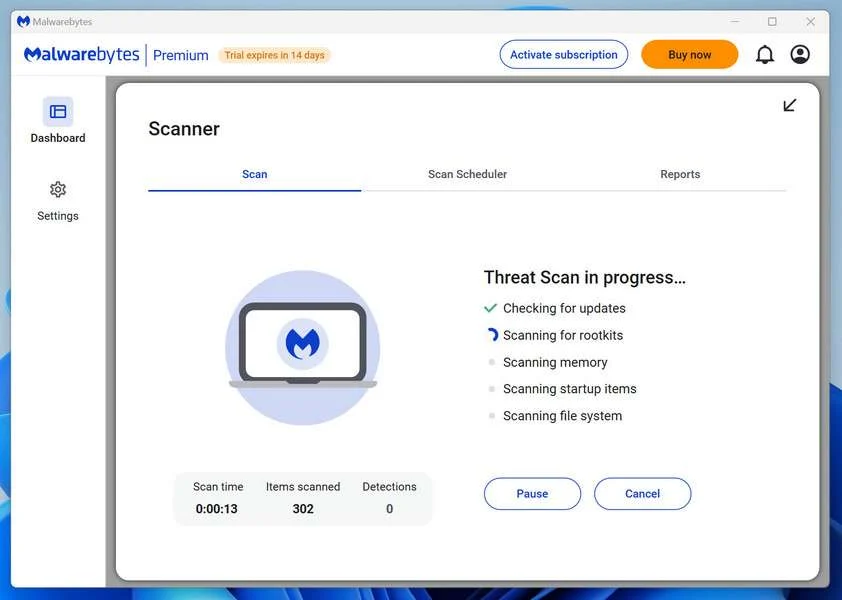
Wait for the Scan to Finish
The scan checks your entire system for browser hijackers and other malicious programs, so it can take 5 to 20 minutes depending on your computer. Feel free to do something else — just check back occasionally to see the progress.
-
Quarantine the Detected Threats
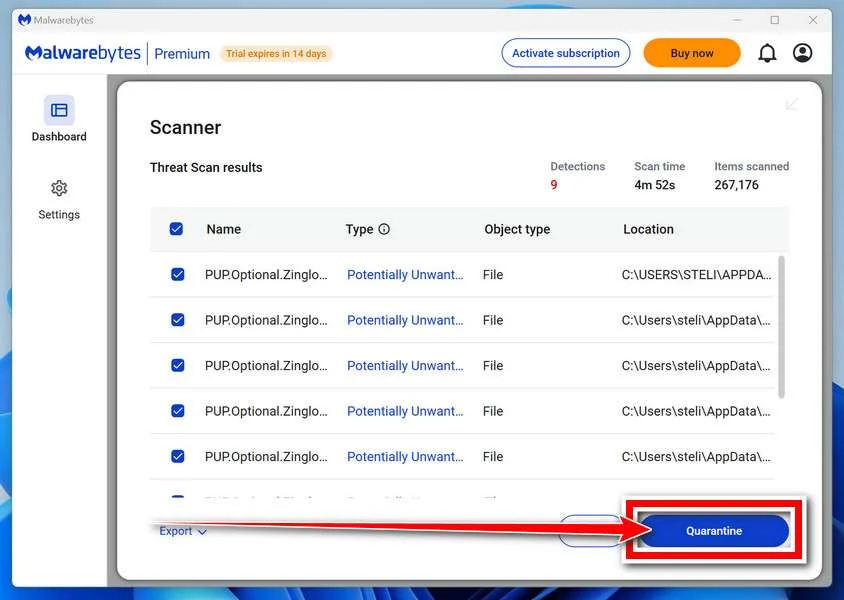
When the scan is done, you’ll see a list of everything Malwarebytes found — malware, adware, and potentially unwanted programs. Click the “Quarantine” button to remove all of them at once.
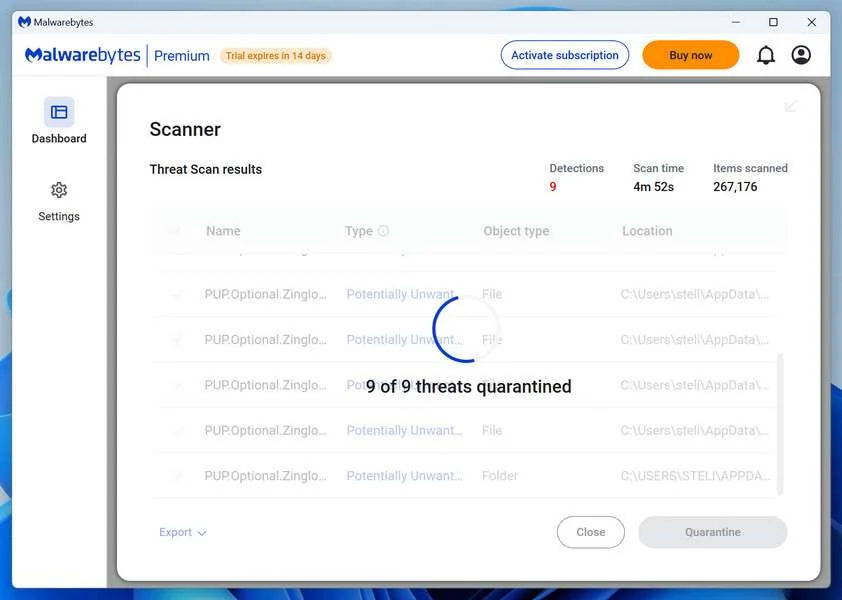
Malwarebytes will now remove the malicious files and registry entries and move them safely into quarantine.
-
Restart Your Computer
Some threats can only be fully removed after a reboot. If Malwarebytes asks you to restart, click Yes. Once you’re logged back in, Malwarebytes has finished removing the threats it found.
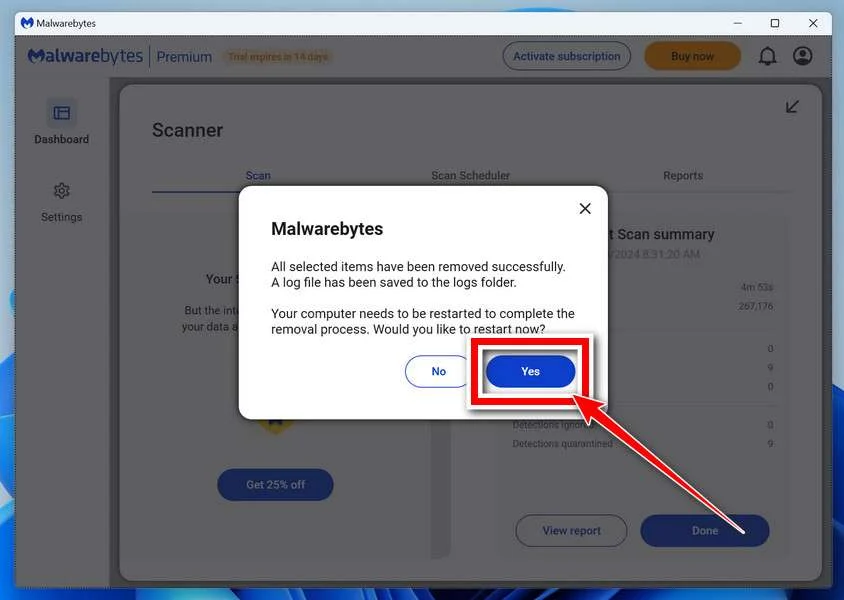
When the scan is done, check whether the problems you noticed have stopped. If they continue, see the options below.
If you are still having problems with your computer after completing these instructions, then please follow one of the steps:
- Run a computer scan with ESET Online Scanner
- Ask for help in our Windows Malware Removal Help & Support forum.
Run a Malware Scan with Malwarebytes for Mac
Malwarebytes for Mac is a free on-demand scanner that removes the malware other security software tends to miss — adware, browser hijackers, and unwanted programs included. Cleaning an infected Mac with Malwarebytes has always been completely free, and it’s our go-to recommendation. Follow the steps below to scan your Mac and remove what Malwarebytes finds.
-
Download Malwarebytes for Mac
Click the button below to download the latest version of Malwarebytes for Mac.
Download MalwarebytesOfficial installer for macOS. Your download starts right away.Want real-time protection? See Malwarebytes PremiumMalwarebytes Free for MacScans and removes malware at no cost -
Open the Malwarebytes setup file
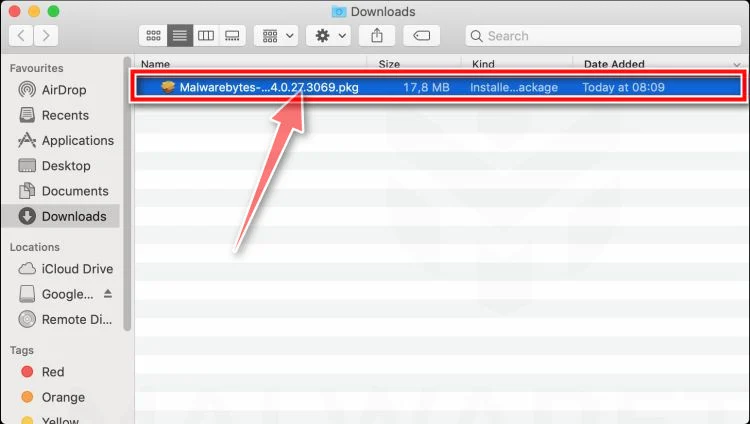
When the download finishes, open your Downloads folder and double-click the setup file to begin the installation.
-
Follow the On-Screen Prompts to Install Malwarebytes
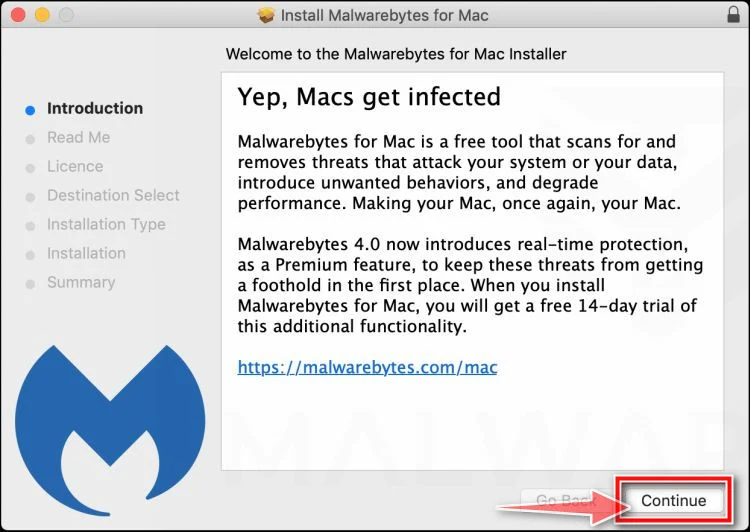
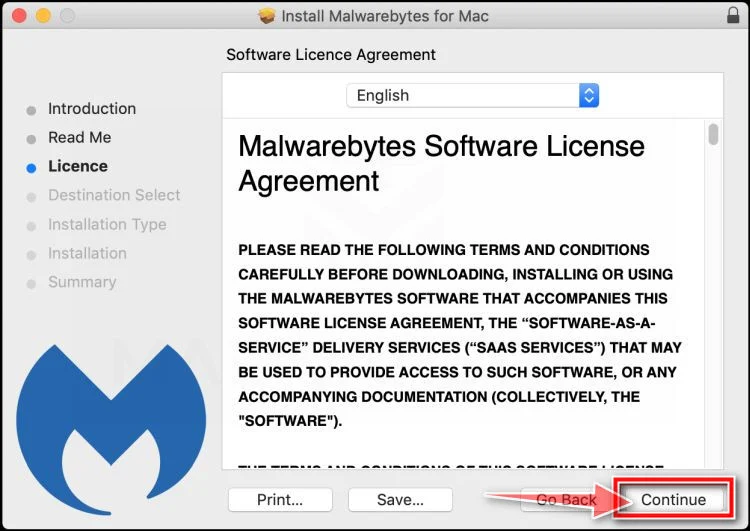
The Malwarebytes for Mac Installer will guide you through a few quick screens. Click “Continue” and keep following the prompts until the installation completes.
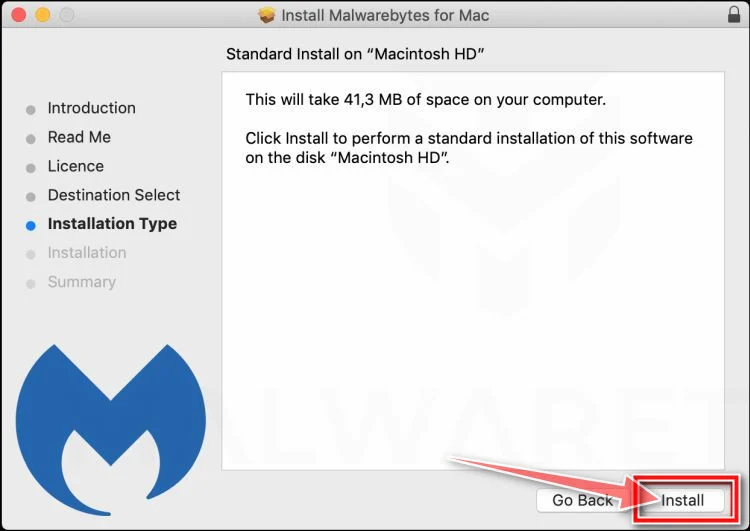
When the installation is complete, Malwarebytes opens to the Welcome to Malwarebytes screen. Click “Get started“.
Malwarebytes needs Full Disk Access to check your whole Mac. When it asks, open System Settings > Privacy & Security > Full Disk Access, turn on Malwarebytes (it may be listed as Malwarebytes Protection), and confirm with your password or Touch ID. Then return to Malwarebytes. On macOS Monterey and earlier, this setting is in System Preferences > Security & Privacy > Privacy.
-
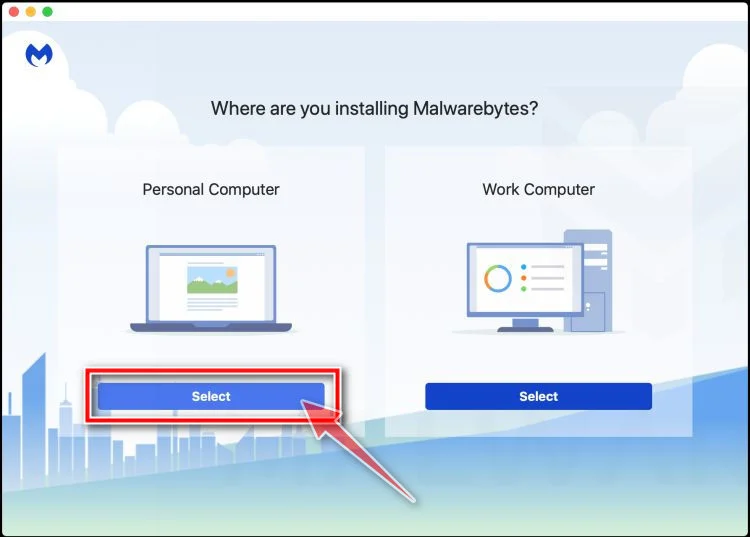
Select “Personal Computer” or “Work Computer”
Malwarebytes will ask what type of computer you’re installing it on. Click either Personal Computer or Work Computer, whichever applies.
-
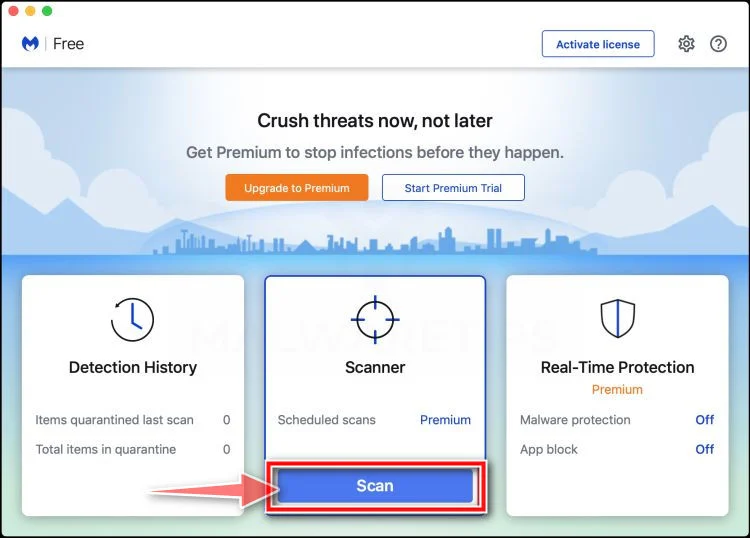
Start the Scan
Click the “Scan” button. Malwarebytes will automatically update its detection database and begin checking your Mac for malware.
-
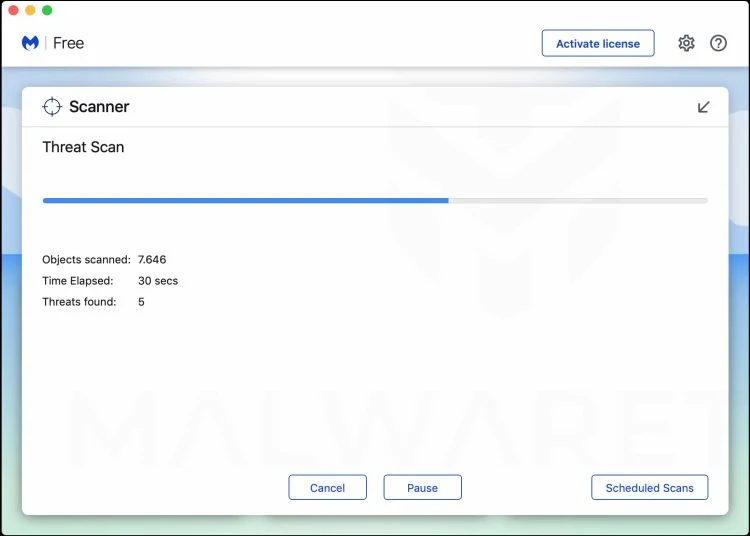
Wait for the Scan to Finish
Malwarebytes will scan your Mac for adware, browser hijackers, and other malicious programs. This can take a few minutes, so feel free to do something else — just check back occasionally to see the progress.
-
Quarantine the Detected Threats
When the scan is done, you’ll see a list of everything Malwarebytes found. Click the “Quarantine” button to remove all the threats at once.
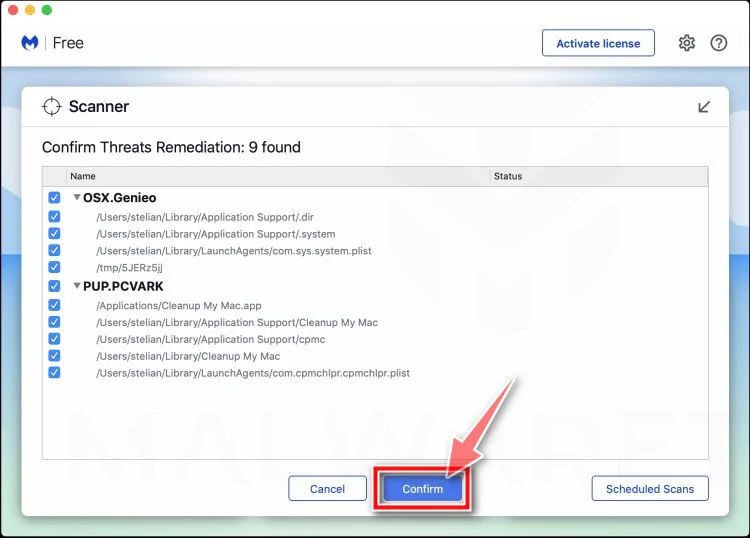
-
Restart Your Mac
Malwarebytes will now remove all the malicious files it found. Some threats can only be fully removed after a reboot — if Malwarebytes asks you to restart, allow it. Once you’re logged back in, check whether the problems you noticed have stopped. If they come back, save the scan report and ask for help in our forum.
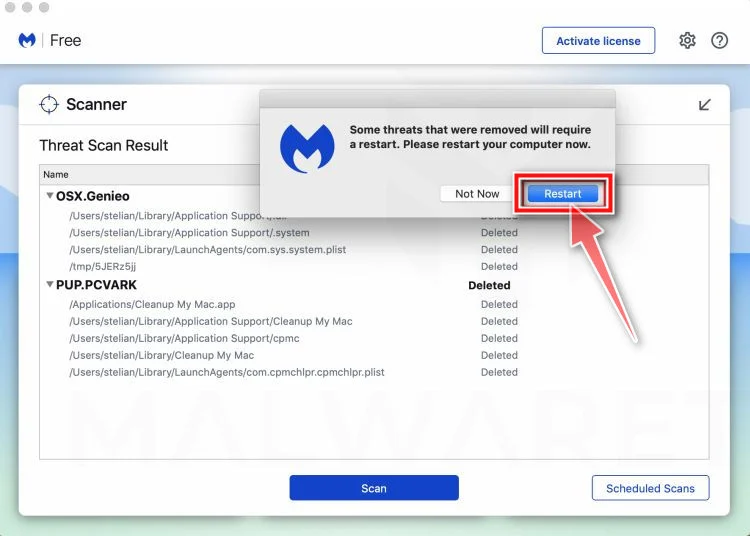
If the problems you noticed continue after the scan, see the options below.
If you are still experiencing problems while trying to remove a malicious program from your computer, please ask for help in our Mac Malware Removal Help & Support forum.
Run a Malware Scan with Malwarebytes for Android
Malwarebytes for Android scans your phone or tablet for malware, adware, and potentially unwanted apps. The free version scans only when you start a scan. Real-time protection, which checks apps automatically, is part of the paid Premium version.
-
Download Malwarebytes for Android.
You can download Malwarebytes for Android by clicking the link below.
Get Malwarebytes for AndroidOpens Google Play in a new tab.Want real-time protection? See Malwarebytes Premium for AndroidMalwarebytes for AndroidScans your phone and removes malware at no cost -
Install Malwarebytes for Android on your phone.
In the Google Play Store, tap “Install” to install Malwarebytes for Android on your device.
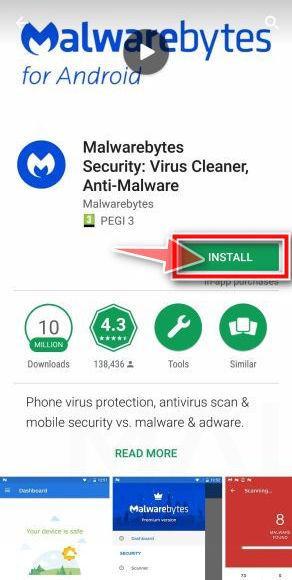
When the installation process has finished, tap “Open” to begin using Malwarebytes for Android. You can also open Malwarebytes by tapping on its icon in your phone menu or home screen.
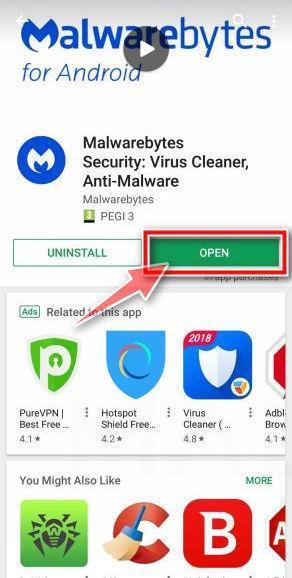
-
Follow the on-screen prompts to complete the setup process
When Malwarebytes opens, it walks you through a short setup. Tap Get started and follow the prompts. If you see an offer for a trial or a paid plan, read it before you accept. You can skip it and keep using the free scanner.
Malwarebytes will ask for permission to access the files on your phone so it can scan them. Tap Allow, or turn on the permission in the Android screen that opens, then return to Malwarebytes.
-
Run a scan with Malwarebytes for Android
On the main screen, tap Scan now. In some versions, you open the menu, tap Scanner, and then tap Run a scan.
-
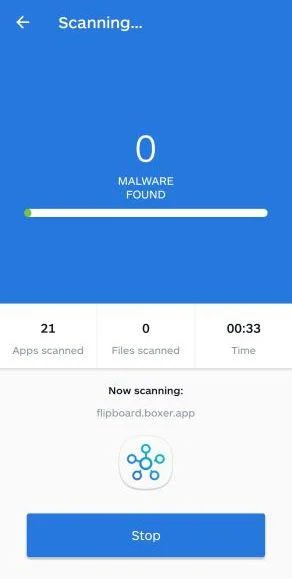
Wait for the Malwarebytes scan to complete.
Malwarebytes will now start scanning your phone for adware and other malicious apps. This process can take a few minutes, so we suggest you do something else and periodically check on the status of the scan to see when it is finished.
-
Remove the detected apps.
When the scan has been completed, you will see a list of the threats that Malwarebytes for Android has detected. Next to each detected item, tap the menu icon (three dots), then choose to uninstall the app or delete the file. Android then asks you to confirm. Tap OK or Uninstall to remove the app.
-
Restart your phone.
When the detected apps are removed, restart your phone if Malwarebytes asks you to. Then check whether the problems you noticed have stopped.
If the problems you noticed continue after the scan, see the options below.
If you are still having problems with your phone after completing these instructions, then please follow one of the steps:
- Ask for help in our Mobile Malware Removal Help & Support forum.
- Only as a last resort, reset your phone to factory settings. Read the warning below first.
- Back up your photos, videos, files, and messages, for example to your Google account or a computer.
- Make sure you know your Google account email and password. The phone asks for them after the reset. If you changed the password recently, Google recommends waiting 24 hours before you reset.
- On a Samsung phone, also make sure you know your Samsung account password.
- If you use an authenticator app for two-step verification, move your accounts to another device or save your backup codes first.
Stay Protected: Block Ads and Malicious Sites
No scan can prove a device is completely clean, so it helps to block threats before they reach you. Most infections start with a malicious ad or a fake download button — so blocking them at the source is your best defense.
We recommend AdGuard, which blocks malicious ads, phishing pages, and dangerous redirects before they can reach you.
👉 Download AdGuard and browse safely
Frequently Asked Questions
Is Fxvfvbbvff.blogspot.com a real Robux generator?
Definitely not. Fxvfvbbvff.blogspot.com is a free Robux scam. The generator is an animation, and the “verification” offers exist to pay the operator, not to give you anything.
Can a website add Robux to my account with only my username?
No. A username just tells a site who you are. It gives the site no way to send currency, because only Roblox can add Robux to an account.
Why does Fxvfvbbvff.blogspot.com make me complete offers?
Making money from those offers is the whole plan. The operator collects a commission through an ad network for each app install, survey or sign-up you complete.
Can I get banned for using a Robux generator?
Fake generator pages can’t touch your account. Cheat tools break Roblox’s rules, and that can get an account banned. Not one of them can create a single Robux.
I entered my username on Fxvfvbbvff.blogspot.com. Is my account in danger?
Just a username isn’t enough to unlock an account. If you also gave away your password or a login code, the danger is real, so change your password.
Is there any legitimate way to get free Robux?
Generators and websites won’t give you free Robux. The no-cost path is creating on Roblox to earn Robux. Otherwise, buy Robux, a gift card or Premium.
The Bottom Line
Fxvfvbbvff.blogspot.com is a free Robux scam. The generator? A show. The “human verification”? An ad wall. The Robux? It will never reach your account.
Skip the username box, skip the offers, and keep your Roblox password for roblox.com or the official app, nowhere else.
Already went through it? Start with a fresh Roblox password and 2-step verification. After that, cancel any subscriptions those offers started and report the link where it showed up.

Join the discussion
0 commentsShare your experience or ask a question about this article.
Discussion
Start the conversation
Have a question or something useful to share? Add the first comment.