

A new email phishing scam has emerged involving fraudulent messages claiming your Geek Squad membership requires immediate billing updates. The scam email provides a customer service number to urgently call regarding the alleged account issue. However, it is a deceitful attempt to extract personal information and money from victims who call. This article explains how to detect this “Geek Squad Membership Update” email scam.
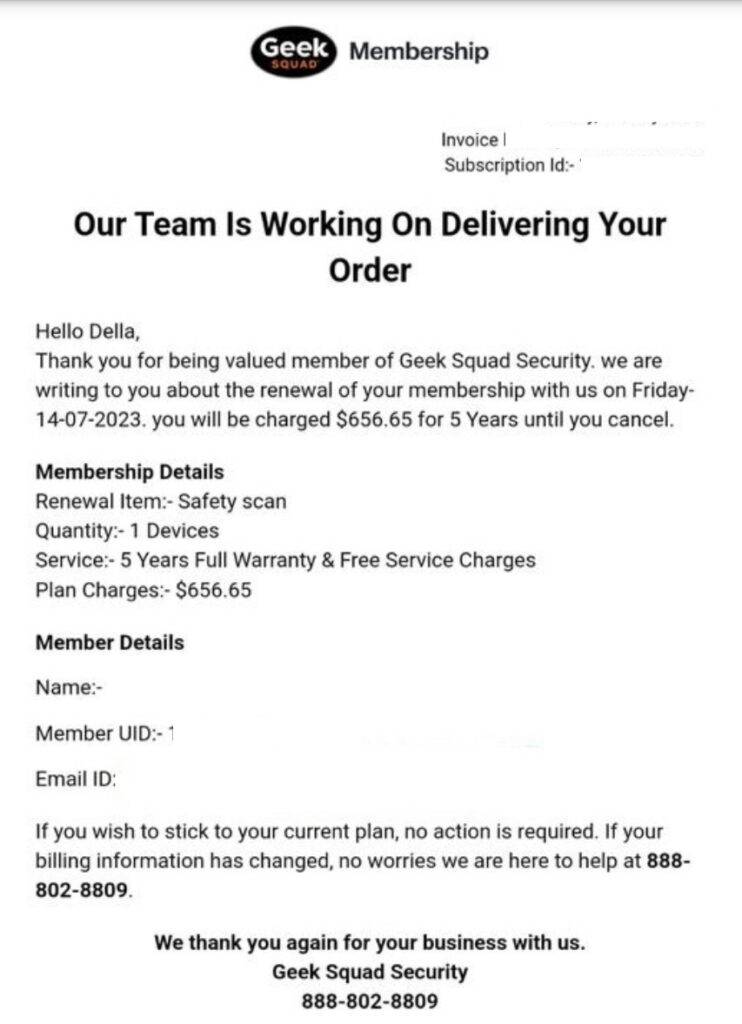
The Fake Geek Squad ‘Membership Requires Update’ Email
The Geek Squad ‘Membership Requires Update’ phishing scam starts with potential victims receiving an unsolicited email crafted to expertly impersonate an official customer account notice from Geek Squad, Best Buy’s computer and tech support division.
The scam email closely mimics a real Geek Squad membership expiration notice in many aspects including:
- Using a spoofed sender address to appear as an authentic Geek Squad billing email.
- Including the real Geek Squad logo and Best Buy branding to look legitimate.
- Adding fake personalized details like the recipient’s name, account ID, and upcoming expiration date.
- Listing a believable membership renewal price consistent with Geek Squad’s actual pricing plans.
- Citing an urgent need to update billing details to avoid an interruption in membership coverage.
- Providing a customer support phone number to call to supposedly assist with the account issue.
Here is an example of the phishing email template:
From: billing@geeksquad.com
Subject: Immediate Action Needed - Your Geek Squad Membership Expiring

Valued Geek Squad Member William Smith,

Your Geek Squad Total Tech Support membership, with Member ID GSS326F211, will be expiring on 07/30/2023.

To avoid any interruption in your coverage, please contact our billing department immediately at 888-555-1234 to confirm your latest payment information is on file so we can process your upcoming $349.99 renewal charge.

Thank you for your prompt attention to this important membership renewal matter.

Geek Squad Billing
The urgent tone insists the recipient must call the provided number right away regarding updating their payment details in order to renew their supposedly expiring membership plan.
However, Geek Squad does not typically send unsolicited account expiration notices in this manner. The email and number are complete fabrications by scammers aiming to deceive people who call into providing personal information and money through manipulation.
If recipients, unfortunately, call the phone number, sophisticated scammers posing as Geek Squad billing agents answer. They confirm the caller’s name and account number to pretend familiarity. The scammers then proceed to:
- Request remote access to the victim’s computer under the guise of verifying membership status. This allows them to install malware, steal data, and harvest information.
- Ask victims to log into their real bank account portals to “process a refund or cancellation”. The scammers can then steal money or expose account data.
- Have victims pay phantom renewal fees over the phone via gift cards to keep the scam funds difficult to trace. The numbers are quickly redeemed by scammers.
- Use urgency tactics to scare victims into immediate action like threatening membership termination if payment issues aren’t resolved.
The longer they can keep targets engaged, the more personal data they can elicit through manipulation to facilitate financial frauds and identity theft.
Red Flags of the Geek Squad ‘Membership Requires Update’ Scam Email
Here are some indicators an email insisting you urgently call Geek Squad to update membership details is likely fraudulent:
- You did not recently request any account changes or assistance to prompt such an notice.
- The sender email domain shows subtle differences from the official @geeksquad.com address.
- There are questionable grammar usage, spacing errors, or formatting inconsistencies unlike professional Geek Squad communications.
- It pressures immediate calling of the provided number instead of advising logging into your real Best Buy account online.
- The given number rings to an undisclosed overseas call center instead of verified legitimate Geek Squad support lines.
- The email asks for sensitive personal and financial data Geek Squad would already have documented if you were a current member.
- Details about your supposed member ID, renewal date, or monthly costs do not match any active membership you actually have.
If an email raises any suspicions, do not call the provided number. Check your real Geek Squad account status directly through official Best Buy channels.
What to Do if You Called the Number
If you unfortunately already called the phone number in one of the scam emails, quickly take these steps:
- Contact your bank immediately if you revealed any financial account information over the call. Halt any unauthorized transactions.
- Reset all account passwords and enable two-factor authentication anywhere it was disabled if credentials were compromised.
- Run comprehensive antivirus and malware scans if you downloaded anything to check for monitoring programs or theft-enabling infections.
- Review credit reports and account statements to check for any signs of initial identity theft or financial fraud based on data exposed in the call.
- Report details about the Geek Squad impersonation scam call to the FTC and IC3 to aid investigations into these criminal operations.
Avoiding the Geek Squad ‘Membership Requires Update’ Scam
Here are tips to avoid falling for the fake Geek Squad membership expiration email and call scam:
- Disregard any unexpected account emails with instructions to urgently call unknown numbers. Independently verify legitimacy on your terms first.
- Closely check that any email sender addresses match official domains exactly, watching for even single character typos or deviations.
- Do not call any numbers provided in emails. Look up published customer service lines yourself to call companies.
- Log into your real account portal directly to confirm any account alerts before trusting details in an email.
- Never disclose personal or financial details over calls from unverified numbers who reach out to you first.
Exercising caution when contacted unexpectedly can prevent you from being manipulated by scammers impersonating well-known brands like Geek Squad through fraudulent account notification emails and calls.
Conclusion
In summary, do not call the number provided in any unexpected Geek Squad ‘Membership Requires Update’ emails. The emails are phishing scams aiming to trick recipients into surrendering sensitive data and providing money or computer access, enabling financial frauds. Always independently confirm account issues directly through official websites or published numbers. With proper skepticism, you can avoid the traps set by these phishing “account notification” tactics from scammers posing as legitimate businesses.

Join the discussion
0 commentsShare your experience or ask a question about this article.
Discussion
Start the conversation
Have a question or something useful to share? Add the first comment.