

A new disturbing email scam has emerged that aims to trick victims into paying bitcoin ransoms. Using social engineering tactics that prey on fear, these fraudulent messages claim a hacker has fully compromised the recipient’s device.
Dubbed the “Hacker Who Hacked Your Operating System” scam, this con uses flimsy evidence and empty threats in an attempt to extort money from the unaware. While these emails may sound concerning, they are completely fabricated by criminals.
In this comprehensive guide, we will break down how this scam works, provide examples of the scam email, offer advice for victims, and equip you with knowledge to avoid falling for this fraud. Forewarned and forearmed against such cyber extortion ploys.
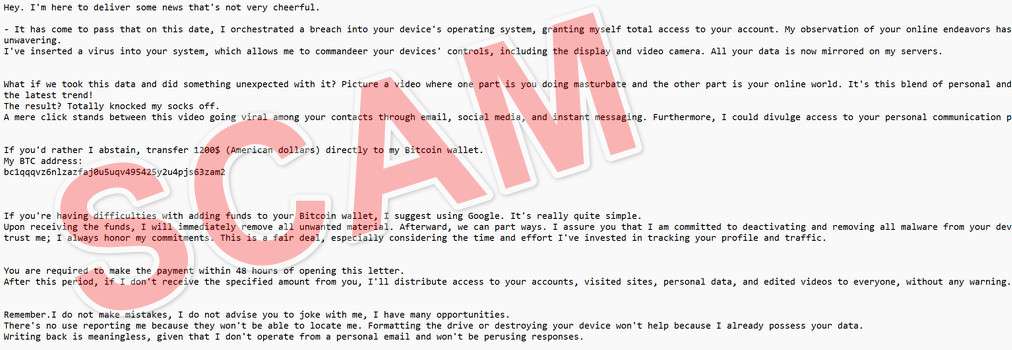
Overview of the “Hacker Who Hacked Your Operating System” Scam
The “Hacker Who Hacked Your Operating System” scam exhibits many hallmarks of a classic sextortion con. The criminals rely on the exploitation of human emotions like anxiety, panic, and the fear of public embarrassment.
By claiming to have deeply personal videos of the recipient, the scammers hope the target will be frightened into complying with their demands. However, these claims are false, designed to trick victims out of money.
Here is how the “Hacker Who Hacked Your Operating System” email scam looks:
Hi!
I’m a hacker who hacked your operating system a few months ago.
This means that I have full access to your account:
At the time of hacking your account(xxxxxxx@xxxxxxx.com) had this password:You can say: this is my, but old password!
Or: I can change my password at any time!Of course! You will be right,
but the fact is that when you change the password, my malicious code every time saved a new one!I’ve been watching you for a few months now.
But the fact is that you were infected with malware through an adult site that you visited.If you are not familiar with this, I will explain.
Trojan Virus gives me full access and control over a computer or other device.
This means that I can see everything on your screen, turn on the camera and microphone, but you do not know about it.I also have access to all your contacts and all your correspondence from e-mail and messangers.
Why your antivirus did not detect my malware?
Answer: My malware uses the driver, I update its signatures every 4 hours so that your antivirus is silent.I made a video showing how you masturbate in the left half of the screen, and in the right half you see the video that you watched.
With one click of the mouse, I can send this video to all your emails and contacts on social networks. I can also post access to all your e-mail correspondence and messengers that you use.If you want to prevent this, transfer the amount of $950 to my bitcoin address (if you do not know how to do this, write to Google: “Buy Bitcoin”).
My bitcoin address (BTC Wallet) is: 1AJ4syJxPPP7hYhURPiQUQMY4LurJgYvY8
After receiving the payment, I will delete the video and you will never hear me again.
I give you 48 hours to pay.
I have a notice reading this letter, and the timer will work when you see this letter.Filing a complaint somewhere does not make sense because this email cannot be tracked like my bitcoin address.
I do not make any mistakes.If I find that you have shared this message with someone else, the video will be immediately distributed.
Bye!
Some key things to know about this scam include:
- Targets everyday internet users – These scam emails blast out randomly to ensnare as many victims as possible. Anyone with an email could potentially fall prey.
- Exploits fear and shame – The email tries to scare recipients into paying the ransom by threatening to share humiliating videos that do not actually exist.
- Demands untraceable payment – The scammers insist on payment by bitcoin, which allows them to remain anonymous and withdraw money instantly.
- Makes bogus hacking claims – The message falsely claims the recipient’s device was compromised and infected with malware, which is fabricated.
- Threatens distribution of footage – If the ransom isn’t paid, the criminals threaten to send imaginary embarrassing videos to the target’s email and social media contacts.
- Tries to avoid tracking – By claiming email responses won’t be read, the scammers try to prevent email tracing tools from uncovering their location.
- Pressures urgency – The 48 hour timeframe adds urgency to pay the ransom before the non-existent videos get leaked. This gets victims to act rashly out of fear.
- Preys on the vulnerable – Elderly individuals, as well as those with mental health issues, are often prime targets for these exploitative extortion scams.
Next, let’s examine exactly how this devious scam works from start to finish.
How the “Hacker Who Hacked Your Operating System” Scam Works
The “Hacker Who Hacked Your Operating System” extortion scam operates in several stages:
1. Criminals Obtain Email Addresses
The first step is for the scammers to acquire large caches of potential victims’ email addresses. These are gathered through various underhanded means, like:
- Hacking websites and databases to steal email lists
- Scraping public internet forums and social media sites for emails
- Purchasing email lists from shady dark web brokers
- Using bots to harvest emails from across the web
2. Fraudulent Email Template Created
The criminals then design an email template containing their fake hacking claims and extortion demand. The message is crafted to sound credible, citing technical jargon about malware installation and supposed full system access.
3. Scam Emails Blasted Out
Using the stolen email lists from step one, the scammers send their fraudulent emails en masse to millions of potential victims. The more emails blasted out, the more potential targets they ensnare.
4. Recipients Open and Read Email
As the scam messages land in inboxes around the world, some recipients inevitably open and read them. If the target exhibits any gullibility or computer inexperience, they may fall for the scam that was crafted just for them.
5. Ransom Demands Made
The email contains ransom payment instructions, demanding $950 in bitcoin to the scammer’s provided wallet address. Threats of leaking embarrassing videos are made if the ransom isn’t paid within 48 hours.
6. Some Victims Send Payment
If the scam works, the emotionally-manipulated recipient overlooks the email’s dubious claims and sends the ransom payment in bitcoin per the demands. This is the scammer’s desired outcome.
7. Criminals Disappear with the Money
Upon receiving payment in their anonymous bitcoin wallet, the scammers simply cut off all contact with the victim. Since bitcoin transactions are irreversible, victims have no way to recover their funds from these criminals.
8. Scammers Repeat the Process
With a fresh financial windfall in hand, the hackers repeat the process and blast out more scam emails to different potential victims. Rinse and repeat, making easy money off this exploitation.
This anatomy illuminates how these scams leverage fear to manipulate targets into overlooking logic and hastily sending ransom payments. Next, let’s explore how to recover if you fell victim.
What to Do If You’ve Fallen Victim to This Scam
Finding out you paid a ransom to hackers impersonating you online is a nightmare scenario. If this happens to you, here are tips on responding:
- Don’t pay any more money – Cut off all contact with the scammers and never send additional payments, no matter how threatening they seem.
- Report the email – Forward the scam email to your email provider’s abuse team and the FBI’s Internet Crime Complaint Center.
- Notify contacts – If you paid the ransom, the criminals may still try to contact your friends and family asking for money while posing as you. Warn your contacts that it’s a scam.
- Boost security – Change all account passwords, run antivirus scans, turn on two-factor authentication everywhere possible, and monitor closely for signs of misuse.
- Watch for tax fraud – Be on high alert for tax refund fraud, as scammers may have obtained key personal details enabling them to file taxes in your name.
- Seek legal counsel – Speak with a lawyer regarding filing a report with the authorities. They may be able to trace the bitcoin wallet payments to identify the criminal.
- Get emotional support – Being extorted online can take a serious mental toll. Seek counseling or join a support group to help process feelings of violation. You are not alone.
- Learn from the mistake – As the saying goes, forewarned is forearmed. Use this as a lesson to be more vigilant against online scams going forward.
With proper reporting and enhanced security, you can limit the damage caused by these scammers. Don’t let shame prevent you from seeking help – there are resources available.
Frequently Asked Questions About the “Hacker Who Hacked Your Operating System” Scam
1. How does the “Hacker Who Hacked Your Operating System” scam work?
This scam begins with an email claiming the recipient’s operating system was hacked months ago. It threatens to send embarrassing videos to contacts unless a $950 bitcoin ransom is paid within 48 hours. This is completely fabricated to trick victims.
2. What are some key details in the scam email?
- Claims full access to accounts and screens
- Says it infected device with undetectable malware
- Threatens to leak adult videos spliced with personal data
- Demands untraceable $950 bitcoin payment to provided wallet
- Warns contacting others or seeking help is useless
3. What are some tactics used in the scam email?
- Exploits fear, panic, and embarrassment
- Cites old passwords to appear credible
- Pressures urgency to pay quickly before videos get sent
- Makes targets feel powerless to stop the threats
- Attempts to avoid email tracking to hide scammers’ location
4. What type of personal information is compromised?
No personal data is actually compromised. The hackers’ claims of videos and account access are completely fabricated to extort money. They do not have any sensitive information.
5. Does paying the ransom help?
No, paying only enables the scammers and funds their criminal operations. There are no videos to delete, so paying provides no benefit. The scammers typically disappear after receiving payment.
6. What happens if I don’t pay the ransom?
Nothing happens if the ransom is not paid, as the scammers have no compromising footage to distribute and no actual access. They are merely using empty threats in hopes of tricking victims into paying. Not paying is the recommended action.
7. Should I report the scam email?
Yes, report the scam email to your email provider’s abuse team and the FBI’s Internet Crime Complaint Center. This helps authorities track and shut down these fraudsters. Also warn your contacts in case they receive similar video threats.
8. How can I recover if I already paid the ransom?
If you paid, immediately contact your bank and police. Monitor accounts closely for misuse. Enable two-factor authentication everywhere and change passwords. Seek counseling for stress. But the likelihood of recovering lost funds is unfortunately very low.
9. How can I boost security after receiving the scam email?
Scan devices for malware, change passwords, turn on two-factor authentication, monitor accounts closely, and be extra vigilant for any further contact attempts by the scammers. Also watch out for other scams targeting the same email address.
10. How can I avoid becoming a victim of this scam?
Be skeptical of threat emails demanding untraceable payments. Look for signs like threats, limited timeframes, and claims of total access as red flags. Stay calm and think critically before taking any action. When in doubt, seek help. Don’t let fear override your best judgement.
The Bottom Line
The emergence of the “Hacker Who Hacked Your Operating System” scam makes it evident that users must stay skeptical in the face of threats demanding quick payments.
This guide has armed you with specific knowledge on how these scams leverage social engineering and fear against victims. But with greater awareness, we can work together to combat these frauds.
Remember, alleged hackers contacting you demanding untraceable payment in bitcoin are almost certainly running a scam. Never act solely based on emotions like fear or panic. Stop and think critically before taking any action.
The supposed embarrassing videos, access to accounts, and contact threats are all bluffing tactics to coerce ransom payment. But armed with the information in this article, potential victims can stop these criminal extortion schemes in their tracks.

Join the discussion
0 commentsShare your experience or ask a question about this article.
Discussion
Start the conversation
Have a question or something useful to share? Add the first comment.