

Hey Dude Shoes is a popular brand of casual footwear that offers comfort, style and durability. However, some scammers have taken advantage of its popularity and created fake online stores that claim to sell Hey Dude Shoes at discounted prices. These fake online stores are designed to lure unsuspecting customers into providing their personal and financial information, and then never deliver the products they ordered. In this blog post, we will explain what the Hey Dude Shoes fake online stores scam is, how it works, how to avoid it and what to do if you have been scammed.
What is the Hey Dude Shoes Fake Online Stores Scam?
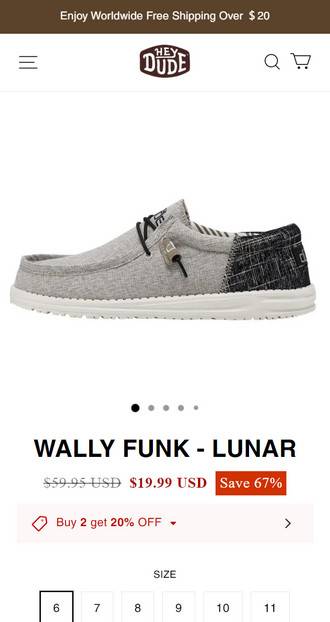
The Hey Dude Shoes fake online stores scam is a type of online fraud that involves creating fake websites that look like the official Hey Dude website or other legitimate online retailers that sell Hey Dude Shoes. These fake websites use the same logo, design, images and product descriptions as the real ones, but they offer lower prices and free shipping to attract customers. Some examples of fake Hey Dude Shoes online stores are heydude2008.com, heydudestores.com and others sites.
The scammers behind these fake websites use various methods to promote them, such as sending spam emails, posting fake ads on social media platforms, creating fake reviews and testimonials, and using search engine optimization techniques to rank high on search results. They also use fake contact information, such as email addresses like sily@peachcher.com, to make their websites seem more credible.
How Does The Hey Dude Shoes Fake Online Stores Scam Works?
The Hey Dude Shoes fake online stores scam works by tricking customers into believing that they are buying genuine Hey Dude Shoes products from a legitimate website. When customers visit these fake websites, they are asked to create an account, choose their products, enter their shipping and billing information, and pay for their orders using a credit card or other payment methods. However, after they complete their transactions, they never receive any confirmation emails or tracking numbers for their orders. They also find out that their credit cards have been charged more than the amount they agreed to pay, or that they have been charged for products or services that they did not order.
When customers try to contact the customer service of these fake websites, they either get no response or receive automated replies that ask them to wait for their orders or provide more information. They also discover that the phone numbers and addresses listed on these websites are either invalid or belong to someone else. They realize that they have been scammed and that they have no way of getting their money back or receiving their products.
What To Do If You Have Fallen Victim
If you have fallen victim to the Hey Dude Shoes fake online stores scam, you should take the following steps as soon as possible:
- Contact your bank or credit card company and report the fraudulent transaction. Ask them to cancel your card and issue a new one. Also ask them to open a dispute and request a chargeback for your money.
- Contact the official Hey Dude Shoes website at www.heydude.com and inform them about the scam. They may be able to provide you with some assistance or advice on how to deal with the situation.
- Report the scam website to the relevant authorities, such as the Federal Trade Commission (FTC), the Better Business Bureau (BBB), the Internet Crime Complaint Center (IC3), or your local consumer protection agency. Provide them with as much information as possible about the scam website, such as its URL, contact details, screenshots and any correspondence you had with them.
- Warn your friends and family about the scam and advise them not to visit or buy from these fake websites. Also share your experience on social media platforms and online forums to raise awareness and prevent others from falling victim.
Conclusion
The Hey Dude Shoes fake online stores scam is a serious threat to online shoppers who are looking for comfortable and stylish footwear. By creating fake websites that look like the real ones, scammers are able to deceive customers into providing their personal and financial information and then steal their money and identity. To avoid this scam, customers should always verify the authenticity of any website before making a purchase, especially if it offers prices that are too good to be true. Customers should also check the reviews and ratings of any website before trusting it, and use secure payment methods that offer protection in case of fraud. If customers have been scammed by these fake websites, they should act quickly and report the scam to their bank, the official Hey Dude Shoes website and the relevant authorities.

Join the discussion
0 commentsShare your experience or ask a question about this article.
Discussion
Start the conversation
Have a question or something useful to share? Add the first comment.