

Scam websites have been popping up pretending to offer free Coleman camping tents through Home Depot. Through convincing branding and too-good-to-be-true deals, these fraudulent sites trick victims into signing up for recurring monthly subscription fees in order to receive the supposedly free tents.
This elaborate ruse is known as a hidden subscription scam. By making an amazing free offer, the scammers convince victims to hand over financial information which is then used to repeatedly charge monthly fees. These fraudulent sites even use the Home Depot and Coleman branding without permission to appear more legitimate.
It’s important to understand how this type of scam works so you can avoid becoming a victim. This article will provide an in-depth examination of the Home Depot Coleman tent scam, including how to identify fraudulent offers, avoid providing your information, and steps to take if you fell for the ruse.
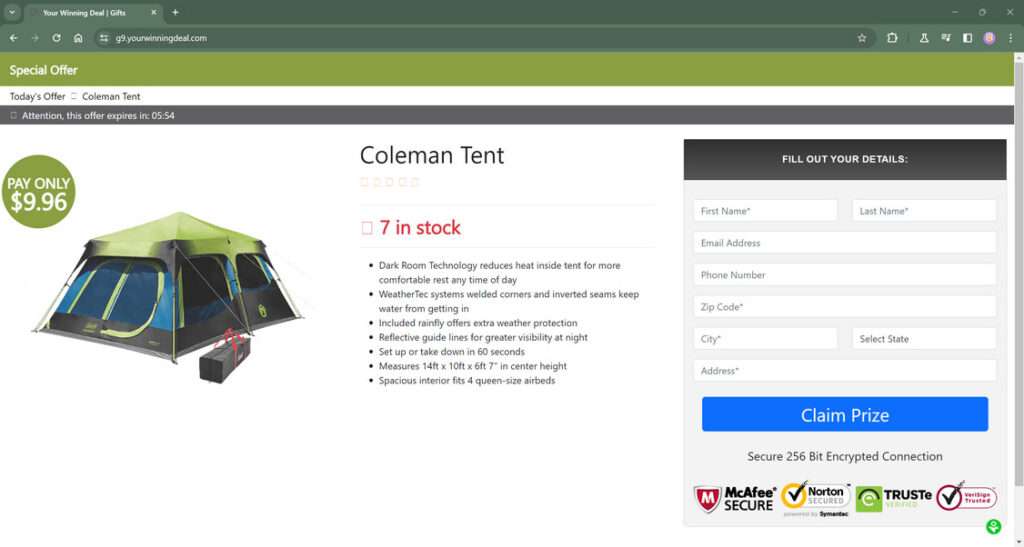
Overview of the Scam Process
The Home Depot Coleman tent scam is an elaborate hidden subscription ruse designed to gather victims’ personal information and credit card details under the guise of an exclusive free tent offer. Here is a more detailed overview of how this fraudulent scheme works:
- Scammers create fake promotional websites designed to strongly resemble a legitimate Home Depot page advertising an amazing deal – free Coleman tents with just a small shipping fee.
- The scam pages use Home Depot’s official logos, fonts, imagery and overall branding to appear authentic. Coleman branding is also prominently displayed and actual Coleman tent models are shown.
- These fraudulent sites are promoted through online ads, social media posts, or links made to look like official Home Depot announcements of the giveaway.
- Exciting headlines and messaging convince users they are getting an amazing free tent valued at several hundred dollars in an exclusive offer for Home Depot customers.
- When victims visit the page, they are instructed to enter details like name, address, phone number and email address in order to redeem the free tent offer.
- The final step is to enter credit card information under the guise of paying a small shipping and handling fee – usually $5 to $8. This obtains an active credit card number from victims.
- Buried in tiny print, separate terms and conditions, or other less obvious places on the site will be declarations that by submitting your details you are agreeing to enroll in hidden paid monthly subscriptions that will be billed recurringly to your credit card on file.
- These subscriptions can include things like discounted shopping clubs, coupon programs, financing services, identity theft protection, or other services the scammers pretend will be valuable to users. Prices are usually set exorbitantly high around $150 to $200 per month.
- Most users will not thoroughly read all disclaimers or terms before entering info, as the upfront offer is simply a free tent. So they end up unintentionally agreeing to recurring monthly billing.
- After obtaining users’ credit cards and related personal details, the scammers will initiate the recurring subscription charges on a monthly basis, continuing to bill victims until they eventually notice and attempt to cancel.
- The scammers also retain the credit card information and personal details for misuse in other forms of fraud, identity theft, or sale on dark web marketplaces.
- When victims try to cancel the unwanted subscriptions and reverse the fraudulent charges, they find it extremely difficult or impossible to contact the scammers posing as a legitimate company.
By understanding all the elements of this sophisticated scam in detail, consumers can better identify fraudulent offers and avoid becoming unsuspecting victims. Spotting the red flags is key to protecting yourself.
How the Home Depot Coleman Tent Scam Works
Now let’s look at how this hidden subscription scam unfolds step-by-step:
1. You See an Online Advertisement
While browsing online, you come across advertisements promoting an amazing deal – free Coleman tents offered exclusively through Home Depot. The ads use official Home Depot and Coleman logos and branding.
Excited about the deal, you click the ad to learn more about claiming your free tent. But this sends you to a fraudulent website disguised to look like a legitimate offer.
2. Arrive at the Fake Promotional Website
The website you arrive at has the look and feel of an official Home Depot promotions page. There are logos, proper color schemes, and details about Coleman tents.
At first glance, everything looks normal. But upon closer inspection, the URL may be misspelled or on an unrelated domain – a clue it is not real.
3. Provide Your Personal Information
The website prompts you to provide personal details like your name, address, email, phone number and more under the guise it is needed to ship your free tent.
You enter the information without realizing you are handing it directly to scammers running this fraudulent site.
4. Enter Credit Card Details
The final step in claiming your “free” tent is entering credit card information. This is said to be for a small shipping and handling fee of around $5-$8 dollars.
You enter your card number, CVV code, and expiration date. This allows the scammers to charge your card not just for the small S&H fee, but for upcoming monthly subscription costs.
5. Buried Subscription Terms
Hidden in small fine print, likely at the bottom of the website or in separate terms and conditions, are mentions of recurring monthly subscription plans ranging from $150-$200 per month.
But most people are unlikely to notice this fine print or read all the terms before providing their information expecting a free tent.
6. Monthly Charges Begin
Within a month of entering your credit card information and paying the small S&H fee, much larger unauthorized charges from the scammers will begin appearing on your statement.
This is the monthly subscription plans outlined in the terms being charged to your card without your permission after just wanting the free tent offer.
7. Difficulty Canceling and Removing Charges
You contact the company to cancel the monthly plans and subscriptions you never wanted or agreed to. But there is no legitimate business – just scammers who make canceling difficult or impossible.
The monthly fees continue being charged to your card even after attempting to close the accounts and reverse the charges.
8. Credit Cards and Identities Used for Other Fraud
In addition to the unauthorized monthly fees, your credit card details and personal information is retained by the scammers and sold on the dark web or used to commit further identity fraud against victims.
Your information is now in the hands of criminals to be misused and exploited for profit.
What to Do If You Are Targeted by This Scam
If you suspect you have fallen victim to the Coleman tent hidden subscription scam from a fraudulent Home Depot offer website, here are the important next steps to take:
1. Review Statements for Unauthorized Charges
Carefully review your credit card statements as soon as possible looking for any monthly subscription charges you did not agree to. This may be under a variety of odd company names.
2. Contact Credit Card Company
Notify your credit card provider of the fraudulent charges and have them reverse the payments. Cancel the credit card altogether since the number is compromised. Request a new card be issued to you with a different account number.
3. Place Fraud Alert
Contact the major credit bureaus to place fraud alerts on your credit reports to detect any suspicious activity. Also consider signing up for credit monitoring services that regularly check your reports for scams.
4. File Complaints
File formal complaints with the FTC, FBI IC3, Home Depot, Coleman, and your local law enforcement to report these scam websites misusing legit company branding and stealing consumer information.
5. Reset Account Passwords
Change the passwords on all of your online accounts. Do not use the same or similar password you provided to the scam website. Enable two-factor authentication where possible.
6. Monitor Accounts Closely
Carefully monitor all your financial accounts and credit reports for signs of new fraudulent activity. Be vigilant for additional unfamiliar charges or accounts opened in your name by scammers with your stolen info.
7. Use Identity Theft Protection
Sign up for identity theft protection services that can help act on your behalf if more serious identity theft emerges. They can place protections, contest fraudulent accounts, and help restore your identity if needed.
Avoiding Hidden Subscription Scams
Here are some tips to protect yourself from falling victim to hidden monthly subscription scams when encountering tempting free offers online:
- Be wary of online ads promoting free products – they often lead to scams.
- Avoid clicking links in ads or providing any personal information to claim offers.
- Research the company advertising the deal independently to confirm legitimacy.
- Slow down – high pressure tactics are red flags something is wrong.
- Verify URLs – look for misspellings or unrelated domains.
- Read all fine print carefully before entering payment information.
- Never provide credit card details just for “shipping fees” to receive a free item.
- Use prepaid debit cards when possible for one-time use if making any payments.
- Monitor all charges to your real credit cards closely to identify any unwanted subscriptions.
- Act quickly to stop monthly billing charges and report fraudulent sites.
Frequently Asked Questions about the Home Depot Coleman Tent Scam
What is the Home Depot Coleman tent scam?
This scam involves fraudulent websites pretending to offer free Coleman tents as part of a Home Depot promotion. They trick victims into providing credit cards and personal information which is then used to charge recurring monthly subscription fees around $150 without consent.
How do the scammers carry out this scam?
The scammers:
- Create convincing fake websites making it look like an official Home Depot offer
- Use Home Depot and Coleman branding without permission
- Promote the sites through online ads and links
- Prompt visitors to enter personal and credit card details to “claim” the free tent
- Bury terms and conditions with monthly fee subscriptions
- Charge small initial fees to acquire active credit card information
- Repeatedly charge monthly recurring fees tied to the cards
- Make it difficult for victims to cancel the unwanted subscriptions
- Sell or misuse stolen credit card and identity information
What techniques do the scam websites use?
The fraudulent websites use:
- Official Home Depot and Coleman logos and graphics
- Photos and descriptions of Coleman tent products
- Claims the offer is exclusive to Home Depot rewards members
- Countdown timers or limited supply messages to create urgency
- Requests for personal information under the guise of a shipment
- Small $5-$8 shipping and handling fees to obtain credit cards
- Buried terms and conditions in separate links or fine print
- Charges under vague company names that are hard to spot
What are signs the website is fraudulent?
Red flags include:
- Misspelled or clearly forged website URLs
- Lack of SSL security seals
- Errors, typos, grammatical mistakes
- Credit card required for a “free” item
- No physical address listed for the business
- Missing contact phone numbers or email
- Difficulty finding terms and conditions
What happens after victims enter information?
After providing details, victims see monthly charges around $150 from questionable vendors appear on their cards. The scammers sell or misuse the stolen financial and personal information. Victims have problems stopping recurring billing.
What should you do if you spot one of these scam ads?
If you see a suspicious ad:
- Do not click the link or provide any personal information
- Find legitimate contact info and verify the offer with Home Depot first
- Report the ad to the website/platform it is hosted on
- Notify the FTC and IC3 about the fraudulent promotion
How can you avoid falling victim to the scam?
To avoid the scam:
- Be wary of online free product offers
- Research legitimacy before providing info
- Read all terms and conditions closely
- Never give credit card info for a free item
- Use prepaid cards if you must enter payment details
- Monitor statements closely for any unauthorized charges
- Act swiftly to stop unwanted billing if it occurs
What should you do if you fell victim to the scam?
If you fell for the scam:
- Notify your credit card company of the fraudulent charges
- Place fraud alerts on credit reports and sign up for credit monitoring
- Change account passwords and enable two-factor authentication
- File complaints with the FTC, IC3, Home Depot and Coleman
- Monitor your accounts closely for any new misuse of your information
- Consider an identity theft protection service to help restore your identity
The Bottom Line
The Home Depot Coleman tent hidden subscription scam takes advantage of brand familiarity and enticing free offers to trick victims into handing over their financial information. But through reviewing statements carefully, reporting fraudulent charges, and implementing identity theft protections, the damage caused by these scams can be contained.
Approach any online deals and contests with healthy skepticism. Verify legitimacy, read the fine print, and never give your personal or credit card information on unfamiliar sites. With caution and awareness, you can avoid putting your identity and finances at risk to these deceptive tent offers impersonating trusted retailers. Don’t let the prospect of free camping gear put your security in jeopardy.

Join the discussion
0 commentsShare your experience or ask a question about this article.
Discussion
Start the conversation
Have a question or something useful to share? Add the first comment.