

Have you received an email claiming to have caught you watching adult content and masturbating? This is an increasingly common email scam that aims to extort money from victims by threatening to send compromising videos to your contacts.
In this comprehensive guide, we will break down exactly how this scam works, provide tips on how to recognize it, explain what to do if you have fallen victim, and outline key steps you can take to protect yourself now and in the future.
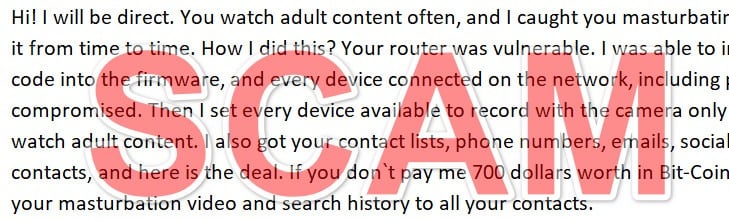
A Breakdown of This Devious Email Scam
This scam starts with an email that seems personalized and claims knowledge of your online activities. The email subject line often says something like “I know what you did” or “I have a dirty secret of yours.”
The email content explains that your devices have been compromised and used to record you viewing adult content and masturbating. It goes on to threaten to send the embarrassing video to all your contacts if you do not pay a ransom in Bitcoin within 72 hours.
While unsettling, it’s important to know that this is a pure scam designed to scare victims into paying quickly. Here are some key things to understand about how this scam operates:
They Don’t Really Have Any Compromising Videos
The scammers have no actual video footage of you. The email is sent en masse to thousands of addresses at once. No malware or viruses have infected your devices to spy on you. This is a modern version of the classic extortion scam.
Your Information Was Not Hacked
Your contacts, social media, and other personal information was likely culled from public sources or past data breaches. The scam email is meant to seem personalized, but no actual hacking has occurred.
Payment Does Not Make Them Go Away
If you pay the ransom, you get added to a list of vulnerable targets. This means you are likely to be targeted again in the future with similar or increased demands. The scammers have no incentive to actually delete the imaginary video if paid.
They Cannot Follow Through On Threats
Without any actual compromising footage, the scammers cannot follow through on threats to send video to your contacts. Any additional demands sent after payment should be ignored as more empty threats.
By understanding the major elements and psychology of this scam email, you can more readily identify it as a fraudulent attempt to extort money through baseless threats and intimidation.
Anatomy of The “I Will Be Direct” Scam Email
Now that we know this is a purely scam email with no teeth, let’s break down exactly how it is structured and why.
Here is an example of a typical email body this scam uses:
“Hi! I will be direct. You watch adult content often, and I caught you masturbating. We all do it from time to time. How I did this? Your router was vulnerable. I was able to inject some code into the firmware, and every device connected on the network, including phones, was compromised. Then I set every device available to record with the camera only when you watch adult content. I also got your contact lists, phone numbers, emails, social media contacts, and here is the deal. If you don`t pay me 700 dollars worth in Bit-Coin, I will send your masturbation video and search history to all your contacts.
Amount: 0.08 BTC (approximately)
BTC Account:Quick tip! You can buy Bit-Coin from Paxful. Use Google to find it.
Also, search for what is No Fap and read about the benefits of no PMO. Watching dirty porn is a waste of time, energy, and minerals from the body. I hope you will think about this very seriously. In case you wonder why your anti-viruses were not triggered is because my code is not set to steal passwords, PIN codes, and other sensitive details. The only function is to record with the cameras (in silent mode) and grab the contacts. I know that you have that amount of money that is requested. So don`t worry about your passwords and bank accounts. However, for your mental peace, go ahead, change them.
You have 72 hours (3 days) to send the payment. When coins are submitted, the video with you doing… you know what will be destroyed, and you will never hear from me. Next time you cover your cameras, somebody may watch it! Limit yourself to one time per month if you can`t go completely NoFap.”
Let’s analyze each section:
Subject Line
The subject line is short and ominous, often saying something like “I know what you did”. This is designed to ensure the email gets opened.
Introduction
The opening sentence gets right to the supposed point – that you have been caught watching adult content and masturbating. This aims to immediately shock and scare the reader.
Explanation of “Hacking”
The scam email uses technical jargon about injecting code into your router firmware to make the supposed spying seem plausible. This makes it clear cameras were accessed on all devices.
Threats and Demands
Contact lists and social media contacts are referenced to add legitimacy to threats of sending embarrassing videos. A ransom demand is made to a Bitcoin address with a short deadline.
False Reassurances
The email tells victims not to worry about bank account safety. This is to overcome skepticism and get the victim to pay quickly.
By combining intimidation, implied technical knowledge, personal information, threats, a scary deadline, and false assurances, the email is carefully crafted for maximum psychological impact.
How The “I Will Be Direct” Scam Unfolds
Understanding each step of how this scam operates can further help identify the tactics used:
1. Scammers Obtain Email Addresses
Email addresses are compiled through breached databases, public records, compromised computers, and contact lists bought on the dark web. Tens of thousands may be gathered.
2. The Scam Email is Created
A basic form email is written with ominous threats tailored to viewing adult content and demands for payment in Bitcoin.
3. Emails are Sent En Masse
Using mail merge, the scam email is sent to thousands of targeted addresses. Each email looks personalized, but is just a form letter.
4. Victims Open The Email
Curiosity, fear, or the ominous subject line cause victims to open the email, seeing the threats and demands.
5. Some Victims Pay The Ransom
A small percentage of recipients will fear the threats and pay the ransom in Bitcoin within 72 hours.
6. Scammers Disappear After Payment
Once paid, scammers simply ignore victims. With no actual compromising footage, extorting further payments is impossible.
7. Scammers Retarget Victims
Names and emails of those who paid once get added to “known victims” lists. These are targeted again with similar or new scams.
8. Ransoms Fund More Scamming
The Bitcoin extorted from victims is used to refine scams and send to more addresses. The cycle continues…
Understanding the step-by-step process helps reveal the criminal psychology and tactics built into each phase of this scam.
8 Ways to Recognize The “I Will Be Direct” Webcam Scam
Now that you understand how this scam works from start to finish, here are some key signs to look for to avoid falling for it:
- 1. Generic, ominous subject line – Subject says something like “I know what you did” or “Your dirty secret.” This gets it opened.
- 2. Threats to release embarrassing/compromising content – The email threatens to send adult content of you to all your contacts.
- 3. Demand for payment by Bitcoin – Ransom payment is demanded in Bitcoin, often within 72 hours.
- 4. Fake technical jargon – Explanations of how you were “hacked” use bogus tech terms.
- 5. No actual evidence provided – No proof of any compromising content is ever provided or linked.
- 6. grammatic errors – language use and grammer may seem clumsy or unnatural.
- 7. Follow-up demands – Even after paying, new demands for more money may arrive.
- 8. Contact info looks suspicious – Email address or Bitcoin wallet may use random numbers/letters.
Watching for these common red flags can help you steer clear of getting fooled and parting with your hard-earned money.
What To Do If You Fall Victim to The Webcam Blackmail Scam
Despite the signs, some still get fooled and pay the ransom. If this happens to you, here are important steps to take:
- Don’t panic – You are not in danger. The scammers have no compromising content.
- Ignore further demands – Any additional demands are empty threats. Follow-ups try to extort more money.
- Alert contacts – Let your friends and family know to disregard any concerning emails about you.
- Contact the FTC – File a complaint with the Federal Trade Commission about the scam.
- Watch accounts – Monitor financial accounts used to pay ransom for fraudulent charges.
- Change passwords – Update passwords on email and other accounts out of caution after being targeted.
- Beware repeat targeting – Know that you may be targeted again in the future using details from this scam.
- Seek support if needed – Talk to a professional counselor if you are experiencing anxiety, fear, or trauma.
While falling victim is unfortunate, the most important thing is not to panic. No real hacking occurred and you can regain peace of mind by taking the right actions.
How to Protect Yourself From This Webcam Scam
Once this scam is on your radar, there are proactive steps you can take to avoid becoming a victim:
- Use webcam covers when not in use – Laptops and phones should have cameras physically covered when not needed.
- Keep software updated – Maintain regular software updates on all devices to minimize vulnerabilities.
- Use secure passwords – Have unique, complex passwords on all accounts and update periodically.
- Be wary of public WiFi – Avoid accessing sensitive accounts or info on public networks.
- Use a VPN – Using a virtual private network encrypts traffic and masks your IP address.
- Watch out for phishing tactics – Any email demanding immediate payment or threatening release of info is suspect.
- Never pay ransoms – Paying ransoms funds criminal enterprises and makes you a bigger target.
- Set email spam filters – Configure spam filters to block foreign emails and report phishing attempts.
- Reduce online footprint – Limit the amount of personal info available publicly online to make you less vulnerable.
- Ask contacts to disregard concerning emails about you – Let friends/family know to delete without opening any troubling emails referencing compromising info about you.
The combination of being vigilant, keeping devices secure, practicing safe online habits, and not ceding to ransom demands provides the best multi-layer protection.
Frequently Asked Questions About the “I Will Be Direct” Webcam Blackmail Scam
1. What is the “I Will Be Direct” webcam blackmail scam?
This is an email scam where recipients are told their computer’s webcam was hacked to record them watching porn or masturbating. The email threatens to send the video to your contacts unless you pay a ransom in Bitcoin.
2. How does the “I Will Be Direct” scam work?
Scammers send mass emails to thousands of addresses at once claiming to have compromising footage. The emails are designed to scare recipients into paying ransoms in Bitcoin, often within 72 hours. No actual hacking takes place.
3. What are some tactics used in the scam email?
Tactics include an ominous subject line, threats to release embarrassing videos, demands for Bitcoin, fake technical jargon about hacking, no proof provided, and short deadlines.
4. How do scammers obtain email addresses?
Addresses come from breached databases, public records, compromised computers, contact lists purchased on the dark web, and past victims. Tens of thousands may be targeted.
5. What should I do if I already paid the ransom?
First, don’t panic. No real hacking occurred. Ignore further demands, as these are empty threats to get more money. Alert contacts, monitor accounts, change passwords, and beware repeat targeting.
6. What can I do to protect myself from this scam?
Tips include using webcam covers, avoiding unknown links/attachments, keeping software updated, using strong passwords, avoiding public WiFi for sensitive info, enabling spam filters, and never paying any ransoms.
7. How can I identify the “I Will Be Direct” scam email?
Watch for a generic ominous subject line, threats around adult content, demands for Bitcoin payment, fake technical language, no proof provided, typos/grammar issues, suspicious contact info, and follow-up demands after paying.
8. What should I do if I receive the blackmail email?
Do not reply or pay the ransom. Report the email as spam or phishing. Check account security settings and update passwords. And know the scammers have no real compromising footage.
9. Why is Bitcoin demanded for payment?
Bitcoin is used because transfers are essentially irreversible and pseudonymous. This lets scammers grab the funds and disappear without being traced.
10. Where can I report the scam or get help if targeted?
File a complaint with the FTC. Seek professional counseling if experiencing significant fear, anxiety or trauma from being targeted.
The Bottom Line
This “I will be direct” webcam blackmail scam can be unnerving, but understanding its false nature is key to avoiding becoming victimized. The scammers have no actual compromising footage – just baseless threats and demands.
Safeguard yourself by recognizing the scam tactics and inconsistencies in these emails. Never pay the ransom, as it just encourages more targeting. Lock down security settings and be selective in what links you click and info you share publicly.
While we all must be increasingly vigilant of online scams, this too shall pass. Maintaining awareness and following best practices can keep your data secure, money in your pocket, and peace of mind intact. Don’t let faceless scammers intimidate you online.

Join the discussion
0 commentsShare your experience or ask a question about this article.
Discussion
Start the conversation
Have a question or something useful to share? Add the first comment.