

The internet can be a dangerous place, and online scams are unfortunately quite common these days. One scam that has been making the rounds targets iPhone and iPad users specifically. Scammers are sending fake iCloud storage alert messages in an attempt to steal Apple IDs, credit card information, and other personal data.
This clever phishing scam can seem very believable at first glance. The messages claim your iCloud storage is full and you must immediately upgrade your plan or risk losing your photos, files, and other data stored in iCloud. Don’t let these fake alerts fool you! Read on to learn more about how this scam works, how to protect yourself, and what to do if you fell for the trick.
Overview of the Fake iCloud Storage Alert Scam
This scam typically begins with a text message or email that appears to come from Apple. The message urgently claims there is an issue with your iCloud storage and includes a link to “upgrade” or “verify” your account.
Of course, the link does not lead to Apple, but rather to a convincing phishing site. Scammers are hoping you’ll panic about losing your precious photos and files. In your rush, you may enter your Apple ID, iCloud password, credit card number, or other information on their fake site.
With your Apple ID login credentials, scammers can access your real iCloud account and all synced data. They can see personal information, turn off Find My iPhone, wipe your device, and even lock you out of your own account. Your credit card details also enable them to make fraudulent purchases under your name.
This scam is often effective because fear is a powerful motivator. No one wants to lose years’ worth of photos, files, notes, and other data stored in their iCloud account. The messages instill urgency and panic, causing the recipient to act rashly.
However, there are a few key signs that can help you determine the messages are fake before you mistakenly give scammers access to your personal information.
How the Fake iCloud Alert Scam Works
Scammers use clever psychological tactics to convince victims the messages are real. Here is an inside look at exactly how the phishing scam operates.
Step 1: Sending Out Bait
The scam begins with text messages or emails sent out en masse to iPhone users. Scammers likely obtained names, phone numbers, and email addresses from a data breach or by purchasing stolen data online.
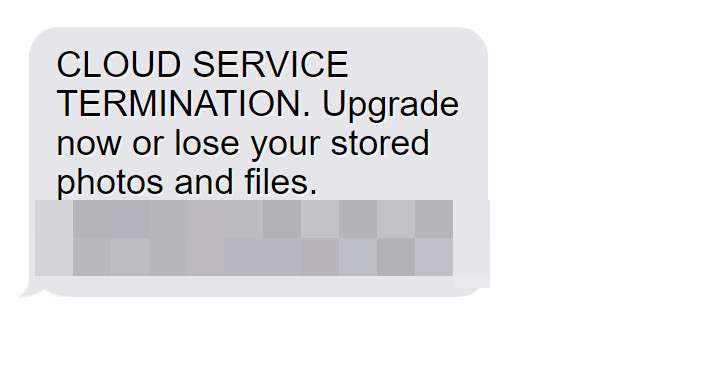
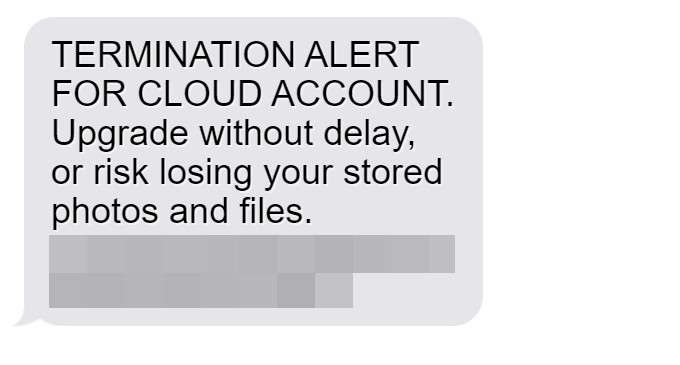
The messages claim there is an urgent issue with the recipient’s iCloud storage. Two common examples include:
- “CLOUD SERVICE TERMINATION. Upgrade now or lose your stored photos and files. “
- “TERMINATION ALERT FOR CLOUD ACCOUNT. Upgrade without delay, or risk losing your stored photos and files. “
The messages instill fear with threats of losing precious data and photos. This motivates recipients to take immediate action without thinking it through.
Step 2: Driving Traffic to the Fake Site
When recipients click the link, they are taken to a website designed to look exactly like the official iCloud login page. The site has Apple branding, imagery, and web design elements to seem legitimate.
In their haste, victims may not notice subtle inconsistencies proving the site is fake. Or the differences are insignificant enough to overlook.
Step 3: Harvesting Login Credentials and Credit Card Details
On the phishing site, victims enter their Apple ID email/password thinking they are verifying or upgrading their account. In reality, they are handing over login credentials directly to scammers.
Some versions of the scam also prompt victims to enter a credit card number to pay for a storage upgrade. Scammers can use this to make fraudulent purchases.
Step 4: Accessing Accounts and Devices
With control of the victim’s Apple ID, scammers can access private data including photos, files, notes, and more. They can turn off Find My iPhone to claim stolen devices.
In a worst case scenario, they can remotely wipe the victim’s iPhone or iPad entirely, deleting all data and removing any trace of themselves from the device. They can even completely lock the owner out of their own Apple account.
Step 5: Spreading to Contacts
To maximize damage, scammers may also access victims’ contact lists and spread phishing messages to friends and family. This helps the scam proliferate rapidly.
A message from a known contact seems more trustworthy. If your friend’s account was compromised, a scam message from them could trick you into clicking the link and falling for the phishing scheme as well.
Warning Signs of the Fake iCloud Alert Scam
While these fake alerts can seem legitimate at first glance, there are a few key signs that reveal their fraudulent nature:
- Generic greetings – Real Apple notifications address you by name, not “Dear user,” “Dear customer,” etc.
- Threatening urgent tones – Apple will not threaten or pressure you aggressively. Scare tactics are a red flag.
- Requests for immediate payment – Apple always gives warnings about low storage well in advance and suggestions for managing space before asking for payments.
- Spelling/grammatical errors – Real Apple communications do not contain typos or awkward phrasings.
- Incorrect URLs – Hover over links to inspect the URLs. Apple URLs should contain “apple.com” not unrelated or odd-looking links.
- Requests for sensitive info – Apple would never ask for your password, Social Security number, credit card info, etc via unsolicited messages.
- Unknown senders – Emails come from Apple email addresses. Look for slight variations that indicate a phishing attempt.
- Unusual formatting – Odd fonts, colors, alignments etc. likely indicate a scam.
Stay vigilant and think before clicking any links or providing personal information. If in doubt, contact Apple Support directly to confirm whether a communication is legitimate.
What to Do If You Fell for the iCloud Phishing Scam
If you unfortunately submitted personal information on a fake iCloud phishing site, stay calm but act swiftly to protect yourself. Follow these steps immediately:
Step 1: Change Your Apple ID Password
First and foremost, you need to prevent scammers from accessing your account. Go to appleid.apple.com and reset your password to something completely new. Make sure it is a strong, randomized password.
Step 2: Remove Saved Credit Cards from Your Apple Account
If scammers obtained your credentials, they may have access to your stored credit card number(s) for purchases on iTunes, App Store, etc.
To prevent fraudulent charges in your name, log in to your Apple account and remove any saved payment methods:
- Tap your profile picture at the top right and choose ‘Settings’
- Tap ‘Payment & Shipping’
- Tap ‘Edit’ beside any stored cards
- Tap the delete icon and confirm removal
Step 3: Contact Your Credit Card Company
Your next step is to get in touch with your credit card provider. Let them know your card details may have been compromised. They can take precautions to flag suspicious charges and may issue you a new card number.
Step 4: Enable Two-Factor Authentication
Make your Apple account more secure by turning on two-factor authentication. This requires a second step of verification when signing in, such as an SMS code or confirmation prompt on a trusted device.
Step 5: Run Antivirus Software on All Your Devices
Scammers could potentially gain remote access to your computer or devices if they obtained your iCloud credentials.
Scan all your devices with trusted antivirus software to check for malicious activity and remove any infections found. Change all account passwords as an extra precaution.
Step 6: Contact Apple Support
Apple has dedicated teams to deal with phishing issues and compromised accounts. Contact Apple Support to ensure your account is secure and see if they can restore or protect any of your data.
Step 7: Watch for Suspicious Activity
Carefully monitor all your accounts over the next few weeks. Keep an eye out for additional phishing attempts, fraudulent charges, or any other suspicious activity. Report anything out of the ordinary to the appropriate companies.
Frequently Asked Questions About the Fake iCloud Alert Scam
The fake iCloud storage alert scam tricks users into handing over Apple ID logins, credit cards, and other personal information. This FAQ provides key information everyone should know to avoid falling for phishing attacks.
What exactly is the fake iCloud storage alert scam?
This is a phishing scam where scammers send fake alerts claiming your iCloud storage is full. The messages threaten you’ll lose data unless you immediately click a link to upgrade your account. However, the link sends you to a fake login page to steal your Apple ID, credit card, and other info.
How do the fake iCloud alerts reach me?
Scammers send these phishing attempts via SMS text messages or email. They likely got your contact information from a data breach or by purchasing stolen records online. The messages can look like they come directly from Apple.
What are some examples of the phishing messages?
Some common fake alert examples are:
- “CLOUD SERVICE TERMINATION. Upgrade now or lose your stored photos and files. “
- “TERMINATION ALERT FOR CLOUD ACCOUNT. Upgrade without delay, or risk losing your stored photos and files. “
What information are scammers trying to steal?
Their goal is to get your Apple ID email address and password. With this, they can access your real iCloud account and synced data like photos, files, notes, contacts, etc. They may also prompt for credit card details to make fraudulent purchases in your name.
What should I do if I get a suspicious iCloud alert?
Do not click any links or provide information. Contact Apple Support directly to verify whether the message is real. Check for phishing warning signs like grammatical errors, urgent threats, incorrect URLs, etc. Err on the side of caution.
What happens if I entered my information on the phishing site?
Immediately change your Apple ID password. Remove saved credit cards from your Apple account. Contact your credit card company to flag suspicious charges. Enable two-factor authentication for added security. Scan devices for malware and watch for further suspicious activity.
How can I better protect myself from phishing scams?
Be wary of unsolicited messages requesting personal information or money. Verify legitimacy directly with companies before clicking links or sharing data. Use strong unique passwords and two-factor authentication. Install antivirus software. Check for warning signs like poor grammar, odd URLs, threats, etc.
Who should I contact if my Apple account was compromised?
Notify Apple Support right away if you believe someone obtained unauthorized access to your account. They can help secure it, restore data, and detect malicious activity. Provide details of exactly what occurred and what information was impacted.
What legal recourse do I have if I was scammed?
You can report phishing scams and cybercrimes to the FBI Internet Crime Complaint Center (IC3). Contact your bank and credit card companies regarding any fraudulent charges. Consider freezing your credit to prevent identity theft. Contact Apple to ensure your account is restored.
This FAQ provides a detailed overview of the inner workings of the fake iCloud alert phishing scam, how to identify it, steps to take if compromised, and key advice to avoid falling victim. Share this guide to help protect yourself and others from scammers seeking personal data and money. Stay vigilant against phishing attempts.
The Bottom Line
Fake iCloud storage alerts are a prime example of how convincing phishing scams can be nowadays. With the right tactics, scammers prey on people’s fears of losing their precious data and photos.
However, arming yourself with information is key to avoiding these traps. Now that you know the warning signs and steps to take if compromised, you can better protect yourself.
Stay alert, think before acting, and contact Apple or service providers directly with any concerns. Don’t let scammers steal your personal information or peace of mind.

Join the discussion
0 commentsShare your experience or ask a question about this article.
Discussion
Start the conversation
Have a question or something useful to share? Add the first comment.