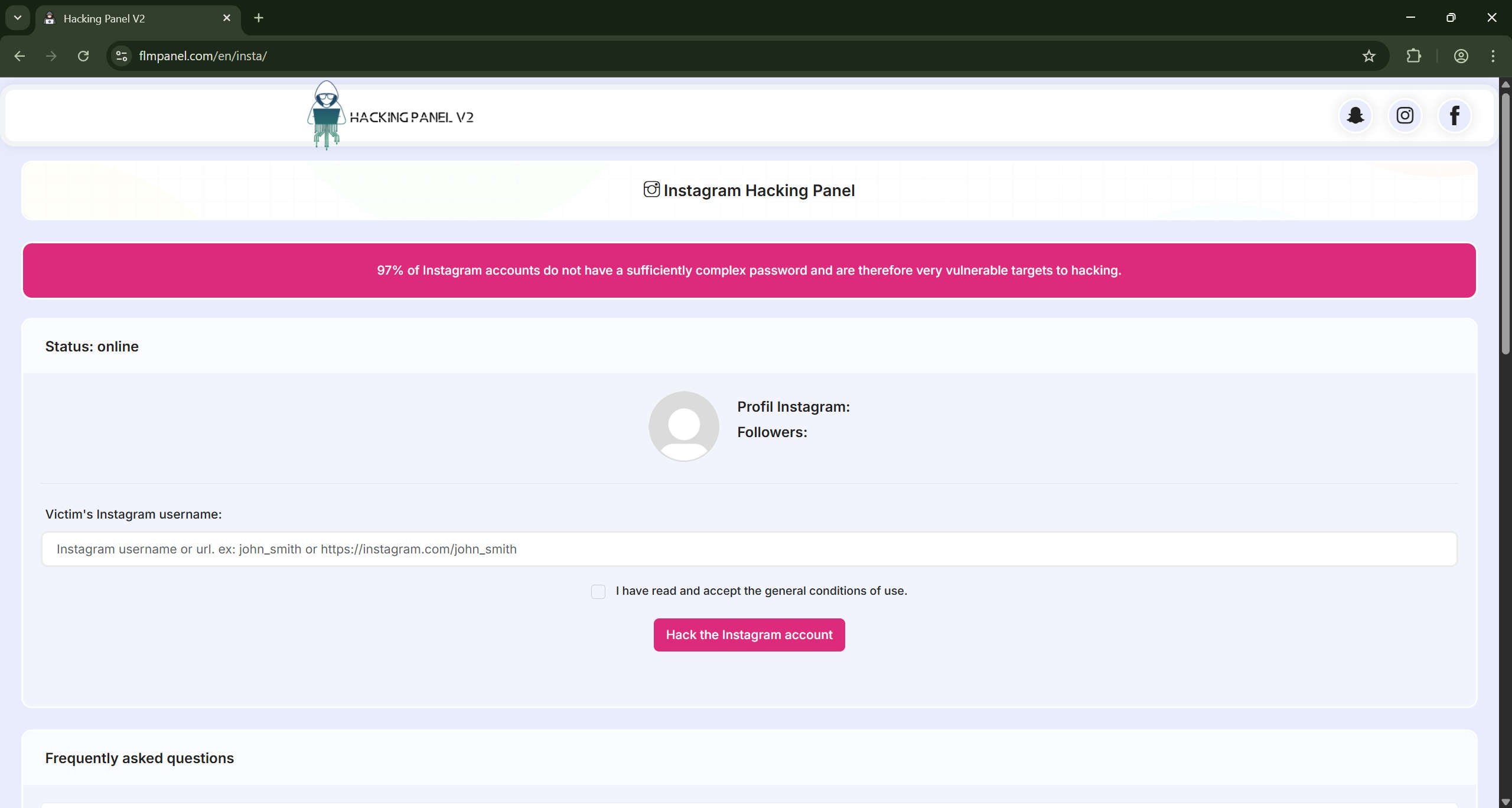
A slick website promises instant access to someone else’s Instagram account. The page looks professional, complete with progress animations, bold claims about weak passwords, and a button labeled “Hack This Account Now.” You enter a username, watch a fake “injection” process, and then the site asks you to pay or click a link to “unlock” the results. Instead of a password you get redirected to a product such as mSpy, asked to complete surveys, or pushed to download questionable files. That is the Instagram hacking panel scam in a nutshell.
This article explains the scam in-depth, step by step. You will learn exactly how scammers lure victims, how the fake process is staged, what they get out of it, and practical, concrete steps to take if you or someone you know has been targeted. The goal is to help you spot the scam quickly, avoid harm, and recover if you were tricked.
Scam Overview
What the Instagram hacking panel scam looks like
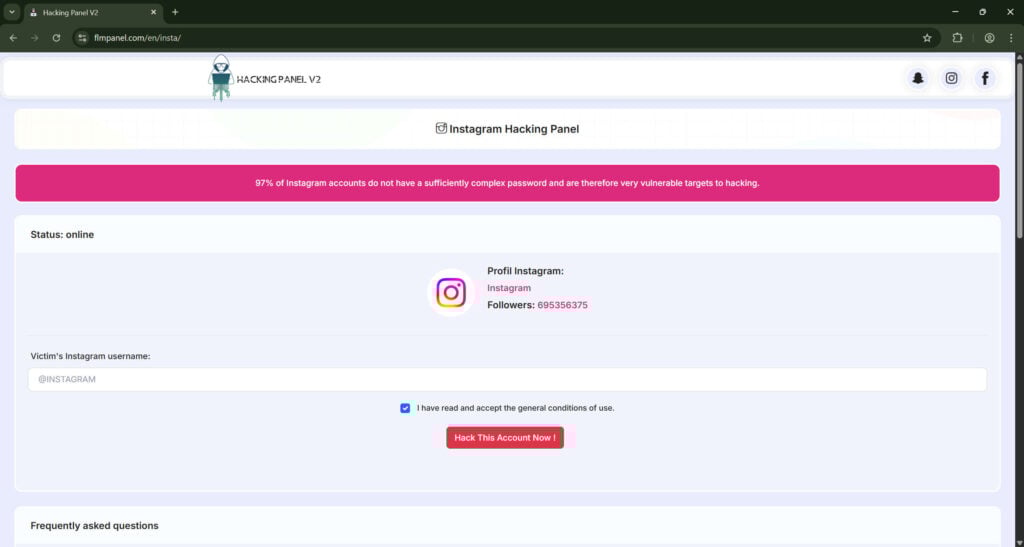
At first glance, an Instagram hacking panel site is designed to appear legitimate. It often uses:
- Clean, modern web design and familiar Instagram branding.
- “Status” indicators such as online/offline, server load, or success rate.
- Forms that ask only for a username or profile URL, not a password.
- Simulated, animated processes described with technical-sounding language, for example “injecting many codes” or “configuring session anonymity”.
- Progress bars, rotating dots, or fake logs that make the process appear real.
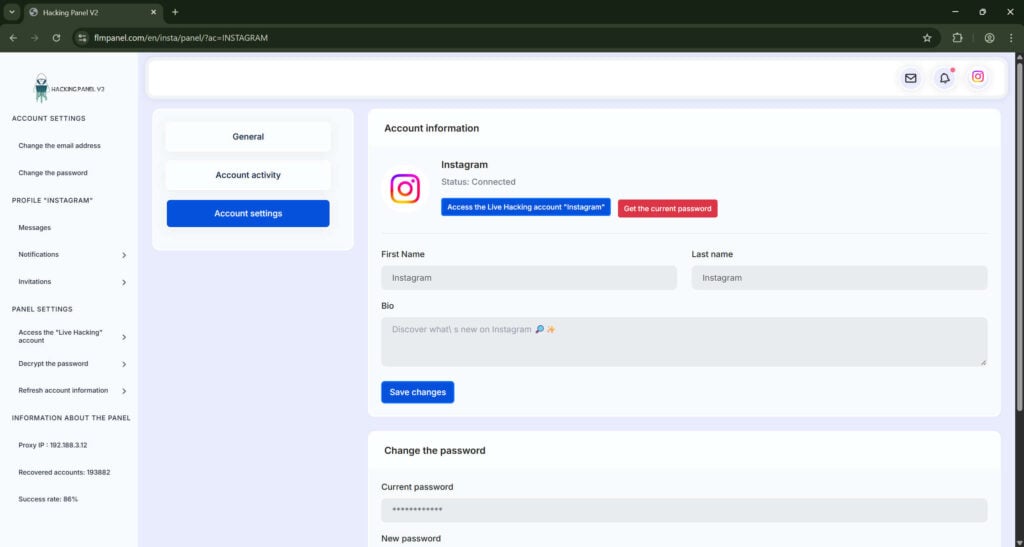
- A results page that claims the account has been “successfully hacked,” followed by a button to “access” the account or “get the current password”.
- Gateways that require payment, surveys, downloads, or account signups to finish the process.
- Affiliate links to legitimate monitoring software or subscription services, which give the scammer a commission for each sale.
- Secondary redirections to survey farms, pages that push potentially unwanted programs, or offers with monthly subscriptions.
These elements combine to create a sense of progress and legitimacy. The design plays on emotions: curiosity, anger, revenge, or urgency. People who want access to a private account or want to see someone’s messages are prime targets.
Why this scam is effective
These scams work because they exploit a few predictable human behaviors and web design heuristics:
- Simplicity sells. Asking only for a username looks harmless and lowers barriers. Many people will try something that seems low-risk.
- Authority and familiarity. Using Instagram-style visuals or professional layouts creates instant trust.
- Technical jargon. Words like “session injection,” “anonymize connection,” or “bruteforce” sound technical, which convinces some users the site knows what it’s doing.
- Instant gratification. Users see simulated progress and immediate “success” messages. That satisfies curiosity and reduces skepticism.
- Monetization paths are hidden. Rather than stealing credentials directly, scammers convert interest into commission revenue. If someone buys a subscription or completes a survey, the scammer earns money without the risk and legal exposure of more harmful attacks.
- Legal cover. The scam site often frames itself as a “tool for educational or parental use,” or claims to provide legitimate recovery for lost accounts. This gives the operator plausible deniability while still pushing victims toward affiliate purchases.
Variants and common add-ons
Not every site follows the exact same pattern. There are several variants:
- Affiliate funnel: The site finishes the fake hack and sends users through affiliate links to monitoring software (for example mSpy or similar platforms). These are legitimate third-party products but are promoted via deceptive means.
- Survey wall: After the fake process, users must complete a series of surveys to “prove they are human.” Those surveys pay the scammer via survey networks. Often they never lead to a reward and may collect personal data.
- PUP downloads: The site instructs users to download software or browser extensions that bundle potentially unwanted programs. These can be adware, trackers, or low-quality “toolbars” that degrade privacy and performance.
- Subscription traps: Users are asked to sign up for a trial that requires payment details and converts to a paid monthly subscription after a short period. These services may be ebooks, streaming clubs, or “account unlocking” services.
- Phishing escalation: In some cases the next page asks for more sensitive input: phone number, email, or even Instagram credentials. This is an explicit move toward credential theft or SIM-targeting attacks.
- Malware injection: Rare but more aggressive pages might prompt the user to run an executable or mobile app. That can install spyware or remote access tools.
Who runs these scams and why
The operators are typically small criminal or semi-legitimate affiliates who monetize attention rather than accessing accounts directly. Their typical motives:
- Affiliate commissions: They partner with affiliate programs. For each sale or signup they drive, they earn a cut.
- Survey revenue: Traffic fed to survey farms generates money per completed survey or per lead.
- PUP distribution: They receive payment for each install of bundled software.
- Data harvesting: If users provide emails, phone numbers, or other PII, that data can be sold to brokers or used for targeted fraud.
- Credential theft: Operators may sometimes escalate to phishing and directly harvest credentials, but many prefer the lower-risk affiliate model.
Operators benefit from a hands-off, scalable approach. A single well-designed landing page can generate many conversions with minimal maintenance. Social media, search ads, or SEO content funnels drive traffic. The end user pays, and the operator earns, all while the victim is left with a wasted purchase, risk of additional scams, or compromised device privacy.
Legal and ethical risks
Offering to hack accounts is illegal in many jurisdictions. Running a site that claims to hack accounts may attract law enforcement attention, but these operators often hide through affiliate intermediaries, offshore hosting, and disposable domains.
For victims, engaging with these sites can put them at legal risk too. Attempting to access someone else’s account is a crime in most countries. Purchasing or using tools that facilitate account access may be illegal, and being associated with those actions can complicate any recovery or police report.
Broader ecosystem
This scam sits inside a larger ecosystem of social engineering and online fraud. It connects to:
- Phishing kits that mimic login pages.
- Credential stuffing and brute force tools that actually try stolen passwords.
- Social media impersonation and doxxing.
- Malvertising networks that push users to harmful pages.
- Affiliate and CPA networks that pay for leads and offer ways to launder income.
Understanding that this is less about “hacking” and more about “funnel monetization” is key to spotting the scam. The real product being sold is the victim’s attention and sometimes their payment details, not access to an Instagram account.
How The Scam Works
This section explains the scam step-by-step, in detail. The intent is to describe the entire flow so you can recognize each stage and know which signs to look for. These steps represent common patterns; individual pages may skip some steps or add others.
Step 1: Discovery and luring the victim
- Traffic sources
Scammers use a variety of channels to attract potential victims:- Organic search results targeting queries like “hack Instagram,” “get Instagram password,” or “view private Instagram messages.”
- Social media posts, groups, or comments promising easy hacks and linking to the page.
- Paid ads placed on low-quality networks that accept deceptive content.
- Viral content or YouTube videos demonstrating the “tool,” with links in the description.
- Messages and DMs from fake accounts that appear to offer the service.
- Promise and psychology
The landing page uses emotional triggers:- Curiosity: “See private messages instantly.”
- Revenge: “Get access to an ex’s account.”
- Convenience: “No password required.”
- Authority: “97% of accounts are vulnerable.”
The copy uses bold claims to override skepticism and encourage immediate action.
- Low barrier to entry
The site asks only for a username or profile URL. This minimal friction increases conversion rates. Many people see it as harmless because they are not entering their own password.
Step 2: Data entry and validation
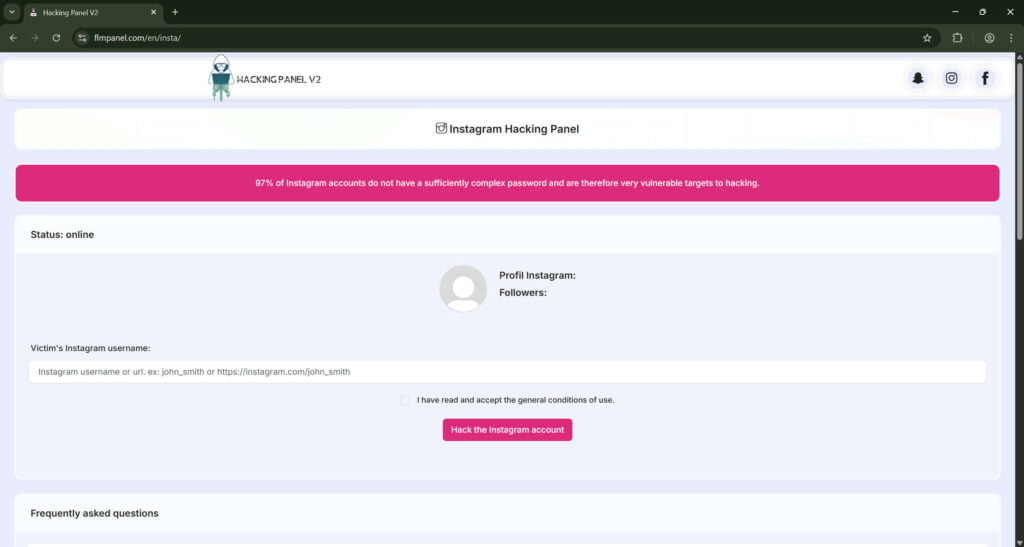
- Username input
The form asks for the target Instagram username or profile URL. It may include placeholders like “john_smith or https://instagram.com/john_smith”. - Client-side validation
To look professional, the page may validate the input format. It might detect whether the username is plausible and display a mock profile image and follower count fetched from Instagram or fabricated. - Terms checkbox
A checkbox or small line about “I accept the general conditions of use” is often included. This creates the illusion of legality and provides a flimsy legal cover for the operator.
Step 3: Fake processing and simulated attack
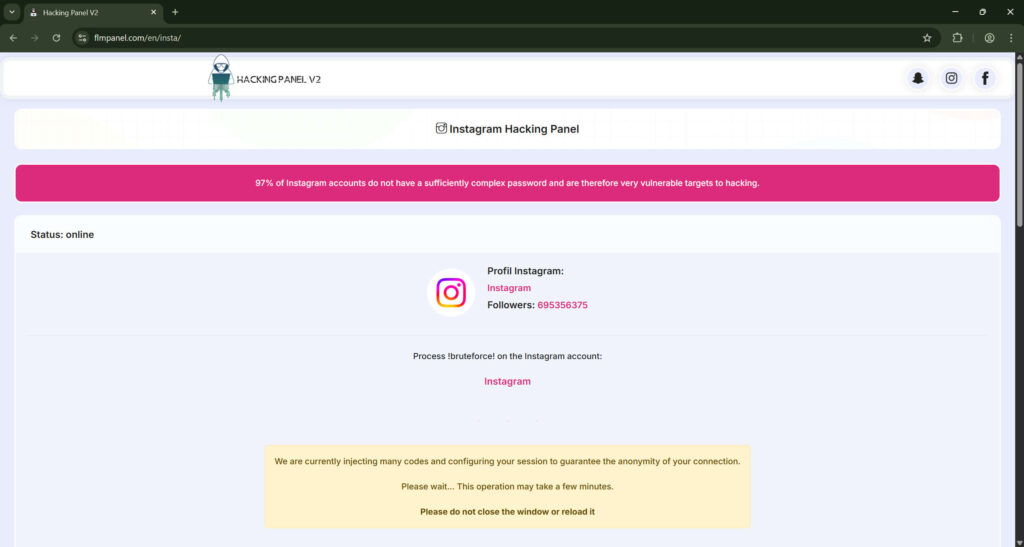
- Initiation message
After submission, the page displays a status: “Status: online” or “Our hacking servers are available.” This primes the user for a live operation. - Technical language and animations
The page simulates an attack with phrases such as:- “Injecting many codes”
- “Configuring session to guarantee anonymity”
- “Process! bruteforce! on the Instagram account”
Animation and progress bars move slowly to mimic real processing. Rotating dots, progress numbers, and fake logs create a sense of authenticity.
- Fake server load and delays
Scammers intentionally include delays and messages like “Our hacking servers are currently overloaded, please be patient.” This reduces immediate suspicion and conditions the user for further steps, like payment requests. - Intermediate steps
The site might show intermediate “successes,” such as:- “Bypassing 2-factor authentication”
- “Connecting to Instagram API”
- “Decrypting database records”
All of this is staged. No actual negotiation with Instagram servers is occurring.
Step 4: The results page and gating
- Success message
The simulated process culminates in a triumphant message: “The Instagram account has been successfully hacked!” This reduces doubt and increases eagerness to claim the reward. - Partial data reveal
The page may show non-sensitive details to enhance believability:- Profile name
- Account ID
- Follower count
These are public, easy to find, and verify the target exists. Showing them gives a false sense of progress.
- The gate
At this point the scam introduces a barrier. Common gates include:- A prompt to “Get the current password” which requires payment or a subscription.
- A requirement to click an affiliate link to “verify human” by taking a survey.
- A “trial version” notification that asks you to upgrade to proceed.
- A download button for software that is actually a PUP or installer containing additional offers.
Step 5: Monetization paths
- Affiliate link to monitoring software
The most common path is a redirect to a legitimate commercial product sold via affiliate networks. Example: mSpy or similar parental monitoring services. The scammer earns a commission for each sale or trial signup. The product is real, but the promotion is deceptive. - Survey completion funnels
Users are presented with a sequence of surveys. Each completed survey is a lead or a micro-conversion that pays out to the funnel operator. Often these surveys loop or dead-end without delivering the promised reward. - Subscription trap offers
Users are invited to sign up for trials for ebooks, movie clubs, or other services. The trial may require credit card details and automatically convert to a recurring charge. - PUP and installer distribution
Users are asked to download a file or app that bundles adware, browser hijackers, or tracking software. Some of these programs can carry persistent privacy risks. - Phishing escalation
In more aggressive attacks the site asks for the user’s own credentials, email, or phone number under the guise of verification. At this point the attacker aims to harvest accounts or enable targeted attacks like SIM swap attempts.

Step 6: Aftermath for victims
- No actual hack occurred
If a victim pays or completes actions, they do not obtain the target account password. The site provided no real access. The only certainty is that they were funneled into a monetized offer. - Financial loss and recurring charges
Victims who enter payment info or sign up for trials may face recurring charges, hard-to-cancel subscriptions, or difficulty getting refunds. - Privacy and device risk
Downloads may install tracking or adware. Personal data submitted in surveys may be sold or used for future scams. - Legal exposure
Engaging in or attempting to obtain unauthorized access to another’s account may lead to legal trouble in certain jurisdictions. - Emotional fallout
Victims may feel shame or fear about being associated with an illegal activity, which can delay reporting or recovery actions.
Step 7: How scammers profit and hide
- Affiliate payouts
Affiliate networks pay commissions to partners who drive conversions. Scammers register under a pseudonym and route traffic through tracking links. They earn per sale, per trial, or per lead. - Survey networks
The site can monetize by sending users to advertorial or survey networks that pay for user engagement. - Ad networks and PUP deals
Some installers include bundled software that pays per install. Others incorporate ad networks that monetize user browsing. - Data resale
Collected emails, phone numbers, and other PII fetch a price on the data market. - Operational obscurity
Scammers move quickly: they register domains anonymously, use offshore hosting, and change URLs to avoid takedowns. They often use payment processors that tolerate gray-area offers or use intermediaries to cash out.
What To Do If You Have Fallen Victim To This Scam
If you clicked through, paid money, or downloaded files from an Instagram hacking panel scam, act quickly. The longer you wait, the more damage can occur. Below is a numbered, prioritized action plan covering immediate steps, follow-up security measures, and longer-term recovery options.
1. Stop interacting with the scam site immediately
- Close the browser tab and do not follow any more links from the page.
- Do not enter any additional information, passwords, or phone numbers.
- Do not download or run any files the site recommended.
2. Change passwords for YOUR accounts right away
- Change the password for your Instagram account if you used the same password anywhere else.
- Use a unique, strong password for each account. Aim for at least 12 characters with a mix of letters, numbers, and symbols.
- If you used your Instagram password elsewhere, change those accounts too.
3. Revoke app access and check connected devices
- On Instagram: go to Settings, Security, and check “Apps and Websites” for any suspicious connected apps. Revoke access to anything you do not recognize.
- Check active login sessions on Instagram and log out any sessions that are not yours.
- Look at your email account’s connected apps and sign-ins and remove unknown devices.
4. Secure your email account
- Your email is the recovery key for many services. Change its password immediately.
- Turn on two-factor authentication for your email, preferably with an authenticator app, not SMS.
- Review recent activity and sign out all devices if your account supports it.
5. Turn on two-factor authentication across important accounts
- Enable 2FA on Instagram and all other accounts that support it.
- Use an authenticator app like Google Authenticator, Authy, or Microsoft Authenticator. Authenticator apps provide better security than SMS.
- Consider hardware keys such as YubiKey for high-value accounts.
6. Check your banking and payment methods
- If you entered any payment details on the scam funnel, contact your bank or credit card provider immediately and report the transaction as fraudulent.
- Consider canceling the card used or adding a fraud alert.
- Review recent statements for unauthorized charges, including small recurring subscriptions that may come from trial signups.
7. Uninstall any downloaded files and run a malware scan
- If you downloaded an installer or app, uninstall it and delete related files.
- Run a reputable anti-malware scan on your device using tools like Malwarebytes, Windows Defender, or other trusted scanners.
- On mobile devices, check for unknown apps and revoke any suspicious permissions.
8. Request refunds or dispute charges
- If you purchased a product after being funneled through the scam, contact the merchant and explain that you were redirected via a deceptive website. Request a refund.
- If the merchant refuses, file a dispute with your bank or credit card issuer. Provide screenshots of the funnel and payment receipts as evidence.
9. Report the scam to platforms and authorities
- Report the scam website to Google Safe Browsing by using the “Report Phishing Page” form.
- Report to the hosting provider. Use WHOIS or other lookup services to find contact points.
- Report the incident to Instagram via the Help Center or in-app reporting tools if it involves attempted unauthorized access or impersonation.
- File a complaint with consumer protection agencies in your country. For example, in the U.S. use the FTC complaint assistant. In the U.K., report to Action Fraud.
- If you lost a substantial amount or your identity was compromised, file a police report.
10. Monitor for identity theft
- Watch for signs of identity theft such as new accounts opened in your name, loans, or unexpected bills.
- Consider placing a fraud alert or credit freeze with major credit bureaus if you provided sensitive personal data.
- Use credit monitoring services if you think your personal data was exposed.
Malwarebytes for Android automatically detects and removes dangerous threats like malware and ransomware so you don’t have to worry about your most-used device being compromised. Aggressive detection of adware and potentially unwanted programs keeps your Android phone or tablet running smooth.
Download Malwarebytes for Android.
You can download Malwarebytes for Android by clicking the link below.
 MALWAREBYTES FOR ANDROID DOWNLOAD LINK
(The above link will open a new page from where you can download Malwarebytes for Android)Install Malwarebytes for Android on your phone.
In the Google Play Store, tap “Install” to install Malwarebytes for Android on your device.

When the installation process has finished, tap “Open” to begin using Malwarebytes for Android. You can also open Malwarebytes by tapping on its icon in your phone menu or home screen.

Follow the on-screen prompts to complete the setup process
When Malwarebytes will open, you will see the Malwarebytes Setup Wizard which will guide you through a series of permissions and other setup options.
This is the first of two screens that explain the difference between the Premium and Free versions. Swipe this screen to continue.
Tap on “Got it” to proceed to the next step.
Malwarebytes for Android will now ask for a set of permissions that are required to scan your device and protect it from malware. Tap on “Give permission” to continue.
Tap on “Allow” to permit Malwarebytes to access the files on your phone.
Update database and run a scan with Malwarebytes for Android
You will now be prompted to update the Malwarebytes database and run a full system scan.

Click on “Update database” to update the Malwarebytes for Android definitions to the latest version, then click on “Run full scan” to perform a system scan.

Wait for the Malwarebytes scan to complete.
Malwarebytes will now start scanning your phone for adware and other malicious apps. This process can take a few minutes, so we suggest you do something else and periodically check on the status of the scan to see when it is finished.

Click on “Remove Selected”.
When the scan has been completed, you will be presented with a screen showing the malware infections that Malwarebytes for Android has detected. To remove the malicious apps that Malwarebytes has found, tap on the “Remove Selected” button.

Restart your phone.
Malwarebytes for Android will now remove all the malicious apps that it has found. To complete the malware removal process, Malwarebytes may ask you to restart your device.
How To Spot These Scams Before You Click
Prevention is always better than recovery. Here are strong, practical indicators to spot an Instagram hacking panel scam and avoid it.
Visual and technical red flags
- Promises of hacking for a username only. Legitimate account recovery never works this way.
- Progress bars and fake logs. Real security tools do not show staged “bypass steps” with fake outcomes.
- Requests to click an affiliate link or complete surveys. These are classic monetization methods for scams.
- “Trial” notices that require payment to view results. That is a bait-and-switch.
- Downloads promoted as “unblockers.” Never run executables from unknown sources, especially if they claim to “crack” accounts.
- No verifiable company information. Legitimate services provide clear contact details and support.
Behavioral red flags
- High emotional stakes. Scams target revenge, jealousy, or curiosity. If the offer preys on emotion, pause.
- Too good to be true. Instant access to private data is rarely real.
- Pressure to act now. Scammers create artificial urgency to prevent reflection.
Simple checks you can do right away
- Search the domain or brand name plus “scam” or “review”.
- Check the WHOIS record and domain age. Fresh domains without reputable ties are suspicious.
- Inspect the final URL after clicking links before entering data.
- Use a virtual machine or secondary device for risky clicks if you must explore.
- Ask yourself: would Instagram ever offer access that way? The answer is no.
Frequently Asked Questions About the Instagram Hacking Panel Scam
What is the Instagram Hacking Panel scam?
The Instagram Hacking Panel scam is a fraudulent scheme that claims to let users hack into someone else’s Instagram account simply by entering a username or profile URL. These websites imitate legitimate hacking tools and display fake progress animations, technical jargon, and status updates such as “injecting codes” or “configuring session anonymity.” After simulating a fake hacking process, the site then asks users to pay, download files, or complete surveys to “get the password.” In reality, no hacking occurs. Instead, the operator earns money through affiliate programs, downloads, or subscriptions.
How does the Instagram Hacking Panel scam work?
This scam works through psychological manipulation and fake technology. It starts by luring users who search for “hack Instagram account,” “see private Instagram messages,” or similar queries. The website promises fast, risk-free access to any account. Once the user enters a username, the page simulates a fake hacking sequence. It then displays a success message claiming the account was “hacked” and prompts the user to pay, take a survey, or sign up for a subscription to see the password. All of this is staged. The user’s actions generate revenue for the scammer, not results.
Is the Instagram Hacking Panel real or fake?
It is 100% fake. These sites cannot hack Instagram or access any private data. The entire process, including loading bars, code injections, and progress messages, is fabricated to make the user believe something technical is happening. Instagram’s security systems are extremely advanced, and it is impossible for a third-party website to breach accounts this way. Any site claiming to hack accounts with just a username is fraudulent.
Why are people falling for this scam?
People fall for the Instagram Hacking Panel scam because it uses professional-looking design, convincing technical language, and emotional triggers. Many victims are driven by curiosity, jealousy, or a desire to recover lost accounts. The fake “process” reduces skepticism, while promises like “guaranteed anonymity” make the offer seem safe. Scammers take advantage of human psychology by combining visual credibility with immediate gratification.
What happens after you enter an Instagram username on the scam site?
After entering a username, the page simulates activity such as “injecting codes” or “connecting to servers.” Then it shows a fake success message saying the account has been hacked. The final step usually involves a paywall or redirect. You might be asked to:
- Purchase access to a “premium hacking panel.”
- Complete a survey to “prove you’re human.”
- Download an application or file.
- Sign up for a service with recurring payments.
The website earns money from these actions, while the user receives nothing of value.
Is it illegal to use or attempt to use an Instagram hacking panel?
Yes. Attempting to hack or gain unauthorized access to someone else’s social media account is illegal in most countries. Even visiting or interacting with these sites can create legal exposure. Many scam pages try to disguise themselves as “educational tools” or “password recovery services,” but using them for any unauthorized purpose can violate computer misuse and privacy laws.
Can these sites steal my information?
Yes, they can. While pretending to hack Instagram, these pages may collect personal data such as email addresses, IP information, or payment details. If you pay for access, complete surveys, or download files, you risk exposing sensitive information. Some versions of the scam also distribute potentially unwanted programs (PUPs) or adware, which can slow your device and compromise privacy.
What if I entered my credit card information?
If you entered payment details on a scam site, contact your bank or credit card provider immediately. Explain that you were deceived by a fraudulent website and request to block future charges. Ask about filing a chargeback or disputing unauthorized payments. Scammers often enroll victims in automatic monthly subscriptions that are hard to cancel, so prompt action is critical.
What if I downloaded software from the site?
Uninstall the program immediately. Then run a full malware scan using a trusted security tool such as Malwarebytes, Windows Defender, or Bitdefender. Delete temporary files and clear your browser cache. If the file was downloaded on a mobile device, remove the app and check for permissions granted to suspicious software. Downloaded programs from these scams often include hidden trackers, adware, or malicious code.
What if I provided my Instagram password or personal data?
If you entered your Instagram credentials or any personal information on one of these sites, change your password immediately. Enable two-factor authentication to prevent unauthorized logins. Review your account’s active sessions and revoke unknown devices. Also, check your email account for any suspicious activity since it is commonly linked to your social media.
How can I tell if a hacking site is fake?
Several red flags indicate a fake hacking site:
- It claims to hack accounts using only a username.
- It displays fake technical processes like “code injection” or “brute-force attack.”
- It asks for payment, surveys, or downloads before showing results.
- It redirects to unrelated products such as mSpy or subscription pages.
- It lacks contact information or a legitimate privacy policy.
- It violates Instagram’s terms of service by offering unauthorized access.
If any of these signs appear, the website is fraudulent.
What does the scammer gain from this scheme?
Scammers profit by driving users toward monetized actions. Each time a victim completes a survey, installs a bundled program, or signs up for a paid service, the scammer earns a commission. These sites also collect valuable personal information, which can be sold or reused for targeted fraud. The operators do not need to actually hack anything; they just need users to believe they can.
What are affiliate scams and how do they relate to this?
Affiliate scams involve earning money through deceptive promotion. The Instagram Hacking Panel scam uses fake hacking promises as bait, then sends users to legitimate affiliate programs. For instance, a user may end up on a parental monitoring software page such as mSpy. If the victim purchases it, the scammer receives a payout. This practice is called “affiliate funneling,” and it is often used by scammers to make quick profits from misleading claims.
Are legitimate tools like mSpy involved in the scam?
The legitimate product itself is not the scam, but it is misused in the scam’s monetization process. Scammers embed affiliate links that redirect victims to genuine software pages. The problem lies in the deceptive marketing that leads users to believe they are purchasing access to hacked accounts. The affiliate networks behind these programs often have no direct control over how their links are promoted, allowing scammers to exploit them.
Why do these sites use fake progress bars and animations?
Fake progress bars, technical text, and simulated “code injections” are psychological tools. They give users the illusion that something complex is happening in real time. When people see apparent progress, they are less skeptical and more willing to complete the next step—usually paying, downloading, or signing up. It is a manipulation tactic designed to make the scam look legitimate.
Can these scams harm my device or social media account?
Yes. Even if the site does not directly hack your account, it can harm your security in multiple ways:
- Installing unwanted or malicious software.
- Exposing your personal information to fraudsters.
- Enabling unauthorized charges or subscriptions.
- Leading you to phishing pages that collect passwords.
- Compromising your browser through malicious scripts.
Always assume that any “Instagram hacking” page can pose a risk.
What should I do if I have fallen victim to the Instagram Hacking Panel scam?
If you were tricked by this scam, follow these steps immediately:
- Stop interacting with the site and close all related browser tabs.
- Change your Instagram and email passwords.
- Enable two-factor authentication.
- Run a malware scan on your device.
- Contact your bank to report fraudulent charges if you paid for anything.
- Revoke access to suspicious third-party apps on Instagram.
- Report the scam to Instagram, Google, and your local cybercrime authority.
- Monitor your bank statements and email for suspicious activity.
How can I report an Instagram hacking panel scam?
You can report these scams through multiple channels:
- Instagram: Go to the Help Center and choose “Report a hacked account” or “Report a scam.”
- Google Safe Browsing: Use the “Report Phishing” form to flag the site.
- Hosting provider: Look up the domain owner through WHOIS and send an abuse report.
- Local authorities: File a cybercrime or fraud report with your national agency (such as FTC in the U.S. or Action Fraud in the U.K.).
Reporting helps take down scam sites and protects others from becoming victims.
How can I protect myself from similar scams in the future?
- Never visit websites that promise to hack or unlock accounts.
- Avoid clicking on suspicious links in videos or social media posts.
- Use strong, unique passwords and a password manager.
- Turn on two-factor authentication across all important accounts.
- Keep your software and antivirus up to date.
- Verify URLs before entering any personal data.
- Educate others about these scams to reduce their effectiveness.
Can scammers use my data for identity theft?
Yes. If you entered personal data such as your email, phone number, or payment details, scammers can use it for phishing attempts, fraudulent purchases, or other identity theft activities. They may also sell your information on underground forums. That is why it is important to monitor your credit reports and online accounts for any unusual activity after exposure.
What is the best way to verify whether a website is trustworthy?
To determine if a website is legitimate, check for:
- A clear privacy policy and real contact details.
- HTTPS security with a valid certificate.
- Consistent branding and no spelling errors.
- Independent reviews from reliable sources.
- No unrealistic claims about hacking or instant access.
When in doubt, perform a web search for the site’s name followed by “scam” or “review.”
What are the consequences of trying to hack someone’s Instagram account?
Attempting to hack another person’s social media account can lead to severe consequences, including:
- Criminal charges under computer misuse and data protection laws.
- Permanent bans from social media platforms.
- Civil liability for damages or privacy violations.
- Long-term damage to reputation and online trustworthiness.
Even if the scam site fails to hack the account, your intent to access someone else’s data can still have legal implications.
Does Instagram ever provide tools to hack or recover other accounts?
No. Instagram never provides tools or services that allow users to hack or view another person’s private account. The only legitimate recovery options are through Instagram’s official support channels for your own account. Any site offering hacking, spying, or password retrieval for other users is unauthorized and dangerous.
What keywords should I search to learn more about this scam?
For more information, search queries like “Instagram hacking panel scam,” “Instagram hack site fake,” “Instagram password generator scam,” or “Instagram account recovery scam.” These keywords will lead you to trusted cybersecurity blogs, consumer protection resources, and news outlets that explain this type of fraud in detail.
Why do these scams keep reappearing under different names?
Scammers frequently change domains and rebrand their pages to avoid detection and takedowns. Once a site is reported and blocked, the operator quickly launches a new version with a slightly different URL, logo, or color scheme. The underlying script and funnel remain the same. Because this process is automated, these scams can multiply faster than authorities can remove them.
Can I recover money lost to this scam?
You might be able to recover funds if you act quickly. Contact your bank or payment provider, explain the situation, and request a chargeback. If you were signed up for recurring subscriptions, cancel them through your card provider. Keep all emails, receipts, and screenshots as evidence. If recovery fails, report the incident to a consumer protection agency, which can sometimes pressure merchants into issuing refunds.
How do I remove malicious extensions or programs from my device?
If you installed any software after visiting a fake Instagram hacking panel:
- Open your browser’s extensions list and remove unfamiliar add-ons.
- Uninstall unknown applications through your system settings.
- Run a trusted antivirus or anti-malware scan.
- Clear browser cookies and cache.
- Restart your device after cleaning.
This process helps eliminate lingering scripts or adware that may have been installed.
Why do scammers use legitimate companies like mSpy in their funnels?
Scammers use legitimate companies to gain credibility. By redirecting victims to a real product page, they appear more authentic. The affiliate programs of these companies pay for referrals, so scammers earn commissions even though they promoted the service dishonestly. It is an exploitation of legitimate marketing channels through deceptive means.
The Bottom Line
The Instagram hacking panel scam is not about sophisticated hacking. It is about monetizing curiosity and deception. Operators use polished design, fake technical progress, and emotional bait to lure victims into affiliate links, survey funnels, or downloads that cost money or invade privacy. The best defense is awareness: never seek or use tools that promise unauthorized access to other people’s accounts, and treat pages that simulate “hacks” as malicious.
If you have fallen victim, act fast: secure your accounts, notify banks if you entered payment details, run malware scans, and report the site to Instagram and authorities. Keep evidence and monitor for fraud. Prevention tools like unique passwords, password managers, and two-factor authentication dramatically reduce your exposure.
This scam leverages modern affiliate systems and ad networks, making its reach broad and persistent. By recognizing the signs and acting decisively, you can avoid the financial, legal, and emotional costs these pages inflict.