

Imagine seamlessly paying your SunPass bill online, only to later discover your identity was stolen by digital con artists. For countless people, this nightmarish scenario is all too real. A frighteningly sophisticated fake website, InvoiceSunPassToll.com, has emerged to prey upon unsuspecting drivers across the state.
This scam site is ingeniously designed to impersonate the real SunPass, tricking visitors into handing over sensitive personal and financial data. But what appears to be a simple online toll payment might just end up costing you your peace of mind, credit score, and hard-earned money.
In this comprehensive exposé, we’ll delve into the elaborate workings of the InvoiceSunPassToll.com phishing scam. You’ll learn its deceptive tactics, red flags to watch for, and most critically—how to avoid becoming its next victim. With this insider knowledge, drivers can outsmart these digital thieves before they swindle away your identity, bank account, or worse.
Overview of the InvoiceSunPassToll.com Scam Website
InvoiceSunPassToll.com is an alarmingly sophisticated phishing website targeting drivers with SunPass transponders. This detailed overview will uncover exactly how the elaborate scam works, provide real-world examples, and highlight the red flags to watch out for.
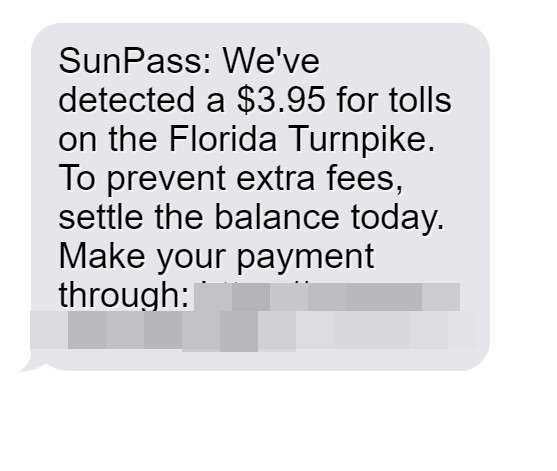
The devious fraud begins with SunPass users receiving an urgent text message:
“Oregon toll service: We’ve noticed an outstanding balance of $11.69 on your record. To prevent a late fee of $50.00, please visit https:// toll-sunpass.com to settle your invoice.“
The message sounds legitimate and official, instructing recipients to pay $11.69 in mystery tolls and fees immediately. Under pressure, many drivers will click the link, expecting it to lead to the official SunPass site to pay the supposed unpaid bill.
However, the URL directs to InvoiceSunPassToll.com instead. This domain name is carefully crafted to instill trust by including “SunPass” while omitting the real site, sunpass.com. Once on the fraudulent site, victims won’t immediately realize they are not on the legitimate SunPass site.
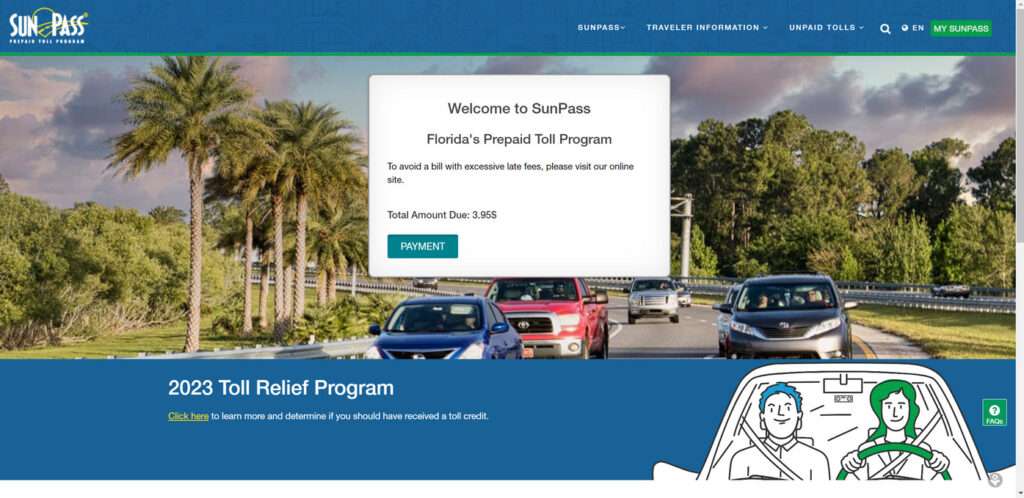
The sophisticated InvoiceSunPassToll.com site is intricately designed to replicate the look and feel of the real SunPass. The scam website has the exact same:
- SunPass logo
- Fonts and color schemes
- Navigation menus
- Graphics and toll road imagery
- Links to FAQs and contact pages
To an unsuspecting visitor, the fake site appears virtually indistinguishable from the real thing. The only giveaway upon close inspection is the domain name itself.
The deceitful site also copies language directly from the official SunPass stating:
“Welcome to SunPass, Florida’s prepaid toll program. Save time and money with SunPass.”
Further down in bold, red text designed to create urgency it says:
“To avoid a bill with excessive late fees, please pay immediately.”
These visual and textual cues lend credibility to the scam by making it look precisely like the real SunPass website. The site reduces suspicion allowing victims to feel comfortable entering their sensitive information.
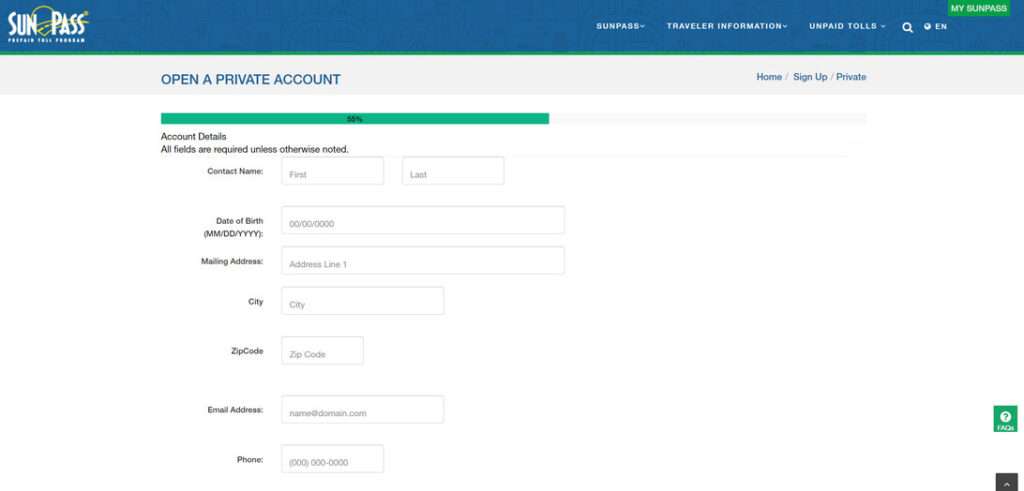
The fake SunPass site claims to allow drivers to pay any outstanding tolls and fees online. After duping visitors into thinking the site is legitimate, it asks users to enter detailed personal and financial information including:
- Legal name
- Home address
- Phone number
- Email address
- License plate number
- Full debit/credit card number
- Card expiration date
- Card CVV security code
It states this data is required to process the unpaid $11.69 tolls mentioned in the initial text message. However, visitors are really handing over the keys to their financial accounts and personal identity.
Once submitted, scammers steal the information and leverage it to commit identity theft and financial fraud. Stolen credit card details are sold on the dark web or used directly for fraudulent purchases. Sensitive personal data provides the means to open fake accounts, take out loans, file false tax returns, and wreak further havoc.
Meanwhile, the digital fraudsters behind the fake SunPass site cover their tracks. They routinely take down the site after accumulating victims’ information. The scam artists then disappear without a trace, leaving violated consumers to deal with the devastating aftermath.
This is precisely how the masterfully crafted InvoiceSunPassToll.com scam manages to deceive drivers accustomed to seamlessly paying SunPass bills online. The urgent payment pleas and painstakingly replicated website provide the perfect ruse to trick visitors into handing over the keys to their financial and digital lives.
Only through awareness of the common red flags can Floridians learn to detect and avoid falling prey to this devious scam. With vigilance and insight into their deceitful tactics, we can outsmart these digital con artists before becoming their next victims. Don’t let them swindle you out of your hard-earned money or precious personal data.
How the InvoiceSunPassToll.com Scam Works
Here is an in-depth look at how this devious phishing scheme unfolds:
Step 1. Drivers Receive a Text About Unpaid Tolls
Florida drivers first receive a text stating:
“SunPass: We’ve detected a $11.69 toll charge on the Turnpike. Pay now to avoid fees: InvoiceSunPassToll.com”
The message appears to come from SunPass, warning recipients to pay $11.69 in tolls urgently.
Step 2. The Link Goes to InvoiceSunPassToll.com
Those who click the link are taken to InvoiceSunPassToll.com. The domain name is designed to instill trust by containing “SunPass”.
Step 3. The Site Spoofs SunPass to Look Legitimate
The fraudulent site has the SunPass logo and branding throughout. It claims to allow drivers to immediately pay any outstanding toll fees online.
Step 4. The Site Requests Personal and Financial Data
The fake SunPass site prompts users to enter information like:
- Full legal name
- Home address
- Phone number
- Email address
- License plate number
- Full credit/debit card details
It states this data is required to process the unpaid $11.69 tolls.
Step 5. Scammers Steal and Misuse the Data
When victims input their information, the scammers steal it. They sell financial data or use it fraudulently for purchases. Personal details are used to open fake accounts and steal identities.
Step 6. The Scammers Disappear
After accumulating enough stolen data, the scammers take down InvoiceSunPassToll.com. They disappear with the identities and payment information of potentially thousands of victims.
Common Red Flags of the InvoiceSunPassToll.com Scam
Drivers can recognize this insidious phishing scam by watching for these telltale signs:
- The link goes to InvoiceSunPassToll.com, not the official sunpass.com site.
- Uses logos and branding copied from the real SunPass site.
- Requests extensive financial and personal data for a small $11.69 toll payment.
- Pressures urgent action to avoid late fees on mystery toll charges.
- No verification of the tolls or source before demanding payment.
When unsure, contact SunPass directly to validate suspicious texts or toll payment links.
What to Do if You Encountered InvoiceSunPassToll.com
If you came across the fraudulent InvoiceSunPassToll.com site, immediately take these steps:
- If entered your information, contact your bank and monitor for fraud.
- Place fraud alerts on credit reports and sign up for credit monitoring.
- Report identity theft to the FTC if your data was compromised.
- Reset all account passwords if used the same ones on the fake site.
- Contact SunPass to notify them of this scam website.
- Avoid clicking links in suspicious texts claiming you owe mystery bills.
Acting quickly can help limit damages from any stolen financial or personal data.
Frequently Asked Questions About the InvoiceSunPassToll.com Scam
1. What is InvoiceSunPassToll.com?
InvoiceSunPassToll.com is a fake website disguised as the real SunPass toll program site to steal users’ personal and financial information. The sophisticated scam site mimics the look of sunpass.com to deceive visitors.
2. How does the InvoiceSunPassToll.com scam work?
It starts with a text guiding victims to the fraudulent site. The fake SunPass site then asks users to enter detailed personal data and credit card info to supposedly pay outstanding mystery tolls. In reality, the scammers steal entered information for identity theft and financial fraud.
3. What are signs InvoiceSunPassToll.com is fake?
Red flags include:
- The URL is slightly different than the real SunPass site.
- Requests excessive personal details for a small $11.69 toll payment.
- Threatens immediate fees if the dubious toll charge isn’t paid.
- No verification of the suspicious toll before demanding payment info.
4. I visited the site – what should I do now?
If you entered any data on InvoiceSunPassToll.com, immediately:
- Contact your bank and credit card companies to report potential fraud.
- Place fraud alerts on all three credit reports.
- Monitor account statements closely for unauthorized activity.
- Sign up for credit monitoring services to detect any misuse of your information.
- Reset any account passwords you used on the fake site.
5. How can I avoid InvoiceSunPassToll.com and similar scams?
To avoid falling victim:
- Verify links carefully, especially when pressured to urgently pay a bill.
- Never provide personal or financial data without first confirming a site’s authenticity.
- Contact SunPass directly if you have any doubts about toll notices.
- Disregard texts claiming you owe money without documentation.
6. How can I report the InvoiceSunPassToll.com scam site?
You can report the fake site to:
- SunPass: Contact them to notify about this scam impersonating their brand.
- IC3: File a complaint with the FBI’s Internet Crime Complaint Center.
- FTC: Report the deceptive website to the Federal Trade Commission.
7. How does reporting the site help?
Reporting helps get fraudulent sites like InvoiceSunPassToll.com shut down. It also aids investigations into the scammers behind them. The more reports filed, the greater priority law enforcement gives to pursuing and prosecuting these crimes.
The Bottom Line on the InvoiceSunPassToll.com Scam
This incredibly deceptive scam website reveals how far digital fraudsters will go to impersonate real businesses. They exploit trusting consumers conditioned to pay bills online with minimal verification.
The keys to avoiding this are:
- Verify links carefully – InvoiceSunPassToll.com is NOT the real site.
- Disregard texts claiming you owe money urgently without documentation.
- Legit merchants will never ask for that much personal data for a small payment.
- Contact SunPass directly if you have any doubts about toll notices.
Stay vigilant online and you can confidently avoid having your identity stolen by these fraudulent sites posing as SunPass. Don’t let them fool you out of your hard-earned money and personal data.








