

If you have received an email claiming to be from the IRS with the subject line “Third Round of Economic Impact Payment Status Available”, be careful. It is a phishing scam that tries to trick you into giving up your personal and financial information. In this blog post, we will explain what this scam is, how it works, and what you can do to protect yourself and your money.
What is the “IRS: Third Round of Economic Impact Payment Status” Email Scam?
This scam is a type of phishing, which is a fraudulent attempt to obtain sensitive information such as usernames, passwords, credit card numbers, or bank account details by disguising oneself as a trustworthy entity in an electronic communication. In this case, the scammers pretend to be the IRS and send you an email that looks like an official notification about your tax refund.
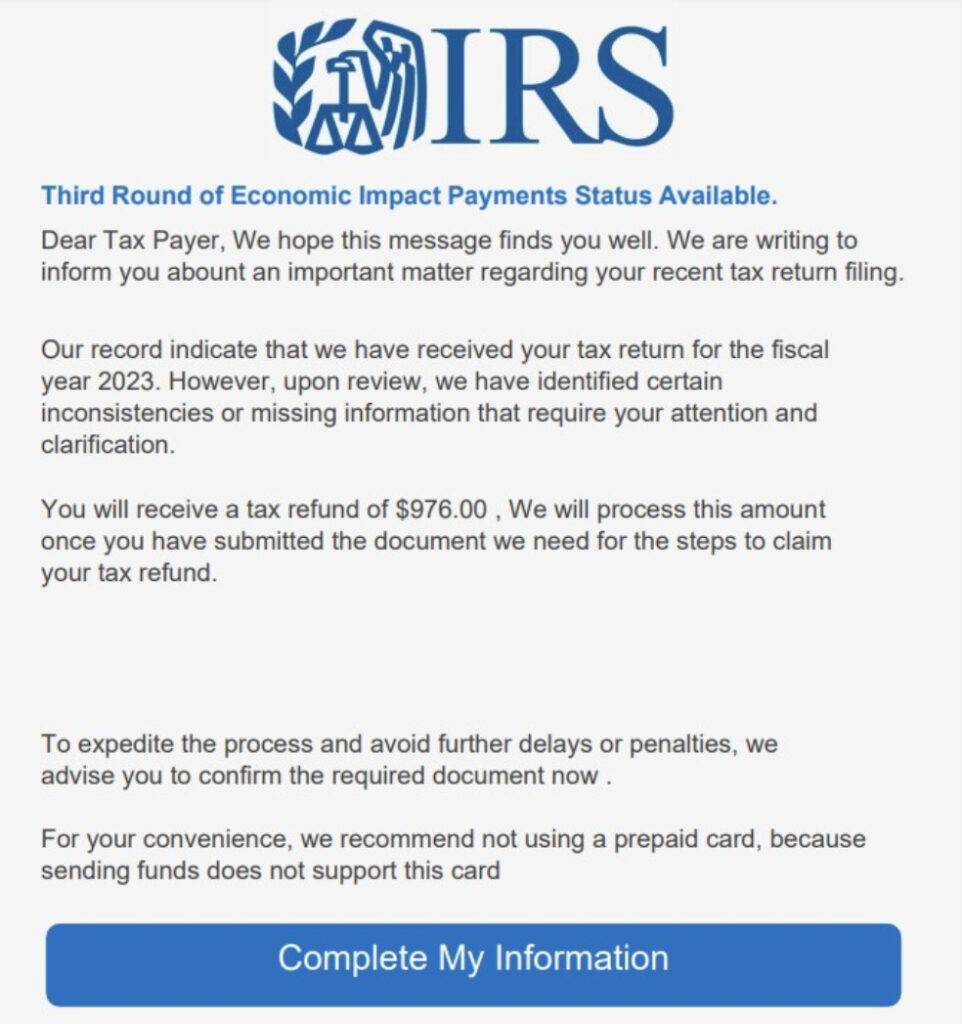
The email claims that the IRS has received your tax return for the fiscal year 2023, but has found some inconsistencies or missing information that need your clarification. It says that you will receive a tax refund of $976, but you need to confirm some documents first. It then urges you to click on a button that says “Complete My Information”, which leads you to a fake website that asks you to enter your personal and financial information.
The email may look convincing, but it is not from the IRS. The IRS does not initiate contact with taxpayers by email, text messages, or social media channels to request personal or financial information. The IRS also does not ask for payment by prepaid cards, gift cards, wire transfers, or cryptocurrencies. The email is a scam that aims to steal your identity and money.
Here is how the email “IRS: Third Round of Economic Impact Payment Status” looks like:
IRS
Third Round of Economic Impact Payment Status Available.
Dear Tax Payer, We hope this message find you well. We are writing to info you about an important matter regarding your recent tax returning filling.Our record indicate that we have received our tax return for the fiscal year 2023. However, upon review, we have identified certain inconsistencies or missing information that require your attention and clarification.
You will receive a tax refund of $976, We will process this amount once you have submitted the document we need for the steps to claim your tax refund.
To expedite the process and avoid further delays or penalties, we advise you to confirm the required document now.For your convenience, we recommend not using a prepaid card, because sending fund does not support this card.
[Complete My Information]
How does the “IRS: Third Round of Economic Impact Payment Status” Email Scam works?
The scammers use various techniques to make their email look legitimate and convincing. They may use the IRS logo, official-sounding language, and a spoofed sender address that mimics the IRS domain name. They may also use a URL shortener or a redirect service to hide the real destination of the link in the email.
The scammers rely on your curiosity, fear, or greed to get you to click on the link and enter your information. They may create a sense of urgency by saying that you need to act fast or face penalties or delays. They may also appeal to your desire for money by promising you a large tax refund.
Once you click on the link, you are taken to a fake website that looks like the IRS website. The website may ask you to verify your identity by entering your name, address, Social Security number, date of birth, and other personal details. It may also ask you to provide your bank account number, credit card number, PIN, or other financial information. It may even ask you to upload a copy of your driver’s license, passport, or other identification documents.
If you provide any of this information, you are giving it to the scammers who can use it to commit identity theft, fraud, or other crimes. They can use your personal information to open new accounts in your name, apply for loans or benefits, file fraudulent tax returns, or make purchases with your credit card. They can also use your financial information to drain your bank account, make unauthorized transactions, or sell it to other criminals.
What to do if you have fallen victim?
If you have received this email and clicked on the link or provided any information, do not panic. There are some steps you can take to minimize the damage and protect yourself from further harm.
- First, contact your bank and credit card companies immediately and inform them of the situation. They can help you freeze your accounts, cancel your cards, and issue new ones. They can also monitor your transactions and alert you of any suspicious activity.
- Second, report the incident to the IRS by forwarding the email to phishing@irs.gov. The IRS can investigate the source of the email and take action against the scammers. You can also visit the IRS website at https://www.irs.gov/identity-theft-fraud-scams/report-phishing for more information on how to report phishing scams.
- Third, check your credit reports for any signs of identity theft or fraud. You can get a free copy of your credit report from each of the three major credit bureaus (Equifax, Experian, and TransUnion) once a year at https://www.annualcreditreport.com/. You can also place a fraud alert or a credit freeze on your credit reports to prevent new accounts from being opened in your name without your permission.
- Fourth, change your passwords for any online accounts that may have been compromised by the scam. Use strong and unique passwords that are not easy to guess or crack. You can also use a password manager to generate and store secure passwords for different accounts.
- Fifth, be more vigilant and cautious when dealing with emails, texts, or calls that ask for your personal or financial information. Do not click on links or open attachments from unknown or suspicious sources. Do not reply to or follow the instructions of unsolicited messages. Do not provide any information that you are not comfortable sharing. Always verify the identity and legitimacy of the sender before responding.
- If you suspect your device is infected with malware, scan your device with Malwarebytes Anti-Malware Free.
Conclusion
The “IRS: Third Round of Economic Impact Payment Status” email scam is a phishing scam that tries to trick you into giving up your personal and financial information by pretending to be the IRS. It is not from the IRS and you should not respond to it or click on any links in it. If you have received this email and fallen victim to it, you should contact your bank and credit card companies, report the incident to the IRS, check your credit reports, change your passwords, and be more careful in the future. By following these steps, you can protect yourself and your money from this and other phishing scams.

Join the discussion
0 commentsShare your experience or ask a question about this article.
Discussion
Start the conversation
Have a question or something useful to share? Add the first comment.