

Attention Kentucky drivers! Urgent texts demanding missed toll payments are sweeping the state, but it’s a complete sham designed to steal your money. Scam artists are deploying digital deception related to fictional toll debts to dupe commuters on Kentucky roadways. This comprehensive article will expose their sneaky tactics so you can cruise past these crooks. I’ll reveal the telltale tricks in their suspicious messages, deceitful links, and phony threats so you don’t get taken for a ride. Let’s hit the road with knowledge to thwart these thieves seeking easy prey. Keep reading to uncover their scam and steer clear of the fast lane to fraud!
Scam Overview
This deception takes advantage of the countless drivers who depend on toll roads for travel all across Kentucky. Whether commuting daily for work or just passing through, tollways are essential arteries many rely on.
Criminals are capitalizing on this by impersonating a completely fabricated entity called “Kentucky Toll Services” in order to defraud residents. Victims receive an unsolicited text message insisting they have unpaid toll charges requiring immediate payment to avoid substantial late fees upwards of $50 or more.
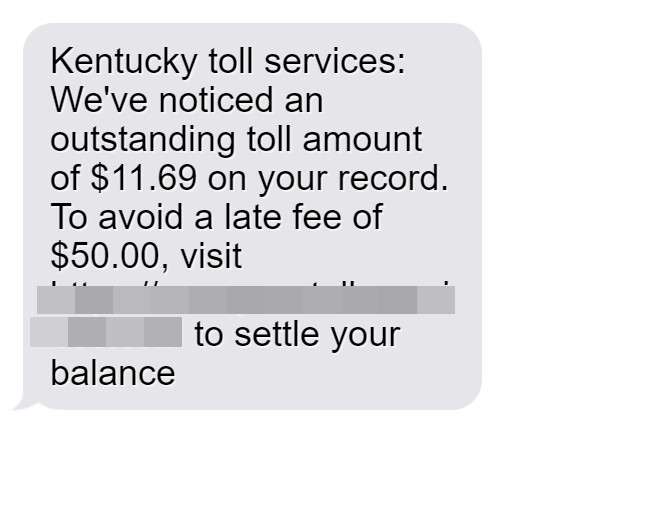
The texts cite an oddly specific supposed outstanding toll amount, like $11.69 for example, and provide a link to hastily settle this fictional “debt” before penalties kick in. However, no such unpaid toll actually exists whatsoever.
The urgent threats of steep fines for delayed payment are pure fiction as well, invented solely to panic recipients into hasty action without deeper scrutiny. Even the name “Kentucky Toll Services” itself is an outright fake, carefully crafted to sound like a legitimate state agency.
In frantic desperation to avoid the imminent and severe late fees described in alarming detail, users click the provided link, which leads not to any valid state website but instead to sophisticated phony portals designed explicitly for stealing personal information and payment credentials.
These fraudulent sites are engineered by scammers to closely resemble official Kentucky government online platforms, incorporating branding, colors, logos and graphics used by the state to help suspend disbelief. But it’s just digital smoke and mirrors masking the criminals’ true motives.
After getting tricked into inputting sensitive personal details, users are shown a convincing mock-up invoice for the exact bogus toll amount first cited in the scam text message. Oftentimes an additional fictional “late fee” is tacked on, sometimes $50 or more, to intensify urgency.
Next, victims are instructed to enter credit card or bank account information to clear this imaginary toll balance immediately, at which point scammers capture financial data for misuse while the user remains unaware.
No money goes to pay any actual Kentucky tolls, which never existed in the first place. The oddly specific fictional toll amounts are purely to subconsciously feel more realistic, as most genuine tolls end up rounded numbers.
In reality, scammers simply pocket ill-gotten gains and identities from those deceived by this toll payment ruse and the air of legitimacy woven throughout it. Don’t let them take you for a ride on Kentucky’s many toll roads.
How The Kentucky Toll Road Scam Unfolds
From the initial text message to the deceitful website it links to, here’s an inside look at how they finagle and take advantage of victims:
Step 1: The Text Message
You’ll receive a text message from a local area code claiming you have unpaid toll charges and face hefty fees if not settled quickly. It cites an oddly specific amount supposedly owed, like $11.69 for instance, and provides a link to hastily pay before penalties kick in:
“Kentucky Toll Services: We’ve noticed an outstanding toll amount of $11.69 on your record. To avoid a late fee of $50, visit https://kentuckytollpay.com to settle your balance.“
The short deadline, lofty fine, and questionable link are red flags. Legitimate toll agencies do not contact users this way.
Step 2: Visiting the Bogus Website
Clicking the link leads you to a sophisticated bogus website made to closely resemble a real Kentucky toll payment portal. You’ll be prompted to enter personal details, allowing scammers to steal your identity.
Step 3: Entering Payment Information
Next, you’ll see a fake invoice for the exact unpaid toll amount first mentioned in the scam text, often with fictional penalties added as well. You’ll be instructed to enter payment information to settle this phony bill. Scammers steal financial data while your identity remains at risk.
No money goes to pay any actual tolls, which were completely fabricated. Scammers simply pocket the details entered and move on to the next target. Don’t let them pull a fast one on you!
What To Do If You Are Scammed
If you fell for the trickery, take these steps ASAP to minimize damages:
- Contact your bank to stop payments and dispute unauthorized charges. Closely monitor for further suspicious activity.
- Place fraud alerts on your credit reports and consider credit monitoring to detect misuse of your identity.
- Report it to the FTC, FBI, and Kentucky Attorney General.
- Change account passwords, particularly if reused on the sham site.
- Avoid further contact with scammers now possessing your details. Block their numbers.
- Call official toll agencies directly regarding any legitimate unpaid tolls.
- Spread awareness to help prevent others from being swindled too.
Swift action can help reduce impacts from compromised finances or stolen personal information. Use the misstep as motivation for sharpening your scam prevention skills.
Frequently Asked Questions about the Kentucky Toll Scam Text
1. What is the Kentucky Toll Services scam text message?
The Kentucky Toll Services scam text involves scammers sending fraudulent text messages claiming to be from Kentucky Toll Services. The texts demand immediate payment for fake unpaid tolls to avoid fictional late fees. Their links go to phony websites designed to steal personal and financial information.
2. Who are the text messages from?
The texts are not from any real Kentucky toll agency. “Kentucky Toll Services” is a completely fabricated name that scammers use to execute this fraud.
3. What details do the scam texts include?
The texts cite a specific unpaid toll amount owed, threats of high fake fees, and links to fraudulent websites dressed up to mimic official portals.
4. How can I recognize the Kentucky toll scam text?
Warning signs include getting unsolicited texts about unpaid tolls, steep late fees, links to questionable sites, requests for your personal info, and pressure to pay immediately.
5. What keywords should raise red flags?
Phrases like “Kentucky Toll Services,” “outstanding toll,” “late fee,” and links to unfamiliar sites are red flags. Legitimate toll agencies do not contact you this way.
6. Are there sender IDs I can look out for?
The texts come from a variety of changing local numbers. Scammers often spoof caller IDs to appear credible. There are no specific numbers that always signal this scam.
7. How can I avoid this Kentucky toll scam text?
Do not click on links in questionable texts about tolls. Contact official toll agencies directly if you have toll questions. Only pay tolls through your real account on official .gov websites.
8. What should I do if I get a suspicious text?
If you get a shady toll-related text, do not click the link or call the number. Report the scam to the FTC and Kentucky AG. Call toll agencies directly using official numbers to inquire.
9. How can I safely pay any legitimate tolls?
Log into your account on official .gov toll websites. Use real online or phone payment options only. Never pay toll bills on third-party sites, especially ones sent unexpectedly via text.
10. What should I do if I paid a fake toll bill?
If you shared information or paid, contact your credit card company right away to dispute the charges. Also place fraud alerts, monitor your statements, change account passwords, and contact the FTC.
11. How can I get my money back if I paid a scam toll bill?
Unfortunately it is very difficult to recover money sent to scammers. File disputes with your bank and monitor for identity theft. Use extreme caution with all money transfer or data sharing requests moving forward.
12. How can I protect myself from identity theft if scammed?
If your information was compromised, enroll in credit monitoring services to detect misuse. Freeze credit reports if warranted. Continue monitoring accounts closely for any fraudulent activity and report it immediately.
Conclusion
The “Kentucky Toll Services” scam text capitalizes on familiarity with toll roads to defraud motorists. Stay alert against texts demanding rushed toll payments and threatening unrealistic fees. Verify real toll agencies through official channels only. Together we can stop these crafty digital fraudsters in their tracks before more honest drivers get taken for a ride. Stay vigilant on those Kentucky tollways!








