

As cryptocurrencies continue to explode in popularity, scammers have come up with various schemes to capitalize on public interest and steal digital assets from unsuspecting victims. One such cryptocurrency scam that has emerged recently is Kucionclaims.com.
Kucionclaims.com promotes itself as a platform for cryptocurrency traders to receive reimbursements of up to $5,000 for trading fees. However, this website has no actual relation to the major exchange KuCoin and is a scam designed to steal cryptocurrency deposits and personal data.
This article will take a deep dive into how the Kucionclaims.com crypto scam works, who is behind it, and how to identify signs that you are being targeted. We will also provide tips on avoiding fraud, best practices for protecting your coins and identity, and steps to take if you have fallen prey to this insidious cryptocurrency phishing operation.
Overview of the Kucionclaims.com Crypto Scam
Kucionclaims.com is a website set up to mimic offerings from the legitimate cryptocurrency exchange KuCoin. Using forged branding and likeness, this scam site claims users can receive reimbursements worth thousands of dollars for trading fees they have paid over the years to KuCoin. However, Kucionclaims.com has no affiliation with the real KuCoin and is a fraudulent platform executing an elaborate ruse to steal crypto deposits and personal information from victims.
Here are some key details about this cryptocurrency phishing scam:
- Operates Fake Website: Kucionclaims.com utilizes KuCoin’s name, logo, fonts, colors, and messaging illegally to appear credible.
- Falsely Promises Fee Refunds: The site deceives users by claiming they qualify for reimbursement of up to $5,000 in trading fees paid to KuCoin over time. This serves as bait to lure victims.
- Instructs Users to Connect Wallets: To supposedly collect reimbursements, users must connect their web crypto wallets via a QR code. This allows deposits to be stolen.
- Steals Crypto Deposits: Once wallets are linked, the scam site generates additional fake fees requiring payment before funds can be withdrawn. Any deposited crypto is stolen.
- Harvests Personal Data: Creating an account requires handing over personal info the scammers can use for identity theft.
- Recruits Via Spam Texts: Kucionclaims.com spreads primarily through SMS text spam messages containing links to the fraudulent website.
This overview shows Kucionclaims.com is an intricate scam designed to mislead victims into handing over cryptocurrency and personal data using the lure of fee reimbursements. Next, we will examine exactly how this crypto phishing operation works to compromise its victims.
How the Kucionclaims.com Crypto Scam Works
The Kucionclaims.com scam operates through a sophisticated process developed to manipulate victims into giving up crypto funds or sensitive personal information. Here is a step-by-step look at how this scam works:
1. Scammers Create Fake Website and Accounts
The scammers begin by registering a domain name similar to KuCoin and designing a website clone using KuCoin’s branding without authorization. The site is set up to closely mimic the real KuCoin platform using logos, colors, fonts, imagery, and messaging. Fake social media accounts are also created to help spread awareness about the scam site.
2. SMS Text Spam Blasts Sent to Random Phone Numbers
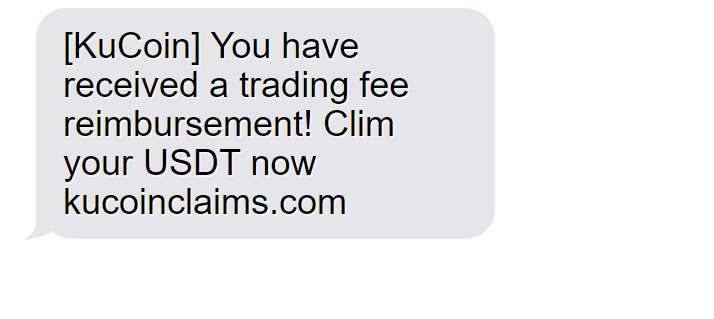
A mass SMS text messaging campaign is launched by the scammers, sending messages randomly to thousands of phone numbers at a time. These texts contain brief pitches and links directing recipients to visit Kucionclaims.com to claim supposed fee reimbursements from KuCoin.
[KuCoin] You have received a trading fee reimbursement! Claim your USDT now kucoinclaims.com
3. Users Tricked into Creating Accounts
When victims arrive at Kucionclaims.com from the spam text links, they are greeted with promises of generous fee reimbursements of up to $5,000 from KuCoin. Users are encouraged to create accounts by inputting personal data including their phone number, email address, and physical address.
4. Scam Site Instructs Users to Connect Wallet
After registering, users are provided with instructions to link their existing web-based cryptocurrency wallets to Kucionclaims.com in order to collect the promised reimbursement funds. A QR code is displayed to facilitate wallet connections.
5. Fake Fees Charged Before Users Can Withdraw Funds
Once wallets are connected, the scam site invents new conditions before funds can be withdrawn. Victims are told they must first pay additional processing fees, conversion fees, taxes, or other made-up charges to access the reimbursements.
6. Scammers Steal All Crypto Deposits
When victims transfer cryptocurrency to the scam site to cover the fake fees, their deposits are stolen. The scammers immediately transfer all coins out of the site’s wallet to their own accounts. Victims never receive any of the promised reimbursements.
7. Personal Data Harvested for Identity Theft
In addition to stealing crypto deposits, the scammers also now possess all personal information entered by the victim when registering on the site. This data can be used for identity theft, account break-ins, credit card fraud, and more.
8. Websites and Accounts Deactivated
After draining victims’ wallets, the scammers eventually deactivate the fake site and social media accounts. Victims lose all ability to recover their stolen funds or data.
This elaborate process manipulates innocent people who believe they are receiving fee refunds from KuCoin into handing over crypto and personal info using deception, false promises, and outright theft. Avoiding this scam takes knowledge of how it works and caution when contacted with enticing offers online.
Red Flags – How to Spot the Kucionclaims Scam
The Kucionclaims.com scam can be identified through several key warning signs:
- The website URL is slightly different from the real KuCoin site, often using .net or misspellings.
- Contact information provided is fake, non-working, or completely absent.
- Promises of easy money through guaranteed refunds, reimbursements, or rewards are highly suspicious.
- Language urging immediate action without delay or review is pressuring and atypical.
- Requests for upfront payment via cryptocurrency before releasing promised funds is a major red flag.
- Small spelling, grammar, punctuation, or design flaws may reflect inauthenticity.
- Arrival via unsolicited message like spam text directs caution on links and claims.
- No verifiable association or endorsement by the real KuCoin exchange.
- Details are vague when questioned and not backed by solid evidence.
Trust your instincts. If something seems questionable at all, it likely is fraudulent. Scrutinize sites and offers carefully before providing sensitive information or payments. Stay alert to recognize common signs of cryptocurrency phishing scams.
What to Do if You Suspect You Are Being Targeted or Have Fallen Victim
If you think you may have been contacted by or fallen prey to the Kucionclaims.com scam, here are important steps to take right away:
- Cease all communication: Immediately stop responding to any texts, emails, or other messages related to Kucionclaims.com. Do not provide any additional info or deposits.
- Report it: Report Kucionclaims.com as a scam site to consumer protection groups like the FTC, IC3, BBB, and more to get it shut down. File complaints about any losses.
- Notify your phone carrier: Alert your phone provider about receiving a suspicious SMS spam text message so they can take measures to block numbers or keywords related to this scam campaign.
- Secure your crypto wallets: Change passwords and enable 2FA on any cryptocurrency wallets linked to Kucionclaims.com. Transfer all remaining coins to new secure wallet addresses not compromised by the scam.
- Freeze affected financial accounts: Put a freeze on any bank account or credit card used to purchase cryptocurrency transferred to the scam website. Report fraudulent charges.
- Run security checks: Run scans to check for malware or viruses on any devices used to access Kucionclaims.com. The site may have tried to infect devices with threats to steal data.
- Watch out for recovery scams: Fraudsters sometimes contact victims again posing as investigators trying to retrieve stolen funds, but this is just another scam. Never pay someone claiming they can recover lost crypto.
- Monitor personal info: Enroll in credit monitoring if any personal data was provided to Kucionclaims.com and continue watching for suspicious activity indicating identity theft.
Taking quick action if you have been sucked into this scam can potentially limit damages and prevent further losses. Be vigilant following any scam encounter.
Frequently Asked Questions About Kucionclaims.com
What exactly is Kucionclaims.com?
Kucionclaims.com is a fraudulent website that impersonates the legitimate cryptocurrency exchange KuCoin. It claims to offer reimbursements for trading fees but is a scam.
How does the Kucionclaims.com scam work?
The site tells users they can get refunds on KuCoin trading fees. But after linking wallets via a QR code, fake fees are generated and any deposited crypto is stolen.
Who is behind this scam website?
Kucionclaims.com was likely created by a group of scammers attempting to capitalize on KuCoin’s reputation to steal crypto deposits and personal data.
How are victims targeted and recruited?
Random SMS text spam messages are sent containing links to the scam site. Social media posts may also help drive traffic.
What should I do if I was scammed by Kucionclaims.com?
Immediately cease all communication, secure crypto wallets, report the fraud, freeze affected financial accounts, and watch out for secondary scams claiming to retrieve lost funds.
What is the QR code for on the site?
The QR code is used to hastily connect the victim’s outside cryptocurrency wallet to the scam site in order to steal deposits.
Can I get my stolen cryptocurrency back?
Unfortunately, recovering any cryptocurrency sent to scammers is extremely unlikely. But reporting the scam can potentially help prevent further victims.
Should I report this scam? To whom?
Yes, report Kucionclaims.com to the FTC, CFTC, IC3, BBB, and relevant cryptocurrency fraud tracking services to get the word out.
How can I avoid Kucionclaims.com and similar crypto scams?
Avoid unknown offers, ignore spam texts, research senders, use strong unique passwords, enable 2FA, and be wary of anything too good to be true.
This FAQ provides a quick overview of the Kucionclaims.com cryptocurrency scam and how to steer clear of this threat. Stay vigilant when contacted with enticing crypto-related offers.
The Bottom Line – Protecting Your Crypto from Theft
As cryptocurrencies skyrocket in popularity, new and elaborate scams like Kucionclaims.com will continue to emerge to take advantage of public interest and steal digital assets. Avoid falling prey to these schemes by implementing best practices, including:
- Never linking wallets or providing personal data to unknown or unverified sites.
- Ensuring crypto wallet and exchange account passwords are long and secure.
- Storing the majority of coins offline in cold storage.
- Ignoring investment opportunities that promise guaranteed massive returns.
- Watching for subtle website URL differences, grammar mistakes, or other signs of fraud.
- Confirming legitimacy directly with companies before providing any sensitive data.
With crypto scams on the rise, investors and traders should stay vigilant and implement robust security to protect themselves. Maintaining strong privacy and self-education on the latest fraud threats will help you keep your cryptocurrency secure against even the most deceptive and persuasive scams.

Reviews & discussion
0 commentsShare a firsthand experience, or ask a question.
Community reviews
kucionclaims.com
Moderated reader experiences, not an editorial verdict.
Start the conversation
Have a question or something useful to share? Add the first comment.