

Lannywitch.com is an online website that claims to sell a variety of products, such as books, car equipment, household materials, plumbing tools, sports items, and more. The website was established in 2020 by LANNY M. FELDMAN, P.A., a company based in Pompano Beach, Florida. The website’s slogan is “Books are the Ladder of Human Progress”. But is Lannywitch a scam or a legit online shop? In this review, we will examine the website’s features, policies, customer reviews, and other factors to help you make an informed decision.
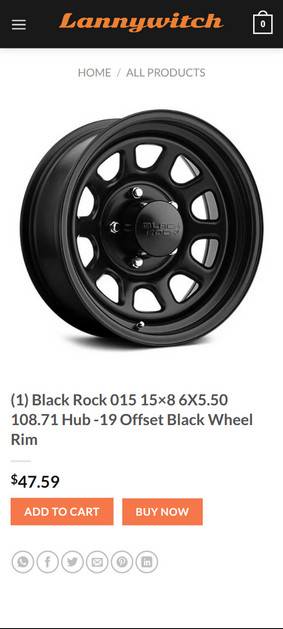
Lannywitch.com Red Flags
Lannywitch.com has a simple and user-friendly design, with categories and subcategories for different products. The website also has a search bar and a filter option to help customers find what they are looking for. The website claims to offer free shipping on all orders over $50 and a 30-day return policy. The website accepts payments via PayPal, Visa, MasterCard, American Express, and Discover. The website also has a contact page with an email address, phone number, and physical address.
However, there are some red flags that indicate that Lannywitch.com may not be a trustworthy online shop. Some of these are:
- The website does not have any social media presence or links to any external platforms, which is unusual for an online shop that claims to sell a wide range of products.
- The website does not have any customer reviews or ratings on its own platform or on third-party sites, which suggests that it has low traffic and popularity.
- The website does not provide any information about its suppliers, manufacturers, or quality control processes, which raises doubts about the authenticity and quality of its products.
- The website offers unrealistically low prices for some of its products, such as $47.59 for a 2021 Louisville Slugger Meta -10 USSSA Baseball Bat or $47.59 for a 5 Pieces Patio Cushioned Rattan Furniture Set . These prices are too good to be true and may indicate that the products are counterfeit or defective.
- The website has several grammatical and spelling errors on its pages, such as “All Products – Lannywitch Home / All Products Quick View All Products” or “The Advantage of Fins with Pliant Energy…” . These errors suggest that the website was poorly created and maintained by someone who is not proficient in English.
Customer Reviews of Lannywitch.com
As mentioned above, Lannywitch.com does not have any customer reviews or ratings on its own platform or on third-party sites. However, we were able to find some online sources that have reviewed the website and exposed it as a scam. For example:
- Scam Detector gave Lannywitch.com a very low trust score of 0.8 out of 100 and warned customers to avoid it at all costs. The site stated that Lannywitch.com has several indicators of fraud, such as fake contact details, hidden identity, copied content, unrealistic discounts, and lack of transparency.
- Gistvic Blog also wrote a negative review of Lannywitch.com and advised customers not to buy anything from it. The site pointed out that Lannywitch.com is a scam website that uses fake images, logos, and testimonials to lure customers into paying for products that they will never receive.
- YouTube also has some videos that have exposed Lannywitch.com as a scam and shared their experiences with it. The videos showed that Lannywitch.com does not deliver the products that it advertises and does not respond to customer queries or complaints.
What should you do if you have shopped from Lannywitch.com?
- Contact your bank or financial institution: If you have paid with your credit card or debit card, you should contact your bank or financial institution as soon as possible and request them to cancel the transaction and refund your money. You should also report the website as a fraudulent site and ask them to block any future charges from it.
- Change your passwords: If you have created an account on Lannywitch.com or used the same password for other online accounts, you should change your passwords immediately. You should also enable two-factor authentication for your accounts if possible. This will prevent hackers from accessing your accounts and stealing your personal information.
- Beware of phishing emails: You might receive emails from Lannywitch.com or other sources claiming to be related to your order or offering you discounts or refunds. These emails are likely to be phishing attempts that aim to trick you into clicking on malicious links or downloading attachments that can infect your device with malware or steal your information. You should delete these emails and do not open any links or attachments from them.
- Use a browser-based content blocker, like AdGuard : Content blockers help stop malicious ads, Trojans, phishing, and other undesirable content that an antivirus product alone may not stop.
- Scan your device for malware. If you have downloaded any attachments or installed any programs from Lannywitch.com run a scan with Malwarebytes Anti-Malware Free.
Lannywitch.com Final Thoughts
Based on our research and analysis, we conclude that Lannywitch.com is a scam website that should be avoided by online shoppers. The website has several red flags that indicate that it is not a legitimate online shop but a fraudulent scheme that aims to steal customers’ money and personal information. Therefore, we advise you not to buy anything from Lannywitch.com or provide any sensitive information to it. If you have already made a purchase from Lannywitch.com, we recommend you contact your bank or credit card company immediately and request a chargeback. You should also report the website to the relevant authorities and warn others about it.

Reviews & discussion
0 commentsShare a firsthand experience, or ask a question.
Community reviews
lannywitch.com
Moderated reader experiences, not an editorial verdict.
Start the conversation
Have a question or something useful to share? Add the first comment.