

Live Security Platinum is a malicious program also known as rogue security software, which will display fake security alerts in an attempt to scare you into buying this fake security product.
In addition, Live Security Platinum has also hijacked your PC,blocking your from running files,so now when your trying to open and executable file (file ending with .exe), this program will instead display this fake alerts:
Warning!

Application cannot be executed. The file rdpclip.exe is infected. Please active your antivirus software.
Security Monitor: WARNING!

Attention! System detected a potential hazard (TrojanSPM/LX) on your computer that may infect executable files. Your private information and PC safety is at risk.

To get rid of unwanted spyware and keep your computer safe you need to update your current security software.

Click Yes to download official intrusion detection system (IDS software).
Live Security Platinum Warning Spyware.IEMonster activity detected. This is spyware that attempts to steal passwords from Internet Explorer, Mozilla FireFox, Outlook and other programs. Click here to remove it immediately with Live Security Platinum
Live Security Platinum Firewall Alert Live Security Platinum Firewall has blocked a program from accessing the Internet. Internet Explorer Internet Browser is infected with SVCHOST.Stealth.Key-logger. This worm is trying to send your credit card details using Internet Explorer Internet Browser to connect to remove host
Live Security Platinum will also cause malicious browser redirects and system slowdowns so it needs to be removed from your computer as soon as possible.
This is are a few images of Live Security Platinum:
![[Image: Live Security Platinum virus]](https://malwaretips.com/blogs/wp-content/uploads/mwt-media/78/783c1b732d113f836bde9af8615f4a67abc3eb2fb84e105be7ae0c5b9a01c993/0f02a9185e04eb2b7d5a52f701fd75bda1efbf8aac6649f081b4d02f12d33095-750.webp "Live Security Platinum")
![[Image: Live Security Platinum Alert]](https://malwaretips.com/blogs/wp-content/uploads/mwt-media/28/28e04da1c8356809c0e9f41a188271e431d5f42ed0dbf33c93be3fe766950757/7cbde32bc1c176bc662475bc3cf375284463c015efcb453ae3da24c085f4d51c-490.webp "Live Security Platinum fake alert")
![[Image: Live Security Platinum Warning]](https://malwaretips.com/blogs/wp-content/uploads/mwt-media/f7/f7cadfc53c851f2cece0312a2a494e10a5fab7d1efcd86947b9f52a4b41ff20e/21ac989757e0d33135d0c674ea46dd36fc2e453bc77d25b0eeb362dc28ea3a77-497.webp "Live Security Platinum fake warning")
Registration codes for Live Security Platinum
As an optional step,you can use the following license key to register Live Security Platinum and stop the fake alerts.
AA39754E-715219CE
Please keep in mind that entering the above registration code will NOT remove Live Security Platinum from your computer , instead it will just stop the fake alerts so that you’ll be able to complete our removal guide more easily.
Live Security Platinum Removal Guide
STEP 1 : Start your computer in Safe Mode with Networking
- Remove all floppy disks, CDs, and DVDs from your computer, and then restart your computer.
- Press and hold the F8 key as your computer restarts.Please keep in mind that you need to press the F8 key before the Windows start-up logo appears.
Note: With some computers, if you press and hold a key as the computer is booting you will get a stuck key message. If this occurs, instead of pressing and holding the “F8 key”, tap the “F8 key” continuously until you get the Advanced Boot Options screen. - On the Advanced Boot Options screen, use the arrow keys to highlight Safe Mode with Networking , and then press ENTER.
![[Image: Safemode.jpg]](//malwaretips.com/images/removalguide/safemode.jpg "Safe Mode with Networking screen")
![[Image: Safemode.jpg]](http://malwaretips.com/images/removalguide/safemode.jpg "Safe Mode with Networking screen")
STEP 2: Remove Live Security Platinum malicious proxy server
Live Security Platinum may add a proxy server which prevents the user from accessing the internet,follow the below instructions to remove the proxy.
- Start the Internet Explorer browser and if you are using Internet Explorer 9 ,click on the gear icon
![[Image: IE gear icon]](//malwaretips.com/images/removalguide/icongear.jpg "Gear Icon") (Tools for Internet Explorer 8 users) ,then select Internet Options.
(Tools for Internet Explorer 8 users) ,then select Internet Options.
![[Image: Internet-options-IE.png]](//malwaretips.com/images/removalguide/ie1.png "Internet Options in IE")
- Go to the tab Connections.At the bottom, click on LAN settings.
![[Image: Remove-proxy-server2.png]](//malwaretips.com/images/removalguide/ie2.png "Connections tab in Internet Explorer")
- Uncheck the option Use a proxy server for your LAN. This should remove the malicious proxy server and allow you to use the internet again.
![[Image: Remove-proxy-server3.png]](//malwaretips.com/images/removalguide/ie3.png "Uncheck the option Use a proxy server for your LAN")
![[Image: IE gear icon]](http://malwaretips.com/images/removalguide/icongear.jpg "Gear Icon") (Tools for Internet Explorer 8 users) ,then select Internet Options.
(Tools for Internet Explorer 8 users) ,then select Internet Options.![[Image: Internet-options-IE.png]](http://malwaretips.com/images/removalguide/ie1.png "Internet Options in IE")
![[Image: Remove-proxy-server2.png]](http://malwaretips.com/images/removalguide/ie2.png "Connections tab in Internet Explorer")
![[Image: Remove-proxy-server3.png]](http://malwaretips.com/images/removalguide/ie3.png "Uncheck the option Use a proxy server for your LAN")
If you are a Firefox users, go to Firefox(upper left corner) → Options → Advanced tab → Network → Settings → Select No Proxy
STEP 3: Repair your Windows Registry from Live Security Platinum malicious changes.
Smart Fortress 2012 has changed your Windows registry settings so that when you try to run a executable file (ending with .exe ) , it will instead launch the infection rather than the desired program.
- Download the registryfix.reg file to fix the malicious registry changes from Live Security Platinum.
Download RegistryFix.regOpens the download page in a new tab. - Double-click on registryfix.reg file to run it. Click “Yes” for Registry Editor prompt window,then click OK.
![[Image: fix registry]](https://malwaretips.com/blogs/wp-content/uploads/mwt-media/eb/ebb442be105de3ba699098a7eabfd9a0d16dc8095665c269a2522c8688db35b2/26385b223113f019b2e1203ccb53c22dd9afebee09d707d7218c37072ce252ce-429.webp "Remove Live Security Platinum (Uninstall Guide) 1")
STEP 4: Run RKill to terminate known malware processes associated with Live Security Platinum.
RKill is a program that will attempt to terminate all malicious processes associated with Live Security Platinum,so that we will be able to perform the next step without being interrupted by this malicious software.
Because this utility will only stop Live Security Platinum running process, and does not delete any files, after running it you should not reboot your computer as any malware processes that are configured to start automatically will just be started again.
- While your computer is in Safe Mode with Networking ,please download the latest official version of RKill.Please note that we will use a renamed version of RKILL so that Live Security Platinum won’t block this utility from running.
Download RKillYour download starts right away. - Double-click on the iExplore.exe icon in order to automatically attempt to stop any processes associated with Live Security Platinum.
![[Image: run-rkill-1.png]](//malwaretips.com/images/removalguide/rkill1.png "RKILL ICON")
- RKill will now start working in the background, please be patient while the program looks for various malware programs and tries to terminate them.
![[Image: run-rkill-2.png]](//malwaretips.com/images/removalguide/rkill2.png "RKILL Command prompt")
IF you are having problems starting or running RKill, you can download any other renamed versions of RKill from here. - When Rkill has completed its task, it will generate a log. You can then proceed with the rest of the guide.
![[Image: Live Security Platinum rkill3.jpg]](//malwaretips.com/images/removalguide/rkill3.png "RKILL LOG")
![[Image: run-rkill-1.png]](http://malwaretips.com/images/removalguide/rkill1.png "RKILL ICON")
![[Image: run-rkill-2.png]](http://malwaretips.com/images/removalguide/rkill2.png "RKILL Command prompt")
![[Image: Live Security Platinum rkill3.jpg]](http://malwaretips.com/images/removalguide/rkill3.png "RKILL LOG")
WARNING: Do not reboot your computer after running RKill as the malware process will start again , preventing you from properly performing the next step.
STEP 5: Remove Live Security Platinum malicious files with Malwarebytes Anti-Malware FREE
- Download the latest official version of Malwarebytes Anti-Malware FREE.
Download MalwarebytesFree official installer. Your download starts right away. - Start the Malwarebytes’ Anti-Malware installation process by double clicking on mbam-setup file.
![[Image: Malwarebytes Installer]](//malwaretips.com/images/removalguide/malwarebytes-setup.png "Malwarebytes Anti-Malware Installer")
- When the installation begins, keep following the prompts in order to continue with the setup process. Do not make any changes to default settings and when the program has finished installing, make sure you leave both the Update Malwarebytes’ Anti-Malware and Launch Malwarebytes’ Anti-Malware checked. Then click on the Finish button. If Malwarebytes’ prompts you to reboot, please do not do so.
![[Image: Finishing Malwarebytes installation]](//malwaretips.com/images/removalguide/update-malwarebytes.png "Malwarebytes last setup screen")
- Malwarebytes Anti-Malware will now start and you’ll be prompted to start a trial period , please select ‘Decline‘ as we just want to use the on-demand scanner.
![[Image: Decline Malwarebytes trial]](//malwaretips.com/images/removalguide/mbam3.PNG "Decline trial period in Malwarebytes Anti-Malware")
- On the Scanner tab,select Perform full scan and then click on the Scanbutton to start scanning your computer.
![[Image: Starting a full system sca]](//malwaretips.com/images/removalguide/start-scan-malwarebytes.png "Perform a Full System Scan with Malwarebytes Anti-Malware")
- Malwarebytes’ Anti-Malware will now start scanning your computer for Live Security Platinum malicious files as shown below.
![[Image: Malwarebytes scanning for malicious files]](//malwaretips.com/images/removalguide/scan-malwarebytes.png "Malwarebytes Anti-Malware scanning for Live Security Platinum")
- When the scan is finished a message box will appear, click OK to continue.
![[Image: Malwarebytes scan results]](//malwaretips.com/images/removalguide/results-malwarebytes.png "Malwarebytes when the system scan has finished")
- You will now be presented with a screen showing you the malware infections that Malwarebytes’ Anti-Malware has detected.Please note that the infections found may be different than what is shown in the image.Make sure that everything is Checked (ticked) and click on the Remove Selectedbutton.
![[Image: Infections found by Malwarebytes]](//malwaretips.com/images/removalguide/detection-malwarebytes.png "Removing the infections found by Malwarebytes")
- Malwarebytes’ Anti-Malware will now start removing the malicious files.After completing this task it will display a message stating that it needs to reboot,please allow this request and then let your PC boot in Normal mode.
![[Image: Malwarebytes Installer]](http://malwaretips.com/images/removalguide/malwarebytes-setup.png "Malwarebytes Anti-Malware Installer")
![[Image: Finishing Malwarebytes installation]](http://malwaretips.com/images/removalguide/update-malwarebytes.png "Malwarebytes last setup screen")
![[Image: Decline Malwarebytes trial]](http://malwaretips.com/images/removalguide/mbam3.PNG "Decline trial period in Malwarebytes Anti-Malware")
![[Image: Starting a full system sca]](http://malwaretips.com/images/removalguide/start-scan-malwarebytes.png "Perform a Full System Scan with Malwarebytes Anti-Malware")
![[Image: Malwarebytes scanning for malicious files]](http://malwaretips.com/images/removalguide/scan-malwarebytes.png "Malwarebytes Anti-Malware scanning for Live Security Platinum")
![[Image: Malwarebytes scan results]](http://malwaretips.com/images/removalguide/results-malwarebytes.png "Malwarebytes when the system scan has finished")
![[Image: Infections found by Malwarebytes]](http://malwaretips.com/images/removalguide/detection-malwarebytes.png "Removing the infections found by Malwarebytes")
STEP 6: Double check your system for any left over infections with HitmanPro
- This step can be performed in Normal Mode ,so please download the latest official version of HitmanPro.
Download HitmanProOfficial Sophos download. Free scan, free 30-day trial to remove threats. - Double click on the previously downloaded fileto start the HitmanPro installation.
![[Image: hitmanpro-icon.png]](//malwaretips.com/images/removalguide/hpro1.png "HitmanPro Installer")
IF you are experiencing problems while trying to starting HitmanPro, you can use the “Force Breach” mode.To start this program in Force Breach mode, hold down the left CTRL-key when you start HitmanPro and all non-essential processes are terminated, including the malware process. (How to start HitmanPro in Force Breach mode – Video) - Click on Next to install HitmanPro on your system.
![[Image: installing-hitmanpro.png]](//malwaretips.com/images/removalguide/hpro2.png "HitmanPro installation process")
- The setup screen is displayed, from which you can decide whether you wish to install HitmanPro on your machine or just perform a one-time scan, select a option then click on Next to start a system scan.
![[Image: hitmanpro-setup-options.png]](//malwaretips.com/images/removalguide/hpro3.png "HitmanPro setup options")
- HitmanPro will start scanning your system for malicious files. Depending on the size of your hard drive, and the performance of your computer, this step will take several minutes.
![[Image: hitmanpro-scanning.png]](//malwaretips.com/images/removalguide/hpro4.png "HitmanPro scanning for Live Security Platinum")
- Once the scan is complete,a screen displaying all the malicious files that the program found will be shown as seen in the image below.After reviewing each malicious object click Next.
![[Image: hitmanpro-scan-results.png]](//malwaretips.com/images/removalguide/hpro5.png "HitmanPro Live Security Platinum scan results")
- Click Activate free license to start the free 30 days trial and remove the malicious files.
![[Image: hitmanpro-activation.png]](//malwaretips.com/images/removalguide/hpro6.png "Activate HitmanPro free license to remove detected infections")
- HitmanPro will now start removing the infected objects, and in some instances, may suggest a reboot in order to completely remove the malware from your system. In this scenario, always confirm the reboot action to be on the safe side.
![[Image: hitmanpro-icon.png]](http://malwaretips.com/images/removalguide/hpro1.png "HitmanPro Installer")
![[Image: installing-hitmanpro.png]](http://malwaretips.com/images/removalguide/hpro2.png "HitmanPro installation process")
![[Image: hitmanpro-setup-options.png]](http://malwaretips.com/images/removalguide/hpro3.png "HitmanPro setup options")
![[Image: hitmanpro-scanning.png]](http://malwaretips.com/images/removalguide/hpro4.png "HitmanPro scanning for Live Security Platinum")
![[Image: hitmanpro-scan-results.png]](http://malwaretips.com/images/removalguide/hpro5.png "HitmanPro Live Security Platinum scan results")
![[Image: hitmanpro-activation.png]](http://malwaretips.com/images/removalguide/hpro6.png "Activate HitmanPro free license to remove detected infections")
STEP 7: Remove any left over malicious registry keys and files
Live Security Platinum has sadded some malicious registry keys to your Windows installation , to remove this malicious changes we need to run a scan with RogueKiller
- Please download the latest official version of RogueKiller.
Download RogueKillerOpens the download page in a new tab. - Double click on RogueKiller.exe to start this utility and then wait for the Prescan to complete.This should take only a few seconds and then you can click the Start button to perform a system scan.
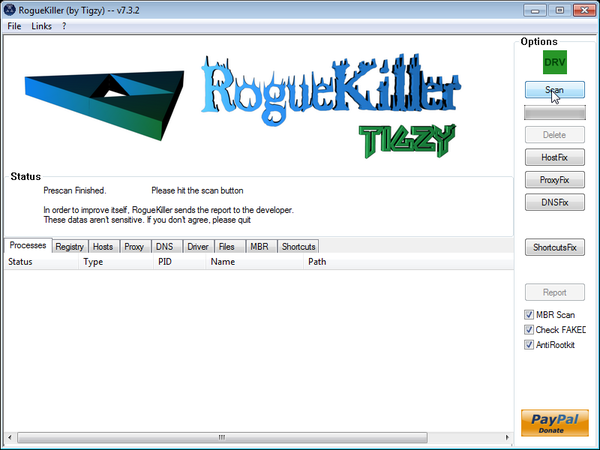
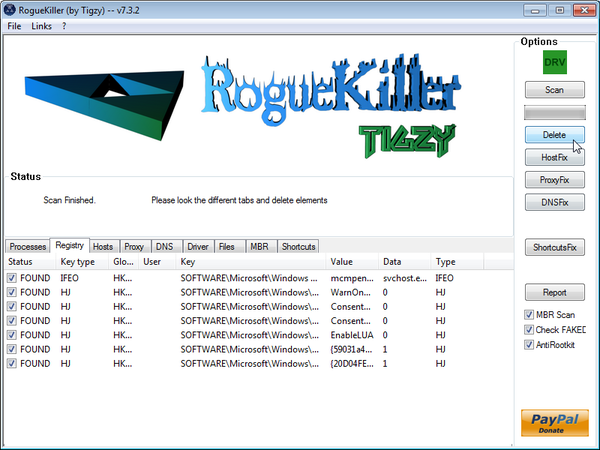
- After the scan has completed, press the Delete button to remove any malicious registry keys.
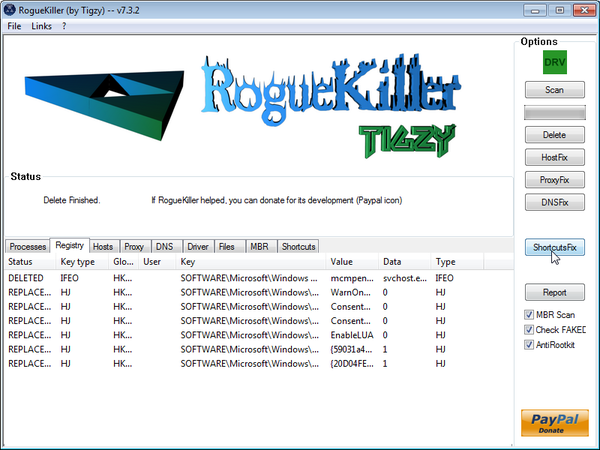
- Next we will need to restore your shortcuts, so click on the ShortcutsFix button and allow the program to run.

Join the discussion
538 commentsShare your experience or ask a question about this article.
Your progress
Did these steps help?
Let us know how the guide worked for you.
Describe what you see and the step you reached. Keep passwords and other private information out.
Discussion
Thank you! We were able to fix my son’s computer with this guide. Now my computer is infected with something because I suddenly can’t access the internet. I went to your regular malware removal guide but can’t get past the step where I turn off the proxy server. Even after a reboot (to safe mode) I still can’t access the internet. Please help!
In reply to Jessica
Hello Jessica,
Can you please run a scan with Combofix,RogueKiller and ESET online scanner and post the logs here :
STEP 1 : Run a scan with Combofix
Download ComboFix from one of the following locations:
COMBOFIX DOWNLOAD LINK #1 (This link will automatically download Combofix on your computer)
COMBOFIX DOWNLOAD LINK #2 (This link will automatically download Combofix on your computer)
VERY IMPORTANT !!! Save as Combo-Fix.exe during the download. ComboFix must be renamed before you download to your Desktop
———————————————————–
———————————————————–
———————————————————–
Notes:
STEP 2: Run a scan with RogueKiller
RogueKiller Download Link (This link will automatically download RogueKiller on your computer)
STEP 3: Run a scan with ESET Online Scanner:
ESET Online Scanner Download Link (This link will automatically download ESET Online Scanner on your computer.)
Next,please run the below utility:
Download and run the Complete Internet Repair utility.
1.Download Complete Internet Repair utilityto your desktop
2.Unzip all the files to their own folder on the desktop
3.Within the folder double click CIntRep
4.Select the following items,then press the GO button.
Waiting for your reply to tell me if your machine is ok and the logs from this utilities.
In reply to Stelian Pilici
Hi. I downloaded combo fix to a thumb drive, copied it to the infected computer and double clicked after closing all virus protection. I received an error message about needing updating for windows restore before the program would continue. Iclicked ok to connet to the internet for update. another message saying no connection. I hit “x” since it said it wouldn’t work but then it started running looking for malware and I am concerned that nor restore point has been set and I will loose everything. I had only partially been able to back-up files. waiting for money to buy a new back-up drive.
I captured the message with a screen shot but I don’t know how to upload it. is all lost?
Current message 2 sreens, On blue background screen “completed stage 2” and gray error message says “failed to download required files. Aborting….Shall continue scanning for malware” I have NOT clicked ok yet.
In reply to Jessica
Hello Jessica,
Can you please let the scan run , you shouldn’t lose any files… The scan will go up to Stage 50 and then it will generate a log…..
Thanks for the great tutorial. Work fantastic! Keep up the good work.
THANK YOU!
Thank you!!!!
awesome!you are awesome!this is awesome!
THANK YOU!
Amazing! Really usefull. Thank you.
My free trial license for Hitman Pro has expired
I have completed all other steps
Can I use any other software?
In reply to Alex
Hello Alex,
Can you please run a scan with Combofix,RogueKiller and ESET online scanner and post the logs here :
STEP 1 : Run a scan with Combofix
Download ComboFix from one of the following locations:
COMBOFIX DOWNLOAD LINK #1 (This link will automatically download Combofix on your computer)
COMBOFIX DOWNLOAD LINK #2 (This link will automatically download Combofix on your computer)
VERY IMPORTANT !!! Save as Combo-Fix.exe during the download. ComboFix must be renamed before you download to your Desktop
———————————————————–
———————————————————–
———————————————————–
Notes:
STEP 2: Run a scan with RogueKiller
RogueKiller Download Link (This link will automatically download RogueKiller on your computer)
STEP 3: Run a scan with ESET Online Scanner:
ESET Online Scanner Download Link (This link will automatically download ESET Online Scanner on your computer.)
Next,please run HitmanPro and Malwarebytes as seen on the guide.
Waiting for your reply to tell me if your machine is ok and the logs from this utilities.
In reply to Alex
I followed your instructions and it worked for me! Thank you so much!!! <3
PS. Live Security Platinum popped up on my computer shortly afer I downloaded Skype.
Awsome, problem fixed. ty
Dear Stelian,
I have this virus and am very new to all this, so please forgive my ignorance. I followed your instructions until STEP 5, no.3 i.e. to download and install Malwarebytes Anti-Malware (MBAM). However, I mistakenly altered the default settings for installation by selecting the “Create a Quick Launch icon” option and this led to installation. Once I reached the “Finish” window, there were 3 options which were selected (I cannot remember exactly what was the 3rd one). I tried to uninstall MBAM and download it again but it did not take me further without having to reboot my laptop for the uninstallation and the re-installation to take effect. As you advised, I did NOT reboot. When I clicked the MBAM icon saved in my folders, a window popped up stating “Run-time error ‘339’: Component ‘vbalsgrid6.ocx’ or one of its dependencies not correctly registered: a file is missing or invalid”
Can you please advise me on how I can get out of this mess? Thanks, MUKit
In reply to MUKit
Don’t worry about that just go ahead with the scan…. If you need to reboot then please run again RKILL……
NEXT,please follow this steps and post the logs here :
STEP 1 : Run a scan with Combofix
Download ComboFix from one of the following locations:
COMBOFIX DOWNLOAD LINK #1 (This link will automatically download Combofix on your computer)
COMBOFIX DOWNLOAD LINK #2 (This link will automatically download Combofix on your computer)
VERY IMPORTANT !!! Save as Combo-Fix.exe during the download. ComboFix must be renamed before you download to your Desktop
———————————————————–
———————————————————–
———————————————————–
Notes:
STEP 2: Run a scan with RogueKiller
RogueKiller Download Link (This link will automatically download RogueKiller on your computer)
STEP 3: Run a scan with ESET Online Scanner:
ESET Online Scanner Download Link (This link will automatically download ESET Online Scanner on your computer.)
Next,please run HitmanPro and Malwarebytes as seen on the guide.
Waiting for your reply to tell me if your machine is ok and the logs from this utilities.
In reply to Stelian Pilici
Thank you so much for your advice. The problem seems to have been solved for now and my machine is working normally.
Hi I actually had this live security platinum virus and I somehow got rid of this by some sort of malware. But I still feel like Live security platinum virus is still around. My HP laptop has HP icon with live security symbol on it. Does tht mean the virus has gone off or still on my laptop. Because my wirelss connection drops out often and there is something else between my internet connection and the internet. Please help me with this problem.
In reply to suman
Hello Suman,
Can you please run a scan with Combofix,RogueKiller and ESET online scanner and post the logs here :
STEP 1 : Run a scan with Combofix
Download ComboFix from one of the following locations:
COMBOFIX DOWNLOAD LINK #1 (This link will automatically download Combofix on your computer)
COMBOFIX DOWNLOAD LINK #2 (This link will automatically download Combofix on your computer)
VERY IMPORTANT !!! Save as Combo-Fix.exe during the download. ComboFix must be renamed before you download to your Desktop
———————————————————–
———————————————————–
———————————————————–
Notes:
STEP 2: Run a scan with RogueKiller
RogueKiller Download Link (This link will automatically download RogueKiller on your computer)
STEP 3: Run a scan with ESET Online Scanner:
ESET Online Scanner Download Link (This link will automatically download ESET Online Scanner on your computer.)
Next,please run HitmanPro and Malwarebytes as seen on the guide.
Waiting for your reply to tell me if your machine is ok and the logs from this utilities.
Worked perfectly, thanks!
Thank you thank you thank you!!! It works
Thank you Stelian!!
Thanks for the help :)
Worked like a charm, the guide was really easy and well written
If I enter the code registration code would I still be able to delete it once I do all the steps?
In reply to ANGEL
Hello Angel,
Yes,even after you’ve enter the activation code ,you will still need to remove this infection!….
Hi Stelian. You helped me get rid of the Live Security Platinum Virus about 2 and a half weeks ago. As I was looking through my files on my computer, I found a folder in Local Disc (C:) called ‘Qoobox’, which has in it a ComboFix quarantine log and a Quarantine folder that has .vir files. Can I delete them? Isn’t that the virus files?
Also, can I delete Malwarebytes from my computer? Can I remove HitmanPro, iExplorer, registryfix, ESET, and Kaspersky setup?
In reply to Magnus
Hello Magnus,
You computer is safe,Qoobox is just the quarantine folder of Combofix…… so you can delete it.
Please uninstall Combofix:
Delete the following folders: (If they exist)
C:\ComboFix
C:\Qoobox
Next,you can uninstall all the files that we’ve used in the Malware Removal Process… Stay safe!
In reply to Magnus
Thankyou so much for your how to on this little bug. I got this virus just after accepting a conformation of adobe flash update. I disregarded any concerns because three of my other office computers all had an update for adobe.
Again many thanks for your effort in providing a very easy walk through :)
I’ve come across a problem at step 4. I use the Rkill, which you say I shouldn’t reboot once it’s done, but the program will restart my computer without any choice. Is there a way to stop this?
In reply to Matt
Hello Matt,
Can you please follow the below steps:
strong>STEP 1: Run a scan with Malwarebytes Anti-Malware in Chameleon Mode in Norman mode:
STEP 2: Run a scan with RogueKiller
[b]RogueKiller Download Link[/b] (This link will automatically download RogueKiller on your computer)
STEP 3 Please perform a scan with HitmanPro as seen on the guide.
If you are having problems starting this program please use the ForceBreach mode as described in the guide.
STEP 4: Run a scan with ESET Online Scanner:
ESET Online Scanner Download Link (This link will automatically download ESET Online Scanner on your computer.)
Waiting for your reply to tell me how everything is running!
Good luck…
In reply to Stelian Pilici
Hi – I tried all 12 files of Malware Chameleon and while a MS-DOS command window opened in each, it indicated that a protective driver was missing and it needed a reboot to install that. Once a reboot occured (I tried both safe and normal modes), 2 error messages popped up related to a path not being found after which nothing happened. Can you please help?
In reply to Aasheesh Chhiber
Hello Aasheesh Chhiber,
Can you please run a scan with Combofix and ESET online scanner and post the logs here :
STEP 1 : Run a scan with Combofix
Download ComboFix from one of the following locations:
COMBOFIX DOWNLOAD LINK #1 (This link will automatically download Combofix on your computer)
COMBOFIX DOWNLOAD LINK #2 (This link will automatically download Combofix on your computer)
VERY IMPORTANT !!! Save as Combo-Fix.exe during the download. ComboFix must be renamed before you download to your Desktop
———————————————————–
———————————————————–
———————————————————–
Notes:
STEP 2: Run a scan with ESET Online Scanner:
ESET Online Scanner Download Link (This link will automatically download ESET Online Scanner on your computer.)
Next,please run HitmanPro and Malwarebytes as seen on the guide.
Waiting for your reply to tell me if your machine is ok and the logs from this utilities.
Thank you so much! Your steps worked perfectly!
Hi Stelian,
I have tried the RKill but it didn’t work so I proceeded to ran the combofix and it seems successfully deleted “something” (I am not sure) so I paste the combofix log as follows:
c:\programdata\Windows
c:\programdata\Windows\ccdxmmde.dat
c:\programdata\Windows\drss.dat
c:\programdata\Windows\xessmsxe.dat
c:\users\dinah yunitawati\AppData\Roaming\Ceufo
c:\users\dinah yunitawati\AppData\Roaming\Ceufo\uroc.gaw
c:\users\dinah yunitawati\AppData\Roaming\Microsoft\Windows\Start Menu\Programs\Live Security Platinum
c:\users\dinah yunitawati\AppData\Roaming\Microsoft\Windows\Start Menu\Programs\Live Security Platinum\Live Security Platinum.lnk
c:\users\dinah yunitawati\AppData\Roaming\mscre.dll
c:\users\dinah yunitawati\Desktop\Live Security Platinum.lnk
c:\windows\Installer\{c614d3bf-243a-3fd7-a4fd-36cd3756874b}\@
c:\windows\Installer\{c614d3bf-243a-3fd7-a4fd-36cd3756874b}\U0000001.@
c:\windows\Installer\{c614d3bf-243a-3fd7-a4fd-36cd3756874b}\U\80000000.@
c:\windows\Installer\{c614d3bf-243a-3fd7-a4fd-36cd3756874b}\U\800000cb.@
F:\install.exe
.
Infected copy of c:\windows\system32\services.exe was found and disinfected
Restored copy from – c:\32788r22fwjfw\HarddiskVolumeShadowCopy3_!Windows!System32!services.exe
However, when I tried to run the Malwarebytes, I didn’t get any Internet connections and I tried Complete Internet Repair utility and still I can’t connect to the internet. any other ways to fix my laptop? Appreciated much.Thanks.
PS: a bit background info for you, hope it’s helping you to analyze my problem :P : My OS is Win 7 Premium, Laptop Dell Inspiron 13R; I can’t enter BIOS and Safe Mode by pressing F8, the latter only worked through msconfig when I don’t connect to the internet.
In reply to Yoga
While in Normal Mode, can you connect to the Internet?
Also what type of internet connection do you have?
You pretty much saved the day.