

Toll road scammers are getting sneakier, sending fake texts claiming drivers have unpaid fees on their Peach Pass accounts. The messages provide a link to MyPeachPass.com-ef.shop and threaten consequences if $6.99 in tolls goes unpaid. However, the texts and site are an elaborate phishing scam aimed at stealing personal and financial data. This in-depth article will uncover how the MyPeachPass.com-ef.shop Peach Pass scam operates, equip drivers to avoid being victimized, and explain effective responses if targeted. With tollway fraud on the rise, drivers must stay vigilant of texts and links related to their accounts.
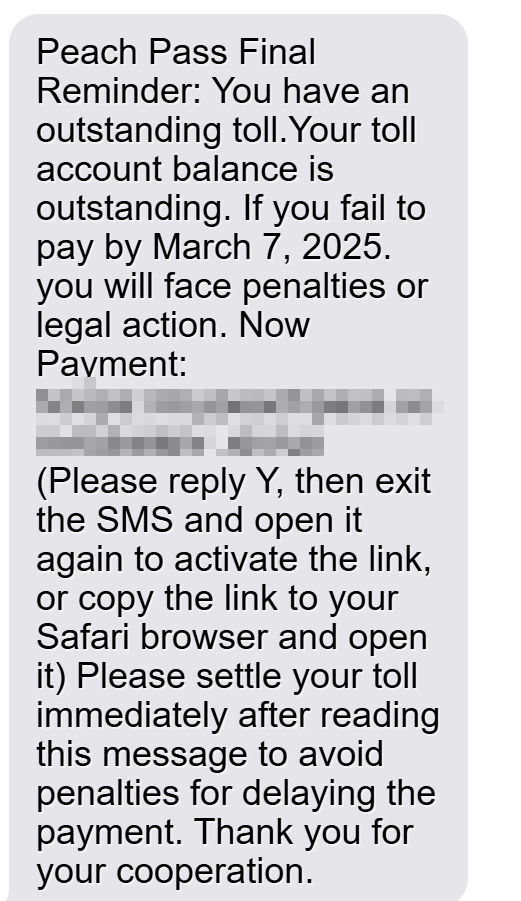
Scam Overview
This Peach Pass scam starts with urgent texts stating the recipient has unpaid tolls and must pay $6.99 immediately to avoid fines or license issues. The messages seem credible, citing specifics like Peach Pass and a dollar amount. However, upon closer inspection several red flags appear.
The texts contain grammatical errors and threats of legal consequences for non-payment, which legitimate toll agencies generally avoid. Additionally, the MyPeachPass.com-ef.shop link goes to a phishing site impersonating the real Georgia Peach Pass site. The scam’s goal is inducing panic in targets to get them to click the link and enter personal data and credit card information, which is then stolen.
Though details vary, the essential scam blueprint involves:
- A text citing an unpaid Peach Pass toll balance of $6.99
- Threats of fines or license impacts if tolls aren’t paid immediately
- A link to a fake MyPeachPass.com-ef.shop site
- The phishing site requesting personal and payment data
- Entered data being stolen by scammers
This scam preys on worries over incurring toll violations and penalties. The urgent tone causes users to panic and provide the requested info without scrutiny. But awareness of this formula can help drivers avoid being deceived.
How the Scam Works
The Peach Pass toll scam unfolds in several sly stages aimed at rapidly generating and stealing victim data before they realize it’s a fraud:
1. The Initial Texts
Targets receive text messages to their mobile phones purporting to be from Peach Pass. The texts address recipients by name and claim:
- The target’s vehicle has unpaid Peach Pass tolls
- The outstanding balance is $6.99
- Payment must be made immediately to avoid fines or issues with one’s driver’s license
- A link is provided to pay the tolls online
Despite being fake, the personalized wording and specific details make the texts appear credible at first glance.
2. The Redirect Link
Within the messages is a short MyPeachPass.com-ef.shop link, making it seem related to the official Georgia Peach Pass site. However, the URL hides the true landing site.
When clicked, the link first requires users to “Reply Y” before opening, verifying an active phone number for scammers. After replying, it redirects to an elaborate phishing site.
3. The Phishing Site
Despite appearing like the real Peach Pass site, MyPeachPass.com-ef.shop is a fake portal operated entirely by scammers. Its sole purpose is stealing personal and financial data entered by victims.
The site has forms prompting users to enter information like:
- Full name and date of birth
- Home address
- Phone number and email address
- Vehicle information
- Credit card number, CSV code, and expiration date
All this data goes straight to criminals rather than paying any Peach Pass tolls.
4. Stealing User Data
Once submitted, the phishing site stores the personal and financial information entered by victims. Contact details are used for identity theft, while credit card data enables scammers to make fraudulent purchases.
The scam concludes by scammers stealing this information to commit various other crimes like opening bogus accounts or taking out loans under the victim’s name.
What to Do if You Are Targeted
If you receive texts demanding Peach Pass payments via MyPeachPass.com-ef.shop, avoid panicking and take these steps:
1. Stay Calm
The urgent threats are intended to provoke panicked reactions. Stay rational, and do not rush to click any links or provide personal data.
2. Gather Details
Note the phone number the texts come from. Search it online to see if others have reported it sending similar scam messages.
3. Contact Peach Pass
Call the Peach Pass customer service at 1-855-PCH-PASS to verify if your account shows unpaid tolls. If not, the texts are fake.
4. Report the Scam
File reports about the phishing texts to various anti-fraud agencies:
- Federal Trade Commission (FTC) at https://reportfraud.ftc.gov/#/
- Federal Communications Commission (FCC) at https://consumercomplaints.fcc.gov
- Georgia Attorney General at https://law.georgia.gov/report-scams-fraud-or-other-consumer-issues
5. Block Numbers
Block the phone numbers that sent the scam texts on your phone, account, and via your mobile carrier. This prevents more messages getting through.
6. Monitor Accounts
Watch for unauthorized charges or activity on your financial accounts in case your data was stolen. Report any suspicious transactions immediately.
7. Spread Awareness
Share details of the scam online and with family/friends to help prevent others from being victimized.
The Bottom Line
The MyPeachPass.com-ef.shop scam reveals the urgent need for caution against toll-related phishing ploys. Scammers rely on impersonation, fake threats, and redirect sites in this formula. But being aware of these core tactics makes their scams easier to spot.
With transportation fees on the rise, drivers must critically analyze any texts or calls regarding unpaid tolls. Contacting agencies directly, refusing to click unverified links, and reporting scam messages stops these crimes fast. Remaining alert against toll phishing protects our personal data against theft and misuse.
Frequently Asked Questions About the MyPeachPass.com-ef.shop Peach Pass Scam
1. What is the MyPeachPass.com-ef.shop Peach Pass scam?
The MyPeachPass.com-ef.shop scam involves fraudulent text messages being sent to Georgia motorists stating they have an outstanding Peach Pass toll balance. The messages threaten fines or license revocation if the $6.99 toll is not paid immediately via the provided MyPeachPass.com-ef.shop link. However, this link leads to a phishing site that steals entered personal and financial information.
2. How does the Peach Pass scam work?
The scam begins with urgent-sounding texts citing an unpaid $6.99 Peach Pass toll. The messages threaten consequences if not paid quickly and provide a MyPeachPass.com-ef.shop link where victims can supposedly pay the toll. However, this link redirects to an elaborate phishing site impersonating the real Peach Pass site. Unsuspecting users enter their data, which is stolen by scammers.
3. What are some red flags of the Peach Pass scam?
Red flags include poor grammar/spelling, threats of legal action, request for payment via an alternative site, and the MyPeachPass.com-ef.shop link going somewhere other than the official Georgia Peach Pass site. Real Peach Pass messages would come from established Peach Pass phone numbers.
4. What information do scammers attempt to steal?
The phishing site prompts victims to enter personal details like their name, birthdate, address, phone, email, and vehicle information. It also requests full credit card information including card number, CSV code, and expiration date. Scammers steal this data for financial fraud and identity theft.
5. What should I do if I receive a text about unpaid Peach Pass tolls?
Do not click any links in the message. Note the sending phone number and report it as a scam. Contact Peach Pass customer service directly to check if your account actually shows unpaid tolls before taking further action. Avoid calling numbers in the suspicious texts.
6. How can I report the Peach Pass scam?
File detailed scam reports with the Federal Trade Commission, Federal Communications Commission, Georgia Attorney General’s office, and Peach Pass. Provide phone numbers, screenshots, and describe how the scam operates. This helps alert others and get fraudulent sites shut down.
7. How can I avoid becoming a victim?
Avoid clicking links in any texts regarding unpaid tolls. Always contact Peach Pass directly through official channels to verify any balances. Report scam messages to block further texts. Sign up for account alerts to stay updated on balances. Monitor accounts closely for any unauthorized charges.
8. What should I do if I already provided my information?
If you entered any personal or financial data, immediately contact your credit card company and banks to report it. Place fraud alerts on your accounts and obtain credit reports showing any suspicious activity. Change online account passwords and enable two-factor authentication where possible.
9. How can I stay safe from Peach Pass scams?
Be wary of any calls/texts with veiled threats and urgent demands for payment. Verify balances and toll notices directly with Peach Pass before providing information or payments. Report scam messages to help warn other motorists. Enroll in account alerts and routinely monitor statements for fraud.
10. Who can I contact for more help with Peach Pass scams?
Contact the Georgia Attorney General’s Consumer Protection Division at 404-651-8600 for help assessing scams and potential fraud recovery. Additional assistance is available from the Federal Trade Commission and Identity Theft Resource Center. Peach Pass customer service can address account-specific concerns.
Conclusion
As toll tags become more commonplace, so too have sophisticated phishing scams involving them. The MyPeachPass.com-ef.shop Peach Pass scam shows how critical it is to verify before providing any personal or financial information online. Avoiding panic, confirming toll balances officially, and reporting phishing texts protects drivers against data theft. With vigilance, motorists can confidently travel the digital highways ahead.

Reviews & discussion
0 commentsShare a firsthand experience, or ask a question.
Community reviews
mypeachpass.com-ef.shop
Moderated reader experiences, not an editorial verdict.
Reviews
Be the first to review
Approved reviews for this site or product will appear here.