


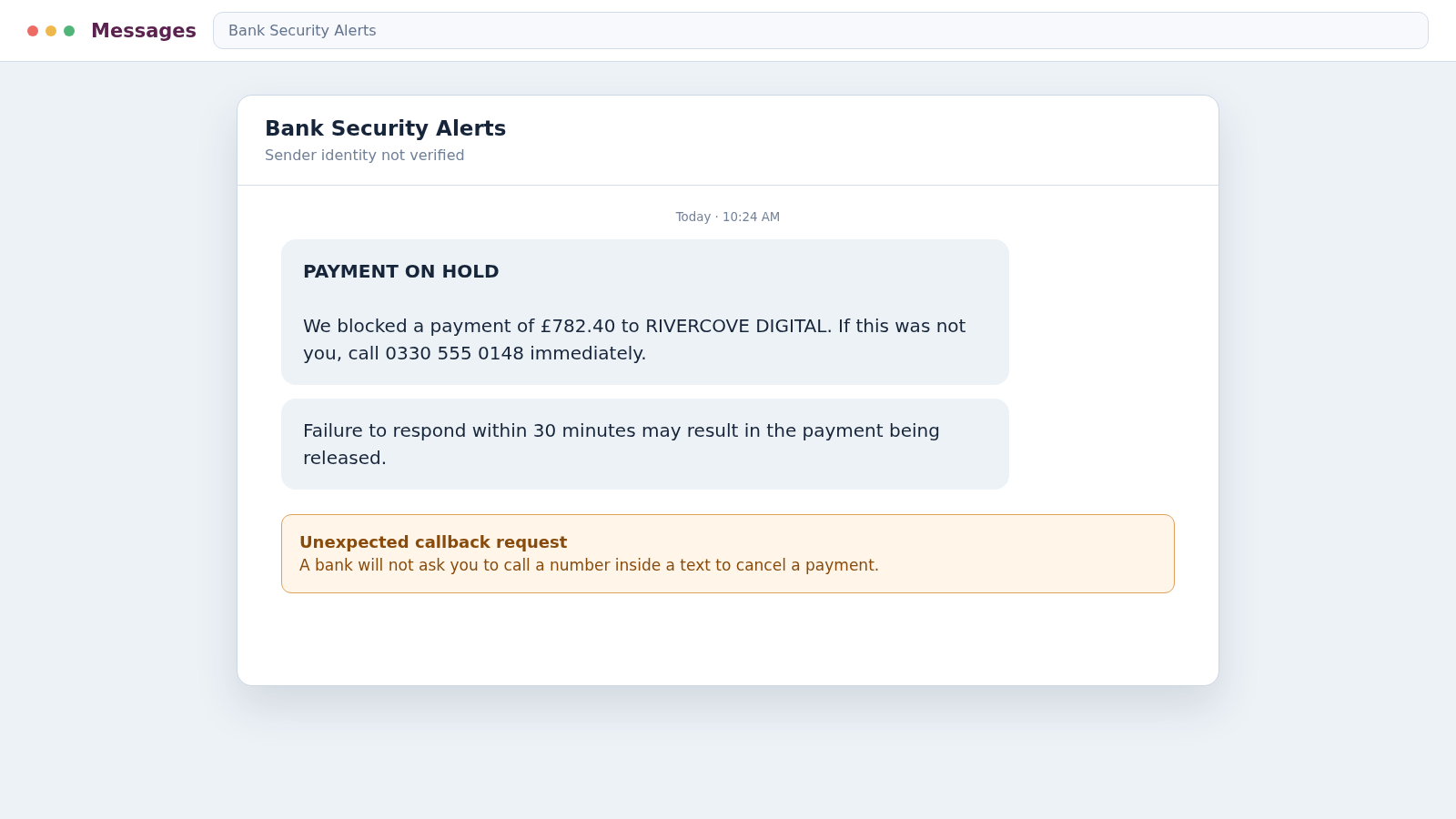
A text appears to come from NatWest and says a payment has been placed on hold. There is just enough detail to make you wonder whether someone really is using your account.
The NatWest scam text is built around that moment of doubt. Before you call the number or touch the link, there are several details that reveal what is actually happening.
Overview
The message invents a banking emergency
Most versions claim that a card payment, transfer, new payee, digital wallet, or online-banking login needs immediate attention. The text offers a link or telephone number for confirming that the activity was not yours.
The warning may arrive inside a message thread that already contains genuine NatWest alerts. Sender-name spoofing and weaknesses in how phones group messages can make a fraudulent text look as though the bank sent it.
The apparent safety step is the real trap
NatWest warns that it will not ask customers to call a number contained in a text to confirm or cancel a payment. A stranger who controls the callback number also controls the story you hear after dialing.
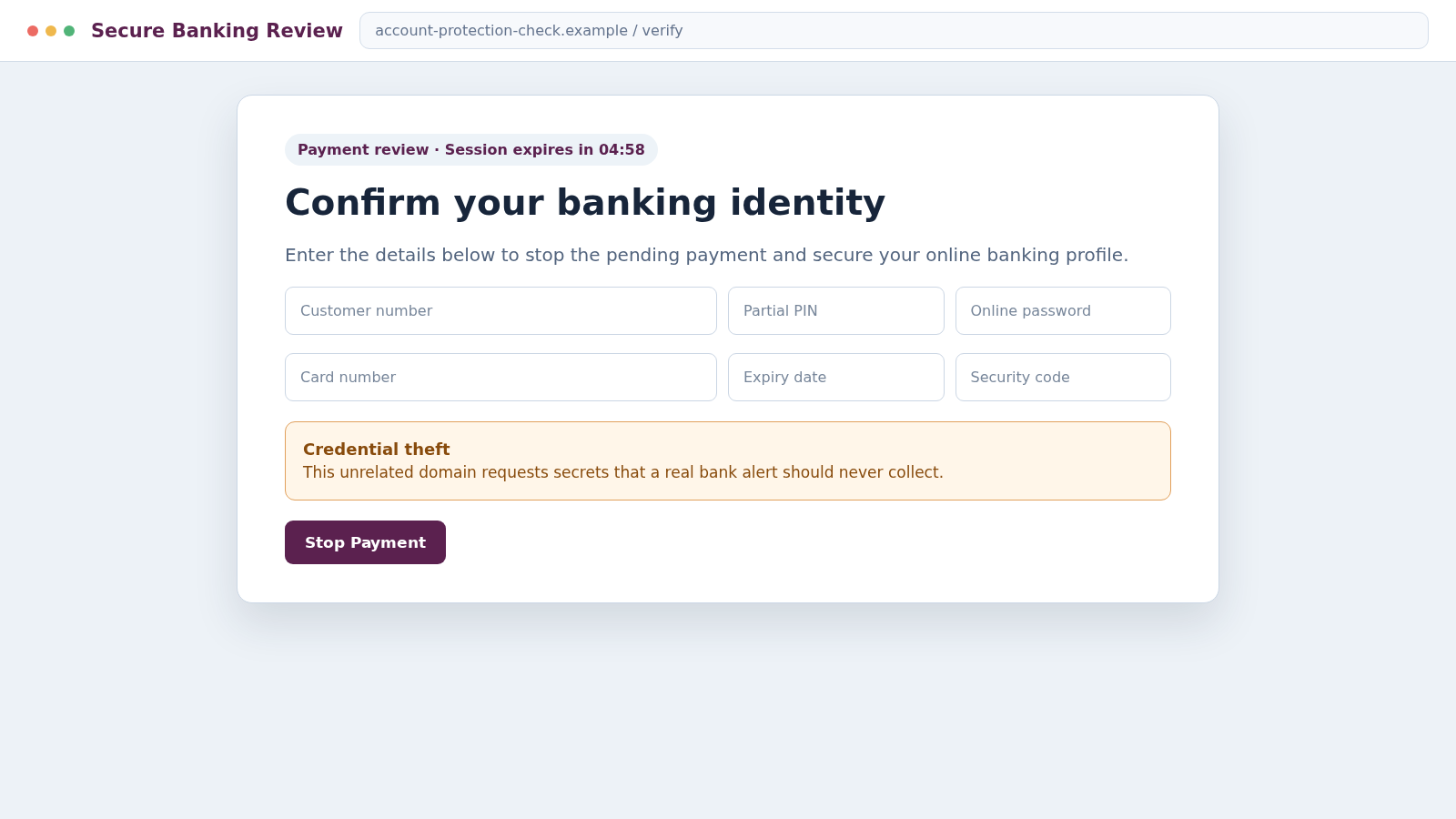
Other versions lead to a copied sign-in page. The form can collect a customer number, partial PIN, password, card details, or one-time passcode while pretending to secure the account.
Stolen details can support several kinds of theft
The first form or call is often only the beginning. A criminal may use the information during a live attempt to enter online banking, register a device, add a payee, or convince the victim to authorize a transfer.
The operation may seek:
- NatWest customer numbers and online-banking credentials
- Card number, expiry date, security code, and billing address
- One-time passcodes generated by a real banking action
- Remote access to a computer or mobile device
- Transfers to a supposed safe, secure, or holding account
- Identity details for later impersonation attempts
- Access to email used for password recovery
A bank alert can be genuine, but the message must be verified through the NatWest app or a known number. The text itself should never decide which website or person handles that verification.
What a Fake NatWest Alert May Say
The wording changes frequently because scammers test different amounts, merchants, and threats. A text may say that a payment is on hold, a new device has signed in, or a recipient has been added to the account.
Some messages ask the recipient to reply YES or NO. A reply confirms that the telephone number is active and may prompt a call from someone claiming to work in the bank’s fraud department.
Another version includes a short link labeled Review, Cancel, Secure, or Verify. The destination copies familiar banking colors and asks the visitor to pass a series of security checks.
A callback version supplies an ordinary UK mobile, geographic, or toll-free number. The caller who answers may know the victim’s name, bank, or partial account details obtained from an unrelated data leak.
None of those details prove the contact is genuine. A criminal needs only enough accurate information to make the next question feel routine.
How the NatWest Scam Text Works
Step 1: Fraudsters prepare a believable target list
Telephone numbers may come from marketing databases, previous phishing campaigns, public profiles, or breaches unrelated to NatWest. The sender does not need to know who banks with NatWest before sending thousands of messages.
Random distribution still reaches real customers. When a text happens to coincide with a recent purchase or expected bank alert, the timing can feel personal even though it was accidental.
Step 2: A spoofed alert creates uncertainty
The message names a merchant, transfer amount, new payee, or device the recipient does not recognize. It then implies that silence will approve the transaction or leave the account exposed.
Urgency prevents a calm check inside the official app. The victim is encouraged to respond through the channel selected by the scammer.
Step 3: The link or callback reaches the criminals
A link opens a lookalike sign-in page on an unrelated domain. A telephone number reaches a fake security desk where an agent asks scripted questions and pretends to review account activity.
Both paths separate the customer from NatWest while preserving the appearance of a bank-controlled process. The criminal can explain every inconsistency as part of a confidential investigation.
Step 4: The victim is taken through fake verification
The page or caller requests information in small stages. Asking first for a name, postcode, or recent transaction makes later requests for login and card information feel less abrupt.
A caller may say they already know the answers but need the customer to repeat them for recording. Genuine possession of data is not proven by asking the victim to supply it.
Step 5: Real bank activity generates a real code
While speaking with the victim, the fraudster may try to sign in, register a new device, add a payee, or make a card transaction. That action can trigger a genuine NatWest security message or one-time passcode.
The scammer predicts the code will arrive and calls it a cancellation number. In reality, reading it aloud may authorize the action the criminal started.
Step 6: A fake fraud officer escalates the pressure
If direct access fails, another person may join the call as a senior investigator. They claim the account is compromised internally, the local branch cannot be trusted, or the case must remain secret.
This stage is designed to isolate the victim from family, bank employees, and police. Any instruction to hide a bank transfer from the bank is a decisive warning.
Step 7: Money is sent to a so-called safe account
The victim may be told to move savings to a protected account, reverse a fraudulent transfer, or help catch a dishonest employee. The destination is controlled by the criminals or a money mule.
There is no special account that customers must fund to keep money safe. A real bank can protect an account without asking the customer to transfer its balance to a stranger.
Step 8: The thieves reuse access and personal data
After a successful payment, the callers may demand another transfer because the first failed a security check. They can also use captured details for card fraud, email takeover, or impersonation at other institutions.
Later contact may come from a supposed police officer, regulator, or recovery specialist. The second approach often relies on facts stolen during the first scam.
Why the Text Can Appear in a Real NatWest Thread
The sender name displayed by a phone is not the same as a verified identity. Some messaging systems allow a sender to place a brand name in the visible field, and phones may group messages that share that label.
This means an old genuine NatWest alert and a new fake message can appear together. The conversation view looks convincing, but it does not prove that every message came through the same secure route.
Caller ID has a similar weakness. A fraudster can make a call display a familiar bank number, then ask the victim to compare it with the number printed on a card.
Verification must involve ending the original contact. Open the NatWest app independently or call a trusted number using a separate call, ideally after waiting for the first connection to clear.
Do not let the caller remain on the line while you check. Remote-access software, call forwarding, or a manipulated conference call can make an attempted callback part of the same scam.
Warning Signs That the NatWest Message Is Fake
- The text says a payment will proceed unless you act immediately.
- It asks you to call a number included in the message.
- A link leads anywhere other than a domain you opened yourself.
- The page requests a full PIN, password, or card security code.
- A caller asks for a one-time passcode or Get Cash code.
- You are told not to speak with branch staff or relatives.
- Money must be moved to a safe or protected account.
- The caller wants remote access to help cancel a payment.
- The claimed transaction does not appear in the official app.
- The agent becomes hostile when you insist on calling back.
Grammar and design are weak tests because modern scam messages can be polished. The requested action is more revealing than the appearance.
How to Verify a NatWest Alert Safely
Do not reply to the text. Open the NatWest app using its normal icon and inspect pending card activity, recent transactions, new payees, and security notices.
If anything is unclear, use the support route inside the app or the telephone number printed on the physical card. Type an official address manually if you prefer online help.
Describe the message without reading private codes or passwords. A genuine employee can investigate without asking the customer to defeat the account’s security controls.
NatWest asks customers to forward suspicious texts referring to the bank to 88355. UK mobile users can also forward scam texts to 7726, which helps the network investigate the sender.
If the alert corresponds to a real transaction, the independent call still reaches the right team. If it is fabricated, breaking contact prevents the scammer from controlling the next step.
Company, Address, and Fulfillment Checks
The sender label is not the bank’s legal identity
A visible NatWest name can be spoofed or inserted into an existing message thread. Treat the sender field as presentation, not proof of who transmitted the text.
The callback number may be disposable or spoofed
Mobile, geographic, and toll-free numbers can all be used by criminals. Verify through a number printed on your card or started inside the official app, never the number supplied by the alert.
Real support does not need your secret credentials
A fraud specialist can discuss a case without collecting a full password, PIN, one-time code, or remote-control session. Requests for those items show that the caller lacks legitimate access.
The destination account reveals who controls the payment
A transfer labeled safe, holding, or verification still goes to the named recipient shown in the banking app. NatWest does not protect savings by moving them into an unknown customer’s account.
What to Do if You Have Fallen Victim to This Scam
- End every conversation with the scammers. Hang up, close the fake page, and do not send a second payment to release, reverse, or recover the first one.
- Contact NatWest through a trusted route. Use the official app or the number on your card. Report codes, credentials, transfers, new payees, card details, and remote access that may have been exposed.
- Ask whether payments can be stopped. Speed matters for bank transfers. Give the fraud team recipient names, account details, amounts, times, and references exactly as they appear.
- Secure online banking and email. Change passwords from a trusted device, review contact information and registered devices, remove unknown sessions, and enable stronger authentication where available.
- Replace exposed cards and monitor accounts. Check pending and completed activity across every linked account. Do not assume that a small test charge is harmless.
- Remove remote-control software. Disconnect the device from the internet, uninstall tools added during the call, and run a full scan with Malwarebytes before returning to banking.
- Reduce repeat exposure. AdGuard can help block known phishing and malicious advertising destinations, although it cannot reverse credentials already submitted.
- Preserve the evidence. Save the text, link, browser history, telephone numbers, call times, payment records, and names used by the callers. Do not continue the conversation merely to collect more.
- Report the fraud. Forward the text to NatWest at 88355 and to 7726. Report financial loss to the UK’s national fraud reporting service and notify local police if immediate safety is involved.
- Expect recovery scams. Anyone promising guaranteed recovery for a fee, tax, or release payment may be using information from the original theft. Discuss recovery only with the bank and authorities.
Frequently Asked Questions
Does NatWest ever send genuine fraud alert texts?
Yes, banks can send genuine alerts. NatWest says it will not ask you to call a number contained in a text to confirm or cancel a payment. Verify through the app or a known number.
Why did the scam message appear beside real NatWest texts?
A spoofed sender label can cause a phone to group the message with an existing conversation. Placement in that thread is not reliable authentication.
Should I reply NO to an unfamiliar payment?
Do not follow instructions in a suspicious text. Check the transaction independently in the official app and contact NatWest through a trusted route.
Will NatWest ask me to move money to a safe account?
No legitimate fraud investigation requires a customer to transfer savings to an unknown account. End the call and report the request immediately.
What if I shared a code but did not transfer money?
Treat the account as compromised. Contact NatWest, change relevant passwords, review registered devices and payees, and monitor all transactions without waiting for a loss.
Can the bank recover a scam transfer?
Recovery depends on timing, payment type, and where the money went. Contact the bank immediately, provide precise evidence, and ask about recall and reimbursement procedures.
The Bottom Line
The NatWest scam text uses a fake payment emergency to choose the victim’s next website, telephone number, and conversation. A convincing sender name or timely one-time code does not authenticate that path.
Stop, leave the message, and verify through the official app or the number on your card. Never share a security code or move money to a safe account, because those are the actions the fraudster needs most.

Join the discussion
0 commentsShare your experience or ask a question about this article.
Discussion
Start the conversation
Have a question or something useful to share? Add the first comment.