

If you are looking for a reliable and trustworthy crypto exchange, you might want to avoid Nopsenx.com. This website is a scam that claims to offer a generous giveaway sponsored by Elon Musk, but in reality, it is just a way to lure unsuspecting users into depositing money and giving away their wallet information. In this blog post, we will explain what the Nopsenx.com scam is, how it works, and what to do if you have fallen victim to it.
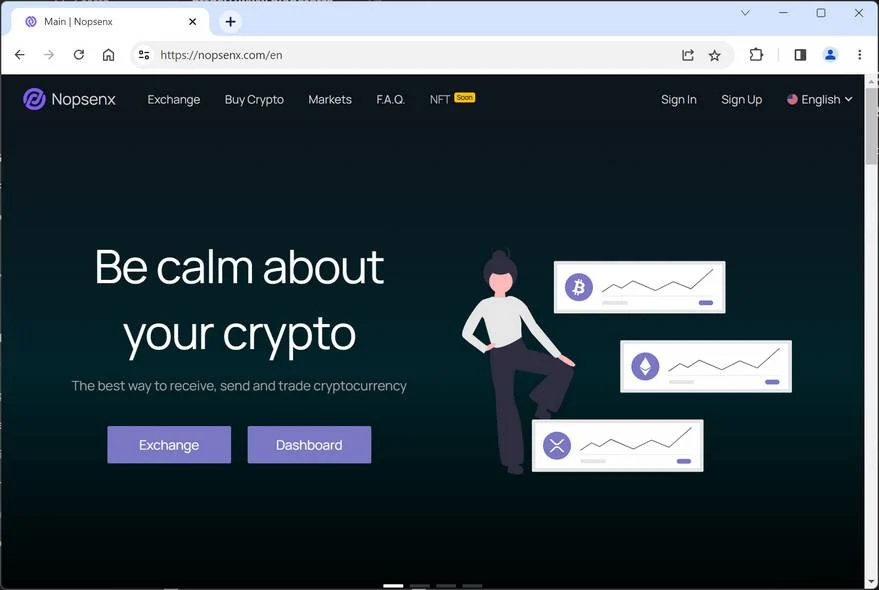
What is the Nopsenx.com scam?
Nopsenx.com is a fake crypto exchange that pretends to be a legitimate platform for trading and investing in cryptocurrencies. However, the website does not provide any information about its owners, location, registration, or regulation. It also does not have any contact details, such as an email address or a phone number. The only way to communicate with them is through a chat box on their site, which is likely to be automated or operated by scammers.
The main attraction of Nopsenx.com is the supposed giveaway that they are running, which is allegedly sponsored by Elon Musk, the billionaire entrepreneur and founder of Tesla and SpaceX. According to their website, anyone who creates an account using a referral code that is being advertised on social media platforms like Facebook, Instagram, and TikTok will receive $12,000 in their Nopsenx wallet. However, this money is not real and cannot be withdrawn until the user deposits $100 of their own money.
How does the Nopsenx.com scam work?
The Nopsenx.com scam works by exploiting the greed and curiosity of people who are interested in cryptocurrencies and want to take advantage of a seemingly easy opportunity to make money. The scammers use fake accounts and bots to spread the referral code and the link to the website on various social media platforms, especially those that are popular among young and inexperienced users, such as TikTok. They also use fake testimonials and reviews to create a false sense of legitimacy and credibility.
Once the user clicks on the link and creates an account using the referral code, they will see $12,000 in their Nopsenx wallet. However, this is just a trick to make them think that they have received a real gift from Elon Musk. In reality, this money is not backed by any cryptocurrency or fiat currency and cannot be transferred or exchanged for anything. The user will also be asked to link their actual wallet to their Nopsenx account, which is a very risky move as they are exposing their private keys and personal information to the scammers.
The user will then be prompted to deposit $100 in order to activate their account and withdraw their $12,000. However, this is where the scam becomes obvious. As soon as the user deposits their money, they will not be able to access it or their $12,000 anymore. The scammers will either block their account, delete their account, or simply ignore their requests for withdrawal or support. The user will end up losing their money and potentially compromising their wallet security.
What to do if you have fallen victim to the Nopsenx.com scam?
If you have fallen victim to the Nopsenx.com scam, you should take immediate action to minimize your losses and protect your identity. Here are some steps that you should follow:
- Contact your bank or payment provider and report the fraudulent transaction. Try to get a chargeback or a refund if possible.
- Change your passwords and security settings for your wallet and any other online accounts that you have linked to Nopsenx.com. If you have given away your private keys or seed phrases, consider creating a new wallet and transferring your funds there.
- Report the scam to the relevant authorities and platforms. You can file a complaint with the Federal Trade Commission (FTC), the Internet Crime Complaint Center (IC3), or your local law enforcement agency. You can also report the scam website and the fake social media accounts to the hosting providers and the platform administrators.
- Educate yourself and others about how to avoid crypto scams in the future. Learn how to spot red flags and verify the legitimacy of any website or offer that claims to provide crypto-related services or opportunities. Do not trust anyone who promises unrealistic returns or asks for upfront payments or personal information. Always do your own research and due diligence before investing in any crypto project.
- If you suspect your device is infected with malware, run a scan with Malwarebytes Free.
Conclusion
Nopsenx.com is a scam that tries to trick people into depositing money and giving away their wallet information by offering a fake giveaway sponsored by Elon Musk. The website is not a real crypto exchange and does not have any license or regulation. The $12,000 that they claim to give away is not real and cannot be withdrawn. The scammers will steal your money and possibly your identity if you fall for their scheme.
If you have been scammed by Nopsenx.com, you should act quickly to recover your money and secure your wallet. You should also report the scam to the authorities and the platforms that they use to spread their lies. Finally, you should educate yourself and others about how to avoid crypto scams in the future and only invest in reputable and trustworthy platforms.

Join the discussion
0 commentsShare your experience or ask a question about this article.
Discussion
Start the conversation
Have a question or something useful to share? Add the first comment.