

OneDrive on the Mac is the cloud in the menu bar: Desktop, Documents, the shop’s shared files. On 11 August 2026 Microsoft closed a local privilege hole in that Mac client. An authorized person already on the Mac can follow a file-system link and come out as root. This is not the Windows OneDrive app, and it is not a page you visit. Click the cloud in the menu bar, open About OneDrive, and take 26.095.0519.0003 or newer.
Overview
What broke
On 11 August 2026 Microsoft published CVE-2026-65680 as Microsoft OneDrive for MacOS Elevation of Privilege. Max severity is Important. The MSRC description is one sentence: improper link resolution before file access (‘link following’) in Microsoft OneDrive allows an authorized attacker to elevate privileges locally. The weakness is CWE-59.
A symbolic link is a file that points at another file. Before OneDrive reads or writes, it is supposed to check where that pointer really goes and refuse a destination the signed-in account should not touch. Microsoft says it did not. The attacker is already an authorized local user. CVSS lists privileges required as high, and the attack vector as local. There is no webpage in this story. Microsoft’s own FAQ is the line that should move your hand: an attacker who successfully exploited this vulnerability could gain ROOT privileges.
The score is CVSS 3.1 6.7. Privileges required are high. The attack is local. Important is not Critical. Root on a Mac that several people unlock is still the whole machine.
Microsoft marked the CVE exploited as No, publicly disclosed as No, and the software-release row as Exploitation Less Likely. CISA has not listed 65680 on the Known Exploited Vulnerabilities catalog. That is not a reason to wait. The updater is already in the menu bar. The patch is out.
Who is in range
You. Any Mac still running OneDrive below 26.095.0519.0003. Microsoft’s affected product row is OneDrive for MacOS, base 26.0.0.0, everything under the fixed build. If About still shows a 25.x or early 26.x train, you are in range.
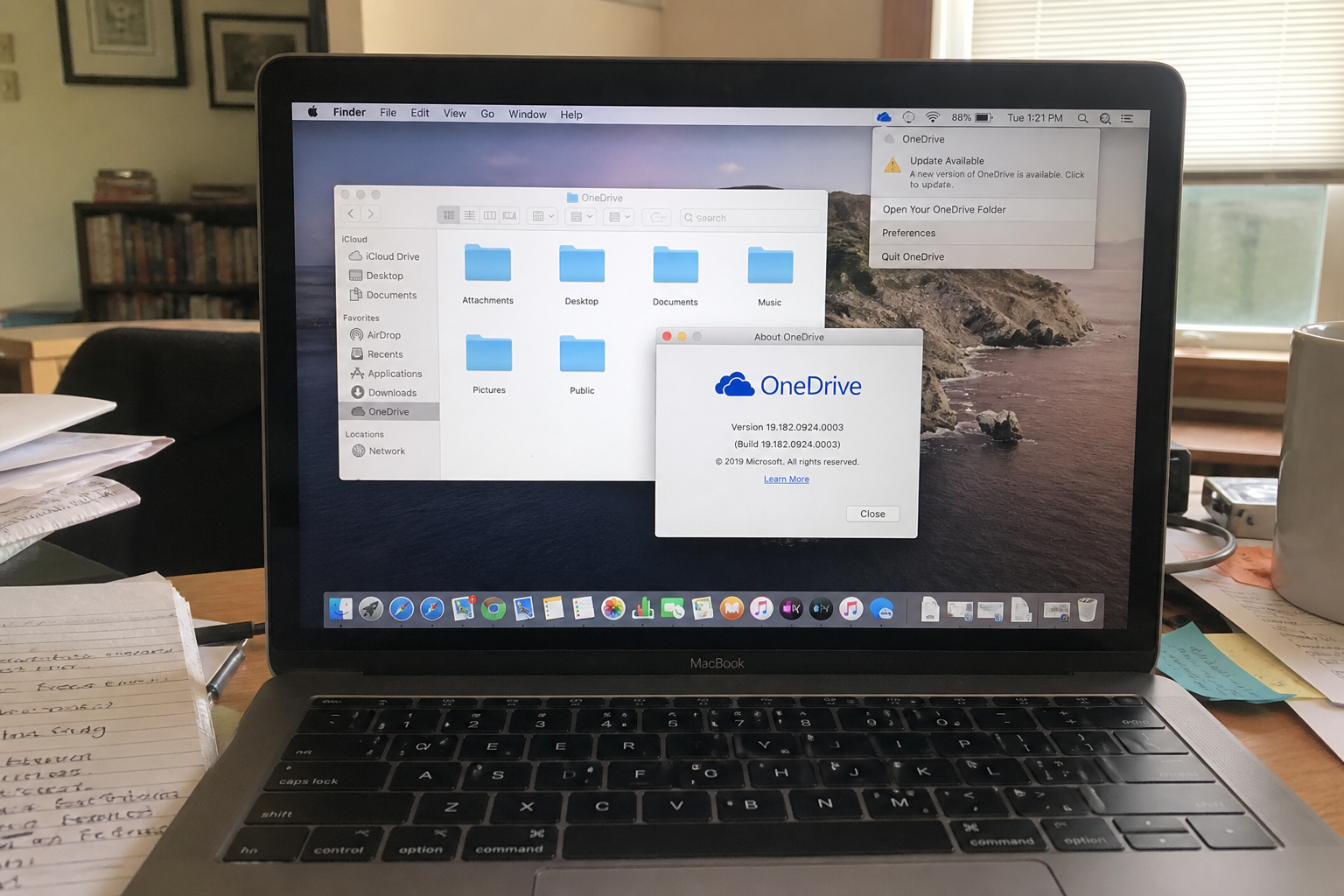
The overview photo may show a 19.x About box, the 2019-era client, with Update Available already in the menu. That Mac is in range. 19.x is not the target. Do not stop at 19-anything. The floor is 26.095.0519.0003 or newer.
A shop Mac that several people unlock is in range until About shows the floor. OneDrive on Windows is a different client and a different CVE list. This number does not apply there. The iPhone OneDrive app is not this client. Updating Microsoft 365 Apps to Version 2607 does not patch OneDrive for Mac. File, Account, Update Now is a different installer.
What the vendor shipped
- OneDrive for macOS 26.095.0519.0003. That is the floor. Later 26.095 builds are fine.
- MSRC release 11 August 2026. Customer action required. A Mac restart is not required.
- Tenable’s Nessus check says the same thing: upgrade to 26.095.0519.0003 or later.
- In-app path: the OneDrive cloud in the Mac menu bar, then About OneDrive (or Help, About). Take Update or Check for updates. Quit and reopen OneDrive. Confirm About.
If the in-app updater sits there, use the Mac App Store, or Microsoft’s OneDrive for Mac download. Microsoft also posted the matching OneDrive.pkg for 26.095.0519.0003 on the advisory. Stay on Microsoft’s own bits.
What this is not
- Not Windows OneDrive. Skip this CVE on a PC that only runs the Windows client.
- Not the iPhone OneDrive app.
- Not patched by Office 2607. File, Account, Update Now does not move this number.
- Not a webpage. You do not visit a site to be hit. You already have a local account.
- Not on CISA KEV. Microsoft has not marked it exploited.
- Not done if About still reads below 26.095.0519.0003, even if a 19.x box once said Update Available.
- Not a reason to treat 19.x as the new version. Take 26.095.0519.0003 or newer.
The patch is out. About OneDrive is already in the menu bar. That is the cheap window.
Do This Now
In range: You. Macs with OneDrive below 26.095.0519.0003.
Urgency: This week. The hole is local and needs an authorized account, but the updater is sitting in the menu bar, and shops share Macs.
- Click the OneDrive cloud in the Mac menu bar. Open About OneDrive (or Help, then About).
- If the version is below 26.095.0519.0003, take Update or Check for updates. Quit OneDrive and open it again.
- Open About one more time and read 26.095.0519.0003 or newer. Repeat on the other Mac that still syncs files.
Who can skip
- OneDrive is not installed on the Mac. Finder has no OneDrive folder and the menu bar has no cloud.
- About OneDrive already shows 26.095.0519.0003 or a later 26.095 build, and you have quit and reopened once.
- Windows-only OneDrive. This CVE is the Mac client. Do not treat a Windows About screen as this close.
- iPhone-only OneDrive, and no Mac in the house still runs the desktop client.
- A shop Mac whose OneDrive is frozen by MDM cannot self-update. That is an IT push of 26.095.0519.0003 or newer, not a skip for the fleet.
Why it matters
OneDrive on the Mac holds the files you already live in: Desktop, Documents, the camera roll you dumped there, the shop’s shared folders. Root is the account that can read and rewrite all of that. Microsoft’s FAQ does not hedge. A successful exploit of 65680 could gain ROOT privileges. You do not need a second bug story for that to be worth a quit and reopen.
This is not a drive-by. Privileges required are high. The attacker is already an authorized local user. That is why shared Macs matter. The front-desk iMac, the laptop that walks between office and home, the machine a contractor unlocks: those already have local accounts. After that account is on the Mac, Microsoft does not ask for an extra click.
Microsoft did not mark 65680 exploited. CISA has not added it to KEV. The row on the advisory is Exploitation Less Likely. Waiting is still how an Important local-root hole sits on the cloud client you leave running all day. The About box is already under the cloud icon. The download is Microsoft’s own updater, Store listing, or pkg, not a third-party “OneDrive update” site.
The other miss is mixing installers. Office 2607 closed a pile of Word bugs on 11 August. That click does not move OneDrive for Mac. Windows OneDrive has its own About screen and is not this CVE. iPhone OneDrive is not this CVE. One stale Mac client is enough to keep the old link-following code alive on a machine that still syncs the shop’s files.
The bottom line
On the Mac
- Open OneDrive if it is not already running. A Finder window of your OneDrive folder is fine. You do not need a special file.
- Click the OneDrive cloud icon in the Mac menu bar, near the clock. A short menu opens.
- Click About OneDrive. Some builds nest it under Help, then About. The box shows OneDrive and a version number. That number is the test.
- If the line is below 26.095.0519.0003, click Update or Check for updates. Stay until it finishes. A 19.x box is still below the floor. Do not treat 19.x as the target.
- Quit OneDrive from that same menu, then open it again. Microsoft does not require a Mac restart. The old process is still the old client until OneDrive itself exits.
- Open About one more time after the restart and read the number. Do not trust a splash that says you are up to date. Trust the About line: 26.095.0519.0003 or newer.
If About never moves
Quit OneDrive fully. Check the menu bar for a leftover cloud, then reopen OneDrive and try About again. A download that sits at 0% is often a proxy, a metered connection, or a shop policy. Use the network you already trust. Do not download OneDrive from a random “cloud update” site.
If the in-app updater is stuck, open the Mac App Store, search Microsoft OneDrive, and take Update. Or use Microsoft’s OneDrive for Mac download page and install from there. The advisory also ships OneDrive.pkg for 26.095.0519.0003. After the pkg or Store install, quit and reopen OneDrive, then confirm About. A shop Mac managed by MDM, Jamf, or a “do not update” catalog will not self-update no matter how many times you open About. Ask whoever owns the image to push 26.095.0519.0003 or newer.
The other Mac and the shop
- The laptop in the bag: same menu-bar cloud, About OneDrive, tonight. Wait for 26.095.0519.0003 or newer, then quit and reopen.
- The front-desk iMac, the shared studio Mac, the machine that “only syncs invoices”: same clicks. One stale client is enough.
- Windows OneDrive on a PC in the same shop is a skip for this CVE. Do not type the Mac build into a Windows About screen and call it done.
- iPhone OneDrive is a skip for this CVE. Office 2607 on Word or Excel is a skip for this CVE. Those are other briefs. They do not close 65680.
What you should see
On the About box the version is a four-part number. 26.095.0519.0003 is the 11 August close. If you still see 19.anything, a 25.x build, or a 26.x build below 0519.0003, you are not on the floor. After you quit and reopen, About should show 26.095.0519.0003 or a later 26.095 build. A menu-bar Update Available banner on a 19.x leftover is a hint. The About line is the proof.
When you are done
About OneDrive reads 26.095.0519.0003 or newer on the home Mac and on every shop Mac that still syncs files. You have quit and reopened once. Windows OneDrive and the iPhone app are separate products. Office 2607 is a separate click. You do not need to unlink the account, rebuild the folder, or restart the Mac for this close. You needed a new Mac build. You have it.