

A new text message scam has been making the rounds, preying on unsuspecting victims with fake parking fines. This fraudulent scam starts with a text message alleging an unpaid parking ticket or penalty charge notice (PCN). The message includes a link to pay the supposed fine online immediately. However, the link leads to a fake government website designed to steal personal and financial information.
This parking ticket text scam has already affected thousands, resulting in stolen identities and compromised bank accounts. Read on to learn everything about how this insidious scam works, how to protect yourself, and what to do if you’ve fallen victim. With knowledge and vigilance, we can shut down these fraudsters for good.
Overview of the PCN Parking Text Message Scam
The PCN parking text scam involves receiving a text message out of the blue regarding an unpaid parking fine. The message appears urgent, warning the recipient that they must pay immediately or face additional fees, prosecution, and court summons. This creates a sense of panic and pressure to comply quickly.
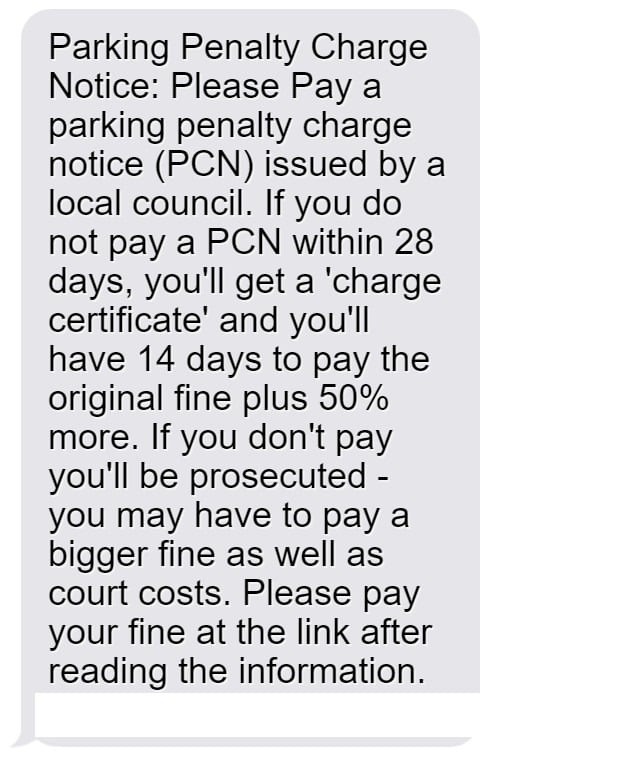
Here is an example of the text message:
Parking Penalty Charge Notice: Please Pay a parking penalty charge notice (PCN) issued by a local council. If you do not pay a PCN within 28 days, you’ll get a ‘charge certificate’ and you’ll have 14 days to pay the original fine plus 50% more.
If you don’t pay you’ll be prosecuted – you may have to pay a bigger fine as well as court costs.
Please pay your fine at the link after reading the information.
[scam site link]
The scam takes advantage of the fact that many local governments do issue PCNs for parking violations. The message seems legitimate at first glance. However, clicking the link leads to a fake website designed to steal financial and personal information.
This seamless scam bilks thousands out of unsuspecting victims. But with knowledge of how it works, we can fight back against these fraudsters.
How Did This Scam Originate?
The parking text message scam likely originated from tech-savvy cybercriminals seeking new avenues for identity theft and financial fraud. Text messaging provides direct access to millions of potential victims. And fears of legal prosecution make the scam seem more credible.
Online forums indicate the parking text scam started appearing around late 2022 primarily in the UK. However, similar scams have now spread worldwide. The fraudsters clearly found a simple but effective new method to exploit innocent victims.
Scope and Scale of the Problem
By mid 2023, the PCN text scam had affected tens of thousands in the UK alone, stealing an estimated £3-5 million from victims. However, the true scale is difficult to pinpoint. Most victims do not report relatively small losses from these scams.
Nonetheless, government agencies have issued warnings about the surge in fake parking texts. The problem continues growing globally, with similar scams appearing worldwide. Without increased awareness, millions more could fall prey to this insidious fraud.
Who is Behind This Scam?
Given the complexity of the scam websites, experts believe organized cybercriminal groups masterminded this fraud. They likely operate overseas, making them harder to track and prosecute.
These scammers can buy access to vast databases of cell phone numbers. Automated texting platforms enable them to blast out millions of messages with ease. And the scam websites require programming expertise to mimic official sites accurately.
The parking text scam certainly provides a lucrative income source for these fraudsters. Sadly, victims pay the price through compromised finances and identities. Public awareness provides the best defense against these criminal networks.
How the PCN Parking Text Scam Works
The PCN parking text scam ensnares victims through meticulously designed ploys. Here is a step-by-step overview of how these fraudsters operate:
1. The Scam Text Message Arrives
The scam starts with an unsolicited text message sent to the victim’s mobile phone. The message claims a parking fine was issued for the recipient’s vehicle. It specifies an amount like £100 or $150 and claims nonpayment will result in additional fees or prosecution.
The text also includes an urgent call to action to pay the fine immediately through the provided link. This rush tactic preys on victim’s fears of legal consequences.
2. The Link Leads to a Fake Website
When victims click the link, it takes them to an extremely convincing fake website. This sham site has the look and feel of an official government site, featuring logos and formatting matching real traffic and parking authority sites.
The scam site domain often contains random strings of letters and numbers rather than a proper .gov URL. But this is easy to overlook when panicked about legal prosecution.
3. Scam Site Requests Personal and Financial Information
After arriving at the sophisticated fake site, victims are prompted to enter personal details to look up and pay their parking ticket. The site first asks for the vehicle registration number.
No matter what number is entered, the site claims to find an unpaid ticket linked to that registration. This makes the supposed fine seem real and urgent.
The site then requests the victim’s name, address, phone number, and crucially, payment card details. This sensitive personal information allows the scammers to steal identities and money.
4. Criminals Steal Entered Data for Fraud
Armed with the victim’s financial and personal information, the scammers can now commit identity theft and drain bank accounts. They may sell the data online or use it themselves for fraudulent purposes.
The innocent victim provided everything needed for the criminals to steal and exploit their information. Even small amounts taken from numerous victims generate huge profits for these scam groups.
5. Fake Website Vanishes
Shortly after collecting data, the sophisticated fake parking authority website often disappears without a trace. The scam domains get switched out regularly to avoid detection and blacklisting.
Victims who go back to investigate the suspicious site will find it’s suddenly unavailable. This prevents scrutiny that could reveal the scam’s fraudulent nature.
By vanishing quickly, the fraudsters cover their tracks while leaving victims scrambling to undo the damage. This adds to the confusion and makes the scam harder to track.
6. Criminals Launder and Cash Out
With thousands of stolen credit cards and online accounts, the fraudsters next need to monetize their scam. They launder the money through cryptocurrency exchanges or money mule accounts. Or they may buy goods with the stolen cards for resale.
Gift cards get purchased with compromised accounts then used or sold for cash. Stolen identities also allow criminals to open fraudulent accounts or get loans.
Through sophisticated techniques, these organized groups turn digital theft into untraceable profits. Sadly, victims suffer the long-term consequences.
What to Do If You Get the Fake Parking Text
If you receive a suspicious text demanding parking fine payment, stay calm and avoid acting rashly. Follow these do’s and don’ts to protect yourself:
Don’t:
- Click on the link in the message under any circumstances.
- Panic or rush to pay the supposed fine. Slow down and investigate first.
- Provide any personal or financial data through the link.
- Assume an urgent-sounding message is legitimate without verification.
Do:
- Check the URL if you clicked the link – real government sites use .gov.uk or similar.
- Search online for reports of similar parking fine scams in your area.
- Call your city’s parking authority through its official website to inquire about any fines.
- Carefully inspect any documentation on your vehicle when parked. Legitimate fines get placed on the windshield.
- Report scam texts to your cell provider and local law enforcement. Provide the phone number, link, and message content.
- Block the senders phone number so you do not get additional scam messages.
Exercising caution and verifying legitimacy before providing information or payments prevents falling victim to such scams. If concerned, take your time investigating rather than rushing to comply with demands.
What to Do If You Already Paid the Fake Fine
If you already provided personal or financial data through one of these scam parking sites, take action immediately to mitigate damages:
- Call your bank – Alert them that your card details got compromised through a scam website and you may see fraudulent charges. Request a new card number to prevent ongoing use of your account.
- Place a fraud alert – Contact one of the three major credit bureaus to place an initial 90-day fraud alert on your credit file requiring additional verification for new lines of credit. This makes it harder for scammers to open accounts in your name. You can renew the fraud alert after it expires.
- Monitor your accounts – Check your credit card and bank account transactions daily for any unauthorized activity. Report unauthorized charges promptly to your bank’s fraud department.
- Consider a credit freeze – Placing a credit freeze on your credit file restricts access to your credit report, which makes it much harder for identity thieves to open new accounts in your name. You can temporarily lift the freeze when you need to apply for credit yourself. Fees may apply for freeze placement.
- Change passwords – If you used the same password on the scam parking site as other accounts, change it immediately on your email, online banking, and other sensitive logins. Use unique strong passwords for every account.
- File an FTC complaint – Report the parking scam to the Federal Trade Commission so they can investigate and help bring the criminals to justice. This also creates a record of identity theft which can help in recovery.
- Local police report – File a report with your local police department about the scam and potential identity theft. This creates an official record that can help with dealing with banks, creditors, and credit bureaus.
By taking quick action, you can stop fraudulent activity and contain the potential damages from any personal data that slipped through. Remain vigilant in monitoring your accounts and credit reports over the next year for any signs of misuse of your information.
The Bottom Line – Protecting Yourself from Parking Fine Scams
Fake parking ticket texts and scam fine websites aim to prey on unsuspecting drivers and steal their personal data and money. These sophisticated frauds can seem very convincing at first glance. But with awareness of how the scam works, you can identify red flags to protect yourself and your finances.
Going forward, remember:
- Parking authorities never contact you first via text about unpaid fines – this is always a scam.
- Verify links carefully before clicking, and never enter info on sites with a non-government URL.
- Slow down and confirm legitimacy before paying any supposed legal fines.
- Monitor bank and credit card accounts closely for any unauthorized charges.
With caution and awareness, we can develop immunity to these criminal scams, stopping them in their tracks. Don’t become another victim. Spread the word so others steer clear of this insidious fraud. Together we can shut down these parking text scammers for good.
Frequently Asked Questions about the PCN Parking Fine Text Scam
1. What is the PCN parking text scam?
The parking text scam involves receiving a text message claiming you have an unpaid parking ticket or penalty charge notice (PCN). The message includes a link to pay the supposed fine immediately. However, it is a scam designed to steal your personal and financial information.
2. How do I recognize the scam text message?
The scam text will say you have an outstanding parking fine that must be paid urgently. It will threaten additional fees or legal prosecution if you don’t pay right away. The message will include a link to pay online, which leads to a fake website.
3. What happens if I click the link in the text?
The link brings you to a sophisticated fake website dressed up to look like an official parking authority domain. Do not enter any information, as the site is designed to steal your data for identity theft and fraud.
4. What information do the scammers want?
The fake parking website will ask for your vehicle registration, personal details like name and address, contact information, and most importantly your credit card number. This provides everything fraudsters need to commit financial crime.
5. What are signs it is a scam site?
Fake parking sites use URL’s with random strings of letters and numbers rather than .gov. They also claim to find a ticket linked to any registration number entered. Legitimate local authorities would never operate this way.
6. I already entered my information, what now?
If you provided your details, immediately contact your bank about unauthorized charges, place a fraud alert on your credit, and monitor your credit reports closely for signs of identity theft. Change any passwords shared with the site.
7. How can I avoid falling for the parking text scam?
Carefully inspect any links before clicking, don’t rush to pay any fines, and call your parking authority through official channels to confirm if any tickets are real. Never pay a legal fine through an online link until you verify its legitimacy.
8. How can I report the parking text scam?
You can report the scam text to your cell provider, local law enforcement, the FTC, and the number 7726 for free in the UK. Provide the phone number, link, and message details so they can investigate the fraud.
9. How can I block or stop the scam texts?
Don’t engage with the texts at all, and simply block the sender’s phone number through your phone’s call and text blocking settings. You can also change your number if the texts persist from different numbers.
10. How can I protect myself from scams like this?
Exercise caution with any urgent payment demands over text. Verify legitimacy through independent channels before clicking links or providing personal or financial information to avoid being scammed.








