


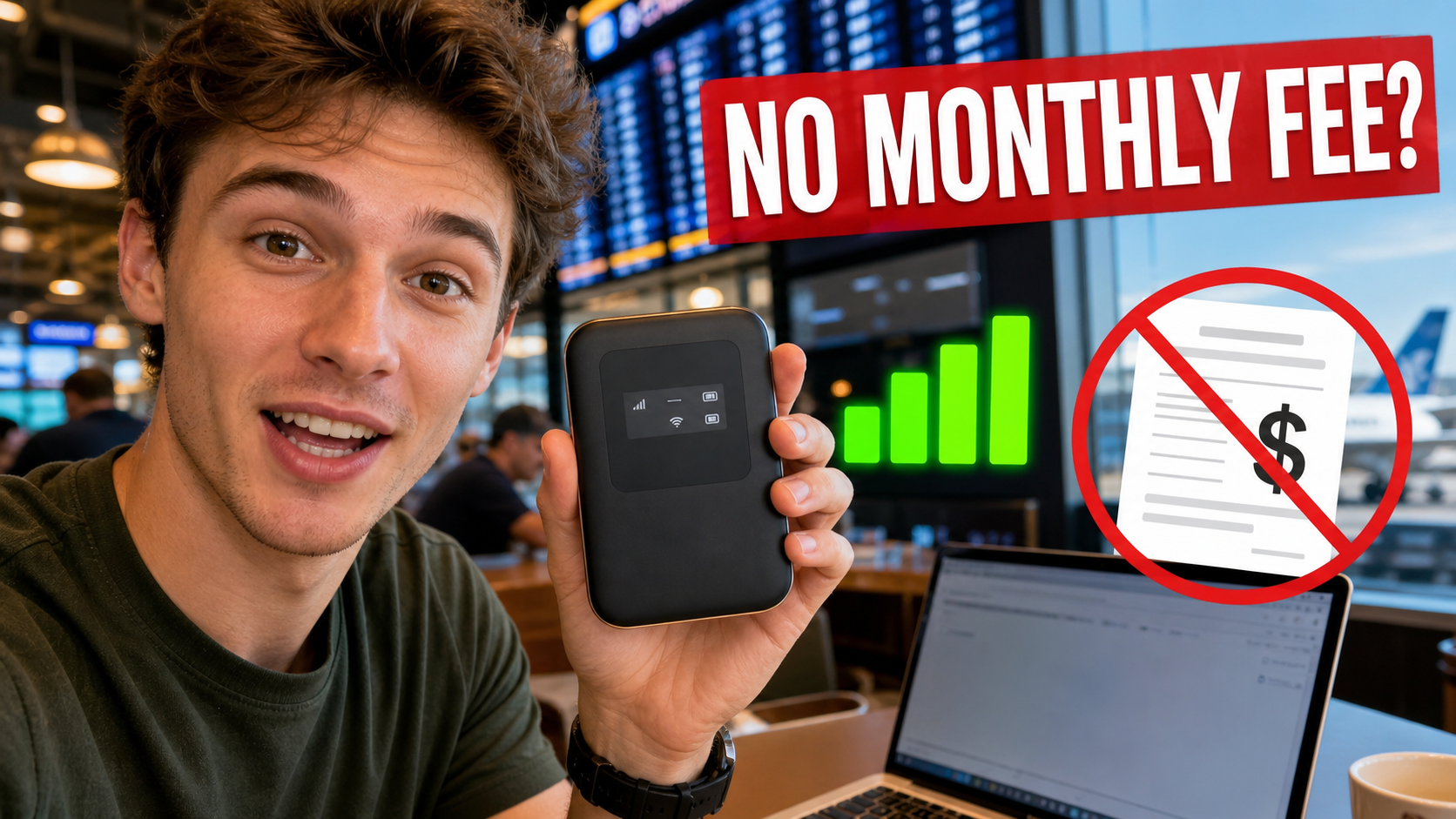
A traveler holds up a pocket-sized box and says it delivers fast internet almost anywhere, with no contract and no monthly fee. The ad promises one purchase, unlimited freedom, and no more expensive hotel or cellular data.
It sounds like the perfect travel gadget. The missing explanation is where the internet connection comes from and who pays the network carrying the data.
This investigation looks at the pocket Wi-Fi ads circulating on TikTok and similar platforms, the rotating product names behind them, and the generic stores collecting the orders.
Overview
The ad sells “internet” as if it were inside the device
The promotion presents a small portable router as a source of free connectivity. It may claim coverage across a country or around the world, fast speeds, secure service, and no ongoing payment.
A hotspot can share a connection, but it does not create a carrier network. It normally needs an active SIM or eSIM and a compatible data plan, or it must connect to an existing internet source that someone already pays for.
The product name changes while the promise stays the same
YAGOO, TI World, and Ecovox are among the names used in versions of the campaign. Other nearly identical devices can appear under new names, domains, and logos.
This is why searching only the current label may provide little protection. The important claim is “portable internet with no monthly fee,” especially when the seller avoids explaining the SIM, carrier, data allowance, and network source.
The storefront may have little connection to telecommunications
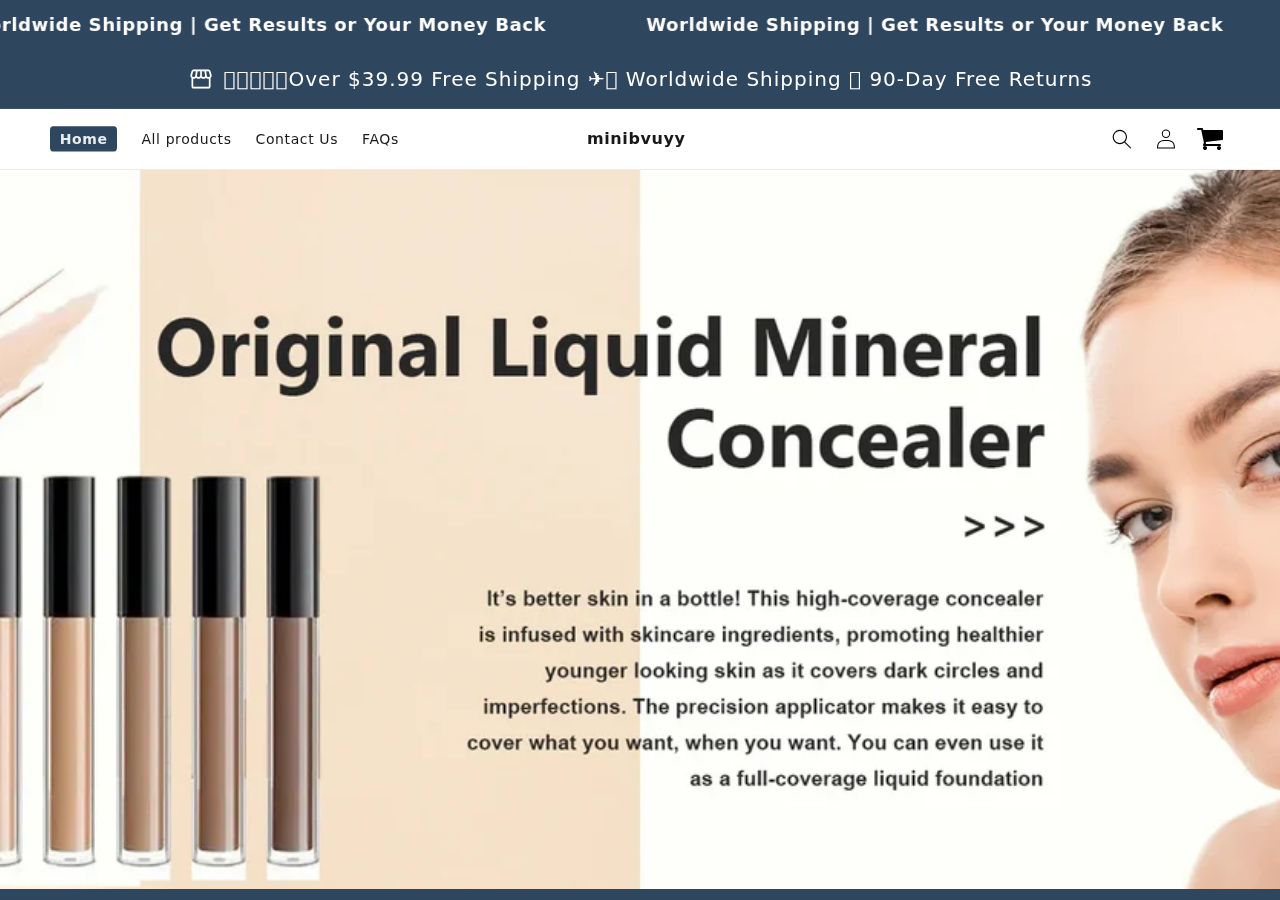
One domain tied to the campaign, minibvuyy.com, appeared as a generic Shopify-style store. During our review, its homepage promoted liquid mineral concealer rather than networking equipment.
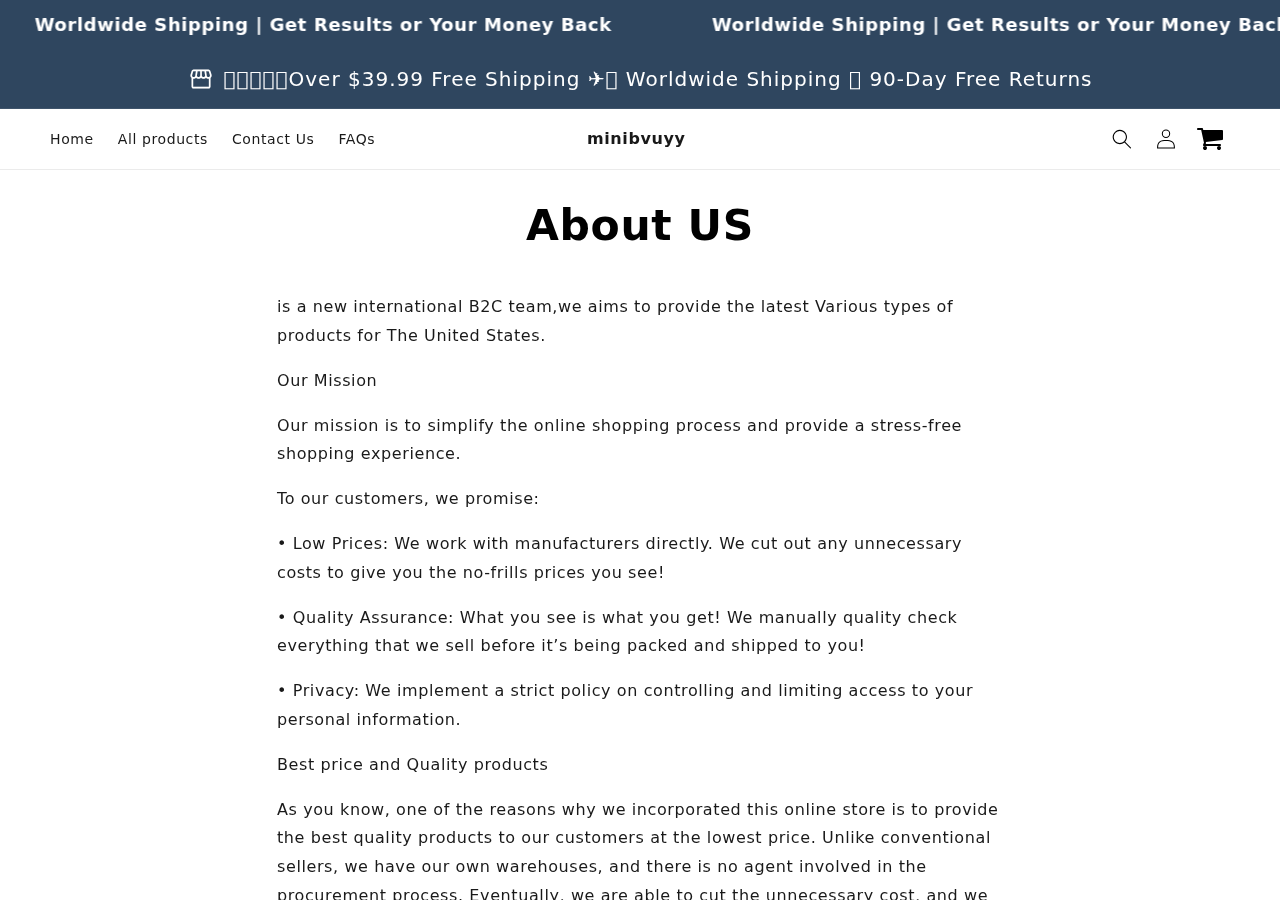
Its About Us page described a “new international B2C team” and broad product sourcing but did not clearly identify a legal company, telecom partner, physical address, or direct support phone number.
- The ad implies the device provides service without explaining the network.
- Names and websites rotate, making reputation checks harder.
- Reviews and social proof may exist only inside the sales funnel.
- Generic stores can switch from one unrelated product to another.
- Terms may be copied from templates and contain conflicting jurisdiction language.
What Pocket Wi-Fi Can and Cannot Do
“Pocket Wi-Fi” is a normal term for a mobile hotspot. A legitimate hotspot connects to a cellular network through a SIM or eSIM, then shares that connection with nearby phones, laptops, or tablets over Wi-Fi.
The hardware can be purchased outright, but the data traveling across the mobile network still belongs to a service arrangement. That arrangement may be monthly, prepaid, pay-as-you-go, bundled with another account, or provided for a limited promotional period.
Another type of small device is a Wi-Fi repeater or travel router. It can share an existing hotel, home, or wired connection, but it cannot provide internet in a remote location where no upstream service exists.
A seller can therefore make “no monthly fee” technically narrow while leaving the consumer with a misleading impression. The seller may not charge a subscription for the plastic device, yet the buyer still needs separate data or existing Wi-Fi.
Questions a legitimate seller should answer
- Does the device contain a modem, or is it only a router or repeater?
- Which cellular bands, carriers, countries, and SIM types are supported?
- Is a SIM or eSIM included, and who is the service provider?
- How much data is included, at what speed, and for how long?
- What happens after the included data is used?
- Are activation, roaming, renewal, or top-up charges required?
If the page cannot answer those questions, the central benefit has not been explained. Signal-bar graphics and airport footage do not fill the gap.
How the TikTok Ads Create the Illusion of Free Internet
The video often begins with a common frustration: expensive roaming, weak hotel Wi-Fi, a dead connection during travel, or a family paying too much for several data plans.
A presenter then reveals the gadget as a clever alternative that carriers supposedly do not want customers to discover. The device is switched on, several green bars appear, and a laptop or phone immediately loads a page.
That demonstration does not reveal the upstream connection. The phone recording the video may already have cellular service. The hotspot may contain an active test SIM. The laptop may connect through another router. A staged speed test cannot prove that future buyers receive free unlimited access.
The “no monthly fee” headline is repeated because it answers the viewer’s biggest objection before technical details are discussed. By the time the person asks how it works, the ad has already established the desired conclusion.
Fake scarcity turns a technical purchase into an impulse buy
Countdowns, low-stock warnings, and discount badges discourage compatibility research. A buyer who would normally compare modem bands and carrier plans instead worries about losing the sale price.
The device may be presented as a recent American innovation or designed in Los Angeles, even when the page provides no identifiable engineering company, patent, certification record, or local office.
Review cards can be part of the advertisement
Testimonials may describe perfect airport coverage, effortless international travel, and years without a bill. If those reviews appear only on the seller’s own page, they are marketing content, not independent verification.
Search for the exact model number, regulatory ID, and hardware photographs outside the seller’s network. A brand name can be changed more easily than a device’s real specifications.
The Storefront Check Raises More Questions
The minibvuyy.com homepage we captured did not look like the website of a telecommunications provider. Its main banner advertised cosmetic concealer, while navigation offered broad product categories, a contact form, and general policies.
A general store can legally sell electronics. The concern is the mismatch between an ad implying a specialized internet breakthrough and a storefront that does not identify a carrier relationship, technical support team, or networking focus.
The store also claimed worldwide shipping, a money-back promise, free returns, and a large number of reviews. Those claims need usable contact details and clear written conditions to have practical value.
A visitor should be able to identify who owns the store before giving it card data. We did not find a company name, physical business address, or direct telephone support in the visible About Us material.
Policy Pages Can Reveal a Copy-and-Paste Operation
Store policies are often more revealing than the sales video. They should identify the contracting company, governing law, return destination, cancellation procedure, shipping time, and the conditions for a refund.
In the minibvuyy terms we reviewed, one section referred to United Kingdom law while another referenced the laws of the United States. That type of inconsistency suggests a generic template was adapted without careful legal review.
A copied policy does not, by itself, prove every order is fraudulent. It does weaken confidence that the seller has built a coherent business capable of honoring country-specific rights and providing reliable technical support.
The About Us page was similarly generic. It described an international B2C team, low prices, direct manufacturer relationships, and warehouses without naming the people or legal entity responsible.
This matters when a product fails. A buyer needs to know where to send the device, which company owes the refund, whether a return must cross international borders, and who can troubleshoot activation.
Contact forms can disappear with the domain. An independent company name, working email, phone number, and verifiable address give the buyer more ways to resolve a problem.
How the Scam Works
Step 1: A TikTok-style video promises escape from data bills
The ad shows a traveler, remote worker, or family frustrated by contracts and roaming fees. It frames cellular companies as expensive gatekeepers and the device as a loophole.
The message is emotional and immediate: buy this once and stop paying for internet access.
Step 2: A staged demonstration hides the upstream service
The presenter powers on the hotspot, shows full signal bars, and connects another device. The clip never shows which SIM is installed, which carrier is active, or who paid for the data.
Without that information, the demonstration proves only that a screen or light turned on during filming.
Step 3: The ad invents an origin story
The product may be described as designed in Los Angeles, developed by former telecom engineers, or released after a breakthrough. The seller offers no named inventors, company history, certification details, or independent technical review.
An origin story makes a generic device feel exclusive and supports a higher price.
Step 4: A one-product landing page removes comparison
The viewer reaches a page filled with benefits, selected reviews, and discount claims. Nearly every button leads to the same order form.
Model numbers, supported bands, carrier compatibility, and data terms are either vague or absent. Those are the details a real hotspot buyer needs most.
Step 5: Bundle pricing raises the initial order
The seller encourages two or more devices for family members, cars, or backup use. The per-unit price falls, but the buyer assumes more risk before testing even one unit.
Shipping protection, warranties, or unrelated upsells can increase the total. Review every line before pressing the final button.
Step 6: The device arrives without free service
The buyer may receive a generic router, repeater, or hotspot that requires a SIM and paid data. It may work as hardware while failing to deliver the main impression created by the ad.
That distinction makes complaints harder. The seller can point to a functioning power button even though the promised no-fee internet was the reason for the purchase.
Step 7: The seller moves to another name or product
YAGOO, TI World, Ecovox, and similar labels can be replaced quickly. A generic storefront can also switch its homepage to cosmetics, household goods, or another viral product.
The domain may remain just long enough to process a wave of orders. Consumers should document the page at the time of purchase.
Company, Address, and Fulfillment Checks
A vague international team is not a legal identity
“International B2C team” describes a business model, not the company accepting liability. The terms and checkout should provide a complete legal name and jurisdiction.
If you cannot identify who owns the store, do not assume the brand printed on the device is the contracting company.
A warehouse cannot answer telecom questions
A fulfillment center may pack and return goods for many unrelated online stores. It does not prove that the seller operates a carrier network or can provide technical support.
Search the return address before shipping anything. Confirm it in writing, use tracking, and keep the delivery record.
No working phone or direct email means no reliable escalation path
A contact form is easy to ignore or remove. Test support before buying and ask a precise question about the SIM, carrier, data limit, activation, and refund process.
If the reply is generic, automated, or unrelated to the exact device, assume post-sale help will be equally limited.
Unknown hardware should not be trusted with sensitive traffic
A portable router handles network traffic. Without a known manufacturer, firmware support, update policy, default-password instructions, or security documentation, the device creates privacy and security questions beyond the purchase price.
Do not use an unverified hotspot for banking, work credentials, or private communications. Cheap mass-market hardware is not automatically malicious, but a seller that hides its identity gives you little recourse if a vulnerability is found.
What to Do if You Have Fallen Victim to This Scam
- Stop using the device for sensitive activity. Disconnect it from phones and computers until you understand the model, firmware, network source, and security settings. Remove any SIM before returning it.
- Photograph everything. Capture the device, box, model number, regulatory labels, SIM slot, instructions, shipping label, and every screen shown during setup.
- Save the ad and original offer. Record the “no monthly fee” claim, coverage map, speed promise, guarantee, product name, domain, checkout total, and advertised company location.
- Check for separate data or billing accounts. Review your email, carrier account, app-store subscriptions, PayPal agreements, and card statement. We did not verify that every campaign creates recurring charges, so look for the exact terms attached to your order.
- Request a refund in writing. Explain that the device did not provide the service represented in the advertisement. Ask for return authorization and a confirmed address before mailing it with tracking.
- Dispute an unresolved misleading charge. Contact the card issuer if the seller fails to honor the policy, charged an incorrect amount, or materially misrepresented the service. Provide the saved ad and support correspondence.
- Change credentials exposed during setup. If the device or its app asked for an existing Wi-Fi password, email password, or unusual permissions, change affected credentials. Run Malwarebytes on devices if you installed software from an unfamiliar download link.
- Block the redirect network. AdGuard can reduce malicious ads, trackers, and redirects that repeatedly promote rotating gadget offers. It does not make an unknown hotspot safe to use.
- Report the seller and ad. Report the video to TikTok or the platform where it appeared, then submit the domain and transaction details to the FTC or your national consumer authority.
Frequently Asked Questions
Can a pocket Wi-Fi device provide internet with no monthly fee?
The hardware can be purchased without a monthly device payment, but internet data must still come from a cellular plan or an existing connection. A prepaid plan may avoid a monthly contract, yet the data is not magically free.
Are YAGOO, TI World, and Ecovox the same device?
They have appeared in closely related advertising, but available evidence does not prove every unit is identical. Compare model numbers, internal hardware, certifications, seller details, and service terms.
Why does the store now show cosmetics?
Generic ecommerce sites frequently rotate viral products and homepage banners. The change suggests the domain is not a dedicated telecom provider and makes archived screenshots important.
Could the device still work as a hotspot?
Possibly. A generic hotspot may work with a compatible paid SIM, and a travel router may share existing Wi-Fi. That does not validate a promise of unlimited independent internet without ongoing service.
Is every no-monthly-fee offer a subscription trap?
No. Some are one-time hardware sales with misleading service implications rather than recurring billing. Inspect the exact checkout, carrier activation, app subscription, and payment authorization.
How can I buy a legitimate travel hotspot?
Choose a known manufacturer or carrier, verify supported bands and countries, read the data-plan terms, confirm security updates, and compare the total hardware plus service cost. Buy from a seller with traceable support and a clear return policy.
The Bottom Line
The pocket Wi-Fi no monthly fee scam depends on a missing sentence: the device still needs an upstream internet connection. A portable box can share service, but it cannot create a free cellular network.
Ignore the rotating names and inspect the mechanics. Ask which carrier provides the data, what it costs, how much is included, and who owns the store. If the seller cannot answer those basic questions, the safest connection is the one you do not buy.

Join the discussion
0 commentsShare your experience or ask a question about this article.
Discussion
Start the conversation
Have a question or something useful to share? Add the first comment.