

Phishing scams targeting bank customers are on the rise. The latest scam involves fraudulent text messages claiming to be from RBC ALERTS stating that the recipient’s access card has been blocked. This convincing phishing scam aims to steal personal and financial information from unsuspecting RBC customers.
In this comprehensive guide, we will uncover everything you need to know about the “Your Access Card Was Blocked” phishing scam targeting RBC customers, including how to spot these fraudulent messages, avoid falling victim, and what to do if you clicked on the link or provided any personal information. With insight into the scam techniques used and expert advice, you will be well-equipped to protect yourself from this and other phishing ploys.
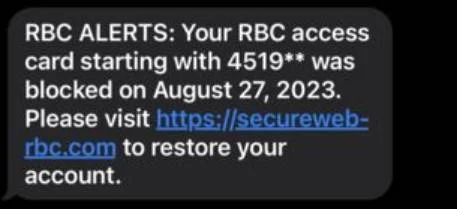
Overview of the RBC ALERTS “Your Access Card Was Blocked” Scam
The RBC ALERTS “Your Access Card Was Blocked” phishing scam involves victims receiving a text message claiming to be from RBC stating that their debit or credit card has been blocked. The message contains a link to a fake RBC website asking the victim to “restore their account.” This is a common phishing technique aiming to steal personal and financial data.
Here are some key details on this scam:
- Victims receive a text message claiming to be from RBC ALERTS with the fraudulent content: “Your RBC access card starting with 4519** was blocked on August 27, 2023. Please visit https://secureweb-rbc.com to restore your account.”
- The real RBC website is rbc.com. The “secureweb” link goes to a convincing but fake lookalike site.
- If victims click the link, they are taken to a fraudulent website mimicking RBC’s real login page.
- The fake site prompts victims to enter their card number, account login details, SIN number, and other sensitive information.
- Scammers use the stolen data to access bank accounts, make unauthorized purchases, apply for loans/credit cards, steal identities, and commit other types of fraud.
- RBC states they will never send texts asking for personal information or to verify account details. Any such messages are scams.
This scam is quite concerning as the website linked closely resembles RBC’s real website. Most recipients would not notice it is fraudulent at first glance. The text message content and instructions also sound legitimate and urgent, tricks used to encourage victims to provide their information without thinking.
However, RBC states they will never contact clients by text asking to update or verify personal or banking details. The bank also does not use the term “access card” in communications. These are telltale signs of a scam.
How the RBC ALERTS “Your Access Card is Blocked” Scam Works
Scammers use clever psychological tricks and convincing website/message content to fool unsuspecting RBC customers into providing sensitive personal and financial information. Here is a step-by-step overview of how this scam typically operates:
1. Victims Receive a Fraudulent Text Message
The scam starts with victims receiving a text message claiming to be from “RBC ALERTS.” The message content states that the recipient’s “access card” starting with partial digits (e.g. 4519**) has been blocked.
This immediately raises feelings of worry and urgency, causing the victim to want to resolve the supposed issue fast. The text includes a link to “restore their account.”
2. The Link Goes to a Fake RBC Website
If victims click the link on their smartphone, it takes them to a website designed to mimic RBC’s real website and online banking login page. The site has RBC’s logo and branding.
At quick glance, most customers would think they are on RBC’s real site. The web address looks legitimate, containing “secureweb-rbc.com.”
However, RBC’s real website is rbc.com. This similar-sounding fraudulent link is designed to avoid raising suspicions.
3. Victims Are Prompted to Enter Personal and Banking Information
The fake RBC login page prompts victims to enter their card number, account username and password, PIN, SIN, address, phone number, and other personal info to supposedly “restore their account.”
Scammers claim this is needed to reactivate the blocked card and regain access. Since the page looks like RBC’s real site, victims enter the data without realizing it is a scam.
4. Scammers Steal and Use the Data for Fraud
Once victims submit their sensitive information, the scammers have gained the data needed to infiltrate accounts, steal identities, and commit financial fraud.
They may log into the victim’s real RBC account to transfer funds or steal private information. Stolen card numbers can be used to make unauthorized purchases online or in-store.
Criminals also use the data to open fraudulent accounts, get loans, credit cards and more in the victim’s name, ruining their reputation and credit profile. Stolen SINs and personal details are used to steal identities and commit tax fraud.
Ultimately, this scam enables scammers to steal thousands of dollars and wreak havoc on victims’ finances through identity theft and account infiltration.
Spotting the Warning Signs of the RBC ALERTS Scam
While this scam is quite convincing on the surface, there are several red flags victims can watch for:
- Text requests personal info – RBC will never contact you via text asking you to provide or verify private account or ID details. Any such requests are scams.
- Web URL looks suspicious – The link goes to “secureweb-rbc.com” instead of rbc.com. Avoid clicking links not from a legitimate rbc.com address.
- Urgent threat of account closure – Scare tactics of immediately losing access are used to panic victims into acting fast without thinking. RBC gives proper notice before closing accounts.
- Use of “access card” – RBC does not use the term “access card” in communications or account servicing. A message stating your “access card” was blocked indicates fraud.
- Requests full card number – RBC would never ask for your full debit/credit card number as they already have it. Requests for the full card number are a giveaway something is wrong.
- Formatting errors – Phishing websites often contain spelling errors, grammatical mistakes, strange fonts or formatting issues, indicating it is not legitimate.
- Odd email/text sender – Carefully check the sender name on emails or the phone number a text comes from. Scam messages usually come from obscure or slightly modified email and phone numbers instead of proper RBC senders.
- Links go to log in page – Legitimate bank links go to general website landing pages, not directly to log in portals asking for your information right away. This is done to capture your data immediately on fake sites.
Stay vigilant and verify any suspicious texts or emails by contacting RBC directly before clicking links or providing information.
What to Do if You Fell Victim to the RBC ALERTS Scam
If you unfortunately submitted personal or financial information through the fake RBC ALERTS website, take these steps right away:
Alert RBC
- Immediately call RBC at 1-800-769-2511 to alert them about the phishing attack.
- Ask them to disable online account access to prevent further damage. Request new login credentials be issued once proper identity verification is completed.
Monitor Accounts and Credit
- Carefully monitor all your RBC accounts for unauthorized transactions. Report any suspicious activity.
- Check other bank/credit accounts frequently for fraudulent activity. Scammers may have access to more than just RBC.
- Order copies of your credit reports from Equifax and TransUnion and review for accounts or inquiries you don’t recognize. Consider putting a fraud alert on your credit file.
Reset All Passwords and Enhance Security
- Once you regain legitimate access to your RBC account, reset your username, password, PIN and security questions. Avoid reusing the same credentials.
- Update passwords on all other financial accounts that may have used the same login details as your RBC profile. Use unique passwords for every account.
- Enable two-factor authentication on your RBC account for added security when logging in. Consider using a password manager.
Watch for Identity Theft
- Place a fraud alert on your credit reports to help prevent criminals from opening new fraudulent accounts.
- Monitor your financial accounts, credit reports, benefits records, tax filings and medical records for signs of misuse of your identity. Report any unauthorized activity.
- Consider signing up for identity theft protection services that provide credit monitoring and identity restoration services if your SIN was compromised.
Report the Scam
- Report the scam to the Canadian Anti-Fraud Centre online or at 1-888-495-8501. Provide all details to assist in their investigation.
- Report to local law enforcement and request a copy of the police report to provide to creditors. Identity theft is a crime and should be reported.
- Report any social insurance number theft to Service Canada at 1-800-206-7218.
- Report compromised bank card numbers to card issuers. Request replacement cards with new card numbers.
Seek Legal Counsel
If you suffered significant financial losses or identity theft issues, consult a lawyer who specializes in cases of fraud. They can review options to recover damages and represent your case.
How to Avoid Falling Victim to the RBC ALERTS Scam
Here are some tips to help identify and avoid this RBC phishing scam:
- Carefully check the sender name on any emails or texts purportedly from RBC. Confirm it matches official RBC contacts.
- Never click links in suspicious emails or texts. Manually type rbc.com into your browser.
- Verify any urgent account closure threats directly with RBC before providing information or clicking links.
- Never provide your full debit/credit card number, online banking credentials or SIN when requested over email, text or calls.
- Look for formatting issues, grammar mistakes and urgency threats in messages – signs of phishing scams.
- Hover over links before clicking to verify they go to a legitimate RBC URL, not a slightly different fake domain.
- Keep device and antivirus software updated and enable firewalls to prevent intrusions. Avoid using public Wi-Fi for banking.
- Set up transaction alerts on your RBC accounts to monitor account activity and catch unauthorized transactions faster.
- Be wary of phone calls from people claiming to be from RBC security teams. Scammers often pretend to be from the bank.
- If unsure about any communication from RBC, call them directly at a verified number to inquire.
- Regularly check your credit reports from Equifax and TransUnion for signs of identity theft. Enroll in their credit monitoring services.
Staying vigilant against phishing scams and verifying any suspicious activity directly with RBC is your best defense against having your personal information compromised by fraudsters. With caution, you can protect yourself and avoid becoming a victim.
RBC ALERTS Scam FAQ
Is it really RBC contacting me about a blocked card?
No, RBC will never contact you by text or email stating your card was blocked and asking you to verify personal information or account details to unlock it. This is a scam.
How do I tell if an RBC text or email is legitimate?
Check that emails are from an @rbc.com address. Caller IDs for texts should show as official RBC numbers. Hover over links to check destinations. RBC will never fully ask for account numbers or passwords.
What’s the harm in clicking the link to check if my card is blocked?
The links lead to convincing fake sites that steal entered info. Even just checking could give scammers access to accounts, your identity and enable financial fraud. Avoid clicking any questionable links.
Can the scammers really access my account if I enter details on their site?
Yes, providing your card number, online banking username/password, SIN and other info gives scammers full ability to log into your accounts, steal your identity and commit serious financial fraud in your name.
How can scammers mimic the real RBC website so closely?
Fraudsters are talented at making lookalike websites that closely mirror legitimate business sites to appear authentic. They buy similar web domains and copy branding. Stay vigilant for slight differences.
What’s the harm in providing my SIN or date of birth if requested?
Your SIN and other personal details enable criminals to steal and use your identity. Never provide this info, even if a site looks official. Identity theft can severely damage your finances and credit.
How much money could I lose from this scam?
Scammers can drain bank accounts, make unauthorized credit/debit purchases, open fraudulent accounts and apply for loans/credit in your name costing thousands. Identity theft losses can be tens of thousands due to extensive damage.
What should I do if I already entered my information on the fake site?
Immediately contact RBC to disable online account access. Monitor accounts closely for unauthorized activity and report it. Reset all your account passwords. Sign up for credit monitoring to detect any misuse of your identity.
Could I be at risk even if I have two-factor authentication enabled?
Yes, with your login credentials and access to your phone, scammers can often bypass two-factor authentication. Change your online banking password immediately and work with RBC to secure your account.
Conclusion
The RBC ALERTS “Your Access Card Was Blocked” phishing scam is an extremely convincing scam that can easily fool customers into giving up valuable personal and financial data. This scam relies on urgent threats, official branding and lookalike sites to appear legitimate and persuade victims to provide sensitive information quickly.
However, awareness of the scam techniques and learning to spot the warning signs of phishing texts and emails allows customers to identify and avoid this fraud. With proper precautions taken, RBC users can protect themselves and their information from theft by scam artists. Being vigilant and proactive is key to preventing phishing scams and safeguarding finances.

Join the discussion
0 commentsShare your experience or ask a question about this article.
Discussion
Start the conversation
Have a question or something useful to share? Add the first comment.