

You glance at your phone and see an urgent text from RBC stating your account has been restricted. As your pulse quickens, it provides a link to reverse this right away. This bait, while compelling, may also be a trap. Phishing texts impersonating banks like RBC are surging, aiming to snare users into clicking malicious links. But armed with insight on these scams’ devious tactics, you can protect your hard-earned savings from fraudster’s grasping hands. This guide will uncover the inner workings of schemes like the “RBC Account Restriction” text scam, equip you to evade phishing traps, and preserve your financial security.
Overview of the RBC “Restrictions On Your Debit Account” Text Message Scam
As digital banking grows increasingly ubiquitous, fraudsters are leveraging the convenience of SMS and mobile messaging to orchestrate sophisticated phishing schemes. A prime example is the “Restrictions On Your Debit Account” text scam impersonating the Royal Bank of Canada (RBC). This is a completely fake notification designed to trick recipients into divulging account login credentials and sensitive personal information on a fraudulent website.
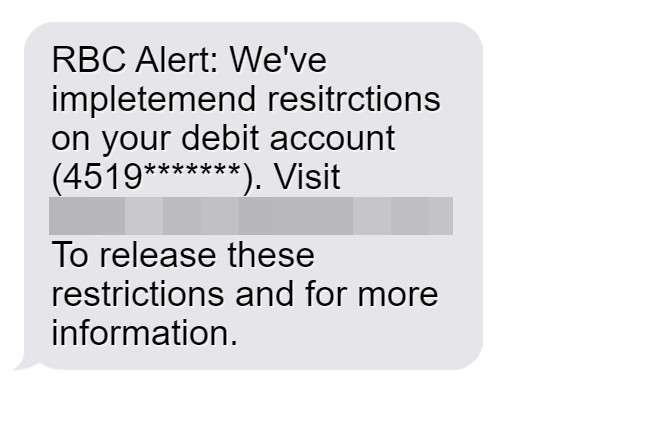
The deceptive text message states:
“RBC Alert: We’ve implemented restrictions on your debit account (4519*******). Visit https://rbcmobileinfo.com to release these restrictions and for more information.”
Despite appearing to come from a legitimate RBC phone number, the message is a complete scam orchestrated to steal data. The fraudsters’ goal is to prompt recipients to urgently click the link and enter information to remove non-existent account restrictions. But the site it links to is a phony clone of RBC’s real website created expressly to harvest login usernames, passwords, card data, SINs, and other personal details.
With the sheer ubiquity of mobile messaging, these phishing texts can reach countless potential victims instantly. And their impersonal nature makes it relatively easy for scammers to masquerade as legitimate businesses like banks. The result is an influx of extremely convincing scams, often leveraging current events, timely warnings, or a false sense of urgency about account security to trick users.
Some hallmarks of this particular RBC text scam include:
- Appearing in existing message threads alongside real RBC texts, making it seem like part of an ongoing conversation.
- Referencing the recipient’s partial debit card number to create a false sense of legitimacy.
- Providing a believable but slightly misspelled web link that directs to a fake site instead of RBC’s real domain.
- Creating urgency by claiming temporary account restrictions have been imposed that need immediate action.
- Demanding personal information like banking logins be entered on the phishing site to supposedly lift restrictions right away.
Once scammers obtain usernames, passwords, card data, SINs and other sensitive credentials, they can directly access real customer accounts and drain funds quickly. Or sell the stolen identity information on the dark web to be used in larger criminal enterprises like tax fraud.
As pervasive as digital banking scams have become, financial institutions like RBC warn they will never send unsolicited texts asking for personal information, account details, or directing users to external websites. Any such message should be considered extremely suspicious, regardless of appearing to come from a legitimate phone number or resembling valid communications.
The Canadian Anti-Fraud Centre (CAFC) also stresses how sophisticated these phishing scams have become. Fraudsters are experts at closely impersonating banks and other brands to deceive consumers. Cloned websites can mirror legitimate sites almost exactly. Logos are copied, branding is mimicked, and web addresses are spoofed to lend credibility.
But examining messages critically can reveal red flags. Look for:
- Grammar errors, spelling inconsistencies, or stylistic mistakes.
- Partial card numbers or personal information that should never be requested unprompted.
- Links to misspelled or slightly different domains than a company’s real website address.
- Threatening language or urgent calls-to-action related to account access.
- Requests to download software applications or files.
Being alert to these warning signs can prevent falling victim to scams. The CAFC recommends controlling the impulse to urgently click on links in questionable texts or emails. Instead, recipients should manually navigate to their bank’s official website or mobile app to examine any notifications flagged in messages. Verifying the situation independently rather than clicking embedded links cuts off the phishing attempt.
Consumers should also leverage all the security features banks provide, like multifactor authentication, fraud monitoring alerts, account activity notifications, and enhanced account validation protocols. The more roadblocks in place, the less likely scammers can access accounts even with stolen login credentials.
Exercising caution and putting urgent-sounding demands for information in context prevents handing over data on a silver platter. Ultimately, savvy users are the front line of defense against increasingly sneaky phishing tactics. Outsmarting fraudsters starts with thinking before clicking.
How the RBC Text Message Scam Works
Here are the steps scammers take to orchestrate this phishing campaign and turn stolen data into illicit cash:
Step 1: Recipients Receive a Text Message
The scam starts with an SMS sent directly to the victim’s mobile device. Spoofing technology allows scammers to mask the originating number, making the message appear in existing message threads alongside legitimate RBC texts.
The content references temporary account restrictions and includes a link to reverse this issue immediately. This creates urgency to act quickly by clicking the link.
Step 2: Victims Click on the Link
If recipients don’t recognize this as a scam, they will likely follow the link to supposedly regain access to their account. The web address looks convincing, and the rest of the message appears credible.
In reality, the link goes to a fake website cloned to precisely mimic RBC’s real login portal. Victims enter their credentials without realizing the data is going straight to scammers.
Step 3: Scammers Obtain Sensitive Information
On the phony login page, victims will input personal details like:
- Online banking usernames/passwords
- Debit/credit card numbers
- Card CVV codes
- Account PINs
- Date of birth
- SIN
With this data, scammers can directly infiltrate the real RBC account and initiate transfers. Or, they leverage the info for larger identity theft.
Step 4: Criminals Drain Accounts and Commit Fraud
Armed with complete account access, scammers can steal directly from the compromised account. They may conduct fraudulent transfers, redirect deposits, apply for loans/credit cards, and more.
Stolen SINs and personal information also facilitate tax fraud, credit card fraud, and other identity theft far beyond the original bank account. Criminals can open unauthorized accounts, claim fake tax refunds, and commit fraud globally.
Victims usually don’t detect the activity until funds start disappearing or new fraudulent accounts appear. At that point, significant financial damage has already occurred.
What to Do If You Fell Victim to the RBC Text Message Scam
If you submitted any personal information through the phishing link, take these steps immediately to protect yourself:
Step 1: Contact RBC Right Away
Call RBC as soon as possible at 1-800-769-2511 to alert them about the scam and potential account breach. They can work to freeze the account, monitor activity, and reissue new account/card numbers. Timeliness is key to preventing money loss.
Step 2: Reset All Account Passwords and Security Questions
Change passwords, PINs and security questions for your online banking, cards, accounts, and any other access points compromised by the scam. Avoid reusing the same credentials elsewhere. Enable two-factor authentication for enhanced security.
Step 3: Sign Up For Credit Monitoring
Check credit reports and sign up for monitoring to catch any unauthorized credit applications or accounts opened in your name. Place fraud alerts or a credit freeze if needed.
Step 4: Scan Devices for Malware
If you downloaded anything suspicious, run antivirus scans to uncover malware designed to steal data. Factory reset devices that downloaded malware to fully remove threats.
Step 5: Block Numbers Associated with Scam
Block the originating number and report it to carriers, RBC, and the Canadian Anti-Fraud Centre to help disrupt the scam. Use carrier tools to block potential scam calls/texts.
Step 6: File Reports About the Incident
File reports with the Canadian Anti-Fraud Centre, police, RBC, credit bureaus, CRA, and other entities. Reporting helps create a paper trail in case of future fraud or identity theft.
Frequently Asked Questions About the RBC “Restrictions on Your Debit Account” Text Message Scam
1. What is the RBC “Restrictions on Your Debit Account” text message scam?
This is a phishing scam where victims receive a text claiming RBC has restricted their debit account. It provides a link to a fake RBC site to steal login credentials and banking information. The scammers then use this info to drain accounts and commit identity theft.
2. How are the scam text messages sent?
The texts use spoofing to appear in existing message threads next to real RBC texts. They reference partial account numbers to seem legit. But RBC would never request sensitive data by text.
3. What happens if I click the link in the text?
The link goes to a fake website impersonating RBC’s real login page. If you enter account usernames or passwords, the scammers steal this info to infiltrate your accounts and steal funds.
4. What data are the scammers phishing for?
Scammers want banking usernames, passwords, PINs, card details, SINs, and other personal info. This lets them access accounts directly or commit larger identity theft.
5. How can I recognize the RBC phishing text is fake?
Real RBC texts won’t threaten account restrictions or request sensitive info. Other red flags are spelling errors, mismatched links, or urgent threats related to account access.
6. What should I do if I shared information through the text?
- Contact RBC immediately to freeze your account.
- Reset all account passwords, PINs, security questions, and enable multifactor authentication.
- Sign up for credit monitoring to catch any fraudulent activity.
- Scan devices for malware if you downloaded anything.
- Block the scam number and report it to carriers and the CAFC.
- File a report with police and inform credit bureaus of potential identity theft.
7. How can I avoid falling for the RBC text scam?
- Never click links in questionable texts requesting your info. Navigate to RBC’s real website/app manually instead.
- Double check the URL of any page asking you to login.
- Call RBC directly using their official published number if you have concerns.
- Don’t react instantly to urgent threats about account access.
- Monitor your accounts and credit regularly for unauthorized activity.
- Enable all RBC security features like fraud monitoring.
8. What should I do if malware was downloaded onto my device?
Run a full antivirus scan to detect and remove any malware. If found, do a factory reset to fully eliminate it. Avoid downloading from unverified sources.
9. Where can I report this scam?
Report details about the scam content, links, and numbers to the Canadian Anti-Fraud Centre. Also notify RBC, mobile carriers, police, and the credit bureaus.
10. How can I learn more about avoiding mobile scams?
Review scam alerts on the CAFC website. Seek guidance on mobile security best practices from your bank, carriers, and technology specialists. Enable account alerts and monitor activity vigilantly.
The Bottom Line
The RBC text notification scam shows that fraudsters constantly impersonate trusted brands like banks to steal personal information via phishing links. However, staying vigilant and employing best practices can protect you from their deception.
Here are key tips if you receive a suspicious text:
- Never click embedded links – Manually navigate to the official RBC website/app.
- Verify the URL before entering info – Double check the domain matches RBC exactly.
- Call RBC directly if you have any concerns – Use RBC’s official published contact number.
- Avoid reacting urgently to demands for information – Take time to validate any supposed issues.
- Enable enhanced account security settings – Turn on two-factor authentication and other features.
- Monitor accounts and credit regularly – Quickly spot potential fraud.
- Report scam texts to help disrupt criminal operations – Alert RBC, carriers, police, and the CAFC.
Exercising caution with electronic communications purported to be from banks can keep your hard-earned money and identity secure. Outsmart scammers by thinking critically before clicking. Your thoughtful discernment is the ultimate scam prevention tool.








