


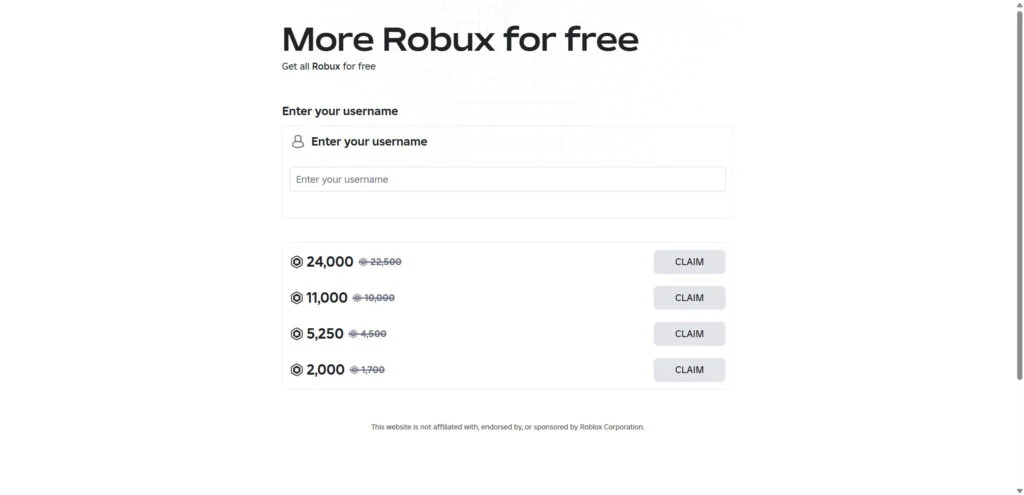
Every Roblox player would love some free Robux. Rbx-robux.blogspot.com says it can send them straight to your account, and the only thing it asks for is your username.
It certainly looks the part, like a tool designed for just that. But pressing the button kicks off a very different story, and your Roblox balance isn’t where it ends.
Overview
What Rbx-robux.blogspot.com tells visitors they’ll get
Rbx-robux.blogspot.com is dressed up as a free Robux generator. It asks for your Roblox username and an amount, often thousands of Robux, then gives you a button to “send” it.
Pages like this usually pile on a progress bar, fake server messages in a console and players who supposedly just got paid. None of it adds Robux.
Roblox has no link to these pages
Roblox tells players to steer clear of sites like Rbx-robux.blogspot.com. It doesn’t run them, doesn’t approve them and doesn’t partner with them.
No matter what the page says, a site that knows your username can’t load currency onto your account. Robux only gets added by Roblox itself.
The truth about the “free” Robux
You never get a delivery. You get a “human verification” demand, which is really a content locker: a wall of apps, surveys and sign-ups that pay the site’s operator.
Here’s how that plays out for you:
- The Robux never show up, no matter how many offers you get through.
- For the operator, every finished offer means a commission, which usually comes from a cost-per-action (CPA) ad network.
- Some offers request personal details, such as your email or phone number.
- Some nudge you into app installs or subscriptions, which can cost real money.
- At a later stage, some of these pages ask you for your Roblox password or a login code.
Don’t trust Rbx-robux.blogspot.com: it’s a free Robux scam. Leave the username field empty, don’t complete its “verification” offers and never pass along your password or a login code.
What We Found on Rbx-robux.blogspot.com
Here’s what stands out about Rbx-robux.blogspot.com:
- The page’s title reads "Roblox Robux Generator 2023".
- It asks for a Roblox username, then locks the reward behind a wall of offers before anything is supposed to arrive.
- Rbx-robux.blogspot.com is hosted on Blogger, Google’s free blogging platform, where anyone can put up a page in minutes.
- It uses the same page template as rbx-rbx.blogspot.com and robiocna.blogspot.com, which MalwareTips has already exposed as free Robux scams.
How the Rbx-robux.blogspot.com Scam Works
You’ll see the same script on domain after domain, since free Robux sites are put together from the same few kits. Here’s how it plays out.
Step 1: The bait arrives as a free Robux link
Not many players go looking for sites like Rbx-robux.blogspot.com. The links come to them, shared in YouTube comments, TikTok videos, Discord servers and messages inside Roblox.
These links come with a punchy pitch: “Claim 10,000 free Robux,” “Working generator,” “No password needed.” Fake comments pile up below it, each swearing the generator worked.
Many of these pages sit on free hosts like Blogger (blogspot.com) or Netlify (netlify.app). Setting one up costs nothing, and swapping it out after a report is easy.
Step 2: Typing in your Roblox username
Nothing about the first ask seems risky: a username, an amount that’s often huge, such as 10,000 or 22,500 Robux, then a click on “Generate” or “Continue.”
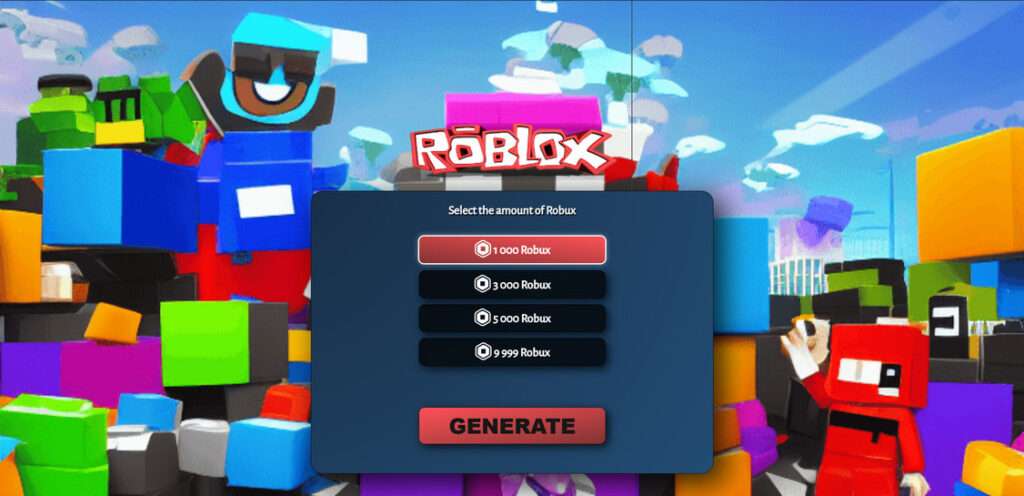
A username makes the whole thing feel personal, like the Robux are already being sent. Some pages even display your avatar, which makes the illusion more convincing.
Websites can’t send Robux to someone based on a username alone. The site asks anyway because it keeps you invested in a delivery that never arrives.
Step 3: The fake generator starts the show
Then the page puts on its act: a filling progress bar and a console printing lines such as “Connecting to Roblox servers” and “Injecting Robux into account.”
Nothing real happens in that window. A scripted animation runs identically for every visitor, your Robux balance goes untouched, and nothing is injected anywhere.
Right before the finish line, the show stops with a message saying the transfer is “almost complete.” That pause sets up the real ask.
Step 4: You’re told to verify you’re human first
Supposedly, finishing one or two offers will “prove you’re not a bot.” So the site opens a box and fills it with apps, games, surveys and sign-ups to choose from.
This is a content locker. CPA networks supply these ad tools, and the operator collects a payment for every offer you finish. Robux never arrives through it.
Step 5: The offers earn money, just not for you
The operator makes money from every task in the locker. An app install, survey answer or trial sign-up can bring in a commission, multiplied across thousands of visitors.
Some offers are only annoying. Others want a phone number that begins a paid text subscription, or they promote apps from sources other than the official app stores.
What makes those offers riskier is who sees them: mainly children. A young player may agree to terms or charges without understanding them.
Step 6: The Robux reward never lands
After you finish, the page reports that verification “failed,” asks for one more task, or reloads itself. Your Roblox balance remains exactly as it was.
By then, the operator’s payment for your time and data has already come in.
A request for your password or a login code to “finish the transfer” is an account takeover attempt. If the page asks for either later on, treat it that way.
Red Flags of Free Robux Sites Like Rbx-robux.blogspot.com
These warning signs appear on almost every free Robux site, and any one of them is enough reason to close the page.
It claims to hand out free Robux
Free Robux from an outside website isn’t something Roblox offers. Any site promising it is running a scam, whatever it calls its tool.
It wants your username to “send” Robux
Only Roblox can put Robux into an account. A website that asks you to type in your name can’t, so that username box is just part of the show.
A loading bar paired with a hacker-style console
A real purchase on roblox.com or in the official app has no theatrics. Here, the fake loading screens, “connecting to server” logs and “injection” messages are simply animations.
Offers attached to a “human verification” step
Proving you’re not a bot should take seconds, like a CAPTCHA, and never involves installing apps or doing surveys. A verification that pays someone else is a content locker.
Gushing comments and winners who keep appearing
That list of players “receiving” Robux is scripted, which is why the same “winners” keep showing up. The glowing comments are scripted too, or posted by fake accounts.
A web address that looks disposable
Free-hosting addresses like blogspot.com or netlify.app, random strings of letters and names cobbled together from “rbx,” “free” and “robux” all point to one thing: a throwaway page.
Why Free Robux Generators Can’t Work
Sounding technical can make a generator feel plausible. The reality is that an outside site has nothing to generate and nothing to hack.
The balance you see in Roblox comes from Roblox’s own servers. Only Roblox adds Robux there, whether from a purchase, a Premium membership or a sale on the platform.
Roblox spells this out on its help pages. If someone offers free Robux, memberships or valuable items, it’s a scam, and they’re really trying to get your account.
Imagine a site really could break into Roblox. Why would it give currency away for free? It wouldn’t. Ads are the only thing these pages are able to hand out.
Same Kit, Different Domains
There are many free Robux pages almost identical to Rbx-robux.blogspot.com. MalwareTips keeps finding fresh ones, and most of them are put together from a handful of ready-made templates.
The page design stays the same even when the content-locker account changes. That suggests the templates are sold or shared, rather than run by one person.
And that’s why the problem rarely ends with one page coming down. The names change, often within days, but the script doesn’t.
Set them side by side and the pages match on the same telltale details:
- The words “free Robux” or “Robux generator” at the top of the page
- A field for your username and a way to pick an amount
- A progress display that’s entirely fake
- Offers stacked inside a so-called “human verification” box
- A comment section or live feed bragging about recent payouts
A page that follows this pattern doesn’t need a test run. It’s the same scam under a different address.
The Real Risks for Your Account, Device and Data
Most visitors lose some time and gain nothing. The bigger risks come from the requests inside the offers and in any later pop-ups or messages. Here’s what to watch for:
- Your Roblox account. Some versions fish for your password, a 2-step verification code or a “login code.” Whoever has those can lock you out and strip your inventory.
- Your device. If an offer pushes you to download an app file from somewhere other than Google Play or the App Store, that file can carry adware or worse.
- Your phone bill. In some offers, entering a phone number can start a premium text subscription. Until you cancel it, the charges arrive every week.
- Your personal details. Every survey and sign-up gathers something: names, emails, ages, addresses. That information ends up on marketing lists and in spam campaigns.
- Your browser. A notification request shows up on some offer pages. Allowing it means fake alerts and more “free Robux” ads filling your screen.
Roblox says your password only ever goes on its official login page. A site asking for it anywhere else is an account thief, whatever prize it dangles.
How to Get Robux the Safe Way
Robux don’t come free, whatever a website claims. You can still add them safely, though, without risking your account:
- Purchase Robux directly on roblox.com or through the official Roblox app.
- Use Roblox’s own redemption page to redeem a gift card you bought from a real store.
- Get Robux every month through a Roblox Premium membership.
- Build items, passes or experiences, then earn Robux by selling them on Roblox itself.
Think a promotion really comes from Roblox? Confirm it on Roblox’s official website or social accounts. Real ones won’t ask you for your username on a stranger’s site.
A Note for Parents
Free Robux sites have a clear audience in mind: children. Young players are more likely to trust a flashy page and less likely to check the terms of an offer.
So talk to them. A few honest sentences help more than any filter: free Robux offers are always fake, and nobody but a parent gets to know a Roblox password.
- Go into your child’s Roblox account and turn on 2-step verification.
- Use the parental controls Roblox offers to limit spending and see what’s been happening on the account.
- Request that your mobile carrier block premium text subscriptions on the phone your child uses.
- Ask your child to promise to show you any unexpected login request or charge first.
Did your child already use a site like Rbx-robux.blogspot.com? Skip the punishment. Sit down together, work through the steps below and change the password first.
What to Do If You Have Fallen Victim to This Scam
The steps below limit the damage if you entered your username, completed offers or shared other details on Rbx-robux.blogspot.com. Start by protecting your account.
- Start with your Roblox account. Anyone who typed their password anywhere on the site should change it on roblox.com right away and sign out of all other sessions.
- Add 2-step verification. That way, a stolen password alone isn’t enough. Anyone trying to sign in would also need the code that gets sent to you.
- Update any reused passwords. Used your Roblox password on your email or other accounts too? Change it there as well, and do your email first.
- Uninstall what the offers made you download. With those apps gone, scan your device using Malwarebytes Free. The steps below walk you through it.
- Cancel any subscriptions. Look through your phone bill and app store subscriptions for charges the offers started. Cancel each one in the store settings or through your carrier.
- Silence notification spam. Remove notification permission, in your browser settings, from every site you don’t recognize. On top of that, AdGuard can block many ads that lead to these pages.
- Report what you saw. Flag the message or experience that shared the link with Roblox’s Report Abuse tools, then report the video, comment or post where it appeared.
- Watch for a second scam. Anyone who offers to restore lost items or Robux, but wants a fee or your password first, is scamming you again.
Can’t sign in anymore? Request account recovery with Roblox’s official support form. It helps to have the username, email and any purchase receipts close by.
Is Your Device Infected? Run a Free Malware Scan
Slow performance, constant pop-ups, or strange behavior? These are classic signs of a malware infection. A quick way to check is to scan your device with Malwarebytes Free, one of the most trusted malware removal tools available. If you only visited a scam page and didn’t download or install anything, this scan is optional.
The free version detects and removes the most common threats, including:
- Adware — the cause of those annoying pop-ups
- Browser hijackers — unwanted redirects and changed homepages
- Trojans and spyware — hidden programs stealing your data
- Potentially unwanted programs (PUPs) — software you never asked for
👉 Select your device below — Windows, Mac, or Android — then follow the simple steps to download Malwarebytes, scan your system, and remove any threats it finds. The scan usually takes 5 to 20 minutes.
Run a Malware Scan with Malwarebytes for Windows
Malwarebytes is one of the most popular and trusted anti-malware tools for Windows — and it’s completely free for removing infections. It catches threats that many antivirus programs miss, including adware, browser hijackers, and trojans. Follow the steps below to scan your PC and remove what Malwarebytes finds.
Download Malwarebytes
Click the button below to download the latest version of Malwarebytes for Windows from the official source. The free version is all you need — it will scan your computer and remove adware, browser hijackers, and other malicious software at no cost.
Download MalwarebytesOfficial installer for Windows 11 and 10. Your download starts right away.Want real-time protection? See Malwarebytes Premium Malwarebytes Free for WindowsScans and removes malware at no cost
-
Install Malwarebytes
When the download finishes, open your Downloads folder and double-click the MBSetup file. If Windows shows a User Account Control pop-up, click “Yes” to allow the installation.
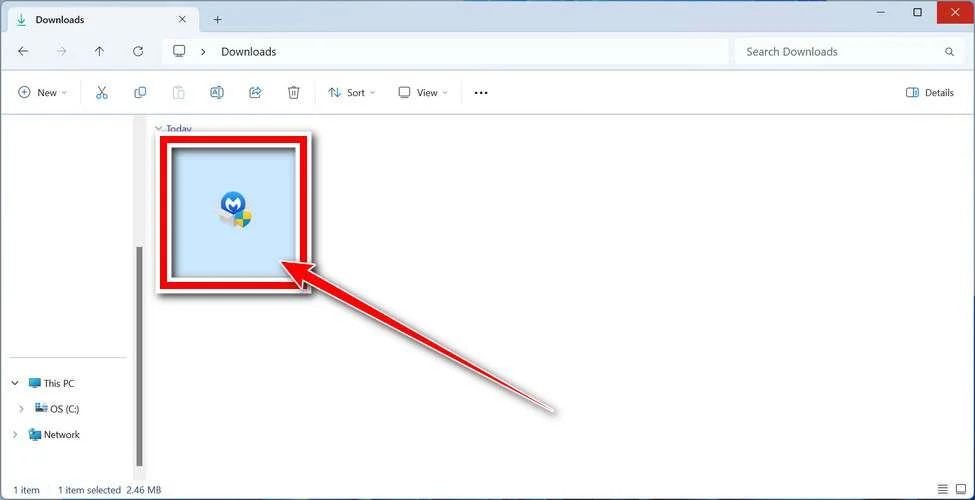
Follow the On-Screen Prompts to Install Malwarebytes
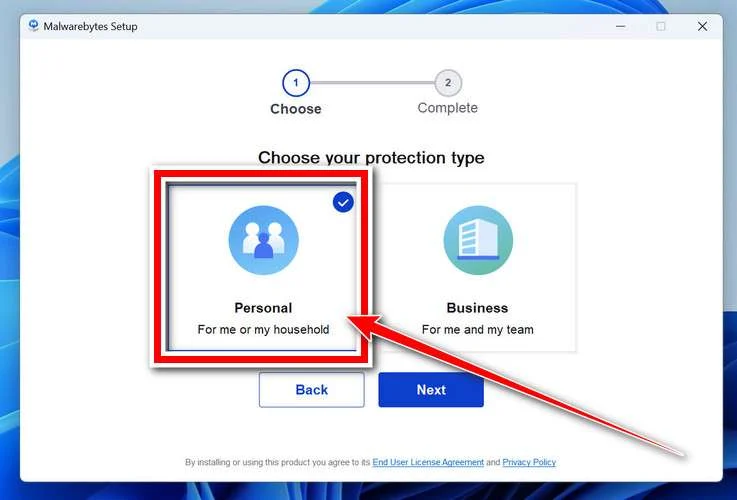
The setup wizard will walk you through a few quick screens:
-
Choose where you’re installing the program — “Personal Computer” or “Work Computer” — then click Next.
-
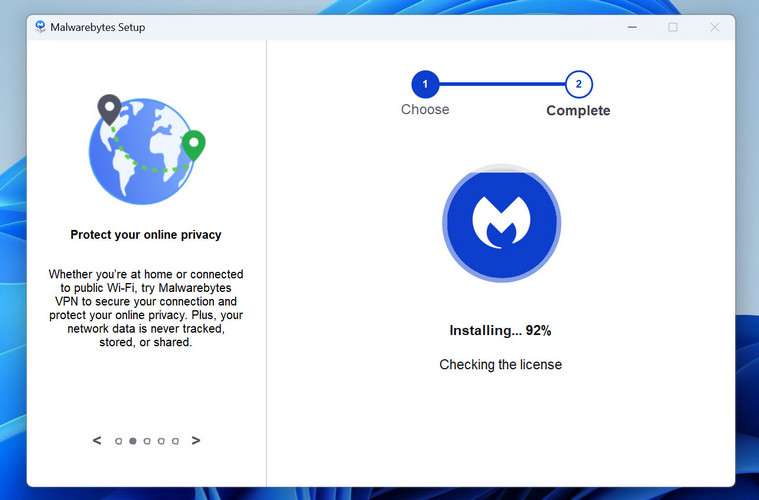
Malwarebytes will now install on your device. This usually takes under a minute.
-
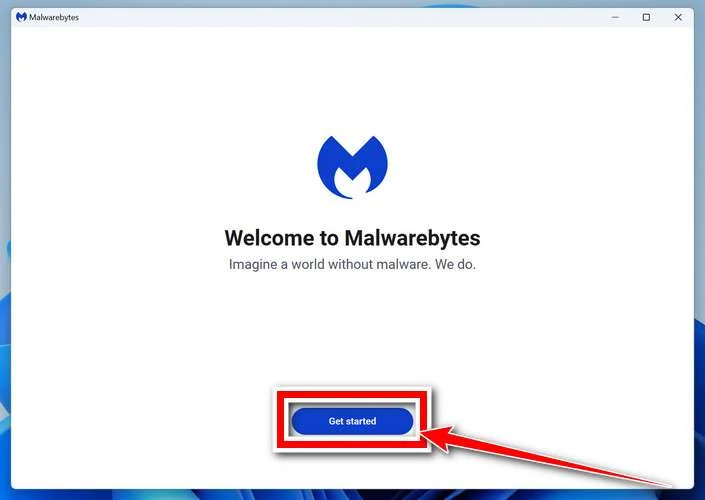
When installation is complete, the “Welcome to Malwarebytes” screen will open automatically.
-
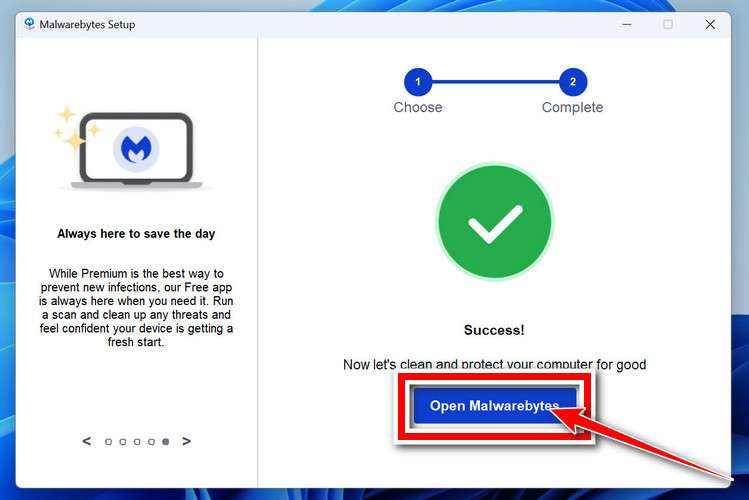
On the final screen, click Open Malwarebytes to launch the program.
-
Optional: Check for rootkits with a Custom Scan
You don’t need to change any settings for a normal scan. The standard Threat Scan in the next step is enough for most problems, so you can go straight to it.
If you also want to check for rootkits, use a Custom Scan. In current versions of Malwarebytes, rootkit scanning is only available there:
- On the Scanner tile, click the three-dot menu and select Advanced Scan.
- Choose Custom Scan. In its options, check Scan for rootkits.
- Select your system drive (usually C:\) as the location to scan, then start the scan. It takes longer than a Threat Scan.
- When it finishes, review and quarantine the results as described in the steps below.
Rootkit scanning isn’t available on Windows devices with ARM processors.
Start the Scan
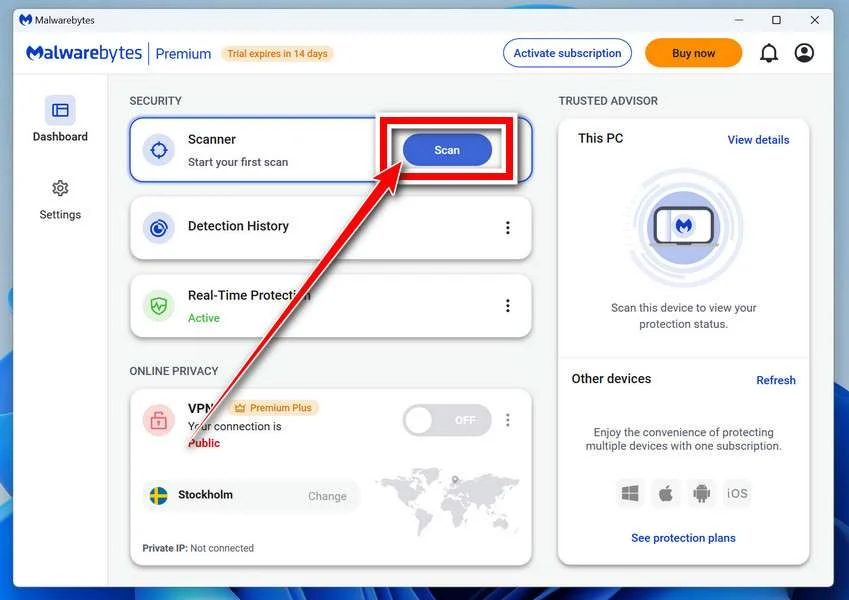
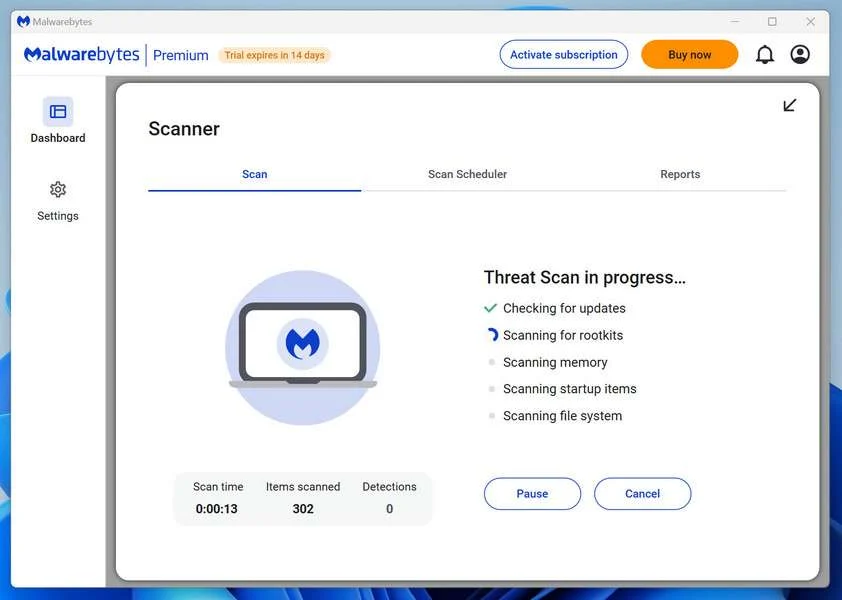
Click the blue Scan button. Malwarebytes will automatically update its virus database and start checking your computer for malware.
-
Wait for the Scan to Finish
The scan checks your entire system for browser hijackers and other malicious programs, so it can take 5 to 20 minutes depending on your computer. Feel free to do something else — just check back occasionally to see the progress.
-
Quarantine the Detected Threats
When the scan is done, you’ll see a list of everything Malwarebytes found — malware, adware, and potentially unwanted programs. Click the “Quarantine” button to remove all of them at once.
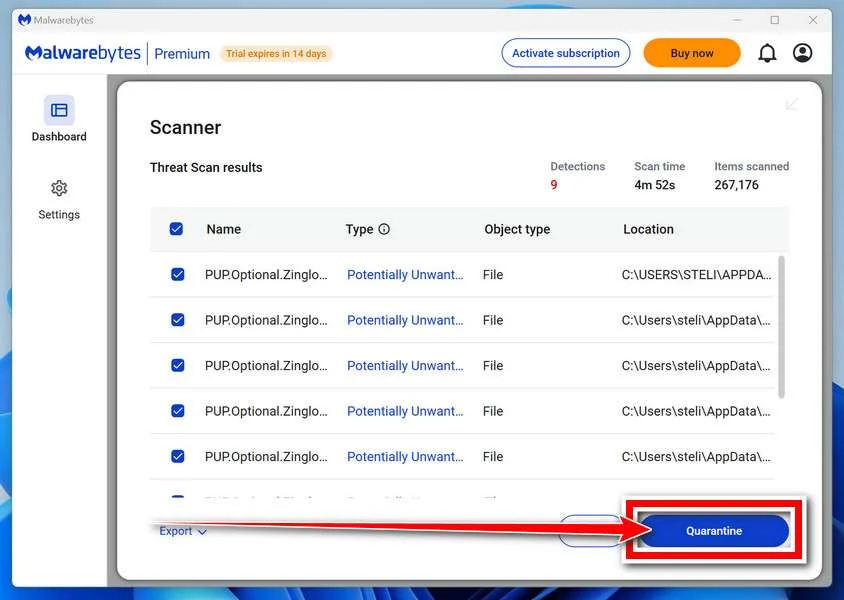
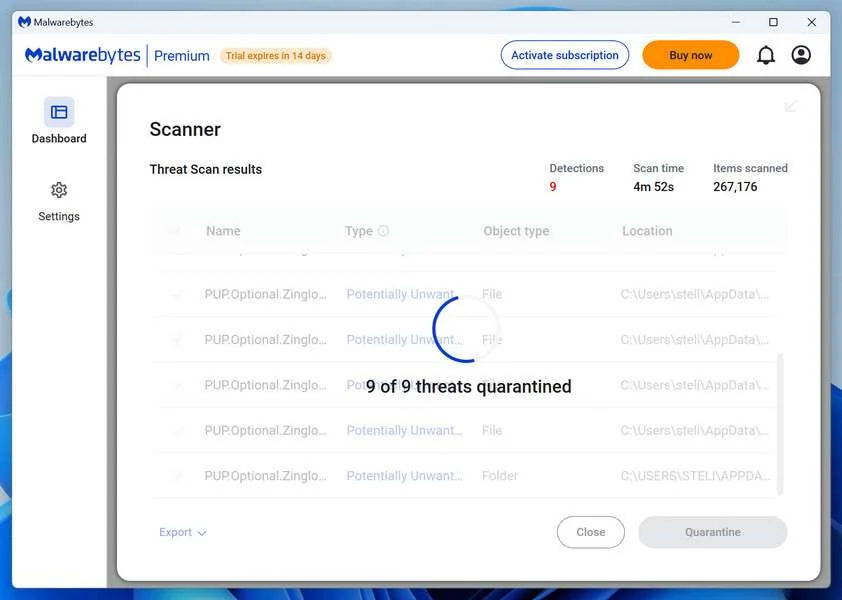
Malwarebytes will now remove the malicious files and registry entries and move them safely into quarantine.
-
Restart Your Computer
Some threats can only be fully removed after a reboot. If Malwarebytes asks you to restart, click Yes. Once you’re logged back in, Malwarebytes has finished removing the threats it found.
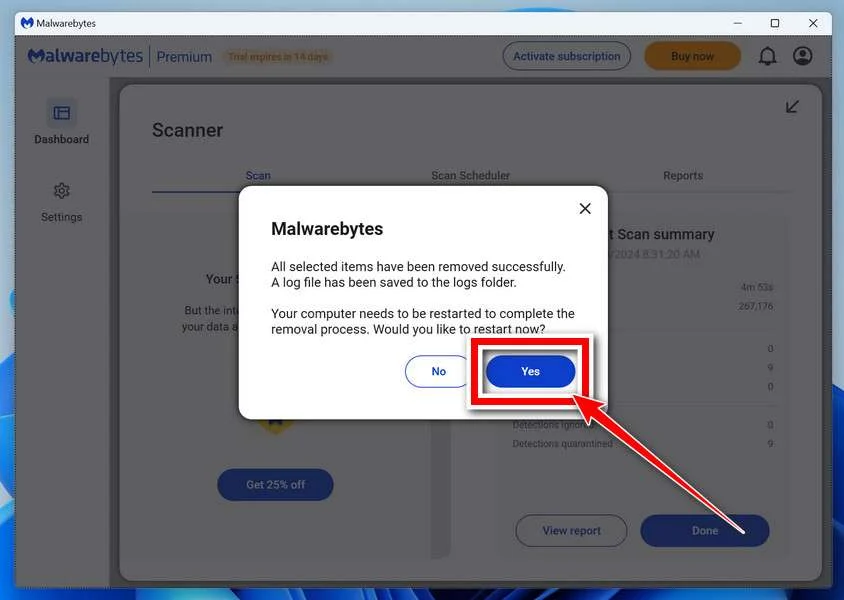
When the scan is done, check whether the problems you noticed have stopped. If they continue, see the options below.
If you are still having problems with your computer after completing these instructions, then please follow one of the steps:
- Run a computer scan with ESET Online Scanner
- Ask for help in our Windows Malware Removal Help & Support forum.
Run a Malware Scan with Malwarebytes for Mac
Malwarebytes for Mac is a free on-demand scanner that removes the malware other security software tends to miss — adware, browser hijackers, and unwanted programs included. Cleaning an infected Mac with Malwarebytes has always been completely free, and it’s our go-to recommendation. Follow the steps below to scan your Mac and remove what Malwarebytes finds.
-
Download Malwarebytes for Mac
Click the button below to download the latest version of Malwarebytes for Mac.
Download MalwarebytesOfficial installer for macOS. Your download starts right away.Want real-time protection? See Malwarebytes PremiumMalwarebytes Free for MacScans and removes malware at no cost -
Open the Malwarebytes setup file
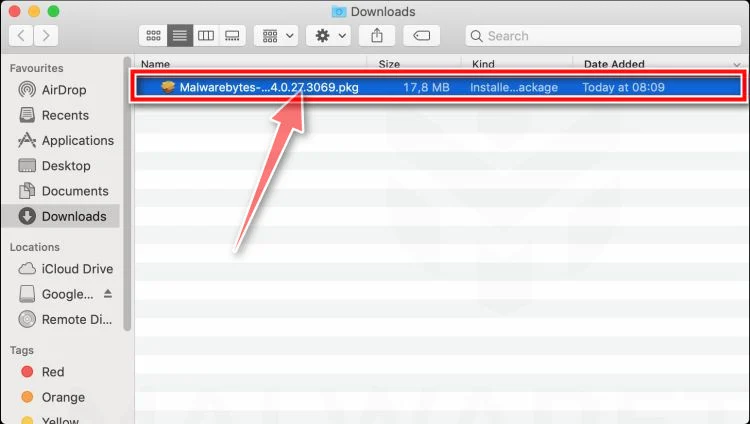
When the download finishes, open your Downloads folder and double-click the setup file to begin the installation.
-
Follow the On-Screen Prompts to Install Malwarebytes
The Malwarebytes for Mac Installer will guide you through a few quick screens. Click “Continue” and keep following the prompts until the installation completes.
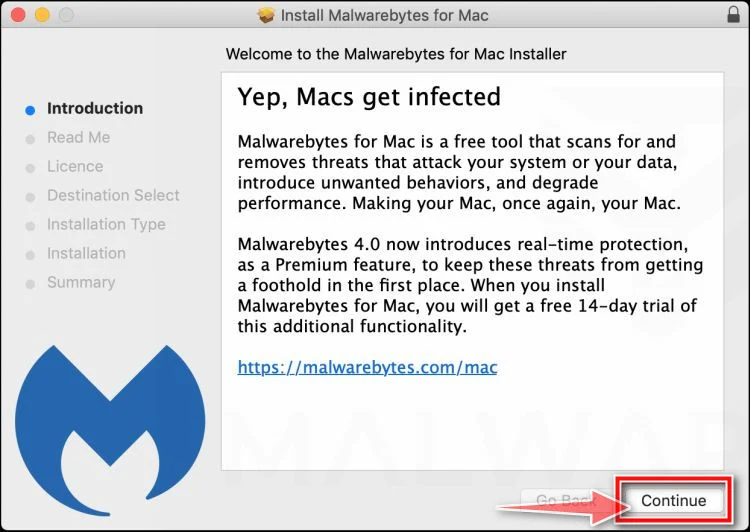
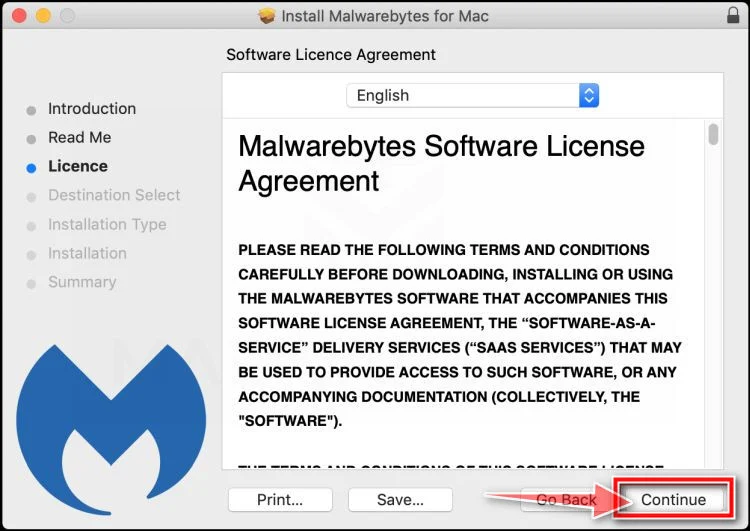
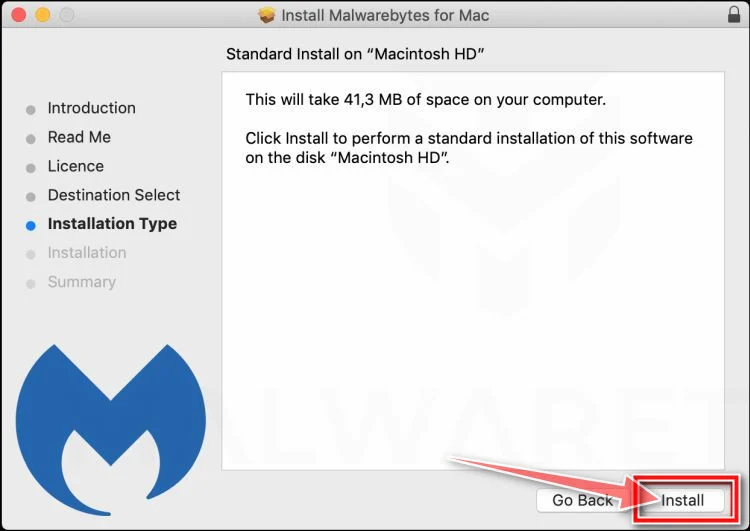
When the installation is complete, Malwarebytes opens to the Welcome to Malwarebytes screen. Click “Get started“.
Malwarebytes needs Full Disk Access to check your whole Mac. When it asks, open System Settings > Privacy & Security > Full Disk Access, turn on Malwarebytes (it may be listed as Malwarebytes Protection), and confirm with your password or Touch ID. Then return to Malwarebytes. On macOS Monterey and earlier, this setting is in System Preferences > Security & Privacy > Privacy.
-
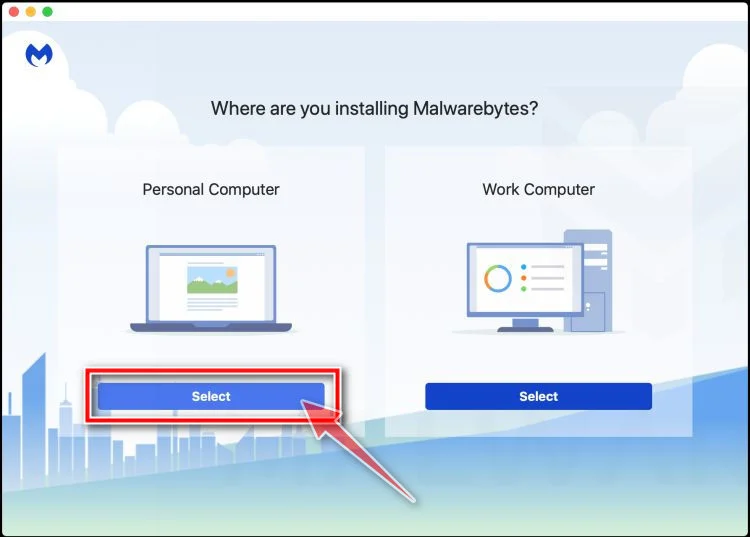
Select “Personal Computer” or “Work Computer”
Malwarebytes will ask what type of computer you’re installing it on. Click either Personal Computer or Work Computer, whichever applies.
-
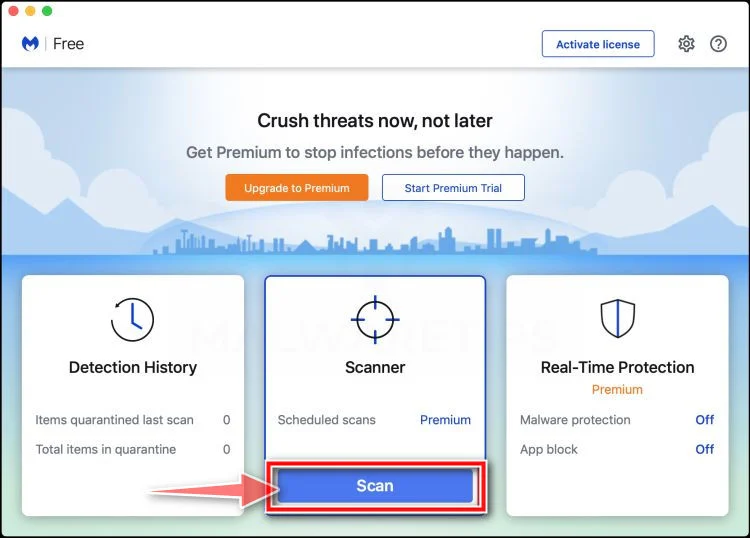
Start the Scan
Click the “Scan” button. Malwarebytes will automatically update its detection database and begin checking your Mac for malware.
-
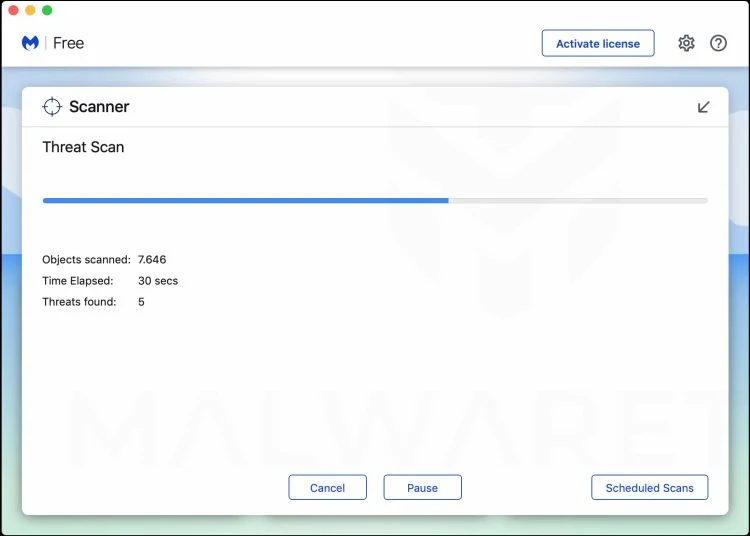
Wait for the Scan to Finish
Malwarebytes will scan your Mac for adware, browser hijackers, and other malicious programs. This can take a few minutes, so feel free to do something else — just check back occasionally to see the progress.
-
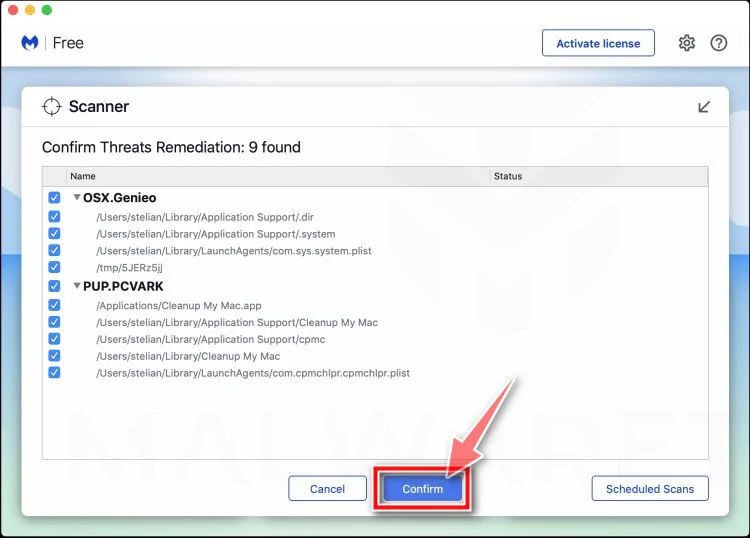
Quarantine the Detected Threats
When the scan is done, you’ll see a list of everything Malwarebytes found. Click the “Quarantine” button to remove all the threats at once.
-
Restart Your Mac
Malwarebytes will now remove all the malicious files it found. Some threats can only be fully removed after a reboot — if Malwarebytes asks you to restart, allow it. Once you’re logged back in, check whether the problems you noticed have stopped. If they come back, save the scan report and ask for help in our forum.
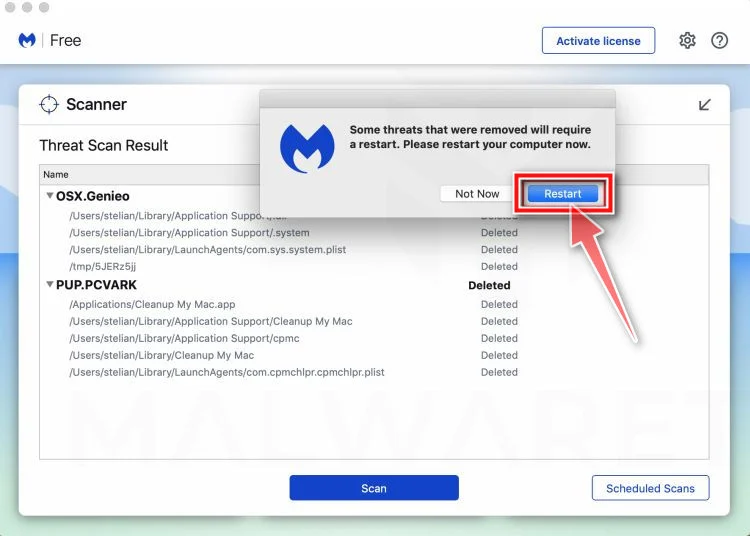
If the problems you noticed continue after the scan, see the options below.
If you are still experiencing problems while trying to remove a malicious program from your computer, please ask for help in our Mac Malware Removal Help & Support forum.
Run a Malware Scan with Malwarebytes for Android
Malwarebytes for Android scans your phone or tablet for malware, adware, and potentially unwanted apps. The free version scans only when you start a scan. Real-time protection, which checks apps automatically, is part of the paid Premium version.
-
Download Malwarebytes for Android.
You can download Malwarebytes for Android by clicking the link below.
Get Malwarebytes for AndroidOpens Google Play in a new tab.Want real-time protection? See Malwarebytes Premium for AndroidMalwarebytes for AndroidScans your phone and removes malware at no cost -
Install Malwarebytes for Android on your phone.
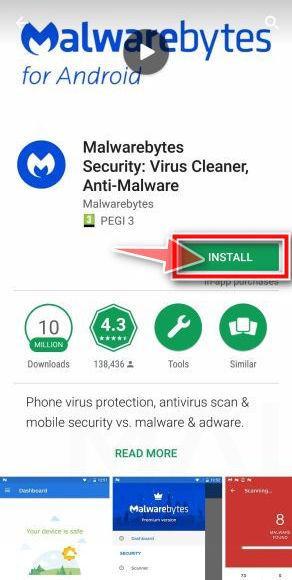
In the Google Play Store, tap “Install” to install Malwarebytes for Android on your device.
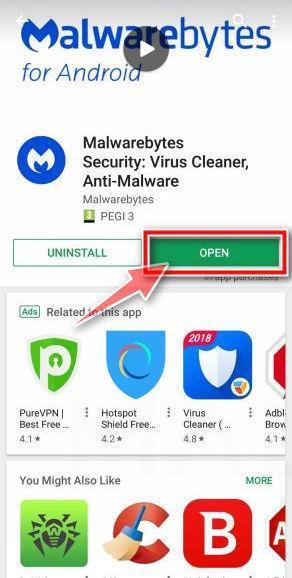
When the installation process has finished, tap “Open” to begin using Malwarebytes for Android. You can also open Malwarebytes by tapping on its icon in your phone menu or home screen.
-
Follow the on-screen prompts to complete the setup process
When Malwarebytes opens, it walks you through a short setup. Tap Get started and follow the prompts. If you see an offer for a trial or a paid plan, read it before you accept. You can skip it and keep using the free scanner.
Malwarebytes will ask for permission to access the files on your phone so it can scan them. Tap Allow, or turn on the permission in the Android screen that opens, then return to Malwarebytes.
-
Run a scan with Malwarebytes for Android
On the main screen, tap Scan now. In some versions, you open the menu, tap Scanner, and then tap Run a scan.
-
Wait for the Malwarebytes scan to complete.
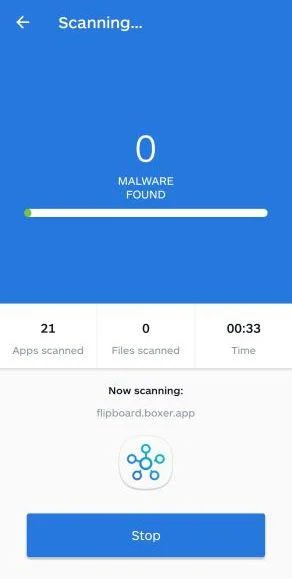
Malwarebytes will now start scanning your phone for adware and other malicious apps. This process can take a few minutes, so we suggest you do something else and periodically check on the status of the scan to see when it is finished.
-
Remove the detected apps.
When the scan has been completed, you will see a list of the threats that Malwarebytes for Android has detected. Next to each detected item, tap the menu icon (three dots), then choose to uninstall the app or delete the file. Android then asks you to confirm. Tap OK or Uninstall to remove the app.
-
Restart your phone.
When the detected apps are removed, restart your phone if Malwarebytes asks you to. Then check whether the problems you noticed have stopped.
If the problems you noticed continue after the scan, see the options below.
If you are still having problems with your phone after completing these instructions, then please follow one of the steps:
- Ask for help in our Mobile Malware Removal Help & Support forum.
- Only as a last resort, reset your phone to factory settings. Read the warning below first.
- Back up your photos, videos, files, and messages, for example to your Google account or a computer.
- Make sure you know your Google account email and password. The phone asks for them after the reset. If you changed the password recently, Google recommends waiting 24 hours before you reset.
- On a Samsung phone, also make sure you know your Samsung account password.
- If you use an authenticator app for two-step verification, move your accounts to another device or save your backup codes first.
Stay Protected: Block Ads and Malicious Sites
No scan can prove a device is completely clean, so it helps to block threats before they reach you. Most infections start with a malicious ad or a fake download button — so blocking them at the source is your best defense.
We recommend AdGuard, which blocks malicious ads, phishing pages, and dangerous redirects before they can reach you.
👉 Download AdGuard and browse safely
Frequently Asked Questions
Is Rbx-robux.blogspot.com a real Robux generator?
No. Rbx-robux.blogspot.com is a free Robux scam. The generator only looks like it’s working because it’s an animation, and the “verification” offers pay the operator while you get nothing.
Can a website add Robux to my account with only my username?
No. Only Roblox can add Robux to an account. A website that has your username knows who you are, but it still can’t send you currency.
Why does Rbx-robux.blogspot.com make me complete offers?
Every task on that list puts money in someone’s pocket, just not yours. Each completed install, survey or sign-up pays the operator a commission via an ad network.
Can I get banned for using a Robux generator?
A fake generator page can’t reach your account. Cheat tools break Roblox’s rules, and breaking them can get an account banned. None of those tools can create Robux.
I entered my username on Rbx-robux.blogspot.com. Is my account in danger?
A username can’t unlock your account by itself. If you also shared your password or a login code, change your password, because that’s when the danger starts.
Is there any legitimate way to get free Robux?
Generators and websites won’t give you free Robux. The no-cost path is creating on Roblox to earn Robux. Otherwise, buy Robux, a gift card or Premium.
The Bottom Line
Treat Rbx-robux.blogspot.com as the free Robux scam it is. The generator is staged, the “human verification” is an ad wall, and your account will never receive a single Robux.
Don’t feed it your username or complete any of the offers it pushes. Never type your Roblox password into anything other than roblox.com or the official app.
Did you already use it? That’s okay. Change your Roblox password, turn on 2-step verification, cancel any subscriptions from the offers and report the link where you found it.

Join the discussion
0 commentsShare your experience or ask a question about this article.
Community experiences
Did this happen to you?
Your experience could help someone recognize the same scam. Submit a private report for our team to review.
I experienced this tooReports are reviewed before publication. Sharing publicly is always your choice.
Discussion
Start the conversation
Have a question or something useful to share? Add the first comment.