

Disk Antivirus Professional is a computer virus (Rogue.WinWebSec), which pretends to be a legitimate security program and claims that malware has been detected on your computer. If you try to remove these infections, Disk Antivirus Professional will state that you need to buy its “full version” before being able to do so.
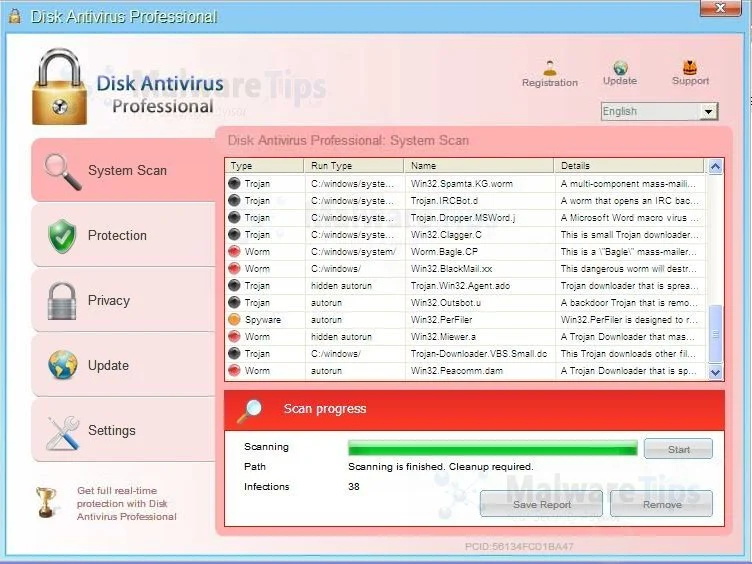
Disk Antivirus Professional targets users browsing Internet websites, and rely on social engineering to deliver its payload.
On infected or hacked websites users are prompted by a pop-up window that has been carefully crafted to resemble a legitimate security warning. These pop-up windows typically alert a user of a computer infection, and then prompt the user to download and install Disk Antivirus Professional to resolve the apparent issue.
Some of the infections may have come from users downloading an infected codec file when they were trying to watch a video online, or users who receive a spam email and open an infected email attachment.
Once installed, Disk Antivirus Professional will display fake security alerts that are designed to think that your data is at risk or that your computer is severely infected.These messages include:
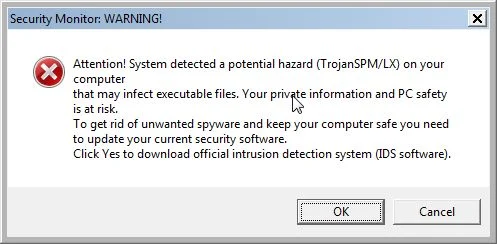
Security Monitor: WARNING!
Attention! System detected a potential hazard (TrojanSPM/LX) on your computer that may infect executable files. Your private information and PC safety is at risk.
To get rid of unwanted spyware and keep your computer safe your need to update your current security software.
Click Yes to download official intrusion detection system (IDS software).Disk Antivirus Professional Warning
Your PC is still infected with dangerous viruses. Activate antivirus protection to prevent data loss and avoid theft of your credit card details.Disk Antivirus Professional Warning
Intercepting programs that may compromise your privacy and harm your system have been detected on your PC.
Click here to remove them immediately with Disk Antivirus Professional.
In reality, none of the reported issues are real, and are only used to scare you into buying Disk Antivirus Professional and stealing your personal financial information.
As part of its self-defense mechanism, Disk Antivirus Professional has disabled the Windows system utilities, including the Windows Task Manager and Registry Editor, and will block you from running certain programs that could lead to its removal.
This rogue antivirus has also modified your Windows files associations, and now whenever you are trying to open a program, Disk Antivirus Professional will block this operation and display a bogus notification in which will report that the file is infected.
Warning!
Application cannot be executed. The file taskmgr.exe infected.
Please activate your antivirus software.
Disk Antivirus Professional will also hijack your web browser so that it displays a security warnings when attempt to visit a site. The text of this warning is:
Warning! The site you are trying visit may harm your computer!
Your security setting level puts your computer at risk!
Activate Disk Antivirus Professional, and enable safe web surfing (recommended).
Ignore warnings and visit that site in the current stat (not recommended).
When you see this message you can safely click on the Ignore warnings and visit that site in the current state (not recommended) link so that you can visit the site you are trying to go to.
If your computer is infected with Disk Antivirus Professional virus, then you are seeing the following screens:
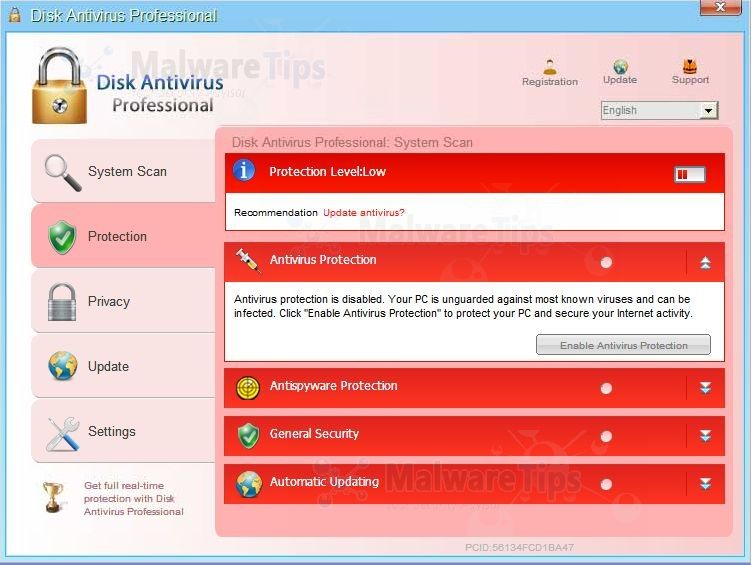
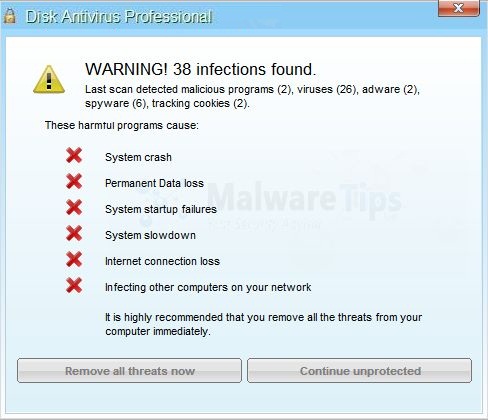
Disk Antivirus Professional is a scam, and you should ignore any alerts that this malicious software might generate.
Under no circumstance should you buy this rogue security software as this could lead to identity theft,and if you have, you should contact your bank and dispute the charge stating that the program is a scam and a computer virus.
Registration codes for Disk Antivirus Professional
As an optional step,you can use any of the following license keys to register Disk Antivirus Professional and stop the fake alerts.
Disk Antivirus Professional activation code: AA39754E-715219CE
Please keep in mind that entering the above registration code will NOT remove Disk Antivirus Professional from your computer , instead it will just stop the fake alerts so that you’ll be able to complete our removal guide more easily.
Disk Antivirus Professional – Virus Removal Instructions
STEP 1: Remove Disk Antivirus Professional malicious files with Malwarebytes Anti-Malware
Malwarebytes Chameleon technologies will allow us to install and run a Malwarebytes Anti-Malware scan without being blocked by Disk Antivirus Professional.
- Download Malwarebytes Chameleon from the below link, and extract it to a folder in a convenient location.
Download Malwarebytes ChameleonOpens the download page in a new tab.
![[Image: Extract Malwarebytes Chameleon utility]](https://malwaretips.com/blogs/wp-content/uploads/mwt-media/b2/b265e12a96e5ac88c372b34158e04f937bacfee747f63c719f50a4771b7048e8/9809c2be34df15eae377a9982d27eae3d60d2cc1b556e7f1f9fa6be62f380051-374.webp "Extract Malwarebytes Chameleon utility")
- Make certain that your infected computer is connected to the internet and then open the Malwarebytes Chameleon folder, and double-click on the svchost.exe file.
![[Image: Double click on svchost.exe]](https://malwaretips.com/blogs/wp-content/uploads/mwt-media/d6/d67768b1c785b16a82c92c81bcce063bb5b8ad9c8f1e7edb48a80040f7e803a3/b05e0bf111c8d18f1c641cfb91f746b45de4454ba605ef516ccfa0ed7cdc5c99-662.webp "Double click on svchost.exe")
IF Malwarebytes Anti-Malware will not start, double-click on the other renamed files until you find one will work, which will be indicated by a black DOS/command prompt window. - Follow the onscreen instructions to press a key to continue and Chameleon will proceed to download and install Malwarebytes Anti-Malware for you.
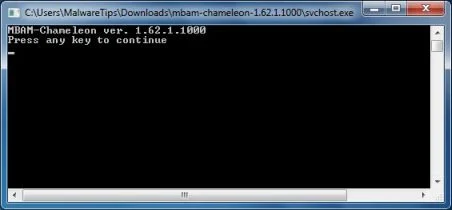
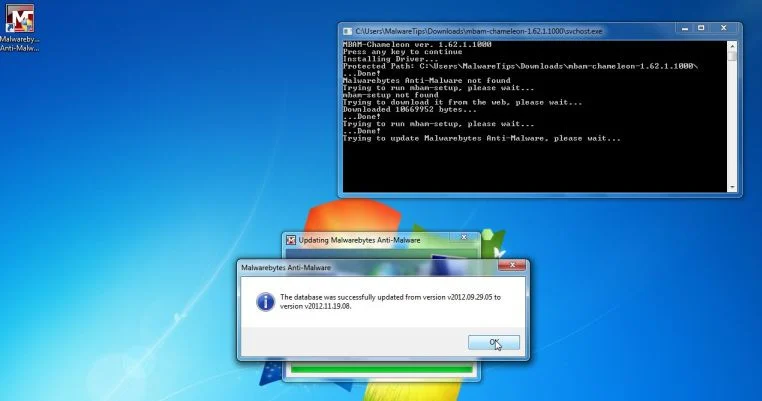
- Once it has done this, it will update Malwarebytes Anti-Malware, and you’ll need to click OK when it says that the database was updated successfully.
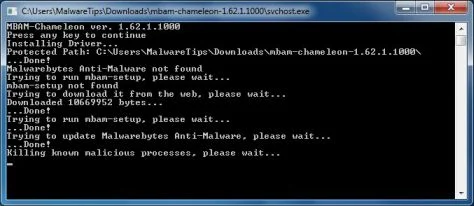
- Malwarebytes Anti-Malware will now attempt to kill all the malicious process associated with Disk Antivirus Professional.Please keep in mind that this process can take up to 10 minutes, so please be patient.
- Next, Malwarebytes Anti-Malware will automatically open and perform a Quick scan for Disk Antivirus Professional malicious files as shown below.
![[Image: Malwarebytes Anti-Malware scanning for Disk Antivirus Professional]](https://malwaretips.com/blogs/wp-content/uploads/mwt-media/f6/f6ecfba43df64204df40586070483f260cb91fa07d5cc90cb4c3a588d159ff30/5b6b2687853201a40d29fe27e142cc66b0852745bbad3900a21030a10399cb4c-521.webp "Malwarebytes Anti-Malware scanning for Disk Antivirus Professional")
- Upon completion of the scan, click on Show Result
![[Image: Malwarebytes Anti-Malware scan results]](https://malwaretips.com/blogs/wp-content/uploads/mwt-media/84/84c62dd46289424dbc686abc53672cb0810111920c8c0bbd69e973844d0a9ab0/a4c04aa700e641f47afec9965f79ff346740668e5952955ccbe5b4c3658b5897-521.webp "Malwarebytes when the system scan has completed")
- You will now be presented with a screen showing you the malware infections that Malwarebytes Anti-Malware has detected.
Make sure that everything is Checked (ticked),then click on the Remove Selected button.
![[Image:Malwarebytes removing virus]](https://malwaretips.com/blogs/wp-content/uploads/mwt-media/d8/d86b6a8bac0e4ece9fd2d259a83db71487943f6b04b567edb0e9adcc3200f492/4eb94651b0e34cc99689c56dc71cd0a49444498ed05c5803ea55fda1cfee1b1f-521.webp "Click on Remove Selected to get rid of Disk Antivirus Professional")
- After your computer restarts, open Malwarebytes Anti-Malware and perform a Full System scan to verify that there are no remaining threats
STEP 2: Remove Disk Antivirus Professional rootkit with HitmanPro
In some cases,Disk Antivirus Professional will also install a rootkit on victims computer.To remove this rootkit we will use HitmanPro.
- Download HitmanPro from the below link,then double-click on it to start this program.
Download HitmanProOfficial Sophos download. Free scan, free 30-day trial to remove threats.
IF you are experiencing problems while trying to start HitmanPro, you can use the Force Breach mode.To start HitmanPro in Force Breach mode, hold down the left CTRL key when you start HitmanPro and all non-essential processes are terminated, including the malware process. (How to start HitmanPro in Force Breach mode – Video) - HitmanPro will start and you’ll need to follow the prompts (by clicking on the Next button) to start a system scan with this program.
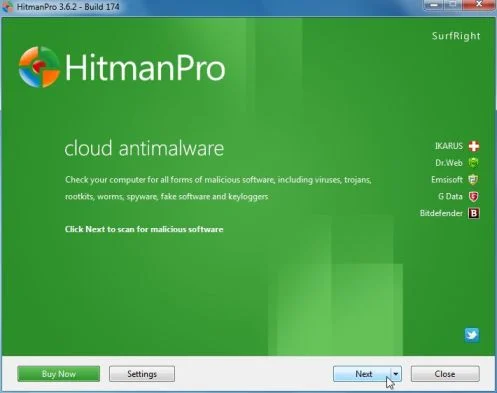
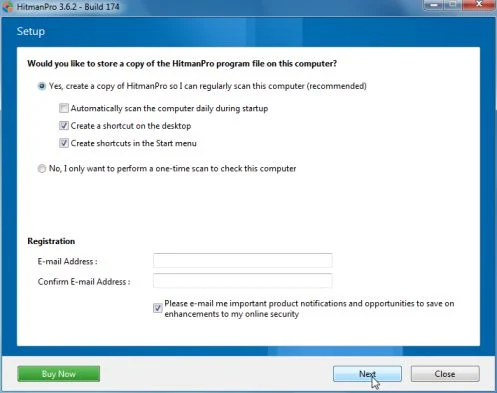
- HitmanPro will start scanning your computer for Disk Antivirus Professional malicious files as seen in the image below.
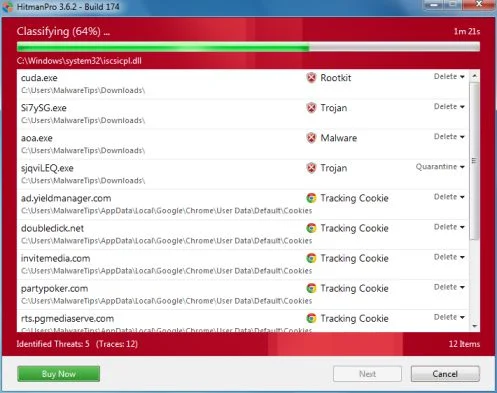
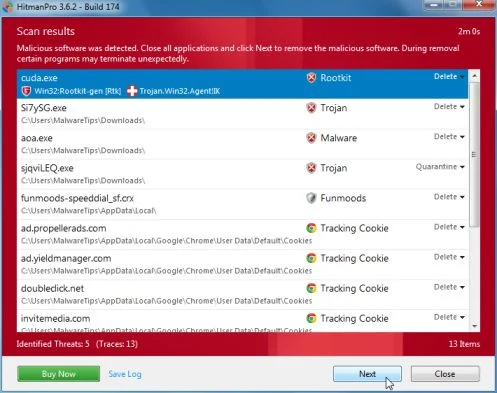
- Once the scan is complete,you’ll see a screen which will display all the infected files that this utility has detected, and you’ll need to click on Next to remove this malicious files.
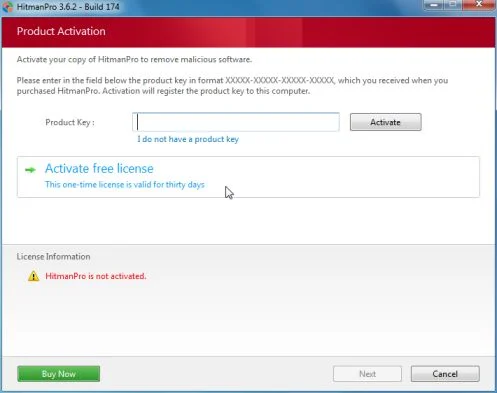
- Click Activate free license to start the free 30 days trial and remove all the malicious files from your computer.
STEP 3: Double check for any left over infections with Emsisoft Emergency Kit
- You can download Emsisoft Emergency Kit from the below link,then extract it to a folder in a convenient location.
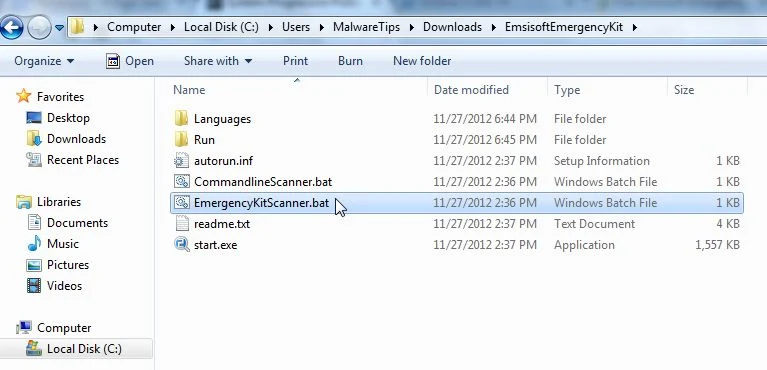
Download Emsisoft Emergency KitOpens the download page in a new tab. - Open the Emsisoft Emergency Kit folder and double click EmergencyKitScanner.bat, then allow this program to update itself.
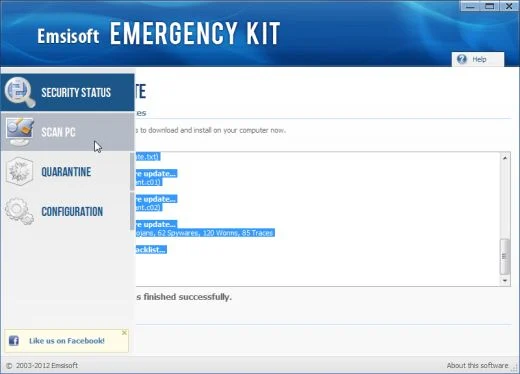
- After the Emsisoft Emergency Kit has update has completed,click on the Menu tab,then select Scan PC.
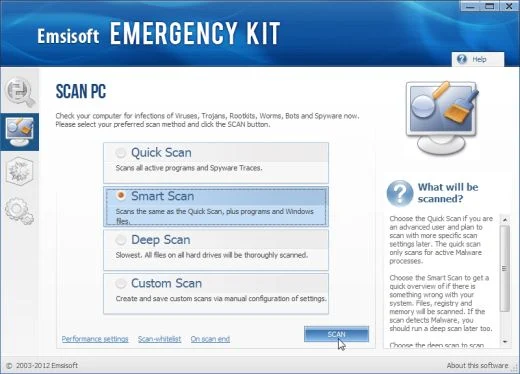
- Select Smart scan and click on the SCAN button to search for Disk Antivirus Professional malicious files.
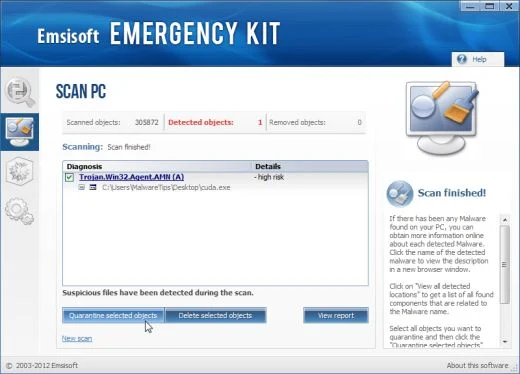
- When the scan will be completed,you will be presented with a screen reporting which malicious files has Emsisoft detected on your computer, and you’ll need to click on Quarantine selected objects to remove them.

Join the discussion
128 commentsShare your experience or ask a question about this article.
Your progress
Did these steps help?
Let us know how the guide worked for you.
Describe what you see and the step you reached. Keep passwords and other private information out.
Discussion
Its great! Problem fixed! Thanks all!
Worked like a champ!
This so great guide I never get. Thank you very very much.
Thanks for your help, any suggestions on how to prevent this in the future? Any ideas on where the virus came from or how it installed itself onto my computer?
Thank you,
Chiona
Thank you so much Stelian for taking your time putting up this solutions, saves me the trouble of reinstalling everything. It was easy to follow.
Thank you very very much, it had been a great help for me to remove this stupid Disc antivirus proffessional. Was not able to open my internet, my files was locked by this.
Thank you
kc
Words cannot express the feels right now. I love you.
Just when I was about to give up…I found you. THANK YOU for sharing it all. I have no idea what I would,of done. I am grateful that there are people out there that are still willing to help others.
Thank you!!!!! This was SO helpful!! I did have an issue with starting vista in safe mode! The virus would not allow it to load! I also could not bypass this virus from blocking my Internet and could not download anything!! After multiple attempts I used another computer to Download RKILL onto a flash disk then I ran that. I WAS SO thankful you included a key for this disk antivirus professional because that finally helped my Internet access!!!!
I’ve now had to do this three times and this helped a ton. thanks!
THANK YOU SO MUCH! This website was such a help. I accidentally clicked “download’ on a link and knew something was wrong immediately when the disc antivirus started popping up and blocking me from accessing all programs on my computer. These instructions were such a help in removing not only that virus, but others that were hidden on my computer. The instructions were easy to follow and quickly solved the problem. I HIGHLY RECOMMEND these removal instuctions to anyone experiencing problems! Once again, thank you sooooo much!!!!!
its awesome!!i just followed your instructions and SOLVED!!!!!TANNAAAAHHHH!!THANKS MAN!!!!
Thanks for nice links
muchas muchas gracias, realmente me ayudaron, en especial las imágenes paso a paso
thank you so much you really helped me, specially the pictures step by step
Thanks! This guide really helped a lot.
Thanks so much. After the second program, the virus was gone. You’re awesome!
Guys I cannot thank you enough this worked perfectly and im back up and running! easy and it works PROPERLY!!!
Thanks again
Malewarebytes was being blocked by the “Disk Antivirus” and someone posted a suggestion that after two days he was able to run Malewarebytes after first getting SUPERAntiSpyware to scan and disinfect first. Miraculously I did this and Malewarebytes was in the end able to take out the virus. So grateful to the people who shared the programs and who shared the tips.
Thank you so much you helped me and it was right directioned ! Like the fact that you showed picture
Your awesome thank you so much this was a huge help and very easy to follow
In reply to Matt
This was a great help, thanks.
In reply to Robert
Thanks so much for you help. I am a librarian who works in IT, your advice helped me to rid this malware from a coworkers PC. Many of the files on her PC were essential, your help saved them, and it the process made me look good. Thanks again,
Bob
In reply to Bob
Thank you very much. It was very efficent.