

You log into Facebook and see a worrying notice from “The Facebook Team” claiming your posts violated copyright, you now have a copyright strike, and your account will be disabled unless you appeal within 24 hours. Panic sets in as you scramble to avoid losing your precious online presence and connections. But what if that urgent warning wasn’t actually from Facebook at all?
This is the grim reality of a pervasive new Facebook phishing scam impersonating the platform’s copyright enforcement team. Scammers are sending fake copyright violation warnings filled with legal jargon to trick users into clicking malicious links under pressure. This gives them access to your Facebook login credentials for account takeovers.
This comprehensive guide reveals exactly how the “Reports Citing Reports Citing Copyright Violations of Your Facebook Posts” scam works, red flags to recognize it, and tips to keep your account secure.
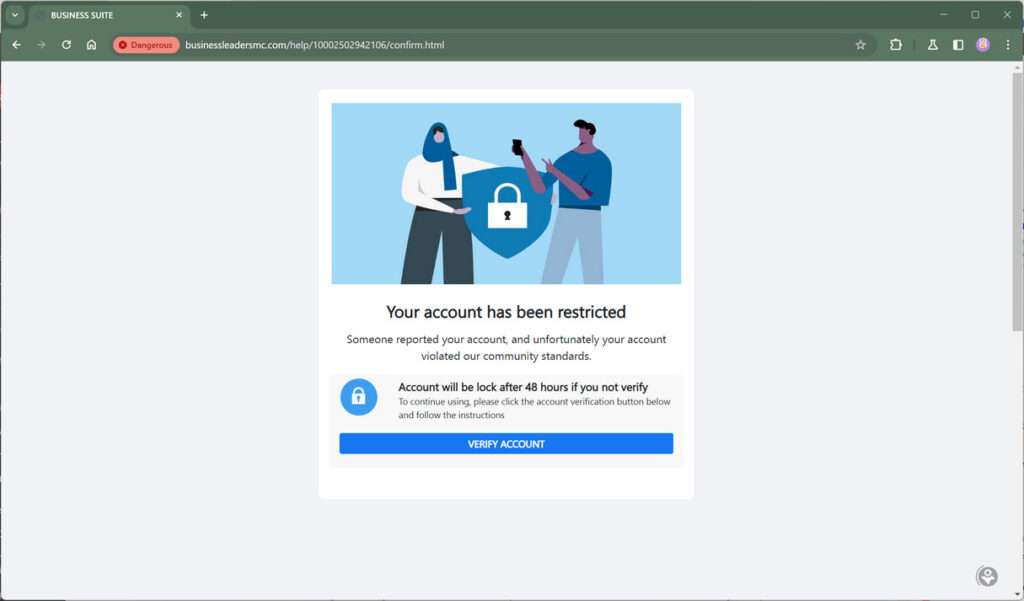
Scam Overview
This phishing campaign starts with messages pretending to come from Facebook’s copyright enforcement division or support teams like “Facebook Legal” or “Copyright Infringement Team.”
The messages claim your account received copyright strikes over stolen content in your posts, putting your account at risk of disabling. It imposes a short 24 hour deadline to appeal the violation before deletion.
However, clicking the provided “appeal” link sends victims to a fake Facebook login page operated by scammers to capture account credentials.
Here is how one such message might look:
Hi,
Recently there have been reports citing copyright violations of your Facebook posts. You now have one copyright strike, and we’ll have to disable your account and take down your pages.
To prevent that from happening, use the link below to submit an appeal:
[malicious link]
Note: If we do not receive an appeal within 24 hours from your account we have to take the decision mentioned above! Thanks, The Facebook Team
Let’s explore the scam details:
Goal: Trick Users Into Surrendering Account Access
- Tactic: Impersonate Facebook copyright teams and fake violation notices
- Goal: Manipulate users into handing over their Facebook login credentials
Once scammers obtain your username and password through this scam, they gain full access to your account for identity theft, spreading malicious links, and hijacking your online presence.
Fabricated Legal Threats and False Time Pressure
The scam’s effectiveness stems from creating a sense of fear and urgency with these tactics:
- Citing serious but fabricated copyright strikes and legal threats
- Imposing short 24 hour deadlines to trigger panic
- Ominous warnings about disabling your account
- Repeating scary phrases like “copyright violation” and “copyright strike”
- Pressure to click phishing links and “appeal” to save your account
Scammers want to override your critical thinking with emotional fear of consequences. This causes hasty reactions before properly analyzing the message’s legitimacy.
Phishing Sites Mimic Real Facebook Pages
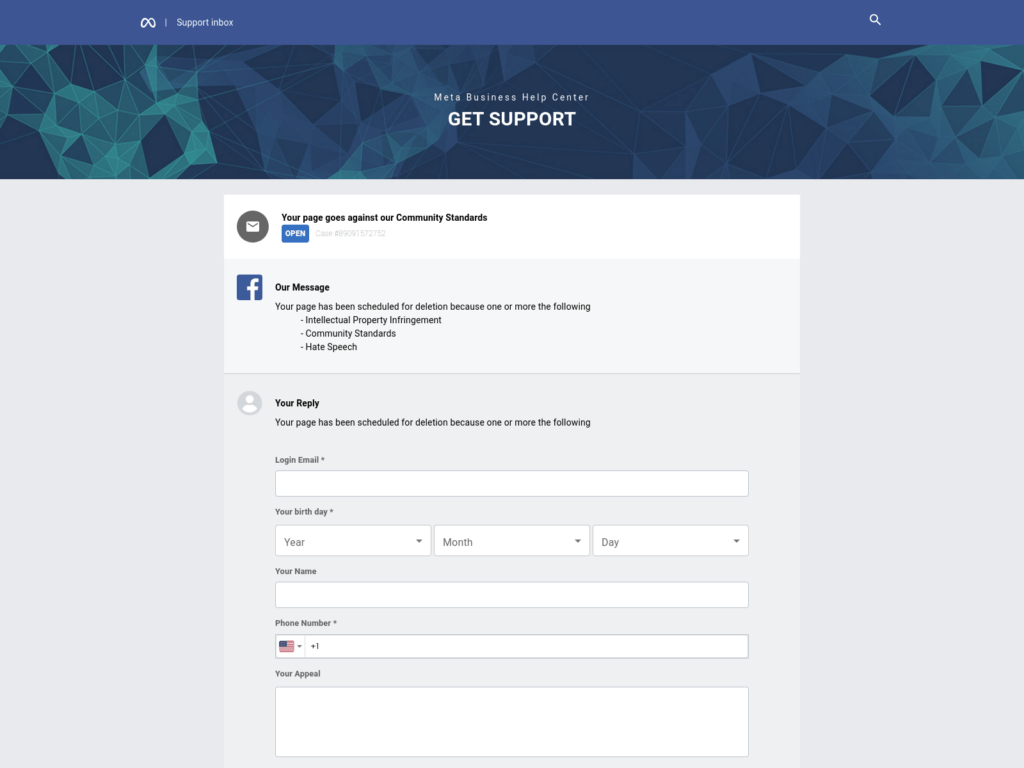
The “appeal” links in scam messages direct victims to convincing phishing sites impersonating Facebook’s Help Center, Legal Pages, and login portals.
While URLs may contain “facebook” or “legal”, they actually route to the scammer’s servers. The sites closely clone Facebook’s real branding and interfaces to trick hurried users.
Victims get prompted to enter their Facebook credentials to access the “appeal form” and cancel the fake copyright strike before the short deadline. But this actually gives scammers access to compromise the accounts.
Account Takeover Dangers
Once scammers have your login details, they can:
- Access private messages and photos
- Post spam links and fake promotions
- Impersonate you to defraud your connections
- Take over other accounts using the same login
- Commit identity theft with your personal info
Losing your account access can damage your reputation, relationships, and finances if the takeover isn’t quickly detected.
How the Facebook “Reports Citing Copyright Violations of Your Facebook Posts” Scam Works
Let’s examine the typical process cybercriminals use to execute this “copyright strike” phishing campaign on Facebook:
Step 1: Create Fake “Facebook Legal” Profiles
First, scammers set up fake Facebook accounts posing as divisions like “Facebook Copyright”, “Facebook Legal”, “Copyright Infringement Team” etc. These mimic Facebook’s real branding like colors, logos and header images.
Some fake accounts also create fake legal looking websites they link to appear more legit.
Step 2: Identify Target Victims
Next, scammers search Facebook for potential targets. They look for established accounts with lots of connections, friends, photos and engagement. The goal is targeting victims with a lot to lose if their account gets disabled.
Step 3: Send Fake Copyright Violation Warnings
Scammers use their fake profiles to send copyright violation notices typically via Facebook comments or messages.
These alerts claim things like:
- Your account received DMCA copyright strikes
- You shared copyrighted content illegally
- Copyright holders reported your violating posts
- Your account now faces disabling if you don’t appeal
The messages sound formal and reference real legal concepts like DMCA and copyright strikes. But the violations cited are completely fabricated.
Step 4: Provide Phishing Links
Each fake notice includes prominent “appeal” links for victims to urgently click before the short 24 hour deadline.
Rather than going to Facebook.com, these phishing links route to the scammers’ fake login pages made to mimic Facebook’s real interfaces. Everything from fonts to form fields are meticulously copied.
The fake sites prompt victims to enter their Facebook email and password to access the “appeal form” and cancel the fictional strike before their account gets deleted.
Step 5: Steal Login Credentials
If a worried user enters their Facebook username and password on the phishing site, the scammers immediately capture those credentials and gain full account access.
They may even redirect victims to a real Facebook page so they think no scam occurred. Meanwhile, scammers take over their account in the background.
Step 6: Abuse Compromised Accounts
With access to victim accounts, scammers quickly start:
- Changing passwords and recovery options to lock out owners
- Posting spam links and fake promotions to your network
- Impersonating you and messaging friends for money
- Accessing private content like messages and photos
- Enabling notifications to track your activity
- Installing malware on your devices
- Committing identity theft and financial fraud
Step 7: Spread to More Victims
To maximize profits, scammers use compromised accounts to spam more fake copyright violation notices to your connections. Friends often blindly trust messages seeming to come from you. This helps phishers cast a wider net for new victims.
What To Do If You Get Duped By This Facebook Scam
If you fell for the copyright violation phishing scam, take these steps immediately to secure your account:
- Reset your password – Log scammers out by creating a new, complex password. Make it unique from passwords on other accounts.
- Review account recovery options – Confirm your backup email, phone number and security question answers weren’t altered. Update them if needed.
- Enable two-factor authentication – Add an extra layer of login protection via codes from an authenticator app or your phone.
- Check connected apps and sites – Remove any unfamiliar third-party apps or websites connected to your account’s login.
- Scan devices for malware – Run antivirus scans to check for any spyware or keyloggers installed by fake sites.
- Warn Facebook friends – Let close connections know about the phishing attempt and not to click suspicious links.
- Monitor account activity – Watch for unauthorized access or abnormal usage indicating compromised credentials.
- Report phishing sites – Inform Facebook about any fake pages you encountered so they can be taken down.
Stay alert for new suspicious messages and immediately report them. Act fast to deny scammers long-term access and prevent irreversible damage.
10 Ways to Avoid Falling for the Facebook “Reports Citing Copyright Violations of Your Facebook Posts” Scam
- Analyze warnings skeptically – Train yourself to approach urgent notices with critical thinking rather than panic.
- Verify message sources – Check profiles claiming to be Facebook teams to confirm they’re legitimate.
- Watch for poor grammar and logos – Real legal and copyright notices will be professional with no typos or low-quality branding.
- Never log into third-party sites – Only enter your Facebook credentials directly on facebook.com. Avoid clicking links.
- Inspect links before clicking – Hover to preview destinations before you click. Look for odd or misspelled domains.
- Don’t rush appeals – Deadline pressure is a manipulation tactic. Move slowly and investigate any violations through official channels.
- Turn on login approvals – Enable Facebook’s two-factor authentication to protect your account from unauthorized access.
- Keep software updated – Maintain up-to-date antivirus and anti-phishing extensions to detect fake pages.
- Avoid unfamiliar ads and posts – Don’t interact with or click on suspicious third-party content from unknown advertisers.
- Report fake accounts – If you spot an imposter Facebook copyright or legal team profile, report it immediately.
FAQs About the Viral “Copyright Violations” Facebook Scam
1. What is the “Copyright Violations” Facebook scam?
This is a phishing scam where scammers impersonate Facebook’s copyright and legal teams. They send fake notices claiming your account received copyright strikes over stolen content. The messages threaten disabling your account unless you appeal within 24 hours. However, their “appeal” links are phishing sites stealing login info.
2. How do scammers send these fake copyright notices?
Scammers create fake Facebook accounts posing as “Facebook Legal”, “Copyright Team”, etc. They use these profiles to send phishing messages via comments or direct messages. Some also comment the scam notices directly on victim’s posts.
3. What are some red flags of the fake copyright violation notices?
Watch for:
- Messages from unknown accounts impersonating Facebook teams
- Vague claims about unspecified copyright violations
- Dire threats of account disabling within 24 hours
- Requests for personal login information
- Poor grammar, spelling errors, and legal misinformation
- Links to odd third-party domains instead of Facebook.com
4. What happens if I click an “appeal” link in a fake notice?
The “appeal” links lead to sophisticated phishing websites designed to mimic Facebook’s real login pages. If you enter your Facebook email and password, scammers capture your credentials. You may then get redirected to Facebook so you don’t realize you got phished.
5. Why do scammers want my Facebook login details?
With your username and password, scammers gain full control of your account. They can then access private data, post scams, spread more fake notices, hack connected accounts, commit identity theft, and damage your reputation.
6. I got tricked by a fake copyright notice! What should I do now?
If you entered your Facebook credentials into a phishing site, immediately:
- Change your Facebook password
- Enable two-factor authentication
- Check account recovery contacts and security settings
- Scan devices used for accessing the phishing site for malware
- Monitor closely for unauthorized account access or changes
- Report the phishing attempt and any fake accounts to Facebook
7. Can Facebook really disable my account for copyright violations without warning?
Facebook may disable accounts posting stolen copyrighted content after official DMCA notifications. However, they provide warnings and chances to resolve issues before permanent disabling. Urgent threats of immediate deletion over unspecified violations are almost always phishing attempts, especially if links are provided to “appeal” the strike.
8. How can I tell a real Facebook account from a fake imposter?
Check account profiles carefully. Real Facebook divisions will have verified blue checkmarks. Tap or click profile pictures and names to view the actual account creation date, friends/followers, and posts. Fake accounts will be recently created with generic content.
9. How do I report fake Facebook accounts or phishing attempts?
Use Facebook’s official reporting tools. Go to the profile sending phishing messages and click the three dots menu, then “Find Support or Report Profile”. Follow prompts to report fake accounts, impersonation, or scams. You can also report phishing posts, comments and messages.
10. How can I protect my Facebook account from phishing scams?
- Use unique complex passwords for all accounts
- Enable two-factor authentication and login approvals
- Maintain up-to-date antivirus and anti-phishing browser extensions
- Log in only at Facebook.com – never third-party sites
- Carefully inspect links and verify message sources before clicking
- Slow down and think critically if you get urgent violation notices
- Report suspicious accounts, messages and content
Stay vigilant and don’t let scammers pressure you into hasty reactions. Your caution is your best defense against phishing.
The Bottom Line
Spotting the “Reports Citing Copyright Violations” Facebook scam comes down to watching for urgent threats, short deadlines, and any links prompting you to enter your Facebook login credentials.
While the legal language and copyright violation claims aim to overwhelm, real Facebook support teams will never disable accounts immediately without warning. They especially won’t demand your password or redirect you to unusual third-party domains.
If a violation notice pressures you to act within 24 hours, cites unspecified offenses, and pushes you to “appeal” on unfamiliar sites, it’s undoubtedly a phishing attempt. Resist alarmist threats trying to override your critical thinking.
Move cautiously, verify message sources, inspect links, and report suspicious accounts or content to Facebook. Your vigilance is the best defense against losing your precious online presence and connections to scammers.








