


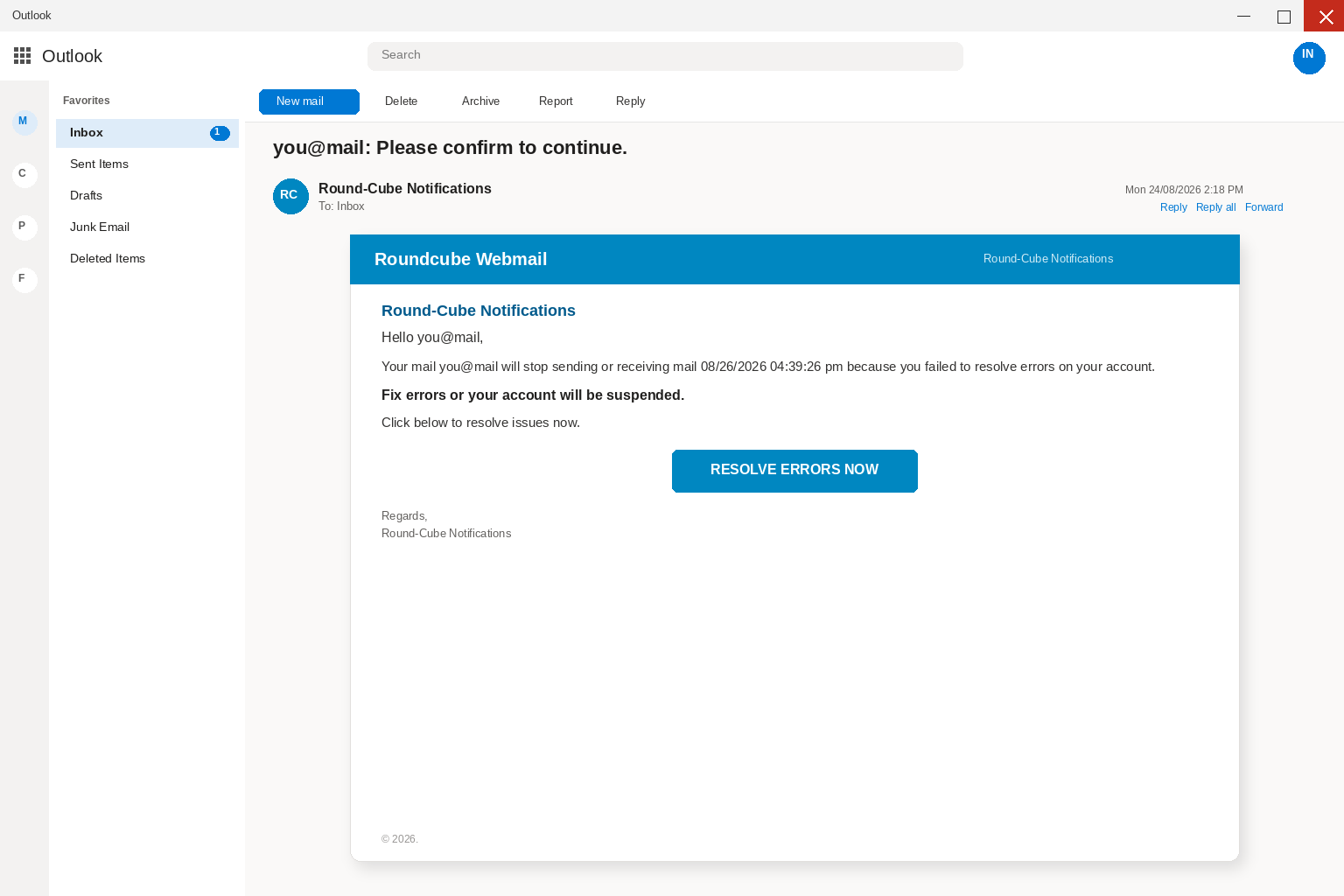
The subject lands with the mailbox already in it, then a colon, then Please confirm to continue, which is the kind of line a tired person reads as a host talking rather than as a stranger who wants something from the account. You open it because a mail error that names the address you actually use feels like a ticket, and because Roundcube is the webmail a lot of hosts put in front of IMAP so people can read mail in a browser without installing a desktop client. The From line says Round-Cube Notifications, close enough to the real name that the extra hyphen barely registers, and the body greets the same address before it names a clock.
Your mail will stop sending or receiving mail on 08/26/2026 at 04:39:26 pm, the letter says, because you failed to resolve errors on your account, and then it stacks the consequence in one more line: Fix errors or your account will be suspended. Click below to resolve issues now sits under that clock, and the only control on the card is a blue button labeled RESOLVE ERRORS NOW. The button is written as if a help desk had already diagnosed the box and only needed you to finish the ticket. People who keep a Roundcube window open for work treat that kind of note as homework. Invoices still have to leave on Monday, and a client thread does not wait politely if the mailbox goes dark at 4:39.
If mail is actually broken, you open the webmail you already use, on the bookmark you already keep, or you call the host on a number from last month’s bill. You do not let a surprise Fix errors button choose the next page for you. A timestamp with seconds looks like a system log, which is why it is sitting in the first paragraph, and a greeting that repeats your own address looks like the host already knows which box it is talking about. None of that is a reason to press the button from inside the unexpected letter, and the quieter habit is to leave the card where it is until you have opened the account yourself.
Overview
You are looking at a phishing letter that borrowed Roundcube’s name so a repair ticket would feel like the host talking. The only job the card is built to do is walk you onto a page that copies Roundcube Webmail and asks for the password. The pitch is an errors notice signed Round-Cube Notifications, with a subject that repeats the recipient’s address and then says Please confirm to continue. The body claims the mailbox will stop sending and receiving on 08/26/2026 at 04:39:26 pm because errors were never resolved. RESOLVE ERRORS NOW is the handoff from that story onto a copied Roundcube Webmail form that asks for the full email address and the password, because those two fields are what the letter was written to collect.
Roundcube is a real, open-source webmail client that hosting companies around the world put in front of IMAP. That fact is the reason the name works in an inbox, not proof that the Roundcube project diagnosed your account and mailed you a repair button. The people who wrote this letter are not the Roundcube project, and they are not your host’s help desk either, even though they borrowed letterhead from software that already sounds like a mailbox so you would treat the click as maintenance. Type roundcube.net yourself if you need the real project, then open webmail the way you always open it, from a bookmark or from the panel your host already gave you, and do not let this letter choose the page.
The Federal Trade Commission writes the same rule in ordinary language in How To Recognize and Avoid Phishing Scams, where it says criminals use email to steal passwords, account numbers, or Social Security numbers, and that a common story is a problem with an account that is not actually a problem. Another common story is that you must confirm something right now or lose access, which is exactly the shape of a stop-mail clock that names the second and then offers a repair. The Commission’s advice is to contact the company or the host with a phone number or website you already know is real, not the information inside the unexpected message, and a RESOLVE ERRORS NOW button is information inside the unexpected message.
CISA says the same thing from the systems side, in two short places that are worth reading before you press anything in a letter you did not ask for. On Avoiding Social Engineering and Phishing Attacks, CISA tells people not to reveal personal or financial information in email, and not to follow links sent in email when a message asks for that information. On Teach Employees to Avoid Phishing, CISA tells staff that if a message feels off, they should verify it without using any phone number or link in the message, which means a number you already have and a site you already type. That is the opposite of fetching a repair from a letter you did not request, and it is the opposite of typing a mailbox password so a timestamp can finish counting down.
A real host can have a real outage, and a real Roundcube install can throw a real error, and neither of those facts turns this card into a ticket you should finish from a cold inbox. If something is actually wrong with sending or receiving, the failure is already visible when you open the webmail you already use, or when you look at the panel your host already gave you, without proving the password to a stranger’s form. The letter already reached the mailbox it claims is broken, which is the quiet contradiction sitting under the 4:39 timestamp, because a box that can still receive a scare notice is not a box that needed this button to keep breathing.
The errors notice
Account errors are useful bait because they sound like maintenance instead of like money, and because most people would rather tap a repair than spend twenty minutes wondering whether Monday’s invoices will leave. The letter does not invent a prize, a refund, or a package sitting at the depot. It invents a fault on the account you already depend on, then it tells you the fault is your failure, which is a useful bit of shame, and then it offers a button that looks like the only grown-up response. You are not asked to understand the error so much as to resolve it, and resolution sounds like a checkbox, which is why the button does not say Sign in even though a login is what follows.
Hello, then the address, is doing the same work as a ticket number, because a blast that only knows it reached an inbox can still paste that inbox into the greeting, and a tired reader hears a system that already has the account on file rather than a stranger who scraped a list. Please confirm to continue pretends a process is already in motion, the way a real host ticket already has a queue, a technician, and a person who will call if you stall, and this letter has none of that. It has a title, a clock, and a button, and the rest of the movie is the one you supply because you do not want to be the person whose mail died at 4:39 while a client was waiting.
Real error mail, when a host actually sends it, usually points you into an account you already open, and it usually survives being ignored long enough for you to use a bookmark. You sign in on the site you already type, you see a banner the panel already knows how to draw, and you can screenshot it or call the number on last month’s invoice if the wording looks wrong. This letter reverses that order when it wants the click first, and it wants the click on a page it chose, which is why the error is described in one sentence and the button is the size of a receipt.
The borrowed Roundcube name
Keep the names straight, because the campaign depends on mixing them up, and because Roundcube itself is not the villain in this inbox. Roundcube exists, hosts install it, and people read mail through it every morning in a browser window that already looks like work. A display name that reads Round-Cube Notifications is easy to type, and a blue bar that says Roundcube Webmail is easy to draw, and neither one is a certificate that the open-source project diagnosed your mailbox and mailed you a repair. Anyone can set a From line and paste a cube-colored header, and delivery only proves they knew the address that received the mail.
The hyphen is a small tell if you are looking for one, because the real project writes Roundcube as one word, and the lure writes Round-Cube as if a marketer split a brand for a notifications desk that does not exist. You should not need a spelling lesson to stay safe, and you should not treat a correct spelling as proof either, because a thief can copy a name more carefully tomorrow. Microsoft’s own guide to spotting phishing tells you to treat a mismatched sender as a warning and to open the real product yourself instead of trusting the costume in the inbox. A message that wears a webmail name and then asks you to repair the account on a surprise page is not the project talking to you.
People who still use hosted webmail are a good audience for this costume, because the mailbox often sits next to invoices, password resets, school mail, and the one address relatives have used for a decade. A threat against that mailbox does not feel like spam so much as a service notice from the company that already bills you for the domain, and the letter is counting on that mix of habit and mild dread. It is also counting on you to fill in the host’s face when the body never names a real support desk you could call, which is why you should not reply to ask whether the errors are real. A reply teaches them the inbox is live, and it lands wherever they pointed the return path.
The stop-mail clock
08/26/2026 04:39:26 pm is doing more work than a calendar reminder, because a timestamp that includes seconds looks logged rather than written, and because a mailbox that will stop sending and receiving is a problem you can feel in your hands. You picture the invoice that will not leave, the reply that will not arrive, and the client who already thinks you are ignoring them, and the letter does not need a long story when the clock already carries that bill. Fix errors or your account will be suspended sits under that clock so the next click feels like the only way to keep the lights on, which is a lot of pressure to hang on a single blue rectangle.
Urgency is the point of the date, not evidence of a real cutoff that a host would enforce through a button in a cold email. A real suspension, when a host actually suspends someone, is visible inside the panel you already open, and it usually comes with a path you can walk without proving your password to a stranger. A fake one cannot wait, because the people who wrote it need you to press the button before you read the address bar and before you notice that the same mailbox just received the warning. The FTC’s phishing page is blunt about this shape: a message that says there is a problem, and a demand that you fix it right now, is the story, and the story is how the password gets taken.
There is a quieter tell if you sit with the sentence for a moment longer than the button wants you to, because a mailbox that is about to stop receiving mail has, in this very moment, just received mail, and a mailbox that is about to stop sending has not yet been given a chance to fail in front of you. If sending were already broken, you would already know from the bounce sitting in the outbox, and if receiving were already broken, this letter would not be in the inbox you are reading. The clock is theater sitting on top of that contradiction, and it is there so you will treat RESOLVE ERRORS NOW as a deadline instead of as a door.
The fake webmail page
After RESOLVE ERRORS NOW, the story changes in a way the card never advertised, because the inbox promised a repair and the next screen promises a sign-in. The page is built to look like Roundcube Webmail, with a field for the full email address, a field for the password, and a Login button, and your address may already be sitting in the first box so the errand feels half finished. The colors look familiar and the language is the language you see every morning, which is the point of copying a window people already trust, and the address bar is the part they hope you do not read. I am not going to paste a hostname for you to hunt, because those pages move and a copied link is how the next person gets hurt.
A padlock in the browser does not fix that, because encryption only means the path is private, and it does not mean the person at the other end is the Roundcube project or the host who actually runs your mail. HTTPS can wrap a stolen password as neatly as a real one, and an accurate logo is not a certificate you can take to a real help desk. Trust the complete domain and the way you reached it, not the artwork inside the page. Google’s advice on phishing in Gmail is blunt on a cousin of this trick: mail providers do not need you to type the password into a surprise page that arrived from a letter, and if a repair click then presents a login, you should open the real product yourself instead of finishing the form.
Do not finish that form to see whether the errors then clear, because a fake login does not become safer when you only wanted the mailbox to keep sending. Open a new tab and type the mail service you already pay, or open the webmail bookmark you already keep, or use the app you already installed, and look at the account from the inside. A mailbox that is truly yours will still be there, and a fake errors notice will not, which is the whole test you needed. If you already typed the password, treat it as burned even if the window now says the repair cannot complete, because a dead tab is not proof the letter was harmless, and a spinner that never finishes is not a refund of the key you just handed over.
How The Scam Works
1. An errors notice lands
It arrives in the same Outlook or hosted webmail you already trust, with a subject that opens on the recipient’s address and then says Please confirm to continue, and with a display name that says Round-Cube Notifications as if a system desk had a queue. There is no long pitch, no prize, and no attachment you have to open, and the whole card fits on a phone screen, which is on purpose, because a short maintenance notice is easier to believe than a letter that asks for a Social Security number in the first line. If you are already signed in to webmail, the folders on the left and the search bar on the top make the fake note feel native, and you are not visiting a strange site yet because you are still reading mail.
The letter only has to survive the few seconds between the subject and RESOLVE ERRORS NOW, and people who would ignore a lottery message will still open an errors notice that looks like the host they already pay. Accounts payable lives on that kind of dread, and so does anyone whose job is to keep a mailbox alive through a Monday. Hello, then the address, then the claim that you failed to resolve errors, is enough to invent the rest of the afternoon, whether that is a bounced invoice, a client who thinks you went silent, or a domain the boss will ask about, and the costume only has to last until the button.
2. The name copies Roundcube
Roundcube is not a made-up webmail invented for one inbox, and that is the load-bearing detail, because you do not need a long story when the letterhead already sounds like the window you use to read mail. If you have ever opened Roundcube through a host’s panel, you fill in the rest yourself, and if you have never heard of it, the phrase Roundcube Webmail still sounds like a mailbox, and a mailbox that is about to stop still makes you click. The people who wrote the letter are not the Roundcube project, even though they borrowed a name that would survive a five-second search, and a blue bar and a 2026 copyright line do the rest of the glance.
A real desk would not need that costume, because a real desk already has a panel you can open without a surprise button, and a thief does need it, because the thief is not inside the project and is not inside your host. The thief is only inside your inbox if the Fix errors click works, which is why display names and headers are cheap while the Roundcube name is expensive in the only way that matters here. It already lives in the muscle memory of people who read mail in a browser for a living, and copying it is the whole first act of the letter.
3. A stop-mail clock is the hurry
You do not get a novel so much as a clock that names the second, plus a sentence that says the mailbox will stop sending or receiving on 08/26/2026 at 04:39:26 pm because errors were never resolved. Those lines are enough to invent the rest of the afternoon, from a missed invoice to a payroll file that will not leave to a customer who will not wait, which is a lot of plot to hang on one timestamp. People who would ignore a Your account will be closed threat that names no product will still press a repair button when the product is the inbox they are sitting in, and that is why the timestamp is printed with seconds instead of with a vague soon.
The date on this lure sits close enough to the present that it does not look like leftover spam from last year, and the time of day is specific enough to feel like a cron job rather than like a person typing. Fix errors or your account will be suspended is the second beat of the same hurry, because suspension is a word hosts actually use, and because it turns a maybe later into a now. CISA’s advice, again, is not to follow a link in a message that then asks for the kind of information a login wants, and the clock is the reason you might ignore that advice for thirty seconds, which is all the button needs.
4. Fix errors is the handoff
You click RESOLVE ERRORS NOW because that is what a repair link is for, and the click is the moment the maintenance costume can drop. The next page is not a status screen with a ticket number you can read back, and it is not a log of the errors the letter claimed you failed to resolve. It is a sign-in, a verify it is you wall, or a short hop that still ends at a password box, and there is no outage you can match against the panel you already have. There is a request for the same credentials you use to open the inbox you are already sitting in, which is the tell, because you are already in mail.
A real repair would open inside the webmail you already use, or it would sit as a banner on the panel your host already gave you, and it would not ask you to prove you are you so a timestamp can stop counting. It would not need a fresh login to keep sending and receiving on a box that just received this letter. CISA tells people not to follow a link in a message that then asks for that kind of information, and RESOLVE ERRORS NOW is the detour from a letter you trust to a page you should not finish. The button is written as a diagnostic, and what it actually does is hand you off.
5. The page copies webmail
The page that follows is dressed as Roundcube Webmail, which is the window a lot of people already associate with a host login, and it may use the same field for the full address, the same field for the password, and the same word Login that the real product uses on a morning you were not being hurried. It may say the mailbox is locked until you authenticate, or that the errors cannot clear until you verify the account, and that sentence is the whole harvest because there are no errors waiting behind the form. There is a form, and familiar is the point, because a page that looks like the mail you just left is how a careful person finishes a login they never meant to start.
Do not finish that form to see whether it is real, and do not keep the tab open as a souvenir while you go hunt for a hostname to compare, because a copied live address is how the next person in the office gets hurt. Type the official site of your mail service, or of your host, in a new tab if you need to check the account, and leave the repair tab alone until you close it. Send a screenshot with the link unclicked, or send the raw message as an attachment to a person you already know, if someone else has to look, and do not mail the live button to a coworker so they can check the errors, because that is how the handoff travels.
6. They want the mailbox password
If you type the password, they have the first key, and if a text, an authenticator prompt, or an email code arrives while that tab is still open, they want the second key too. The story will be helpful when it asks you to confirm so the errors can clear, to approve so sending can resume before 4:39, or to enter the code to verify the mailbox and keep the account from being suspended. Each line is the same request for access, and the repair was never sitting behind that box because the mailbox was. Microsoft’s phishing page tells you to change the password on every affected account if you think you typed it on the wrong site, and to turn on multifactor authentication if it is not already on, and the FTC says the same thing in consumer language.
Treat the password as burned, treat the code as burned, and do not reuse either one on the next page that promises to unlock the errors, and do not type the same password into the host panel, the bank, or payroll just in case they all need a refresh. Change them on sites you open yourself, one at a time, after the fake tab is gone. Once they can open the account, they are not hunting for a log of unresolved errors so much as for money and for other logins that already have your name on them. That is why they read the last invoice you sent and the last invoice you received, then look for a thread with a real customer, a vendor, a bank, or a bookkeeper who pays by wire, and then write the next message in your voice.
A bill that looks like last month’s bill is enough, and a new account, same firm line is enough, and if they add a forwarding rule they can keep a copy after you change the password until someone deletes the rule. A hidden folder can swallow the replies that would have warned you, which turns a compromised mailbox into more than a nuisance you can sleep on until the timestamp passes. It is a way to move a payment without ever calling you again, which is why the lure picked webmail instead of a gift card. The first email was a costume of Roundcube, and the second email is a costume of you.
7. A second crew sells recovery
The last move is often social, and it may not even be the same people, because a day later you can get a call, a text, or a fresh email that already knows you opened a Roundcube errors notice. They will offer to lock the account, pull the errors, or restore sending before the 4:39 cutoff that already passed or is about to, and they will ask for a code, a remote-access session, a second password, or a cleanup fee. Hang up on that offer, because a stranger who found you is not your incident responder, and a Roundcube security desk that called you after RESOLVE ERRORS NOW is not the open-source project and is not your host.
That is why a quiet I already clicked, but I did not pay anyone is not the end of the story, because you may not have paid, and the person who trusts you might. Tell the people who send you money and the people you pay, and tell a real customer, if you actually have one, on a number you already have, not on a number that arrived after Fix errors. A thirty-second call from you is cheaper than a week of wires that look like your week. The second crew is counting on shame to keep you quiet long enough for the first crew’s mail to land, and the recovery offer that already knows the subject line is the same family as the original button.
What To Do If You Have Fallen Victim to This Scam
If you only opened the email and closed it, you are not finished, but you are not doomed, and if you pressed RESOLVE ERRORS NOW and then typed, treat the account as touched and move in this order. Speed beats waiting to name the exact kit they used, because the goal is to take the mailbox back before someone else sends the next invoice in your name, and panic does not help that job. Write the facts down, then work from a page you opened yourself, and stay on that official path even when a later message offers to finish the repair for you.
- Write down what you typed, then stop using that tab Note the time, the subject that opened with your address and Please confirm to continue, the 08/26/2026 04:39:26 pm clock, whether you entered a password, and whether you approved a code or an app prompt, then close the Fix errors page instead of checking it to see if sending resumes, and instead of forwarding the live button to a friend so they can look. Send a screenshot with the link unclicked, or send the raw message as an attachment to a person you already know.
- Open your real mail yourself and change the password Use a new browser tab, type the official site, or use the app you already trust, or open the host panel the way you always open it, and pick a password you have not used on anything else. If this is a Microsoft account sitting in Outlook, follow Microsoft’s steps to recover a hacked or compromised Microsoft account. If you cannot sign in, use the official reset path, not a link from the errors note, and if this is Gmail or a workplace portal or the Roundcube install your host actually runs, open that product the same way, from an address you typed.
- Sign out everywhere and turn the extra lock back on Review recent activity and sign out of other sessions if that control is there, then confirm multifactor authentication is on, and if you approved a prompt you did not start, assume that session is not yours until you kill it. Remove recovery phones and recovery addresses you did not add, because a password change that leaves an old session running is only half a change. If you reuse that password on banking, payroll, or the host panel, change those on their own sites too, after you type those sites yourself.
- Look for rules, forwarding, and mail that left without you Check inbox rules, automatic forwarding, and the Sent folder, then look for a new mailbox delegate, a new app that can read mail, or a filter that hides replies, and delete what you did not create. Search for other Round-Cube Notifications or Please confirm to continue notes you did not expect. If this is a work account, call IT before you spend an hour hunting, because they can dump sessions and pull the audit faster than you can, and if a repair confirmed note went out to your contacts, tell those people the next message from you this week is not a mailbox ticket they need to finish.
- Call the people who pay you and the people you pay Use a number from last year’s invoice, a card in the drawer, or a listing you already trust, and tell them a fake Roundcube errors letter tried to take the mailbox, and that they should not honor a new account number or a rushed updated-wiring note that arrives this week. If invoices or payroll live in that inbox, say that out loud on a number you already have, because the lure picked a webmail name for a reason. A customer who thinks you went silent at 4:39 still needs a human check in the real books.
- Tell the bank if the mailbox sits next to money If invoices, payroll, or deposit files live in that inbox, call the bank and any payroll or processor vendor the same day, and ask them to watch for a change-of-account request. A charge you did not make and a transfer you approved because you asked for it are different problems, and time still matters on both, so do not invent a dollar figure for a loss you have not seen. Report what you actually typed and what you actually see on the statement, and if you use a real merchant account or a real host billing portal, open that product yourself and look there, not in this email.
- Report the email, then scan the device if you downloaded anything In Outlook, use Report and then Report phishing, the path Microsoft publishes on its phishing help page. In Gmail, use Google’s reporting control from the same phishing help page they publish for this. Forward a copy to the Anti-Phishing Working Group at reportphishing@apwg.org, file at the FTC’s ReportFraud site, and if a password, a bank account, or a Social Security number went into that page, use IdentityTheft.gov for the next steps. You can also send a cyber report to the FBI’s IC3, and if RESOLVE ERRORS NOW saved a file or pushed a viewer, run a full scan with Malwarebytes or the antivirus you already keep updated, remembering that the scan does not get a password back and the password change does that.
- Ignore the recovery offer that arrives next A new crew will sell a restore, a takedown, or a cleaner second confirmation, and they found you because the first crew already marked the address, which is why they will want a fee, a fresh password, or a remote session. Close that offer, and if you need help, use the FTC plan, the bank, and the real host’s support on a number you already have, without hiring the person who mailed you first or installing a new cleaner you just searched for because a follow-up email recommended it, because that search is how people add a second problem.
If someone forwarded you the note, send them this page instead of the RESOLVE ERRORS NOW button, because these errors notices travel in office threads when they look like host mail, and that is part of how they move. If you use Roundcube every day, treat this letter as a reminder to open the product from a bookmark you already keep, not from mail, and look at the real account. If sending still works, sending still works, and if something is actually wrong, it will still be wrong after you ignore the button, because a fake repair does not become real when you were waiting on a client, and waiting is the opening they wrote the subject for.
If you sent nothing and typed nothing, still report the email and leave the button alone, which is enough. You do not owe the letter a debate about whether Roundcube is a real project, because the project is real, and the letter can still be a thief, and those two facts sit next to each other without a problem. The open-source client did not diagnose your account at 4:39, and a stranger used the name because the name already lives on the machine you work on.
The Bottom Line
A note that opens with your address and Please confirm to continue, signs as Round-Cube Notifications, warns that mail will stop sending and receiving on 08/26/2026 at 04:39:26 pm, tells you to fix errors or be suspended, and offers RESOLVE ERRORS NOW is not a host talking so much as a login standing behind a repair. The software name is real, and the operator is not that project, which is the split you have to keep when a blue button is yelling about 4:39. The click is the door, the password is what they came for, the inbox is what they use next, and the recovery call that already knows the subject is the second shift.
Open the mail service you already pay by typing it yourself if you need to know whether anything is wrong, and open the Roundcube install your host actually runs the same way, from a site or a panel you already type, if you need to know whether sending actually failed. If you already typed the password, change it on the provider’s own page, kill the other sessions, and tell the people who send you money before the next email goes out as you. The errors were never the point of the letter, because the mailbox was.

Join the discussion
0 commentsShare your experience or ask a question about this article.
Discussion
Start the conversation
Have a question or something useful to share? Add the first comment.