

If your computer is locked, and you are seeing an “Say Hello To Little Virus Brings A Lot Of Problems” notification, then your computer is infected with a piece of malware known as Trojan:Win32/Harasom.A and all your personal documents are encrypted (AES-256-ECB encryption key).
The Say Hello To Little Virus Brings A Lot Of Problems ransomware is distributed through several means. Malicious websites, or legitimate websites that have been hacked, can infect your machine through exploit kits that use vulnerabilities on your computer to install this trojan without your permission of knowledge.
Another method used to propagate this type of malware is spam email containing infected attachments or links to malicious websites. Cyber-criminals spam out an email, with forged header information, tricking you into believing that it is from a shipping company like DHL or FedEx. The email tells you that they tried to deliver a package to you, but failed for some reason. Sometimes the emails claim to be notifications of a shipment you have made. Either way, you can’t resist being curious as to what the email is referring to – and open the attached file (or click on a link embedded inside the email). And with that, your computer is infected with the Say Hello To Little Virus Brings A Lot Of Problems virus.
The threat may also be downloaded manually by tricking the user into thinking they are installing a useful piece of software, for instance a bogus update for Adobe Flash Player or another piece of software.
The Say Hello To Little Virus Brings A Lot Of Problems virus is also prevalent on peer-to-peer file sharing websites and is often packaged with pirated or illegally acquired software.
Once installed on your computer, the Say Hello To Little Virus Brings A Lot Of Problems virus will scan your computer for files that end with the .ddrw ,.pptm ,.dotm ,.xltx ,.text ,.docm ,.djvu ,.potx ,.jpeg ,.pptx ,.sldm ,.xlsm ,.sldx ,.xlsb ,.ppam ,.xlsx ,.ppsm ,.ppsx ,.docx ,.odp ,.eml ,.ods ,.dot ,.php ,.xla ,.pas ,.gif ,.mpg ,.ppt ,.bkf ,.sda ,.mdf ,.ico ,.dwg ,.mbx ,.sfx ,.mdb ,.zip ,.xlt extensions and then encrypt them.
When the ransomware encrypts a file it will rename it as a HTML file and then embed the encrypted file inside of it. If you then attempt to launch any of these encrypted files, a image with the Say Hello To Little Virus Brings A Lot Of Problems notification will be displayed, asking you to pay the ransom in the form of a MoneyPak, Vanilla Reload, or Reloaditvoucher.
To decrypt their images and documents, users are asked to pay $50 or $60 USD using a Moneypak, Vanilla Reload Network or Reloadit card service to gain access to your computer again. Sending money to this cyber criminals will not necessarily return your computer to a usable state, so this is not advisable.

The message displayed by the threat can be localized depending on the user’s location, with text written in the appropriate language.
Say Hello To Little Virus Brings A Lot Of Problems!
Hello! My name is Max Sokolov if you see this message it means that my little virus running on your computer. I started to create this virus since 2010, at the moment the code is so refined that no one in the world can not stop it. All your personal files (photo, documents, databases) have been encrypted by a very strong cipher. You can check this by yourself – just look for files in all folders;)
Virus encrypt your file using Advanced Encryption Standard and 256 symbols randomly generated password and delete source files using DOD 5220.22-M. (DOD 5220.22-M is the Department of Defense clearing and sanitizing standard – You can’t recover your files – Never).
Virus sent this randomly generated password to our secure server and delete this password from your computer. (You can’t get this password – NEVER)
This password is unique for each computer and stored on our secure server (and then erasing from this server and sending to us) and in each encrypted file. If you think that you or some specialist get this password from encrypted file – this is unreal even for government services, because here using 256-bit Advanced Encryption Standard. To brute-force an AES-256-ECB encryption key in a known-plain text attack, using all possible combinations, on a CrayXE6 with one million Opteron 6282 SE cores, it would take up to ~ 78,344,731,523,332,652,678,509,000,000,000,000,000,000,000,000,000 years to complete the known-plain text attack.
You want to ask, what do i need?
I’m the only one who can save your PC;) Your will be able to resume your normal day to day operations without any interruption.
I ask to transfer a small amount (min $50 or $60) with payment systems Moneypak, Vanilla Reload Network or Reloadit.
To remove lock and decrypt your files you need to do next step:
1.Buy Moneypak, Vanillareload or Reloadit card.
2.Send me email with your ID number and card code (you can use mobile internet from your cell phone or another PC to send email)
3.Wait 1-5 hours while i will send you reply email password to unlock and decrypt your files.
Send your Moneypak/Vanilla/Reloadit code to Email evilevilmaxsokolov@yahoo.com. Once i receive your payment and check it authenticity, i will send you reply email password to unlock and decrypt your files.
The Say Hello To Little Virus Brings A Lot Of Problems lock screen is a scam, and you should ignore any alerts that this malicious software might generate.
Under no circumstance should you send any MoneyPak, Vanilla Reload, or Reloadit vouchers to these cyber criminals, and if you have, you can should request a refund, stating that you are the victim of a computer virus and scam.
Say Hello To Little Virus Brings A Lot Of Problems – Virus Removal Guide
This page is a comprehensive guide, which will remove the Say Hello To Little Virus Brings A Lot Of Problems infection from your your computer. Please perform all the steps in the correct order. If you have any questions or doubt at any point, STOP and ask for our assistance.
The Say Hello To Little Virus Brings A Lot Of Problems will start automatically when you login to your computer and display its screen locker so that you are unable to access your files and folders, therefore we will need to remove this infection by using the Safe Mode with Networking mode.
STEP 1: Start your computer in Safe Mode with Networking
STEP 2: Remove Say Hello To Little Virus Brings A Lot Of Problems encryption with Emsisofft
STEP 3: Remove Say Hello To Little Virus Brings A Lot Of Problems virus with Malwarebytes Anti-Malware Free
STEP 4: Double-check for the Say Hello To Little Virus Brings A Lot Of Problems infection with HitmanPro
STEP 1 : Start your computer in Safe Mode with Networking
- Remove all floppy disks, CDs, and DVDs from your computer, and then restart your computer.
- When the computer starts you will see your computer’s hardware being listed. When you see this information start to gently tap the F8 key repeatedly until you are presened with the Windows XP, Vista or 7 Advanced Boot Options.
![[Image: F8 key]](https://malwaretips.com/blogs/wp-content/uploads/mwt-media/7b/7bfe81c611d48e45998c85234b21a111c419d163368a8828a4042c2c1d3cb431/7ca9c0c8c1c47c23e9c1581974ebb6a803ce5e47d7a875a2822fb33bd1da0e34-410.webp "Windows F8 key")
If you are using Windows 8, press the Windows key + C, and then click Settings. Click Power, hold down Shift on your keyboard and click Restart, then click on Troubleshoot and select Advanced options. In the Advanced Options screen, select Startup Settings, then click on Restart. - If you are using Windows XP, Vista or 7 in the Advanced Boot Options screen, use the arrow keys to highlight Safe Mode with Networking , and then press ENTER.
![[Image: Safemode.jpg]](//malwaretips.com/images/removalguide/safemode.jpg "Safe Mode with Networking screen") \
\
If you are using Windows 8, press 5 on your keyboard to Enable Safe Mode with Networking.
Windows will start in Safe Mode with Networking.
![[Image: Safemode.jpg]](http://malwaretips.com/images/removalguide/safemode.jpg "Safe Mode with Networking screen") \
\STEP 2: Remove Say Hello To Little Virus Brings A Lot Of Problems encryption with Emsisoft Harasom Decrypter
The Say Hello To Little Virus Brings A Lot Of Problems virus will encrypt all your personal files, changing their default extension to a HTLM format. To restore your files from the .html to their default extension, we will use the Emsisoft Harasom Decrypter.
This utility will automatically detect the encrypted malware files and tries to recover the file names as well.
- You can download the Emsisoft Harasom Decrypter recovery tool from the below link.
Download Emsisoft Harasom DecrypterYour download starts right away. - Once the file has been downloaded, double-click on the decrypt_harasom.exe icon to start the program. If Windows Smart Screen issues an alert, please allow the program to run anyway. To start the decryption process, please click on the Decrypt button.
![[Image: Emsisoft Harasom Decrypter]](https://malwaretips.com/blogs/wp-content/uploads/mwt-media/28/28231f470cd1ac315e6f1d4c240985c59f3e263a8bceba54f0e711502ab1702c/4c91195cae5cae658dd045c6b40e5f7b506e309d39fa77953bce1bf4f3fa46e0-603.webp "Emsisoft Harasom Decrypter")
The Emsisoft Harasom Decrypter will now scan your computer for variants of the Harasom infection and quarantine them.When it has finished, please review the results and then close the program. You can now check your data and if it opens properly, delete the encrypted versions found on your hard drive.
STEP 3: Remove Say Hello To Little Virus Brings A Lot Of Problems virus with Malwarebytes Anti-Malware FREE
Malwarebytes Anti-Malware Free is a powerful on-demand scanner which will remove Say Hello To Little Virus Brings A Lot Of Problems malicious files from your computer.
- You can download Malwarebytes Anti-Malware Free from the below link, then double-click on the icon named mbam-setup.exe to install this program.
Download MalwarebytesFree official installer. Your download starts right away. - When the installation begins, keep following the prompts in order to continue with the setup process, then at the last screen click on the Finish button.
![[Image: Malwarebytes Anti-Malware final installation screen]](https://malwaretips.com/blogs/wp-content/uploads/mwt-media/47/471448d4dd5aa1d55ea545effccf0ac9c8ccb5a29622da4e38ac677b5d8c37b5/9f473303c15a00262451cc5a56b904de929157b59e19e3cfb2c03ec88f643390-402.webp "Malwarebytes Anti-Malware installation screen")
- On the Scanner tab, select Perform quick scan, and then click on the Scan button to start searching for the Say Hello To Little Virus Brings A Lot Of Problems malicious files.
![[Image: Malwarebytes Anti-Malware Quick Scan]](https://malwaretips.com/blogs/wp-content/uploads/mwt-media/1e/1eb209597ca2f06e596fd060345ac7e3100355f1ec8fc8ea2d9dec7abbb05ea0/3afba9b0b97b56945ffc33817ac48f7433c799241a22e422966180b76473a906-521.webp "Run a Quick Scan with Malwarebytes Anti-Malware")
- Malwarebytes’ Anti-Malware will now start scanning your computer for Say Hello To Little Virus Brings A Lot Of Problems virus as shown below.
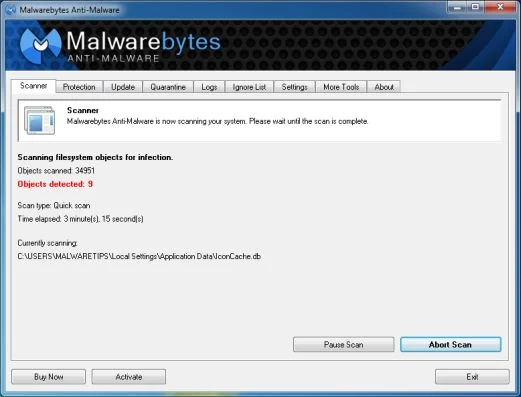
- When the Malwarebytes Anti-Malware scan has finished, click on the Show Results button.
![[Image: Malwarebytes Anti-Malware scan results]](https://malwaretips.com/blogs/wp-content/uploads/mwt-media/84/84c62dd46289424dbc686abc53672cb0810111920c8c0bbd69e973844d0a9ab0/a4c04aa700e641f47afec9965f79ff346740668e5952955ccbe5b4c3658b5897-521.webp "Malwarebytes when the system scan has completed")
- You will now be presented with a screen showing you the computer infections that Malwarebytes Anti-Malware has detected. Make sure that everything is Checked (ticked), then click on the Remove Selected button.
![[Image: Malwarebytes Anti-Malwar removing Say Hello To Little Virus Brings A Lot Of Problems virus]](https://malwaretips.com/blogs/wp-content/uploads/mwt-media/d8/d86b6a8bac0e4ece9fd2d259a83db71487943f6b04b567edb0e9adcc3200f492/4eb94651b0e34cc99689c56dc71cd0a49444498ed05c5803ea55fda1cfee1b1f-521.webp "Malwarebytes Anti-Malwar removing Say Hello To Little Virus Brings A Lot Of Problems virus")
- Once your computer will restart in Windows regular mode, open Malwarebytes Anti-Malware and perform a Full System scan to verify that there are no remaining threats.
STEP 4: Double-check for the Say Hello To Little Virus Brings A Lot Of Problems infection with HitmanPro
HitmanPro is a cloud on-demand scanner, which will scan your computer with 5 antivirus engines (Emsisoft, Bitdefender, Dr. Web, G-Data and Ikarus) for the Say Hello To Little Virus Brings A Lot Of Problems infection.
- You can download HitmanPro from the below link:
Download HitmanProOfficial Sophos download. Free scan, free 30-day trial to remove threats. - Double-click on the file named HitmanPro.exe (for 32-bit versions of Windows) or HitmanPro_x64.exe (for 64-bit versions of Windows). When the program starts you will be presented with the start screen as shown below.
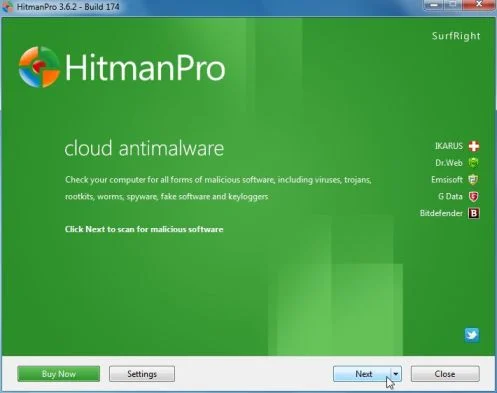
Click on the Next button, to install HitmanPro on your computer.
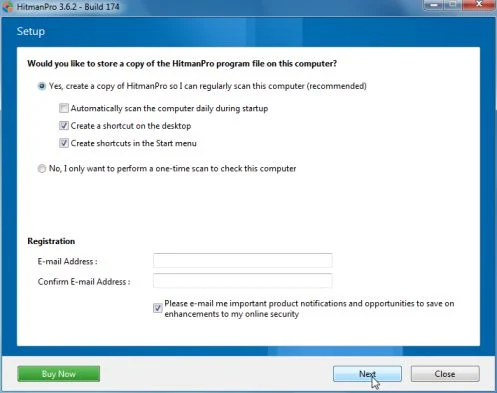
- HitmanPro will now begin to scan your computer for Say Hello To Little Virus Brings A Lot Of Problems trojan.
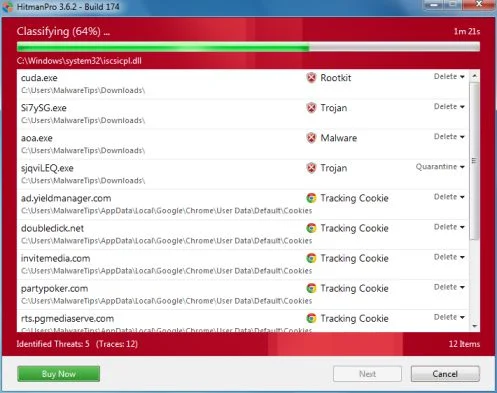
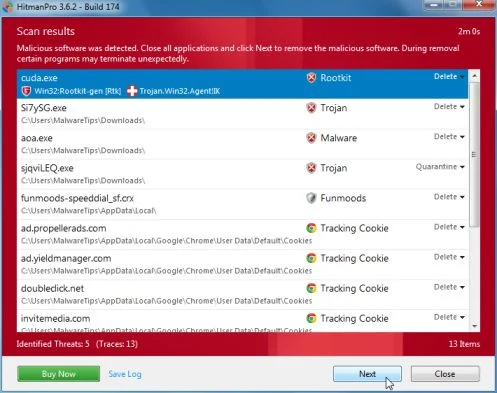
- When it has finished it will display a list of all the malware that the program found as shown in the image below. Click on the Next button, to remove Say Hello To Little Virus Brings A Lot Of Problems virus.
- Click on the Activate free license button to begin the free 30 days trial, and remove all the malicious files from your computer.
![[Image: HitmanPro 30 days activation button]](https://malwaretips.com/blogs/wp-content/uploads/mwt-media/7f/7f063c87fa029d8cd40df3f7faf43765ba1bb9e82c8d5a64c8a49de788018196/2a8400863f3c81fd7d6411e20166dfacdf0bc73e14522edea93a637003240dc1-497.webp "HitmanPro free 30 days trial")
Your computer should now be free of the Say Hello To Little Virus Brings A Lot Of Problems infection. If your current anti-virus solution let this infection through, you may want to consider purchasing the PRO version of Malwarebytes Anti-Malware to protect against these types of threats in the future, and perform regular computer scans with HitmanPro.
If you are still experiencing problems while trying to remove Say Hello To Little Virus Brings A Lot Of Problems Moneypak virus from your machine, please start a new thread in our Malware Removal Assistance forum.

Join the discussion
0 commentsShare your experience or ask a question about this article.
Discussion
Start the conversation
Have a question or something useful to share? Add the first comment.