

If you are an online shopper, you may have come across a website called sentpuff.shop that claims to be a Walmart store. You may have seen their ads on Facebook, Instagram, or TikTok, offering amazing deals on various products. But before you get tempted to buy anything from them, you should know that sentpuff.shop is a scam. In this blog post, we will explain what is the sentpuff.shop scam, how it works, and what to do if you have fallen victim to it.
What is the Sentpuff.shop scam?
The sentpuff.shop scam is a fake and fraudulent website that pretends to be a Walmart store. It uses the Walmart logo and name to trick unsuspecting customers into thinking that they are buying from a legitimate and trusted retailer. However, sentpuff.shop is not affiliated with Walmart in any way, and it is not authorized to use their trademark or sell their products.
The sentpuff.shop scam is designed to lure customers with low prices and discounts on items that are either counterfeit, damaged, or never delivered. Some of the products that sentpuff.shop offers include electronics, furniture, toys, clothing, and more. The website also claims to offer free shipping and returns, as well as a 30-day money-back guarantee. However, these are all lies to make customers feel more confident and secure about their purchases.
How does the Sentpuff.shop scam work?
The sentpuff.shop scam works by using social media platforms such as Facebook, Instagram, and TikTok to promote their fake website and products. They create ads that look appealing and enticing, and target users who are interested in shopping online. They also use fake reviews and testimonials to make their website seem more credible and trustworthy.
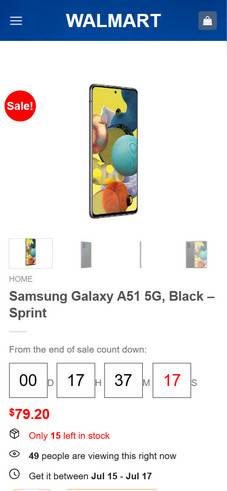
When a customer clicks on an ad or visits the website directly, they are taken to a page that looks like a Walmart store. The website has a similar layout, color scheme, and logo as the real Walmart website. The customer can browse through various categories and products, and add them to their cart. The website also displays a countdown timer and a limited stock alert to create a sense of urgency and scarcity.
Once the customer proceeds to checkout, they are asked to enter their personal and payment information. The website accepts credit cards, debit cards, PayPal, and other online payment methods. However, as soon as the customer submits their payment details, they are charged for their order without receiving any confirmation or receipt. The customer may also notice that their payment is processed by a different company or entity than Walmart.
After the payment is made, the customer may either receive nothing at all from sentpuff.shop, or receive a product that is different from what they ordered. For example, they may receive a cheap knock-off of an electronic device, or a damaged piece of furniture. The product may also arrive late or not at all.
If the customer tries to contact sentpuff.shop for a refund or a return, they will find that the website has no customer service or contact information. The website may also disappear or change its domain name after a few days or weeks. The customer will then realize that they have been scammed by sentpuff.shop and that they have lost their money.
What to do if you have fallen victim to the Sentpuff.shop scam?
If you have fallen victim to the sentpuff.shop scam, you should take immediate action to protect yourself and your money. Here are some steps that you can take:
- Contact your bank or financial institution and report the fraudulent transaction. Ask them to cancel your payment and refund your money if possible. You may also need to cancel your card and request a new one.
- Contact PayPal or any other online payment service that you used and dispute the charge. Explain that you have been scammed by sentpuff.shop and that you did not receive what you ordered.
- Report the scam to the Federal Trade Commission (FTC) at https://reportfraud.ftc.gov/. You can also file a complaint with your state attorney general or consumer protection agency.
- Report the scam to Walmart at https://corporate.walmart.com/report-a-concern/report-a-concern-about-a-product-or-service.
- Report the scam to Facebook, Instagram, TikTok, or any other social media platform that you saw the ads on. You can also report the ads as misleading or fraudulent.
- Warn your friends and family about the sentpuff.shop scam and advise them not to buy anything from them.
- Use a content blocker like AdGuard to prevent ads like the sentpuff.shop from showing up in your browser.
- If you suspect your device is infected with malware, you can run a free virus scan with Malwarebytes Free.
Conclusion
The sentpuff.shop scam is a fake and fraudulent website that pretends to be a Walmart store. It uses social media ads and fake reviews to lure customers with low prices and discounts on various products. However, customers who buy from sentpuff.shop end up losing their money and receiving nothing or counterfeit goods. If you have been scammed by sentpuff.shop, you should contact your bank or payment service and report the scam to the authorities and the platforms. You should also avoid clicking on any links or ads from sentpuff.shop and always check the legitimacy of any website before making a purchase online.

Reviews & discussion
0 commentsShare a firsthand experience, or ask a question.
Community reviews
sentpuff.shop
Moderated reader experiences, not an editorial verdict.
Start the conversation
Have a question or something useful to share? Add the first comment.