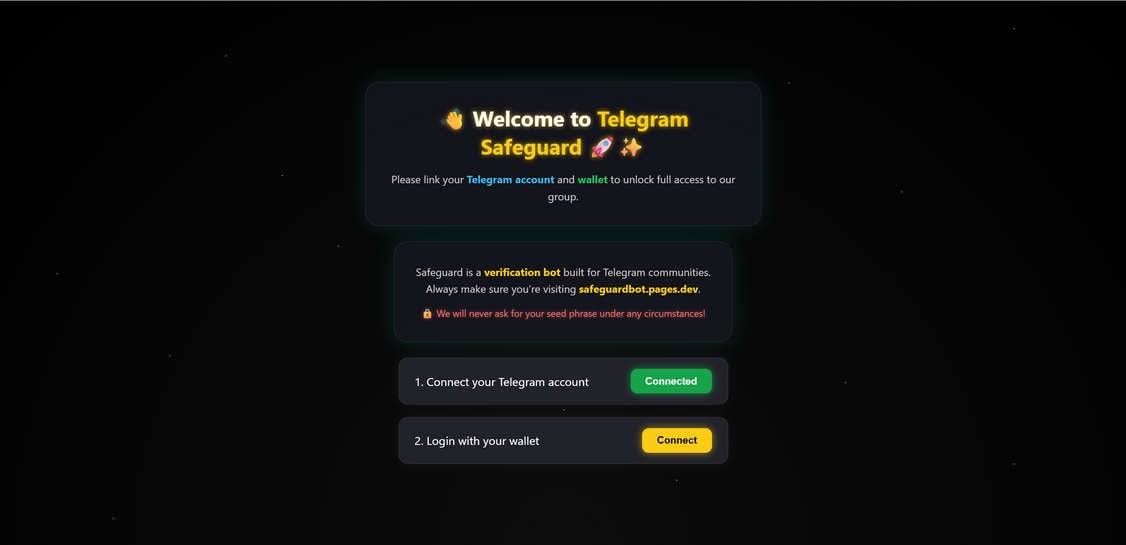
A new wave of crypto-draining scams is targeting Telegram users through fake verification pages like safeguardbot.pages.dev. These fraudulent websites impersonate Telegram community verification services and lure victims into connecting their cryptocurrency wallets. Once the victim connects their wallet, the scammers can silently execute malicious transactions — draining funds in seconds.
This article exposes how the Telegram Safeguard scam works, why it’s dangerous, and what you should do if you’ve fallen victim to it.
Scam Overview: The Fake Telegram “Safeguard” Verification Page
This scam revolves around a single, powerful psychological tactic: users are told they must “verify their account” to join a Telegram group. This creates a false sense of legitimacy, urgency, and exclusivity. Many crypto and NFT communities rely on Telegram for communication, so it’s easy for users to believe that a verification step is normal.
The website we identified during the investigation was hosted on:
safeguardbot.pages.dev
But this is only one of many disposable domains used by the attackers. Similar sites have been observed on:
.pages.dev.vercel.app.netlify.app.appspot.com
These free hosting platforms allow scammers to rapidly deploy and rotate domains whenever one is flagged or blocked.

A Deceptive Interface That Looks “Official”
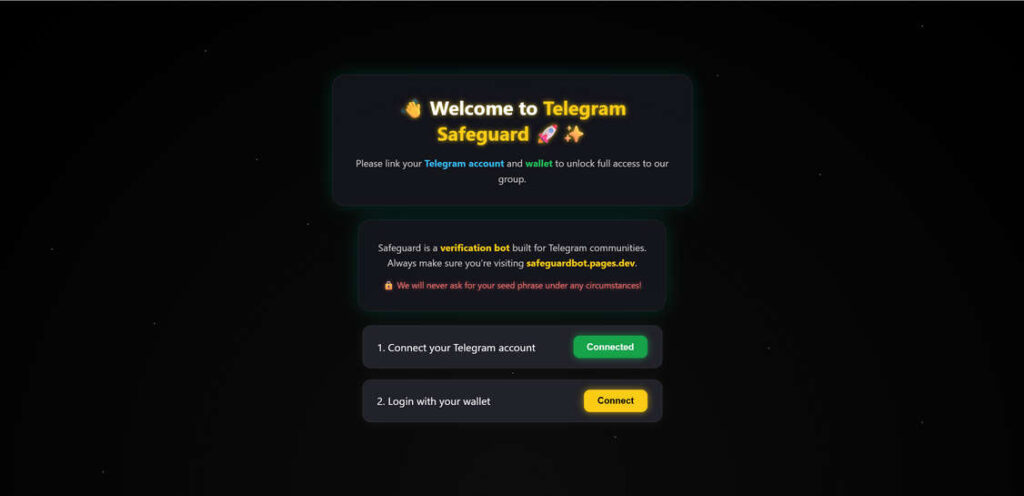
When a victim lands on the fake “Telegram Safeguard” page, they’re welcomed by a polished interface that strongly resembles legitimate wallet authentication pages. The page includes:
- A greeting header such as “Welcome to Telegram Safeguard” with trust-building visuals (like rocket and shield icons).
- A progressive verification checklist with two steps:
- Connect your Telegram account
- Login with your wallet
- A fake security disclaimer, for example: “Safeguard is a verification bot built for Telegram communities. Always make sure you’re visiting safeguardbot.pages.dev. We will never ask for your seed phrase under any circumstances!”
This messaging is carefully crafted to disarm suspicion. By stating they will never ask for seed phrases, the scammers make users lower their guard, not realizing the wallet-draining attack happens through malicious smart contract approvals, not seed phrase theft.
Misuse of WalletConnect to Appear Legitimate
The website integrates a WalletConnect-like interface, allowing users to “connect” through well-known crypto wallets such as:
- MetaMask
- Trust Wallet
- Safe
- Ledger Live
- Rabby
- WalletConnect QR
This tactic is extremely effective because WalletConnect is a real and trusted protocol. Many users have connected their wallet hundreds of times before when joining NFT mints, DeFi platforms, or airdrops. So when they see the familiar WalletConnect popup, they instinctively trust it.
The fake Safeguard site doesn’t actually connect them to Telegram or any real verification system. Instead, it prepares a malicious contract that the victim will unknowingly sign or approve, giving the scammer unrestricted access to their tokens.
Psychological Triggers Used by the Scam
- Authority & Legitimacy:
The use of “Telegram” and “verification bot” language suggests this is an official or semi-official service. It gives users a false sense of credibility. - Social Pressure:
Many Telegram groups have rules and moderators. If users believe they must verify their identity to participate, they’re more likely to comply quickly. - Urgency & Exclusivity:
Victims are often told the group is “private,” “exclusive,” or “time-sensitive.” This pushes them to complete the steps without proper due diligence. - Familiar UX:
The interface mirrors legitimate login flows — progress indicators, green “Connected” buttons, security notes, and familiar wallet logos. - Minimal Red Flags:
The site never asks for a seed phrase directly and does not display obvious pop-ups, malware warnings, or broken English. It’s clean, smooth, and fast.
Why These Scams Are Hard to Detect
- They mimic real verification systems used by legitimate projects.
- No obvious phishing forms (like asking for private keys) appear.
- They use reputable wallet brands (MetaMask, Ledger, WalletConnect) to build instant trust.
- The entire attack happens on-chain, through valid contract signatures, so traditional phishing filters don’t block it.
- Domains rotate frequently, making blacklist-based protection ineffective.
Widespread Targeting of Telegram Crypto Users
This scam is part of a growing trend in Web3 attacks. Telegram has become one of the most active platforms for crypto and NFT communities, and scammers know this. Fake verification bots are now among the most profitable phishing methods in the space.
Victims often encounter the fake Telegram Safeguard site when:
- They try to join an “airdrop” or “pre-sale” group.
- They’re invited to private “trading signals” communities.
- They’re added to fake admin chats or scam groups.
- They receive a DM with a verification link.
In each case, the scammer controls both the Telegram group and the fake website, making the entire setup look internally consistent.
Links to Broader Drainer Infrastructure
Based on similar campaigns, sites like the fake Safeguard page typically:
- Use pre-made drainer kits (such as Angel Drainer or Pink Drainer variants).
- Funnel funds to shared scammer wallets.
- Rotate front-end domains but use the same malicious smart contracts behind the scenes.
- Often cash out through mixers or DEX swaps to obscure the trail.
In short, this is not the work of lone amateurs. It’s part of an organized phishing infrastructure, built to drain wallets efficiently and anonymously.
How the Telegram Safeguard Scam Works
The scam is designed to be fast, simple, and effective. Here’s a detailed breakdown of how it typically unfolds:
1. Initial Bait: Joining a Telegram Group
Victims often encounter the link through:
- Crypto airdrop groups
- NFT or DeFi project chats
- Fake “exclusive” investment channels
- Discord or Twitter DMs redirecting to Telegram
They are told they must “verify their account” to join or access the group.
2. Redirection to a Fake Verification Page
Clicking the link takes them to a page like:
safeguardbot.pages.dev
But scammers often deploy many similar domains to avoid detection (e.g., .pages.app, .vercel.app, .netlify.app).
The fake page mimics legitimate verification flows used by some Telegram communities.
3. Telegram Account “Connection”
The page claims to “Connect Telegram Account.”
This step doesn’t actually verify anything — it simply marks the box as “Connected” to give a false sense of progress.
Victims feel like they’re halfway through the process and are more likely to finish it.
4. Wallet Connection Prompt
The second step is more dangerous:
2. Login with your wallet
When the victim clicks “Connect”, a pop-up opens with WalletConnect or a list of wallets:
- MetaMask
- Trust Wallet
- Safe
- Ledger Live
- Rabby
- and others.
5. Malicious Transaction or Signature Request
Once the wallet is selected, the victim is prompted to sign a transaction or approve permissions.
This is the critical step:
- The transaction may grant unlimited spending approval for specific tokens (like USDT, USDC, ETH).
- It might sign a malicious contract that allows the attacker to drain funds without further approval.
- The interface may look identical to legitimate dApps.
6. Silent Draining of Funds
As soon as the victim approves:
- The scammer executes transactions on the blockchain using the granted permissions.
- Funds are transferred to the scammer’s wallet.
- Sometimes, this happens within seconds.
- In other cases, the scammer waits strategically to avoid immediate detection.
7. No Access Granted
After the wallet is drained, the user is either:
- Redirected to a blank Telegram page
- Shown a fake error message
- Blocked from the group entirely
The scam’s purpose was never verification — it was to get wallet access.
Why This Scam Works So Well
This type of scam is extremely effective because it leverages psychological trust and familiarity:
- Telegram Familiarity: Many crypto users are active in Telegram groups.
- WalletConnect Legitimacy: The interface looks like something they’ve used dozens of times before.
- Urgency and Exclusivity: Victims are told they must verify quickly to not miss out on access or benefits.
- No Seed Phrase Request: The site doesn’t ask for a recovery phrase, which disarms suspicion. Instead, it abuses legitimate signature approvals.
Once permissions are signed, there’s no seed phrase needed. Scammers already have the power they need to empty your wallet.
Known Scam Indicators and Red Flags
- Suspicious Domain
Real Telegram bots do not require wallet connections. If the domain is not a known, trusted project, it’s a red flag. - Telegram Verification + Wallet Request
Telegram itself doesn’t require a crypto wallet for verification. This is inherently suspicious. - “Pages.dev” Hosting
Many scams use free hosting platforms like Vercel, Netlify, or Cloudflare Pages. These are commonly abused by crypto scammers. - Fake Progress Indicators
Marking the Telegram connection as “Connected” without actual verification is a manipulation tactic. - WalletConnect on Non-Official Pages
WalletConnect should only be used on official project websites. Any random verification page using it is dangerous. - Promise of Exclusive Access
Scammers love urgency. “Verify to gain access” is a classic lure.
How to Protect Yourself from Telegram Safeguard Scams
- Always double-check the domain name before connecting your wallet.
- Never sign unknown or unclear transactions.
- Legitimate Telegram bots never require crypto wallet access.
- Use a burner wallet for new or unverified dApps.
- Revoke token approvals regularly using tools like:
- Enable hardware wallet protections when possible.
What to Do If You Have Fallen Victim to This Scam
If you’ve already connected your wallet and signed the malicious transaction, act fast. The longer you wait, the more you risk losing.
1. Revoke Token Approvals Immediately
- Go to revoke.cash or your blockchain’s official approval checker.
- Revoke any suspicious allowances or contracts.
- This can stop the scammer from draining additional assets.
2. Transfer Remaining Funds
- Move any remaining assets to a secure wallet or hardware wallet.
- Do not use the compromised wallet again for transactions.
3. Check Transaction History
- Review your wallet history on Etherscan, BscScan, or other relevant explorers.
- Identify the contract address used by the scammer.
4. Report the Scam
- Report the domain to:
- PhishTank
- Google Safe Browsing
- Hosting provider (e.g., Vercel/Netlify/Cloudflare)
- Report the scam to Telegram group admins if it originated there.
5. Notify Wallet Provider
- If you used a wallet like MetaMask or Trust Wallet, contact support immediately.
- Although they can’t reverse transactions, they can flag malicious contracts.
6. Educate Others
- Warn others in Telegram groups or on platforms like Reddit, Discord, or X (Twitter).
- Scammers rely on silence to keep their schemes running.
The Bottom Line
The Telegram Safeguard verification scam is a sophisticated crypto-draining operation disguised as a harmless group verification step. It exploits user trust in Telegram and WalletConnect, tricking victims into signing malicious transactions that give scammers full control of their funds.
Unlike traditional phishing scams, this one doesn’t ask for seed phrases — it abuses legitimate wallet permissions. Once approved, it’s almost impossible to recover stolen assets.
Protect yourself by:
- Avoiding wallet connections on unknown domains
- Regularly revoking token approvals
- Spreading awareness in your communities
Remember: Telegram groups should never require a crypto wallet for verification. If you see a page like safeguardbot.pages.dev, it’s a 100% scam.
Frequently Asked Questions (FAQ)
WWhat is the Telegram Safeguard Crypto Scam?
The Telegram Safeguard scam is a phishing and wallet-draining campaign that tricks users into linking their cryptocurrency wallets to a fake “Telegram verification bot.” Victims are typically redirected to a deceptive website such as safeguardbot.pages.dev or similar domains. This site claims to verify their Telegram account and grant access to a private group, but in reality, it initiates a malicious transaction that allows scammers to drain funds from the victim’s wallet. The entire process is designed to look legitimate by mimicking trusted Web3 login flows and using familiar wallet connection interfaces.
How does the Telegram Safeguard scam work?
The scam follows a simple but effective structure:
- The victim receives an invitation or link to join a Telegram group.
- The group or bot instructs them to verify their identity through a link.
- The fake website prompts the user to connect their Telegram account and then their crypto wallet.
- When the wallet is connected, the site triggers a signature or approval request.
- This signature grants the scammer’s contract permission to move tokens from the victim’s wallet.
- The scammer then drains the wallet, often within seconds, leaving the victim locked out or redirected to a fake error page.
Is safeguardbot.pages.dev an official Telegram service?
No. safeguardbot.pages.dev is not affiliated with Telegram, WalletConnect, or any legitimate crypto verification service. It’s part of a malicious infrastructure designed to steal cryptocurrency from unsuspecting users. Legitimate Telegram bots or communities will never require wallet connection to verify access.
Why does this scam look so convincing?
The scammers use several psychological and technical tricks:
- A clean, professional user interface that resembles official WalletConnect or DeFi sites.
- Familiar wallet logos such as MetaMask, Trust Wallet, or Ledger Live to build trust.
- Fake progress indicators (e.g., “Telegram Connected” steps) that make the process look real.
- Security disclaimers claiming they will “never ask for seed phrases,” which makes users drop their guard.
- Domains hosted on reputable free platforms like Vercel, Netlify, or Cloudflare Pages to avoid immediate detection.
How can scammers steal funds without asking for a seed phrase?
Unlike traditional phishing schemes, this attack doesn’t require the victim’s private keys or seed phrase. Instead, it relies on malicious smart contract approvals. When a victim connects their wallet and signs a transaction, they may unknowingly grant the scammer permission to spend or transfer their funds. This approval is legally valid on-chain, and the scammer can use it to drain tokens without further input from the victim.
Which wallets are most commonly targeted?
Most major non-custodial wallets can be targeted, including MetaMask, Trust Wallet, Safe, Ledger Live, and Rabby. Since the scam leverages WalletConnect, it can work with hundreds of different wallets. Even hardware wallets can be compromised if the victim signs the malicious approval themselves.
Can I get my stolen funds back if I fall victim?
In most cases, stolen cryptocurrency cannot be recovered. Transactions on the blockchain are irreversible, and scammers quickly move stolen funds through mixers and decentralized exchanges to cover their tracks. The best course of action is to immediately revoke token approvals, transfer any remaining assets to a secure wallet, and report the scam to relevant platforms.
How can I protect myself from this type of scam?
- Never connect your wallet to Telegram verification pages.
- Check the domain carefully before signing any transaction.
- Use official links only from verified project websites.
- Revoke old or suspicious token approvals regularly using revoke.cash.
- Use browser security extensions like Malwarebytes Browser Guard or AdGuard to block phishing pages.
- Consider using a separate burner wallet for unknown dApps or groups.
What should I do if I already connected my wallet?
If you’ve connected your wallet to a fake Telegram Safeguard site and signed anything:
- Revoke any suspicious approvals immediately.
- Transfer remaining funds to a secure wallet.
- Check your transaction history for unauthorized movements.
- Report the scam to hosting providers, Telegram admins, and anti-phishing platforms.
- Stop using the compromised wallet for future transactions.
Are legitimate Telegram bots ever asking for wallet verification?
No. Official Telegram bots and groups do not require wallet connections to verify users. Some legitimate Web3 communities might use external platforms for whitelist verification, but they never operate under random domains like pages.dev. If you’re unsure, contact the project directly through official channels before connecting your wallet.
What are the most common red flags to look for?
- Random or suspicious domain names not linked to the official project.
- Urgent language telling you to “verify now or lose access.”
- Fake Telegram “Connected” messages without any actual authentication.
- WalletConnect prompts from unknown sites.
- No documentation or references to the tool on any official channels.
How can I report a Telegram Safeguard scam site?
You can help protect others by reporting scam domains to:
- Google Safe Browsing
- PhishTank
- Netlify, Vercel, or other hosting providers used by the scammers
- Telegram group admins and moderators if the link originated there
- Anti-phishing reporting platforms such as ScamSniffer or Chainabuse.
Who is most at risk of this scam?
This scam primarily targets:
- Users active in Telegram crypto or NFT communities
- People chasing airdrops, whitelist spots, or private investment groups
- New users who aren’t familiar with on-chain permissions
- Investors who trust WalletConnect pop-ups without double-checking domains.
Does connecting a wallet always mean losing funds?
No. Simply connecting a wallet doesn’t automatically drain it. The danger happens when a victim signs a malicious transaction or grants approval. However, visiting suspicious sites or connecting a wallet to unknown platforms still carries serious risks, so caution is always recommended.
How can I double-check a suspicious site before connecting my wallet?
- Look for official links on verified social media channels or project websites.
- Check the domain’s reputation using tools like VirusTotal.
- Search the domain name plus “scam” or “phishing” to see if others have reported it.
- If in doubt, avoid connecting entirely.
- Use a burner wallet with no funds to test unknown dApps.
Are scammers using Telegram bots to spread this link?
Yes. In many cases, scammers use automated Telegram bots to:
Pretend to be part of well-known crypto projects
These tactics increase the scam’s reach and make it appear more legitimate.
Send invites to fake groups
DM users with links to fake verification pages
Pose as “official moderators” or “security bots”
Final Warning:
The Telegram Safeguard scam is just one of many phishing and draining campaigns currently active. If a Telegram group ever requires wallet verification, it’s almost certainly a scam. Protect your assets by staying skeptical, informed, and secure.