

Have you received a text claiming your vehicle has outstanding toll charges that must be paid immediately? These “Texas Tolls Services” scam texts are on the rise, tricking unsuspecting people into handing over their personal information and payment details.
This article will uncover everything you need to know about how this toll road scam works, how to identify these fraudulent texts, and most importantly, how to protect yourself.
An Overview of the Texas Tolls Services Scam
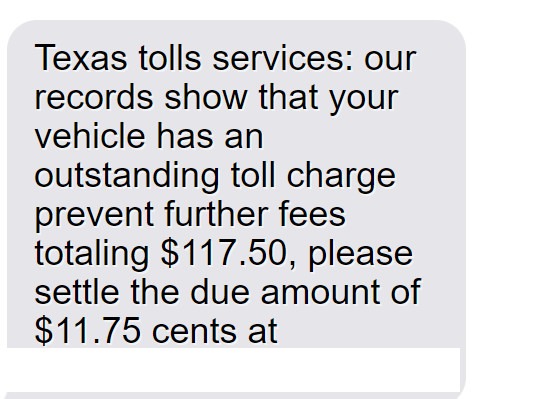
The Texas Tolls Services scam starts with an urgent-sounding text message stating:
“Texas tolls services: our records show that your vehicle has an outstanding toll charge prevent further fees totaling $117.50, please settle the due amount of $11.75 cents at rmatollservices.com“
This text is carefully designed to instill fear and urgency in the recipient. Many will assume it’s legitimate and follow the link to avoid “further fees.”
However, rmatollservices.com is a fake website run by scammers. Its sole purpose is to steal personal and financial information from victims.
Once on the website, you’re prompted to enter details like your name, date of birth, address, phone number, and crucially – your credit card information – to supposedly settle the outstanding toll charge.
In reality, there is no such charge. The scammers simply pocket your details to commit identity theft and credit card fraud.
This toll road scam is often referred to as the Texas Tolls Services scam due to the specific mention of Texas in the initial text. However, these scam messages have been reported across many states, catching drivers nationwide off guard.
How the Texas Tolls Services Scam Works Step-by-Step
Here is a step-by-step breakdown of how the Texas Tolls Services toll scam unfolds:
Step 1: You Receive the Scam Text
The scam starts with an SMS text sent to your mobile phone stating:
“Texas tolls services: our records show that your vehicle has an outstanding toll charge prevent further fees totaling $117.50, please settle the due amount of $11.75 cents at rmatollservices.com”
The text appears to come from a legitimate source – Texas Tolls Services – and conveys urgency with phrases like “outstanding toll charge” and “prevent further fees.” This tricks recipients into thinking they must pay the charge immediately to avoid additional late fees.
Step 2: You Visit the Fake Website
Concerned about owing outstanding tolls (and wanting to avoid extra fees), most recipients will follow the link to rmatollservices.com.
This website is designed to look like a legitimate online payment portal for settling toll invoices. However, it is entirely fake and run by scammers to harvest personal information.
Step 3: You’re Asked for Personal and Payment Details
On the website, you’re prompted to enter various personal and payment details, including:
- Full name
- Date of birth
- Phone number
- Email address
- Home address
- Driver’s license number
- Credit card number
- Credit card expiry date
- CVV security code
You’re led to believe this is required information to look up and pay your outstanding toll charge. In reality, the scammers simply want to steal and exploit these details.
Step 4: Your Information is Stolen
Once submitted, your personal and financial information is stolen by the scammers. They can use this in various fraudulent schemes, such as:
- Identity theft – Full name, date of birth, address and driver’s license number are prime identity theft material.
- Credit card fraud – Armed with your credit card details, scammers can easily make fraudulent purchases in your name.
- Account access – Email, phone, and address details help scammers access other sensitive accounts.
- Phishing scams – Contact details are sold on to be used in additional phishing texts and calls.
Step 5: You Suffer Financial Loss and Harms
As a result of having your details stolen, you may suffer:
- Fraudulent transactions and theft from your bank account
- A drop in your credit score if false applications are made in your name
- The inability to access your own accounts
- Ongoing phishing attacks as your details are sold on
Plus the cost, time and stress of repairing identity theft and fraudulent activity. Without urgent action, the impact can be significant.
Warning Signs – How to Spot This Toll Roads Scam
While these scams are sophisticated, there are telltale signs you can watch for to avoid being caught out:
You Don’t Recognize the Sender
The initial text will come from an unknown number, not the official toll company. Be very wary of any urgent texts from random numbers.
It Requires Immediate Action
Scammers rely on creating a sense of urgency and pressure so you act without thinking. But no legitimate company would threaten penalties for non-payment within a short, random deadline.
There Are Typos and Grammatical Errors
Scam messages often contain typos, awkward phrasing and grammatical errors. A message from an official toll company would be professionally written.
The Toll Charge Is Unusually Low
While toll charges vary, scammers tend to cite suspiciously low amounts under $20. Legitimate toll fees are rarely this small after penalties.
You’re Asked for Unrelated Personal Information
Genuine toll companies have your vehicle details. They would not need random additional personal information like date of birth and address.
The Website Looks Unprofessional
Scam sites usually have poorly designed interfaces and lack any official branding. Real toll company websites look professional.
Credit Card Details Are Requested
Legitimate toll companies allow you to pay toll bills through safer means like linking a bank account. They would never insist on direct credit card details.
Stay vigilant for these red flags, and avoid inputting any information on suspicious texts or websites.
What To Do If You’re Targeted by This Scam
If you receive one of these scam texts, or have already fallen victim by entering details on rmatollservices.com, urgent action is required to protect yourself:
1. Contact Your Bank
If you entered your credit card information, immediately call your bank and inform them what happened. They can place protections on your account, issue you a new card number, and refund any unauthorized transactions.
2. Place a Fraud Alert
Notify credit bureaus to place an initial 90-day fraud alert on your credit file. This flags you as an identity theft victim so banks must verify all applications. You can extend this alert.
3. Check Your Credit Report
Pull your credit reports from Equifax, Experian and TransUnion to check for any signs of fraudulent accounts opened in your name. Dispute any suspicious activity.
4. Reset Online Account Passwords
If you provided your email address or phone number, scammers may try accessing your other online accounts. Reset all your account passwords to new secure phrases. Enable two-factor authentication where possible.
5. Sign Up For Identity Theft Protection
Consider enrolling in an identity theft protection service such as LifeLock or IdentityForce. They monitor for criminal activity and help resolve issues.
6. File an FTC Complaint
Report the scam to the Federal Trade Commission on their complaint site. This helps authorities track and shut down scam operations.
7. Report it to the Toll Company
If the scam used the name of a real toll company, report it to them too so they can issue alerts about the scam texts.
8. Block the Sender
Block the phone number that sent the scam text to prevent further messages. But don’t delete the originals yet, as they help support your fraud case.
Frequently Asked Questions About the Texas Tolls Services Scam
1. I got a text about unpaid tolls. Is this real or a scam?
Unfortunately, this “Texas Tolls Services” text is likely a scam. It’s designed to trick people into paying fake “unpaid tolls” and handing over their personal information. No matter how official it looks, be very wary of urgent texts claiming you owe toll fees.
2. How can I tell if a toll invoice text is fake?
Watch for:
- You don’t recognize the sender number.
- There are typos, grammar issues, or legal threats.
- The toll charge is unusually low.
- It asks for personal details unrelated to tolls.
- The website looks unprofessional.
- Credit card numbers are requested.
These are red flags that indicate it’s a scam, not a real toll company.
3. What happens if I click the link or provide my information?
The scammers will steal your personal and financial details to commit identity theft and credit card fraud. You may suffer fraudulent charges, credit score drops and issues accessing your legitimate accounts.
4. I entered my details on the website. What should I do now?
Immediately call your bank about any card details you provided. Place a fraud alert on your credit file, check your credit reports, reset passwords and consider signing up for identity theft protection services.
5. How can I block these scam text messages?
Block the sender phone number through your phone’s call and text blocking settings. But keep copies of the messages as evidence before blocking.
6. Is there one official toll company for Texas?
No, there are many regional toll authorities and operators in Texas. Common ones include the North Texas Tollway Authority, Harris County Toll Road Authority and the Central Texas Regional Mobility Authority.
7. How can I pay a legitimate toll bill safely?
If you do owe outstanding tolls, contact the official toll operator directly through their real website, not via text. Pay bills through their website portal or mail a check. Avoid giving credit card details over the phone.
8. Who can I report text toll scams to?
Report it to the FTC, the real toll operator, your phone provider and the number messaging blocking platform for your area. This helps warn others and potentially blocks the scammers.
9. What are the risks if I ignore a real toll invoice?
You could face late fees, registration holds, vehicle impoundment or even arrest warrants in Texas if genuine toll bills go unpaid long term. But scam texts should be ignored – focus on legitimate contacts.
Let me know if you need any clarification or have additional questions!
The Bottom Line
Fake texts threatening penalties for unpaid toll charges are a rising scam catching many victims off guard. They aim to harvest personal information to enable identity theft, credit card fraud and account access.
Be vigilant about texts from unknown numbers demanding urgent action. Avoid clicking links or entering details, no matter how convincing the site appears. If you receive one of these scam messages or accidentally provided your information, take immediate steps to protect your identity, accounts and funds from criminal activity.
Handling this quickly limits the potential damages and prevents headaches down the line. Don’t let scammers fool you out of your hard-earned money and peace of mind.








