

A new text message scam has emerged targeting unsuspecting Americans. Scammers claim to be from U.S. Customs and the USPS, stating there is an issue delivering your package. The message provides a link to “confirm your zip code” or solve the delivery problem. But clicking leads to fake USPS sites designed to steal your personal and financial data.
This scam is rampant, with over 20 million suspicious texts sent in 2024 alone. The messages look legitimate and prey upon people awaiting parcel deliveries. But they are a front to siphon your details for identity theft and credit card fraud.
U.S Customs USPS Parcel Scam Overview
The U.S Customs USPS Parcel scam starts with an SMS or text message. It states there is an issue verifying your zip code or address for a pending delivery. The message claims the package is temporarily held or delayed until you confirm your details.
A link is provided to validate your zip code and address information. The text urges you to click the link within 24 hours or your package may be returned. The message is signed off as from the “USPS Delivery Team” to seem official.
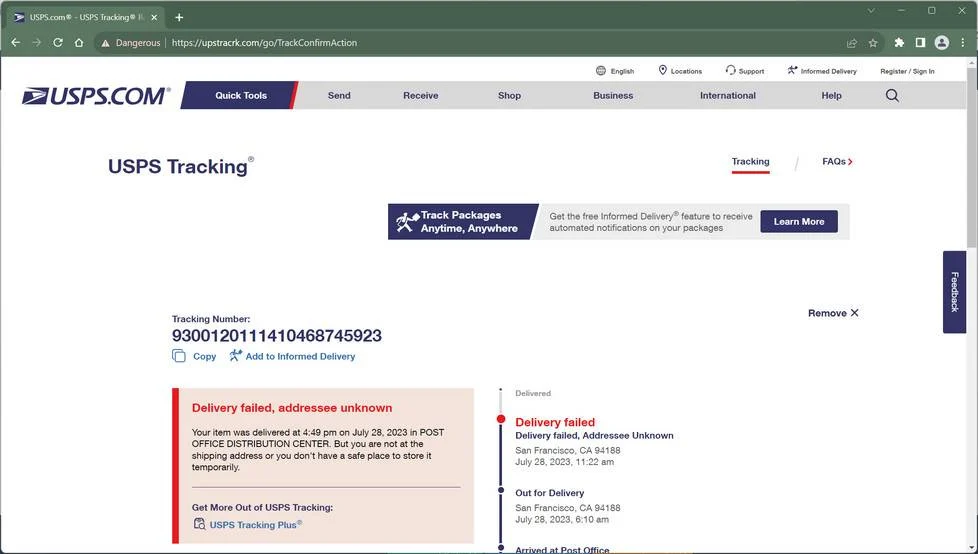
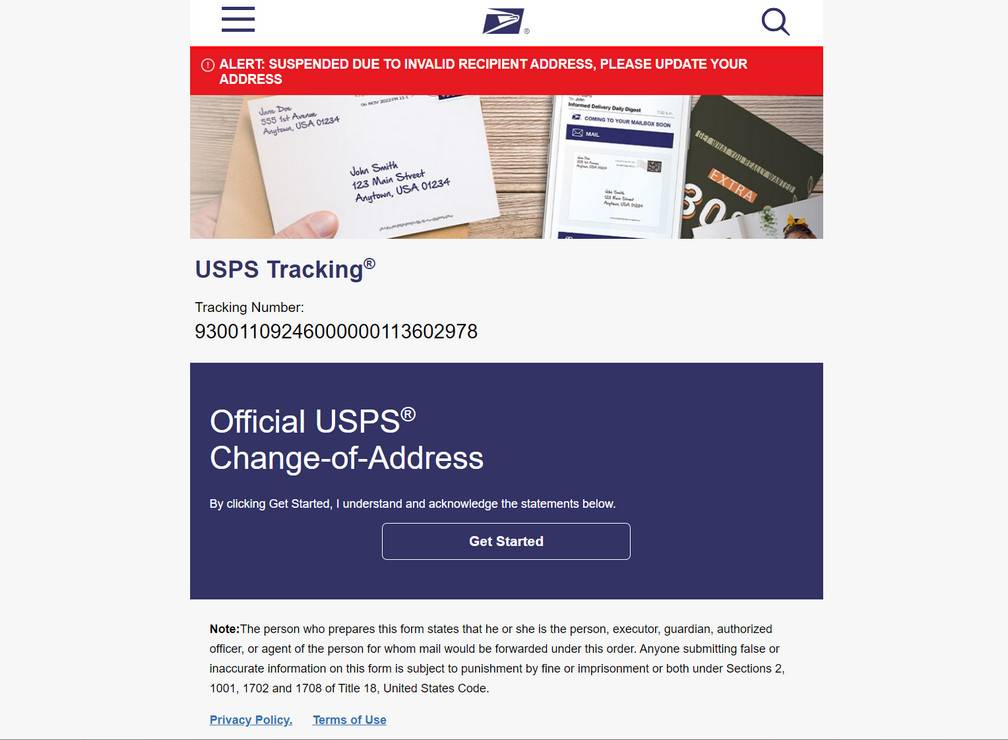
If you click the link, it leads to a fake USPS imposter website. The site mimics the look of the official USPS.com website, even replicating the USPS logo and graphics. This is to trick you into entering personal details onto the fraudulent site.
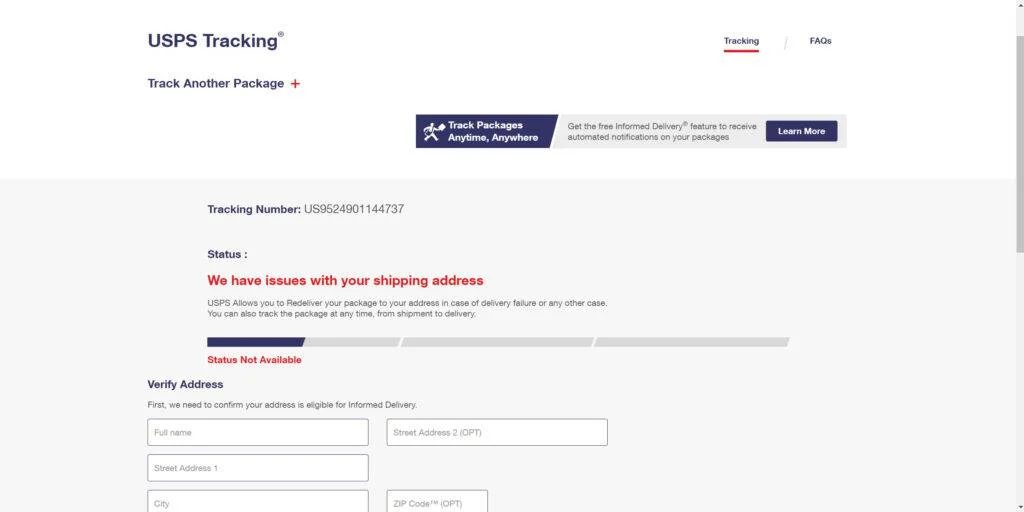
The fake site has an online form asking you to verify your identity to release your stuck package. It requests your full name, home address, phone number, date of birth and sometimes even social security digits.
After submitting this data, you are redirected to another page. This one requests credit card information and a small $2-$5 “redelivery fee” to retry sending your package.
In reality, the entire experience is a scam. The texts are not from USPS. And the fake sites harvest your personal financial details for identity theft and credit card fraud.
How The U.S Customs USPS Parcel Scam Works
1. You Get The Bait Text
The scam starts with an out-of-the-blue SMS text or iMessage. The message looks like it’s from a legitimate business, with USPS or U.S. Customs in the name.
The text states there is an issue with your zip code that’s preventing a package delivery. It urges you to “confirm your zip code” by clicking a link before the deadline.
The message has several red flags. Real couriers don’t contact you unprompted via text about deliveries. And government agencies like US Customs never text random warnings.
But the texts trigger urgency about your undelivered package. Many anxiously click the link, hoping to resolve the phony address issue.
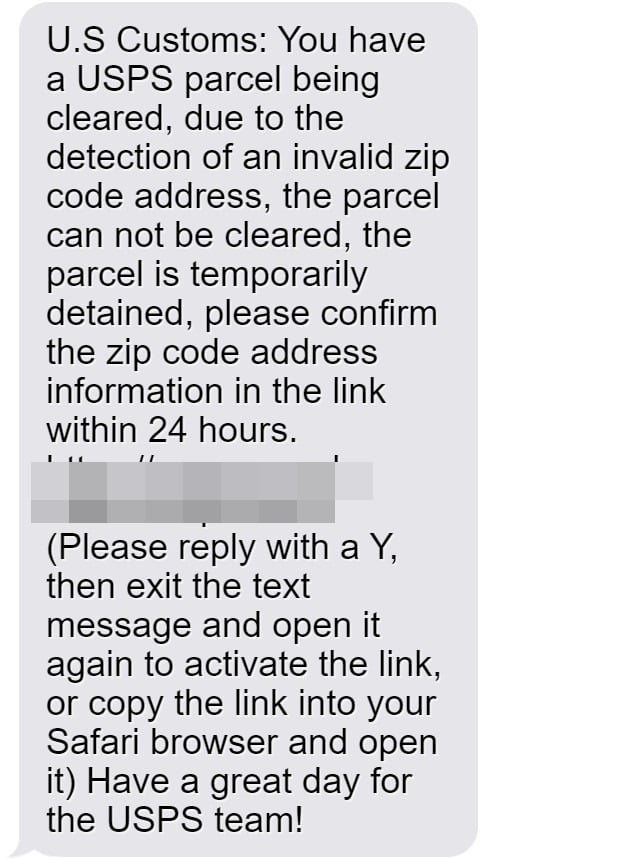
Here is how the fake USPS text message looks:
U.S Customs: You have a USPS parcel being cleared, due to the detection of an invalid zip code address, the parcel can not be cleared, the parcel is temporarily detained, please confirm the zip code address information in the link within 24 hours.
[malicious link]
(Please reply with a Y, then exit the text message and open it again to activate the link, or copy the link into your Safari browser and open it)
Have a great day for the USPS team!
2. You Land On A Fake Website
Clicking the link reroutes your phone browser to a phishing site. The page is dressed up to precisely mimic the look of USPS.com’s Track & Confirm page.
You are met with a form stating they need to “verify your identity” to deliver your stuck package. It requests your full name, street address, phone, date of birth, and sometimes SSN.
The fake site looks so real you likely won’t notice it’s fraudulent. The URL address at the top may even include “USPS” to seem legit.
3. They Steal Your Personal Details
If you submit your details, they go straight to scammers. They immediately have sensitive info like your name, birthdate, address, and phone to steal your identity.
After you complete the form, you are redirected again. This time it’s an online checkout demanding your credit card for a small “shipping fee.”
The $2-$5 amount raises no alarms. But now criminals have your card number, security code, and name to make unauthorized purchases.
4. How Scammers Use Your Details
Armed with your personal and financial information, scammers can:
- Open fraudulent credit cards to rack up debt in your name
- Make unauthorized purchases on your existing credit and debit cards
- Steal your social security benefits
- File fake tax returns for refunds
- Access your existing financial accounts
- Take out loans or lines of credit under your name
They exploit every piece of data you entered for financial gain. Within days, you may see strange charges or accounts opened without your approval.
What To Do If You Fell For This Scam
If you submitted your personal or financial details to one of these fraudulent USPS phishing sites, take action immediately to protect yourself:
- Contact your bank and all credit/debit card companies. Report any fraudulent charges or accounts opened in your name without your approval. Request replacement cards and account numbers where compromised. Enable enhanced security like multi-factor authentication when available.
- Place an initial fraud alert and security freeze on your credit files. This restricts new credit lines being opened without your permission. Lift temporarily only when legitimately applying for new accounts yourself.
- Carefully monitor your accounts and credit reports for signs of identity theft. Watch for unfamiliar bills, calls from debt collectors on unknown accounts, or credit inquiries you didn’t authorize. Dispute any fraudulent accounts swiftly.
- If your SSN was compromised, contact the Social Security Administration. Update them on the scam and implement enhanced protections on your social security number and benefits.
- Check your medical records for any false entries or charges from identity thieves misusing your personal data. Dispute any services you didn’t actually receive.
- If fake accounts accessed your existing financial accounts, update login details on all accounts. Make passwords long, complex, and unique from other sites. Enable two-factor authentication for additional security.
- File detailed complaints with the FTC at ReportFraud.ftc.gov and FCC at consumercomplaints.fcc.gov. Provide any text details, fake site screenshots, and transaction information sent to scammers. This helps authorities track, stop, and prosecute the scam.
- Contact USPS customer service with details to help warn and protect others from the scam. Request they flag the fraudulent domain names.
- Remain vigilant about other suspicious texts, emails, and calls targeting you. Scammers frequently target those already tricked, attempting additional social engineering and fraud. Don’t fall for ongoing phishing attempts.
- Consider identity theft insurance and recovery services if severely impacted. This can help cover some costs if restoring your identity and securing accounts becomes overwhelming.
Taking quick action helps limit the damage from submitted data. But continued diligence protects you long-term by ensuring no further fraudulent activity slips through.
Frequently Asked Questions about U.S Customs USPS Parcel Scam Texts
1. What is the U.S Customs USPS Parcel scam text message?
The USPS parcel scam text is a phishing message sent to trick users into clicking malicious links. The text claims there is an issue delivering your package and that you need to “confirm your zip code.” It provides a link to resolve the fake delivery problem. However, clicking the link leads to fake USPS sites designed to steal your personal and financial data.
2. How does the U.S Customs USPS Parcel text scam work?
You first receive a text claiming to be from USPS, stating they cannot deliver your package due to an invalid zip code. It urges you to click a link to verify your address. The link goes to a fake USPS site asking you to enter personal details to release your package. After submitting this info, you are redirected to another page requesting your credit card and a small fee to resend the delivery. In reality, the fake USPS domains steal the data you entered for identity theft and credit card fraud.
3. What are examples of the fake U.S Customs USPS Parcel text messages?
Here are examples of the fraudulent USPS texts you may receive:
- “USPS: Your package has been delayed due to an invalid zip code. Please verify your zip code here: [malicious link]”
- “U.S. Customs: We cannot deliver your package. Confirm your address here to avoid return: [malicious link]”
- “USPS Delivery: There is an issue with your zip code. Kindly verify by clicking here: [malicious link]”
4. What personal information do the fake sites try to steal?
The fake USPS domains try to steal:
- Full name
- Home address
- Phone number
- Email address
- Date of birth
- Social Security Number
- Credit card details
- Driver’s license details
5. What should I do if I entered my details into a fake USPS site?
If you shared any personal or financial information, take these steps:
- Contact your bank and credit card companies to block fraudulent charges
- Place a fraud alert and credit freeze on your accounts
- Monitor your credit reports and accounts for any fraudulent activity
- Report the scam to the FTC, FCC, and other relevant authorities
- Remain vigilant about other suspicious texts or calls targeting you
6. How can I avoid falling for the USPS text scam?
To avoid this scam:
- Never click links in unsolicited texts about package deliveries
- Verify the sender – legitimate couriers won’t text tracking links
- Check with USPS directly if you have any delivery concerns
- Don’t submit data to sites you aren’t 100% sure are legitimate
- Use security software to block malicious sites and links
7. Where can I get more help with a USPS scam text message?
If you receive a suspicious USPS-themed text, report it to:
- USPS Postal Inspectors
- Federal Trade Commission
- Federal Communications Commission
- Local police cybercrime unit
- Your cell phone provider
You can also contact USPS customer service with details to help warn others.
The Bottom Line
The U.S. Customs USPS text scam tricks people into providing their personal data under the guise of a package delivery problem. But the texts are fake, the sites fraudulent, with the goal only to steal your details. These cons seek to weaponize your anticipation of a delivery to rob you blind.
Be wary of any out-of-context shipping texts. Real couriers don’t message unprompted demands to take actions on deliveries. Verify the sender and never click links from unknown sources. Check with USPS directly if you suspect any package issues.
Staying vigilant protects you from having your identity and accounts compromised by parcel scammers. Avoid becoming another victim by spotting the red flags early and confirming legitimacy before providing any personal or financial information.

Join the discussion
0 commentsShare your experience or ask a question about this article.
Discussion
Start the conversation
Have a question or something useful to share? Add the first comment.